Writing video scripts is the slow part of video production. RightBlogger’s free AI Video Script Generator writes a full script (or a bullet-point outline if you prefer to speak naturally) from any topic or title in seconds, optimized for whichever platform you’re publishing to.
Works across 8 platforms: YouTube long-form, YouTube Shorts, TikTok, Instagram Reels, Facebook, Facebook Reels, Twitter/X, and LinkedIn. The AI adapts pacing, structure, and hook style to fit each platform’s algorithm and viewer behavior.
Why Use an AI Video Script Generator
Most creators either skip scripting (and the video meanders) or spend an hour writing what should take ten minutes. The tool gives you a real starting point so you can focus on filming and editing, where the actual reach is earned.
What it does:
- Generates a complete script draft from your topic or video title.
- Optionally returns a bullet-point outline instead of a full script (better if you prefer to speak naturally on camera).
- Skips the blank-page problem entirely.
- Helps you work through ideas faster when you’re stuck.
- Tailors pacing and structure for 8 specific platforms (YouTube + Shorts, TikTok, Instagram Reels, Facebook + Reels, Twitter/X, LinkedIn).
- Adjusts tone and writing style to match your brand voice.
How to Use the AI Video Script Generator
Four quick steps:
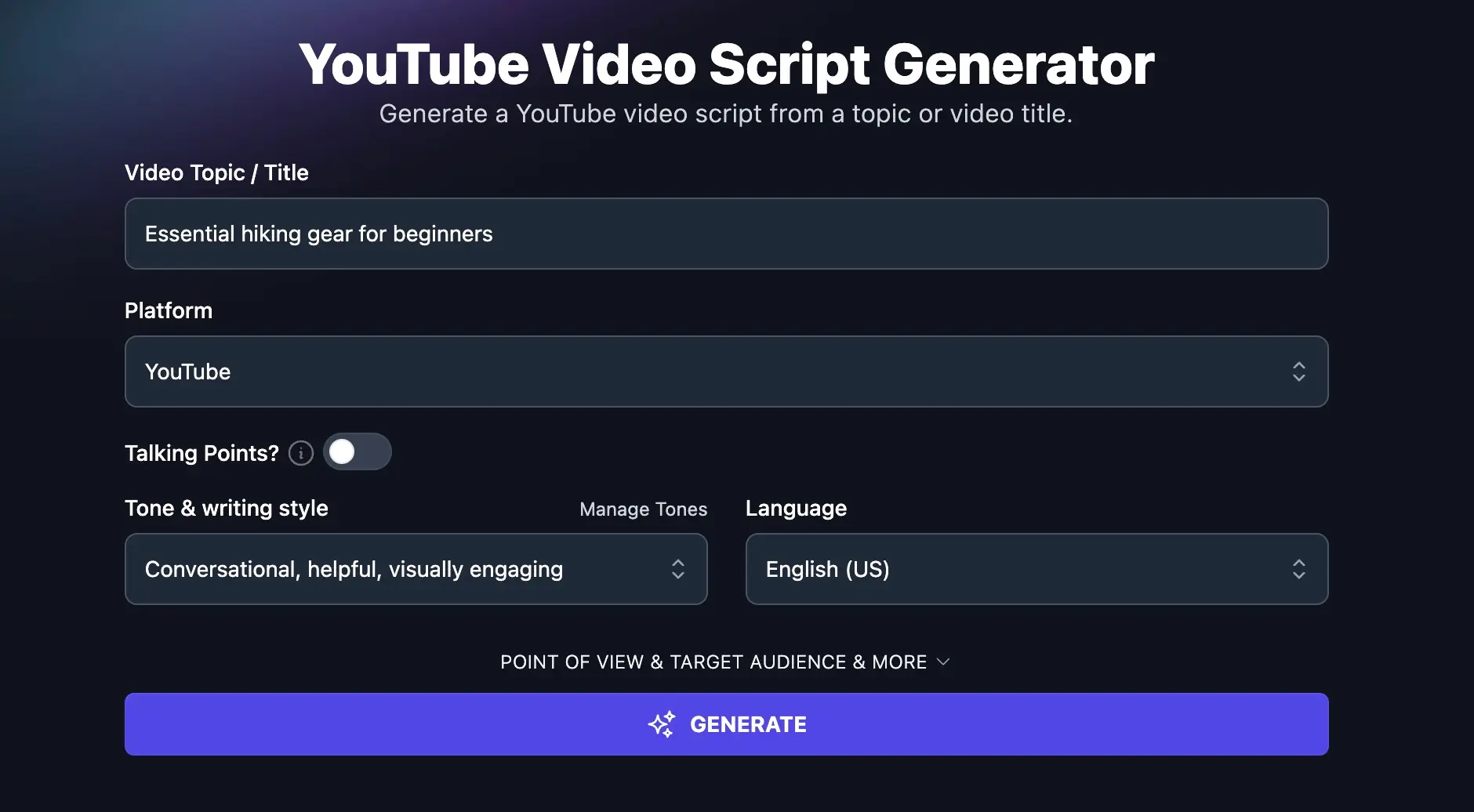
- Enter Your Topic/Title: Provide a brief description of your video idea (e.g., “T-shirt tie-dyeing tutorial,” “Best hiking gear for beginners”).
- Choose Your Platform: Select “YouTube” (or TikTok, Instagram Reel, LinkedIn if you’re creating content for those platforms).
- Script or Talking Points: Choose whether you want a full script or a bullet-point outline.
- Customize (Optional):
- Select a tone and writing style.
- Choose your language.
- Set the point of view (first-person, second-person, etc.).
- Specify your target audience.
- Add additional instructions (e.g., “Include a call to action to subscribe,” “Mention my product X”).
- Adjust the creativity level.
- Click “Generate”: Get a script or outline tailored to your input.
Edit it to fit your voice, add your personal touch, and start filming.
Each Feature, Explained (Plus Advanced Options)
The tool exposes a handful of inputs that change how the AI structures and writes your script. Each one is optional, but knowing what they do lets you steer the output to exactly what you need:
- Creates a clear, logical flow (hook → body → CTA) that holds viewer attention.
- Keeps your video focused on the original promise of the title or topic.
- Cuts pre-production time so more of your hours go into filming and editing.
- Lets you walk into a shoot with a solid plan instead of winging it.
Video Script Generator FAQs
Should I Generate a Full Script or a Talking-Points Outline?
Full scripts work best when you’re going to read directly off a teleprompter or read-aloud setup, or when the video has a tight time limit (Shorts, Reels, TikToks). Talking-points outlines work better when you’re more comfortable on camera and want the video to feel natural and conversational, since you can riff off the bullets without sounding rehearsed.
How Do the Scripts Change Across Platforms?
The AI adjusts the hook, pacing, and structure for each platform. YouTube long-form scripts include a longer hook (the first 15-20 seconds), structured chapters, and a clear CTA at the end. Short-form scripts (YouTube Shorts, TikTok, Reels) start with a tighter hook (1-3 seconds), use shorter sentences, and pack the value into the first 30 seconds. LinkedIn scripts skew professional with a stronger storytelling-into-insight structure. Twitter/X video scripts get the shortest, most punchy structure.
How Long Should My Video Script Be?
The tool will adjust length to fit the platform you select. YouTube long-form scripts typically come out around 800-2,000 words (5-15 minute videos). YouTube Shorts, TikTok, and Reels scripts come out around 100-250 words (30-60 second videos). You can also use the Additional Instructions field to specify your target length explicitly (e.g. “aim for a 3-minute video” or “keep it under 150 words”).
Do I Have to Read the AI Script Word-for-Word?
No. Most creators get the best results by treating the AI output as a strong first draft, then editing it to fit their voice, adding personal anecdotes, and adjusting jokes or transitions. The script gives you the structure and the talking-points scaffolding so you don’t have to invent those from scratch. Your personality on top of that scaffold is what actually wins the view.
What Other AI Tools Can I Use to Plan and Promote My Video?
RightBlogger has a full set of video-creator tools that pair with this one:
- YouTube Video Ideas: brainstorm topics before you script anything
- YouTube Video Outline: if you only need the structure, not a full script
- YouTube Video Title: write a keyword-rich title that drives clicks
- YouTube Video Description: write the SEO-optimized description from your topic, title, URL, or transcript
- YouTube Video Tags: get a list of relevant tags for your video
- YouTube to Blog Post: turn the finished video back into a blog post for SEO
For the broader playbook on using AI to grow a YouTube channel, see our guide on AI YouTube creation tips. For Shorts specifically, see how to promote YouTube Shorts.
How to Sign Up for RightBlogger
The Video Script Generator is included in every RightBlogger plan. Monthly plans start at Solo $59 (annual billing, charged monthly, is $49), monthly $89 (annual $69) for Pro (most popular, includes team seats and multiple connected sites), and monthly Agency $299 (annual $199). Every paid plan includes unlimited words, MyTone, Projects, Chat, and a 7-day free trial and a 30-day money-back guarantee.