White Label SEO Reports for Agencies
Connect Search Console, Get a Client Report
Pick a client project and connect its Google Search Console. RightBlogger backfills up to 16 months of history and builds the report. No spreadsheets or CSV exports.
- Read-only connection
Connect a client's Search Console property once. New data is added daily, and history is kept past Google's 16-month limit.
- One report per project
Each client project gets its own report with its own branding, sections, and link.
- See a live report
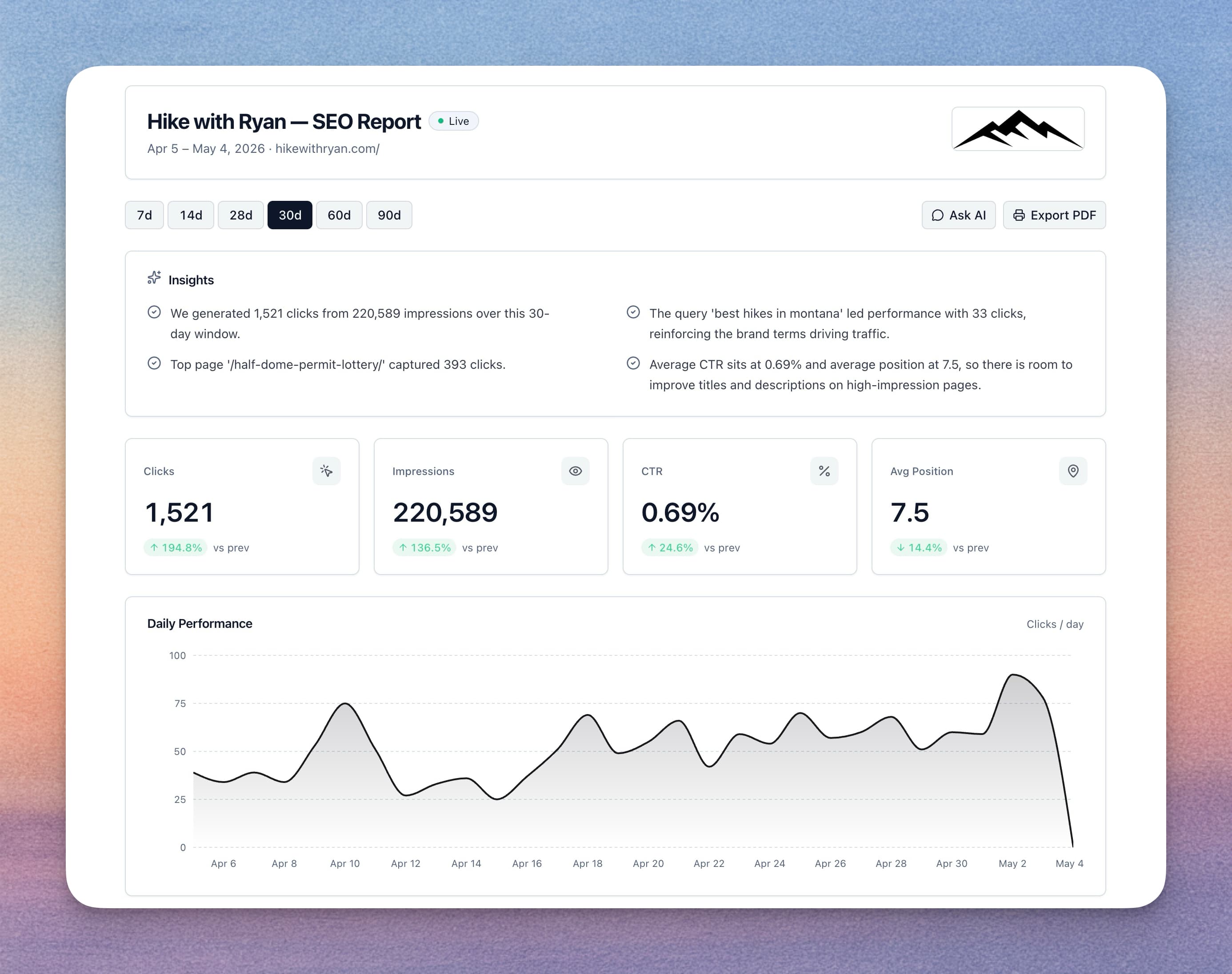
Your White Label SEO Dashboard, Your Brand
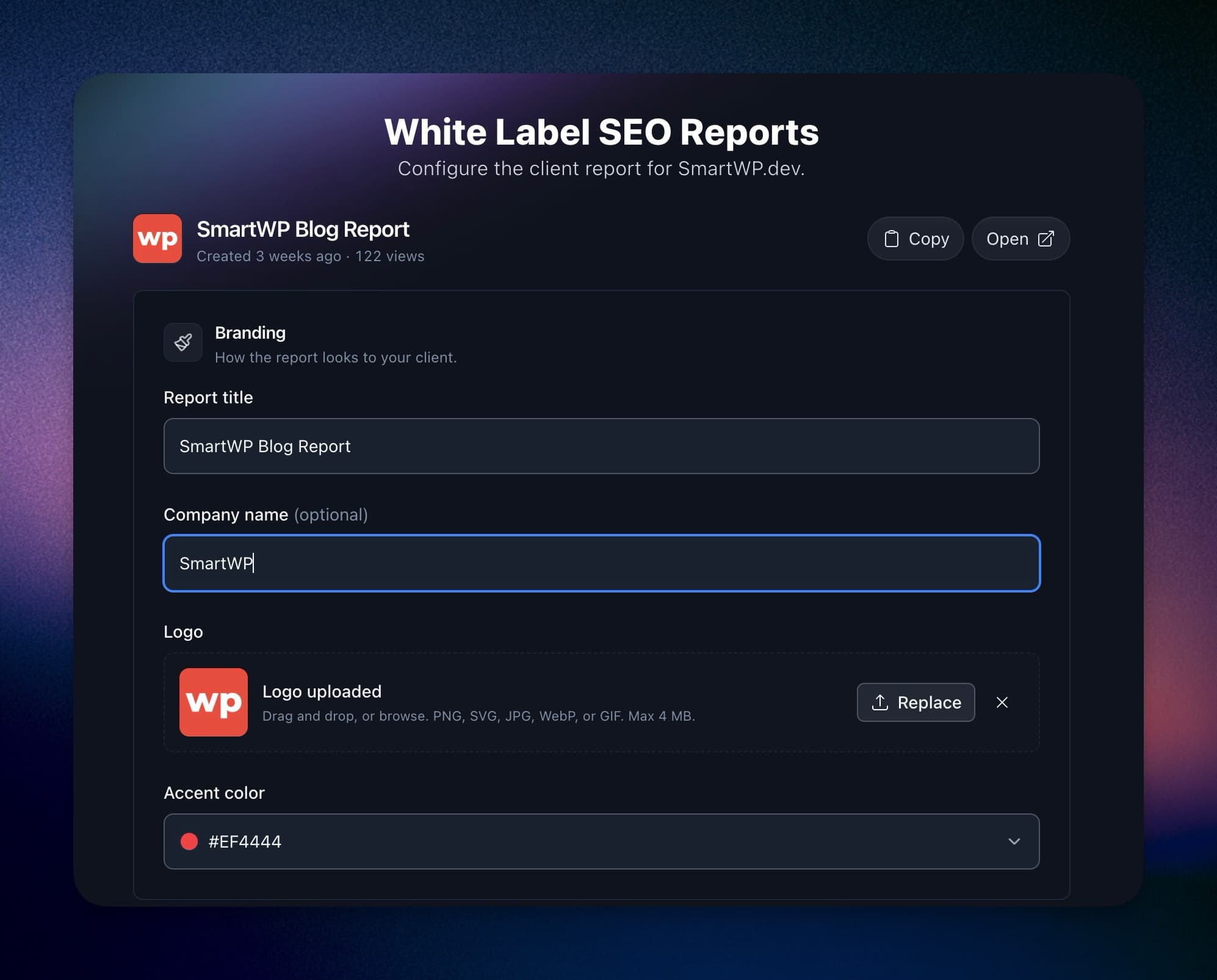
Every paid plan adds your logo, company name, and accent color to the report. The Agency plan removes the RightBlogger badge and serves reports from your own subdomain.
- Logo and accent color
Upload a logo and pick an accent color per report. On Agency, set them once in your Organization profile and reports inherit them.
- Your own subdomain
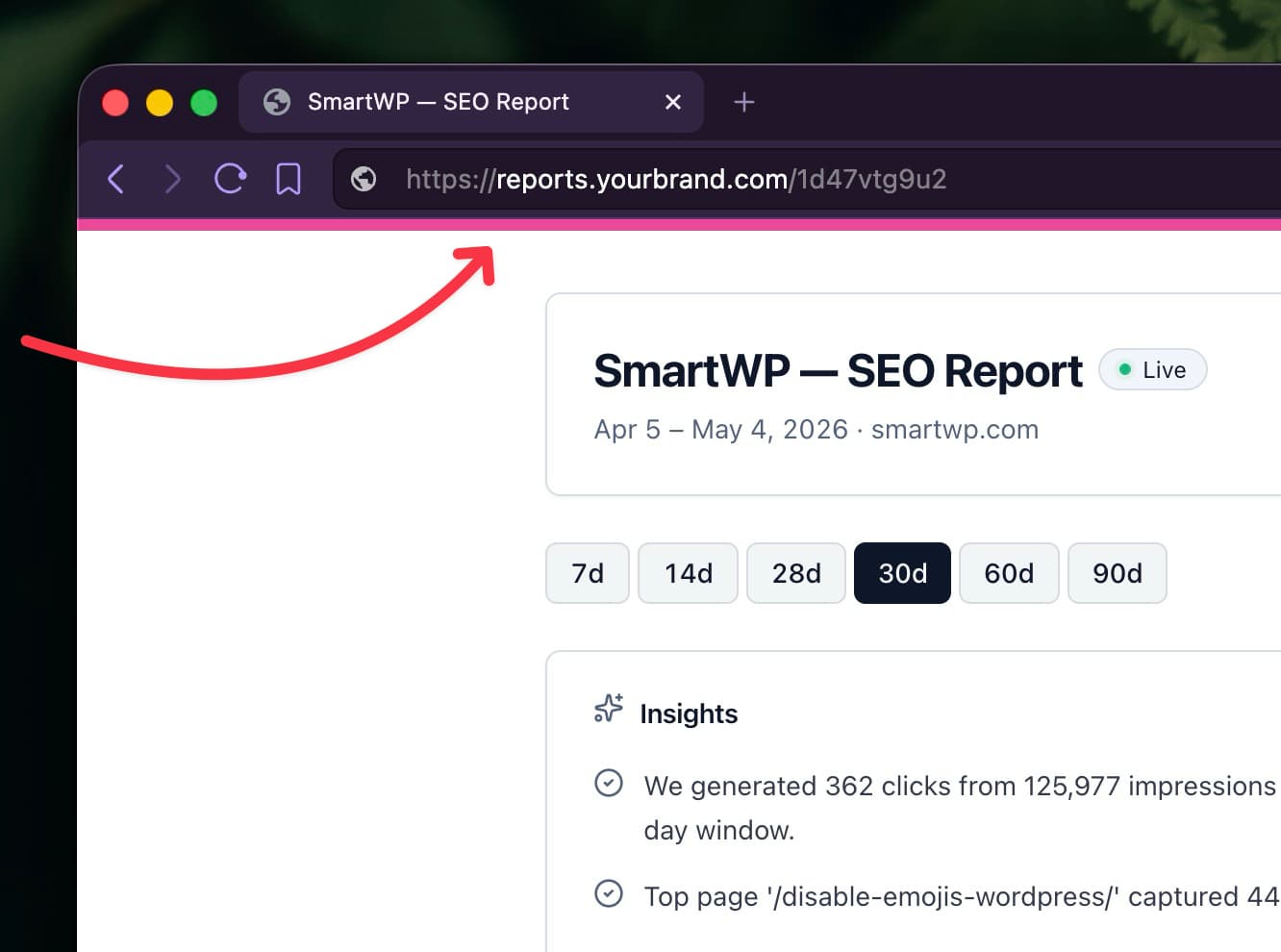
Serve reports from a subdomain like reports.youragency.com with a CNAME record, SSL included, and friendly URLs like /acme-co.
- No RightBlogger badge
On Agency, the "Powered by RightBlogger" badge and the PDF footer credit are removed.
Send a Link. Skip the Login.
Each report has its own URL. Clients open the live report in a browser with no account or password.
- Public or private
Anyone with a public link can view the report, but nobody can edit it or see other clients' reports. Switch a report to private to hide it.
- PDF export
Export the report as a PDF for a client meeting or a monthly recap.
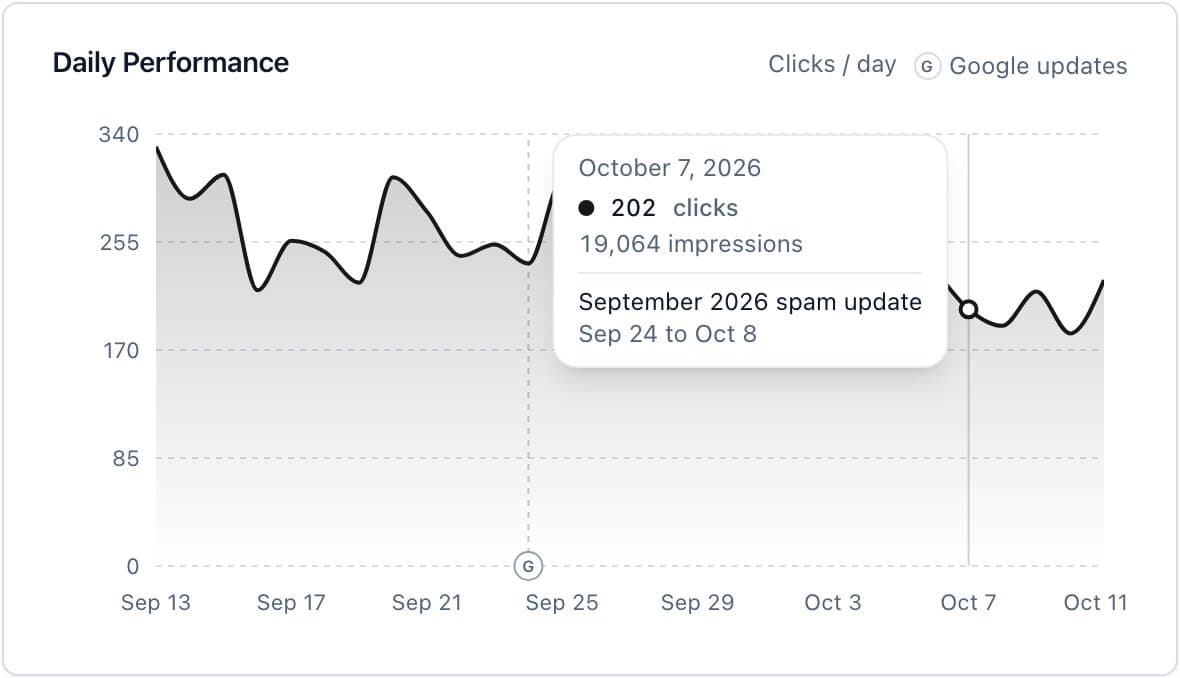
Show Clients What a Google Update Did
Google's core, spam, and reviews updates are marked on the report's daily chart. Hover a day to see which update was rolling out, and the summary can point out how clicks moved in the week after it began.
- Every update since 2021
Pulled from Google's own Search Status Dashboard with each update's rollout dates. New updates appear the day Google announces them.
- Your call per report
Markers are on by default. Switch them off in any report's settings.
What Goes in the Report
Search Console data by default. Turn sections on or off and drag them into the order you want.
Search performance
Clicks, impressions, click-through rate, and average position over time, plus top pages, top queries, devices, and countries.
Google updates on the chart
Core and spam updates are marked on the daily chart, and the summary can point out how clicks moved in the week after one began. Switch it off per report.
Plain-English summary
An AI-written summary of what changed, so the client reads the takeaway before the charts.
Insight sections
Add quick wins, content decay, keyword cannibalization, or site sections to show what to work on next.
AI visibility
How often AI assistants name the brand and its share of voice against competitors, from the AI Brand Monitor. Off by default.
Social analytics
Engagement and top posts from the project's connected social accounts. Off by default.
Recent posts
Posts RightBlogger published for the client this period, with links. Off by default.
Any date range
The last 7, 30, or 90 days, the last 12 months, or all stored history once it passes Google's 16-month limit.
Sortable tables
Clients can re-sort top pages and queries by clicks, impressions, CTR, or position.
Reporting Included, No Separate Fee
Client reporting is part of the RightBlogger subscription, not a separate tool. White label is on Agency, $199/mo billed annually ($2,388/yr) or $299/mo month to month, with a report for each of its 10 sites.
- A report for every site
Every site on your plan gets a report at no extra charge per report.
- Reports next to the work
The same account writes, schedules, and publishes the posts that show up in the Recent posts section.
- Team seats
Agency includes 5 team seats. Invite teammates to client projects instead of sharing a login.
- RightBlogger for agencies
Pricing
Blog automation and unlimited AI words on every plan. Try it free for 7 days. Cancel anytime.
Solo
For bloggers with one site
$588/yr billed annually
Save $120/yr- 1 site included
- 30 SEO reports per month
- AI Brand Monitor 25 checks per site/mo
Pro
For bloggers with multiple sites
$23 per site
$828/yr billed annually
Save $240/yr- Everything in Solo, plus:
- 3 sites included, $20/mo per extra site
- 3 blog automations
- 15 writing styles
- 3 team seats
- 90 SEO reports per month
- Premium courses included
Agency
For agencies managing client sites
$19.90 per site
$2,388/yr billed annually
Save $1,200/yr- Everything in Pro, plus:
- 10 sites included, $20/mo per extra site
- Site Agent daily audits
- 10 blog automations
- 5 team seats
- 300 SEO reports per month
Not ready for a trial? Create a free account and use the tools with 2,000 free words every month. No credit card required.
Frequently Asked Questions
Can't find an answer? Contact us.
What is a white label SEO report?
A white label SEO report is a performance report you share with clients under your agency's brand instead of the reporting tool's. In RightBlogger, you connect a client's Google Search Console, and on the Agency plan the report carries your logo and color, loads from your own subdomain, and shows no RightBlogger badge. Open a live example report to see what a client opens.
How do I create a white label SEO report in RightBlogger?
Open Reporting, pick a client project, and connect its Google Search Console. RightBlogger builds the report and gives you a share link. From report settings you can add a logo and accent color, choose sections, and on Agency connect your own subdomain.
Do I need Google Search Console to use it?
Yes. Reports are built on Google Search Console data, so the project needs a connected Search Console property (read-only access). If it has none, Reporting asks you to connect it first.
How many client reports can I create?
One report per site on your plan: 1 on Solo, 3 on Pro, and 10 on Agency. There is no separate per-report fee. See pricing for site counts and add-on sites.
Can I customize the branding for each client?
Yes. Each report has its own company name, logo, and accent color, and you choose which sections it shows and in what order. On Agency, reports can also inherit your Organization profile branding.
Can I serve reports from my own domain like reports.youragency.com?
Yes, on the Agency plan. Point a subdomain such as reports.youragency.com at RightBlogger with a CNAME record, and reports load at your URL with SSL included. Each account uses one custom domain, which you can attach to any of your reports.
Can I customize the URL for each report?
Yes. Once a custom domain is connected, you can give each report a friendly slug (like reports.youragency.com/acme-co) instead of the auto-generated one.
Can clients view reports without logging in?
Yes. A public report opens for anyone with its link, with no account or password. Viewers can't edit the report or see other clients' data, and you can switch a report to private at any time.
How often does the report data update?
Daily. When you connect Search Console, RightBlogger backfills up to 16 months of history, then adds new data every day and keeps it past Google's 16-month limit.
Does the report show Google algorithm updates?
Yes. Google's core, spam, and reviews updates are marked on the report's daily chart with their rollout dates, and the summary can point out how clicks moved in the week after one began. You can switch the markers off for any report.
Can I export a report as a PDF?
Yes. Any report can be exported as a PDF with your logo and color, for client meetings or monthly recaps. On Agency, the PDF has no RightBlogger credit.
How is this different from AgencyAnalytics, Looker Studio, or other reporting tools?
RightBlogger reports cover Google Search Console, plus optional AI visibility, social analytics, and recent posts; they don't pull Google Analytics or ad platforms. The difference is that reporting comes with the tools that do the work: AI writing, autoblogging, keyword research, the Site Agent, and CMS publishing, in one subscription.
Which plan do I need?
Search Console reports are included on Solo, Pro, and Agency (not Free), with your logo and accent color. White label, meaning no RightBlogger badge and your own subdomain, is on Agency. Agency is $199/mo billed annually or $299/mo month to month. Compare plans.
Send Your Next Client Report Under Your Brand
Connect Search Console and share a live report today.
7-day free trial. Cancel anytime.




