Claude SEO: How to Use Claude for SEO (and the 6 Tools Worth Connecting)
Connect Search Console first, then add keyword data to surface real quick wins without mistaking noisy queries for opportunities.

Claude SEO means one of two things. It is either claude-seo, a free, MIT-licensed plugin for Claude Code that runs site audits, or the broader practice of using Claude to do your SEO work.
Both run into the same limit: Claude doesn’t know your rankings, impressions or search volumes. Connect your own Search Console data first, then add keyword data, and only then an audit skill.
That order matters more than which model you pick. Below is how to set it up, what Claude actually returns once it can see your data (real output from one of my sites), and the six add-ons worth connecting, with what each costs and whether it can change your site.
What Is Claude SEO?
Claude SEO is the name people use for doing search engine optimization with Anthropic’s Claude, and it’s also the name of a specific open-source project. Searchers are split between the two. RightBlogger’s keyword data on Nov 8, 2026 showed 590 US searches a month for “claude seo” and another 480 for “claude seo skill,” which is people looking for the plugin by name.
The project is claude-seo by Daniel Agrici. Its GitHub page describes it as a universal SEO skill for Claude Code with 26 sub-skills and 19 subagents covering technical SEO, E-E-A-T, schema, AI search readiness, local SEO and more, plus 9 optional extensions for live SEO data. It’s free and MIT licensed, and you install it from inside Claude Code:
/plugin marketplace add AgriciDaniel/claude-seo
/plugin install claude-seo@agricidaniel-claude-seo
/seo setup
/seo audit https://example.com
/seo page https://example.com/some-post
/seo setup runs once to prepare its runtime. /seo audit checks a whole site with parallel agents and /seo page checks one page in depth. The README notes that five of its agents run on Opus, so a full audit uses more of your Claude plan than a single-page check.
The other meaning covers everything else: asking Claude to find keywords you’re close to ranking for, rewrite a title, plan a content calendar or check a post against what ranks. That part doesn’t need a plugin at all. It needs data.
What Claude Can’t See Without Your Data
Claude can do the thinking parts of SEO on its own, and none of the measuring parts. Out of the box it writes and edits well, explains search intent, drafts outlines, writes schema and reads any page you paste in or point its web search at. What it can’t see is anything Google only shows you: which queries your pages appear for, your average position, clicks, impressions, or how many people search a phrase each month.
Ask it about your rankings without that data and it fills the gap with a plausible guess. That’s why every useful Claude SEO setup starts with a connector, a small server (using the Model Context Protocol, or MCP) that lets Claude pull real numbers from a tool you already use.
How to Use Claude to Do Your SEO (5 Steps)
Work through these in order. Each step makes the next one more accurate.
1. Connect Google Search Console
Search Console is free and it’s your own site’s data, so it’s the first thing to give Claude. There are DIY servers that need a Google Cloud project and hosted connectors you add with a URL and a sign-in. I compared four ways to connect Google Search Console to Claude in a separate guide, so I won’t repeat the setup here.
2. Add a keyword data source
Search Console only knows queries you already show up for. For new topics Claude needs search volume and difficulty from a keyword database, through an SEO suite’s connector or a cheaper keyword tool. Without one, any volume Claude quotes is invented.
3. Let it read the pages that rank
Claude’s built-in web search and fetch can read the pages ranking above you, which is enough to compare headings and coverage. Give it the exact URLs from the results page rather than asking it to find “competitors.”
4. Add an audit skill if you want site-wide checks
A skill is a packaged set of instructions Claude follows for a task. claude-seo and similar skills crawl pages and score technical issues, schema and content quality. They’re useful for a one-time audit, but they report problems. They don’t know which of those problems cost you clicks unless Search Console is connected too.
5. Write fixes back, with a way to undo them
The last step is changing the post. You can copy Claude’s suggestion into your CMS by hand, or use a connector that edits posts directly. If Claude edits live posts, make sure every change can be reversed and that you approve it first. A good first prompt once steps 1 and 2 are done:
Using my Search Console data for the last 90 days, list queries where my site
averages position 8 to 20 with at least 200 impressions. Group them by page.
For the top 5 pages, read the live post and suggest one specific edit each
(title, a missing section, or an internal link). Don't change anything yet.
What Claude Returns Once Search Console Is Connected
Here’s real output from my WordPress tutorial site, smartwp.com, pulled through RightBlogger’s MCP connector on Nov 8, 2026. I asked for quick wins: queries ranking just below the top spots with real impressions, over the 90 days from Aug 8 to Nov 5, 2026. The site’s average CTR in that window was 0.29%. One of these rows is junk. See if you can spot it before you read on.
| Query | Impressions | Clicks | Avg. position | Suggested next step (as returned) |
|---|---|---|---|---|
| wordpress login | 11,067 | 8 | 8.1 | Rarely clicked for its spot. Rewrite the title around this search. |
| kebab case | 6,168 | 4 | 9.4 | Rarely clicked for its spot. Rewrite the title around this search. |
| best wordpress plugins | 4,783 | 2 | 13 | Searchers want a list. Lead with it, then go deeper. |
| wordpress versions | 1,562 | 0 | 11.3 | This page ranks for 14 of these queries. One refresh helps them all. |
| who is the ceo of [blog name].wordpress.com | 1,254 | 0 | 9 | Searchers want one answer. State it in the first sentence. |
Two things in that list are worth a pause before you act on it.
- The last row is noise. Nobody reading a post about who owns WordPress needs an answer about the CEO of a random wordpress.com blog, so rewriting the intro for it would make the page worse. Claude will happily optimize for junk queries unless you tell it to skip them.
- Nine pages in these quick-win and low-CTR lists had already been edited between Oct 12 and Nov 2 by RightBlogger’s Site Agent, mostly new titles and meta descriptions. Editing them again before Google has re-ranked them muddies the result of the first change. Ask Claude to check when a page was last changed before it suggests another edit.
That second check is the kind of thing an audit skill can’t do, because it needs your edit history as well as your rankings. For the full page-2 workflow, read my guide to posts with high impressions and low CTR.
The Best SEO Tools for Claude
Disclosure: RightBlogger is my company, and its MCP connector is one of the six tools below. It’s listed with the same detail and the same “skip if” as the others.
These cover the jobs from the steps above. Most people need one Search Console option and one keyword data option, not all six. Prices and plan details were checked on each vendor’s site on Nov 8, 2026.
| Tool | What it gives Claude | Setup | Cost | Can change your site? |
|---|---|---|---|---|
| claude-seo | Site audits: technical, schema, content, AI search readiness | Claude Code plugin | Free (MIT) | No |
| mcp-gsc | Your Search Console data | Google Cloud project, OAuth JSON file, terminal | Free (open source) | Not your posts (Search Console sitemaps and properties only) |
| Search Console MCP | Your Search Console data | Paste a URL, sign in with Google | Free plan, then 4.99 euros a month | No (read-only) |
| Ahrefs MCP | Keyword, backlink and SERP data | Connector URL plus an Ahrefs account | Ahrefs Lite plan or higher | No |
| Semrush MCP | Keyword, domain and backlink data | Connector plus a Semrush account | Pro, Guru or One Starter/Pro+ (50,000 API units included) | No |
| RightBlogger MCP | Search Console, keyword data, AI brand visibility, your posts | Paste a URL, sign in | Included on every RightBlogger plan | Yes, with undo on body edits |
1. claude-seo (audit skill)
claude-seo is the project most people mean by “Claude SEO.” It runs a full audit from Claude Code with parallel subagents, gives a rough 0 to 100 health score and exports reports. It’s free and MIT licensed, and optional extensions add live data from other services. It reads your public pages, so it can flag a missing schema type or a slow page, but on its own it can’t tell you which issue costs traffic.
Best for: a one-time technical and content audit. Skip if: you don’t use Claude Code, or you want to know why traffic dropped.
2. mcp-gsc (DIY Search Console)
mcp-gsc (AminForou on GitHub) is a widely used open-source Search Console server. It’s free and the code is public. Setup is the catch: you create a Google Cloud project, enable the Search Console API, make an OAuth client (or a service account), download a JSON credentials file and point the server at it from your config.
Best for: developers who want their data to stay on their own machine. Skip if: the words “OAuth consent screen” make you close the tab.
3. Search Console MCP (hosted, read-only)
Search Console MCP is one of several hosted connectors that skip the Google Cloud setup. It describes itself as “a hosted, read-only Google Search Console MCP server”: you paste one URL into Claude and sign in with Google. There’s a free plan, then 4.99 euros a month. Read-only is a fair default for analysis. It means every fix still goes into your CMS by hand, and you’re trusting a third party with your Search Console access.
Best for: fast Search Console analysis without a terminal. Skip if: you want Claude to apply the fixes it finds.
4. Ahrefs MCP
Ahrefs’ official connector gives Claude its keyword, backlink and SERP data. Ahrefs says the MCP works on Lite and higher plans, with 200,000 API units a month on Lite, and each call costs at least 50 units. It’s the strongest option here for competitor and backlink questions, but it’s priced for people who already pay for Ahrefs.
Best for: existing Ahrefs customers. Skip if: you’d be buying Ahrefs only to use it in Claude.
5. Semrush MCP
Semrush’s connector does the same job from its own database. According to Semrush’s developer docs, MCP access comes with Semrush One Starter, Semrush One Pro+, SEO Classic Pro and SEO Classic Guru, which include 50,000 API units. Business plans need a separate API units package. Every call spends API units, so ask Claude for small, specific tables instead of full reports.
Best for: existing Semrush customers. Skip if: you mainly need data about your own site, which Search Console gives you free.
6. RightBlogger MCP
RightBlogger’s MCP connector (in beta) is the one I used for the table above. Claude can then query Search Console, run keyword research, check AI brand visibility and read your posts on WordPress, Ghost, Webflow, Wix, Shopify or Framer. It can also edit a post: find-and-replace in the body, a new title or meta description. Body edits come with an undo, and anything that publishes asks first. It’s included on every plan. It doesn’t crawl your site or list individual backlinks.
Best for: bloggers who want Claude to find the fix and apply it. Skip if: you only need a technical crawl.
Claude Code or the Claude App?
Use the Claude app (web or desktop) for Search Console analysis and editing posts, and Claude Code for skills that crawl files or need a terminal. Hosted connectors work in both. In the app you add them under Customize, then Connectors, and Anthropic’s help center says custom connectors work on every plan, with Free accounts limited to one. claude-seo is a Claude Code plugin, so it needs Claude Code.
What Claude Still Gets Wrong About SEO
Even with good data connected, check these before you trust a recommendation.
- Volumes are estimates, and tools disagree. On Nov 8, 2026, Ahrefs put “claude seo” at 1,000 US searches a month and RightBlogger’s keyword data said 590. Use volumes to rank keywords against each other, not to forecast traffic.
- It treats every query as real. As the smartwp.com table shows, Search Console includes odd queries that a page should ignore.
- It doesn’t wait. Claude will suggest a new title for a page you changed last week. Give each change a few weeks before you judge it.
- Average position hides a lot. A page averaging 12 might sit at 8 on some days and 30 on others. Ask Claude to break a query down by date before calling it a quick win.
- It can edit faster than you can review. If a connector writes to your site, keep approvals on and know how to undo.
For a hands-off version of this loop that runs on a schedule, see what an AI SEO agent does. If you’re tracking whether Claude and ChatGPT mention your site at all, my list of LLM SEO tools covers the trackers, and the free AI SEO tools list covers what to use when you don’t want another subscription.
Claude SEO FAQs
Is claude-seo free?
Yes. The claude-seo plugin is free and MIT licensed. You still need Claude Code, a full-site audit uses more of your Claude plan than a single-page check, and some optional extensions call paid services.
Can Claude do keyword research?
Only with a keyword data connector. Claude can brainstorm topics and group keywords by intent on its own, but search volume and difficulty have to come from a keyword database such as Ahrefs, Semrush or RightBlogger.
Does the free Claude plan work with SEO connectors?
Yes, with a limit. Anthropic allows one custom connector on the Free plan, so pick the one that gives Claude your Search Console data.
Can Claude edit my WordPress posts?
Yes, through a connector that writes to your CMS. Read-only Search Console connectors can’t. Whatever you use, keep approvals on and make sure each edit can be undone.
Blog Automation That Keeps Your Posts Ranking
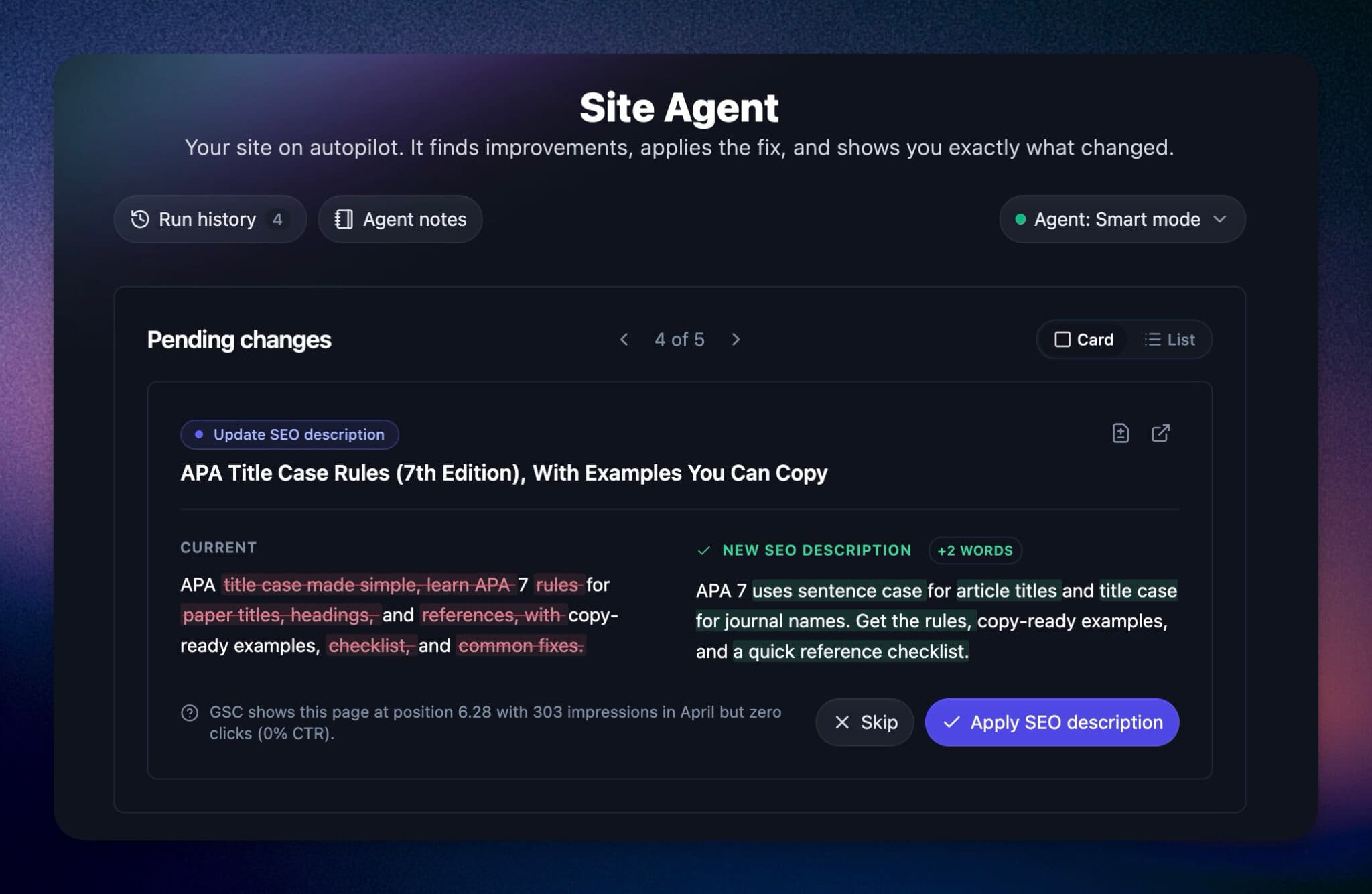
RightBlogger finds keywords, writes SEO articles, and publishes them to your blog. Then its Site Agent uses your Search Console data to keep older posts in shape, adding internal links, sharpening weak meta descriptions, and fixing stale years and broken links. Join 51,000+ bloggers using it to grow traffic from Google and ChatGPT.

RightBlogger Co-Founder, Andy Feliciotti focuses on website development and shares his SEO expertise. He also loves photography and travel.



Automated SEO Blog Posts for Your Site
Research, write, publish, and share from one account.
7-day free trial. Cancel anytime.





Leave a comment