If you’re promoting a product, service, or book, then you may well want to pitch yourself as a guest for relevant podcasts. But how do you find those podcasts? Instead of spending hours researching them yourself, use the Podcast Opportunity Finder tool to pinpoint podcasts in your niche that would be a great fit for you.
As a guest on a podcast, you’ll have thousands, perhaps even hundreds of thousands, of people listening to your insights. If they find you helpful or entertaining, they may well go on to buy your product, service, or book.
Even if you don’t have something to sell, going on podcasts can still be a fantastic way to boost your online presence, get greater name recognition, and grow your audience.
How to Use Our Podcast Opportunity Finder Tool
Ready to give the Podcast Opportunity Finder a try? It’s a powerful tool that’s incredibly easy to use, all you need to do is describe the niche or topic you’re interested in.
For instance, if you’ve written a book on time management, then you might be looking for podcasts on “time management” but also on slightly broader or related topics like “self-improvement” or “career tips”. If you’ve created an app that lets parents easily track their baby or toddler’s food intake, then you’ll be looking for “parenting” podcasts.
Type your niche/topic into the top box, then click the “Find Podcasts” button.
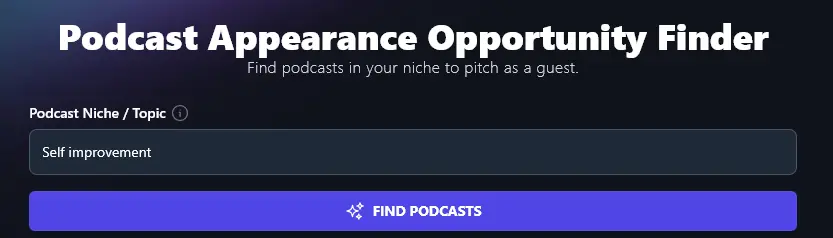
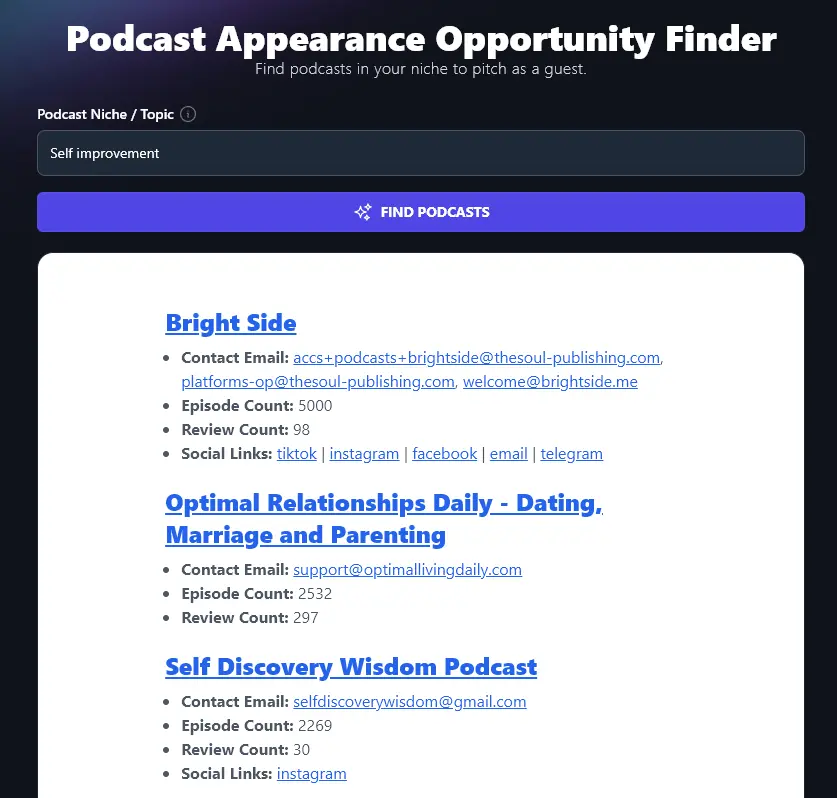
The AI will produce a list of relevant podcasts, giving key information and metrics for each opportunity.
Finding the Best Podcasts to Pitch To
All the podcasts on the list should be broadly relevant for your topic/niche, but you’ll likely want to check them out in detail to make sure you’d be a good potential guest for them.
To see the homepage (e.g. website, YouTube channel) for a podcast, just click on its name in the list. This will open up the podcast’s page in a new tab so you don’t lose your place in the list.

Below the podcast’s title and link, you’ll see one or more contact email addresses, if the contact information for the podcast is available online. Manually tracking down the email address of the person you need to pitch to can be hugely time-consuming … so the AI does all the hard work for you.

Next, you’ll see the episode count. This lets you know how well-established the podcast is. If the episode count is in the hundreds or thousands, you know the podcast has been running for some time.

Tip:Pitching to newer podcasts can still be worthwhile (and makes it easier to land an appearance), but keep in mind you’re unlikely to be reaching a large audience if the podcast has only published a handful of episodes so far.
After the episode count comes the review count. This lets you know how many reviews the podcast has received (across multiple platforms, e.g. Spotify, Apple Podcasts). The more reviews, the more popular the podcast.
Here, these 3 podcasts all have a similar number of episodes, but very different numbers of reviews. It’s a safe bet that the “Motivation with Brendon Burchard” podcast has a lot more listeners than the others.
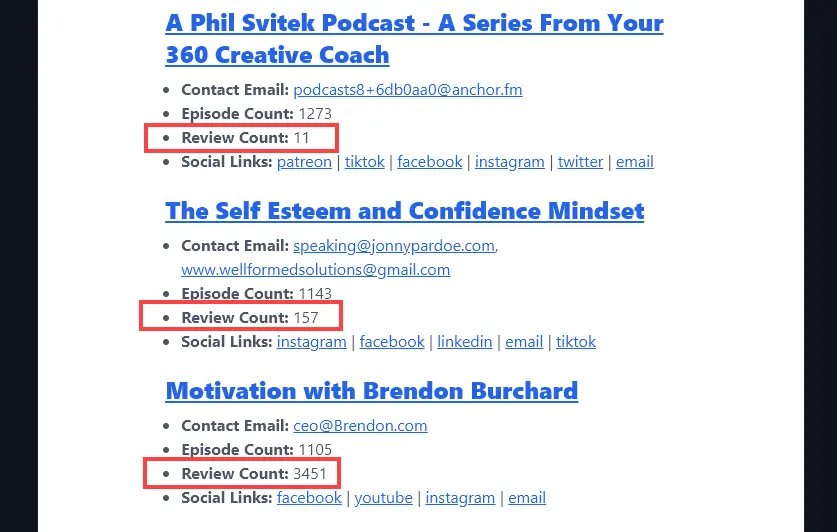
Finally, the AI will list social links for the podcast or the podcaster. (If there are no social links, this section may be omitted, or you may only see a link for email.) Simply click on any of the social profiles to open up the link in a new tab. That way, you can check out the podcaster’s social content or connect with them on the social network of your choice.

What Else to Consider When Choosing Which Podcasts to Pitch To
Along with all the information provided by the AI, you’ll likely want to check out each podcast before writing your pitch.
Some things you’ll want to consider are:
- Does the podcast cover similar topics to what you’d want to talk about?
- Do the podcast episodes normally feature guests or is this fairly rare? (Obviously, it makes sense to focus your pitches on podcasts that usually have guests!)
- If the podcast involves religion or is political, are you comfortable with the podcaster’s stance?
- How long are the episodes? Would the topic/idea you’re pitching offer enough material? Check out a few of the latest episodes to get an idea of the average length.
Podcast Opportunity Finder FAQs (Frequently Asked Questions)
Got more questions about using the Podcast Opportunity Finder or about being a guest on podcasts? Here’s everything you need to know.
Do Guests Get Paid for Podcast Appearances?
In most cases, guests do not get paid for appearing on a podcast. Instead, the podcast is like free advertising in return for their time and expertise. The host will usually introduce them and explain what they do (for instance, that they run a company or have written a book). You can also expect the host to mention the guest’s book, product, or where to find them online at the end.
Do Guests Need to Pay to Be on a Podcast?
Some podcast hosts do charge for appearances (depending on their audience size), but this isn’t the norm. It could even be a red flag that a show isn’t doing well, if they’re trying to charge guests. We recommend that if you’re asked to pay to be a guest, you find a different podcast to appear on instead.
How Do You Get Booked as a Guest on a Podcast?
While some podcast hosts will proactively reach out to potential guests, don’t wait till opportunity knocks! In most cases, you’ll need to find and pitch podcasts that you want to appear on.
When pitching, you’ll need to explain why you want to be on the podcast, what you can contribute, and offer suggested interview topics, even suggested interview questions. You should also include contact details and your social media accounts. A common way to do this is through a podcast guest “one sheet”, where you list all this information in a professional, easy-to-read format along with a headshot.
What Other AI Tools Can I Use to Grow My Online Profile and My Business?
RightBlogger is packed with AI tools to help you with all aspects of growing your online business. Whether blogging, podcasting, or entrepreneurship is your focus, we’re here for you.
Some tools you’ll definitely want to check out are:
- Article Writer: craft a full-length, SEO-optimized article from just a topic or keyword, ideal for bloggers, content marketers, and anyone wanting more website traffic
- Keyword Research Tool: find relevant and achievable keywords that your target audience are searching for
- Podcast Name: if you want to start a podcast of your own, this tool helps you come up with a catchy name
- Podcast Episode Ideas: once you’ve named your podcast, you’ll need lots of episode ideas too
- Press Release: craft a well-formatted press release for your company’s latest news, or for a product or service
- Feature/Benefit/Outcome Generator: quickly craft sales copy for a landing page (or a site like Amazon) about your product, great for entrepreneurs
There are loads of other tools to try too, including social media tools (e.g. the LinkedIn Post generator), ecommerce and sales tools, SEO tools, and lots of blogging tools to create high quality content.
How Do I Sign Up for RightBlogger and How Much Does it Cost?
Every tool in RightBlogger is included in every plan, and paid plans come with unlimited AI words. Explore the full tool suite and pick the plan that fits: monthly Solo $59, Pro $89, or Agency $299 (annual billing, charged monthly, is $49 / $69 / $199). See RightBlogger pricing.
Want to go further with building your online business? The Pro plan is for you. It gives you 3 sites, 3 team seats, and 90 SEO reports per month. Go annual and pay $828/yr instead of monthly. No credits or unexpected add-ons.