Mission Statement Generator
Generate a mission statement for your business or project.
Need a mission statement for your business or non-profit? However passionate you are about what you do, it can be tough to come up with the right words to describe your mission.
Your mission statement is likely to be prominent on your site’s About page, or even on your homepage. It gives potential customers a clear sense of not just what you do but why. A good mission statement will connect with your target audience: they’ll see what they want reflected in it too. Stakeholders may also want a say in your company’s mission statement.
Coming up with the perfect mission statement is, understandably, tricky! And that’s where the free AI Mission Statement Generator comes in. With just a few details about your business, and a little help from artificial intelligence, it can come up with an engaging, inspiring mission statement for you.
How to Use the Free Mission Statement Generator
Ready to craft your mission statement? Our Mission Statement Generator is super simple to use. Here’s what to do, step by step.
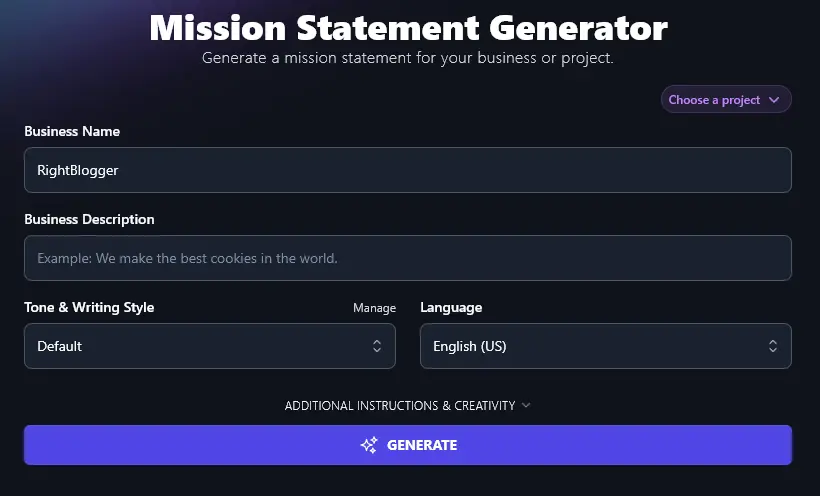
Step 1. Enter Your Business Name
Type your business (or brand) name into the top box, as you want it to appear in your mission statement. You can’t go wrong here!
Step 2. Give the AI a Description of Your Business
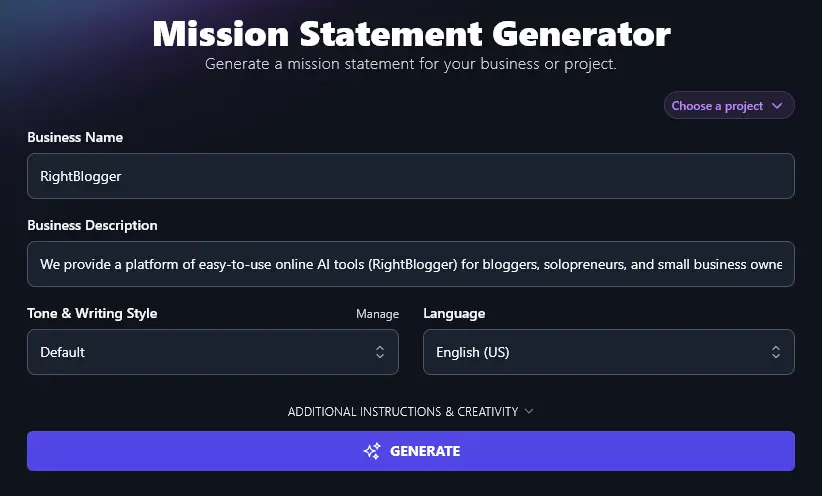
The AI needs to know a bit about what your business does (or if you’re just getting started, what you plan to do). Type a sentence or two about your business in the Business Description box.
Step 3. Choose the Tone & Writing Style for Your Mission Statement
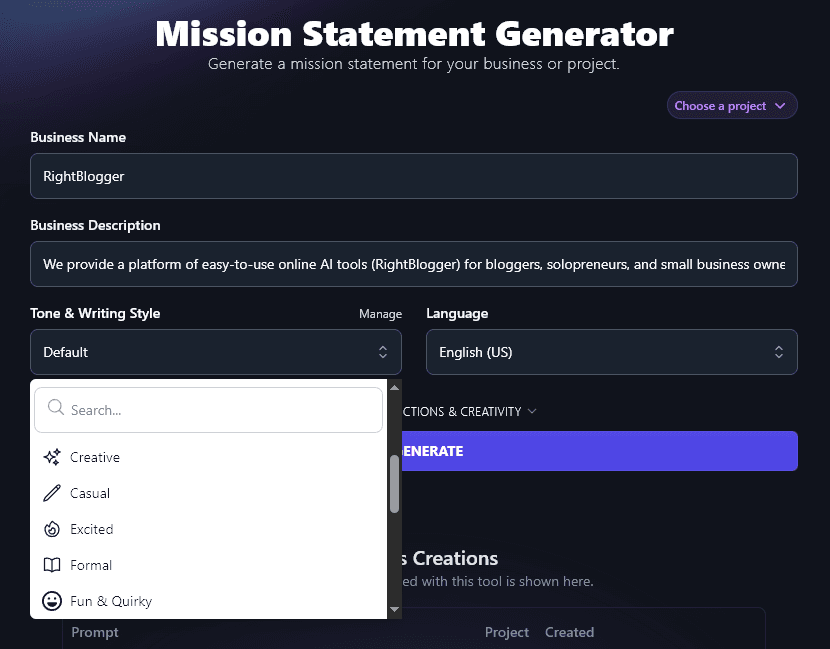
In most cases, you won’t want your mission statement to be dry and factual: instead, you want it to give a sense of what your brand is like.
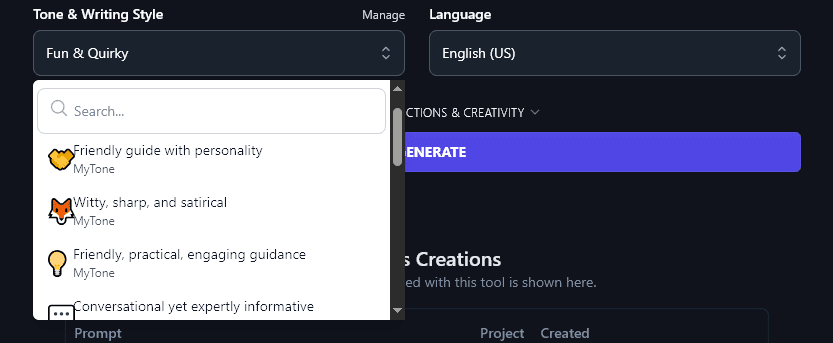
Pick a tone or writing style from the dropdown list that fits well with your brand voice. With options from “Academic” and “Professional” to “Excited” and “Fun & Quirky”, there’s a huge range to choose from.
Step 4. Select a Language for Your Mission Statement
RightBlogger defaults to creating content in English (US) … but if your company is based in a different country, you may well want to write your mission statement in your native language. Go ahead and select your preferred language from the dropdown list, there are over 100 to choose from.
Tip:The dropdown includes a search bar at the top, to save you scrolling.
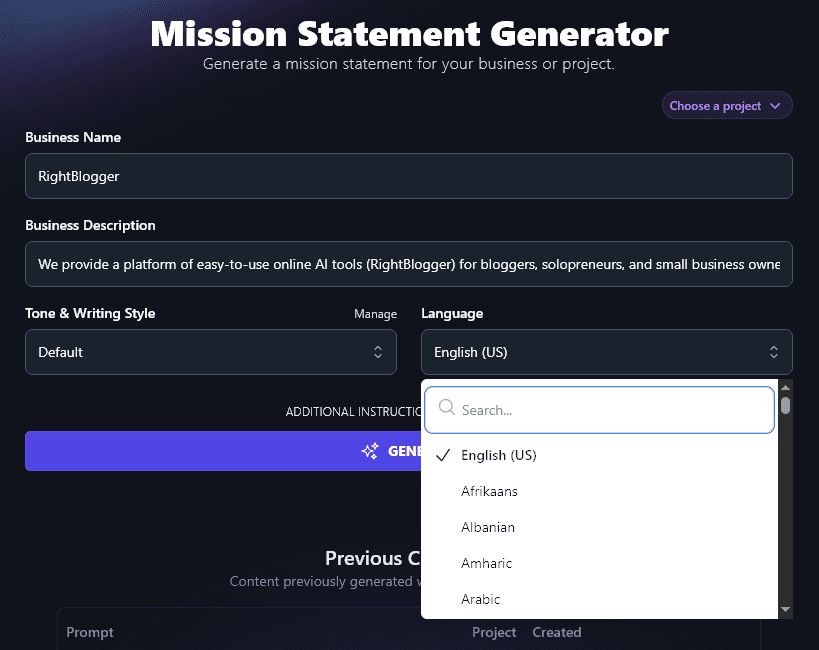
When you’re ready, simply click the “Generate” button and the AI will write a great mission statement for you:
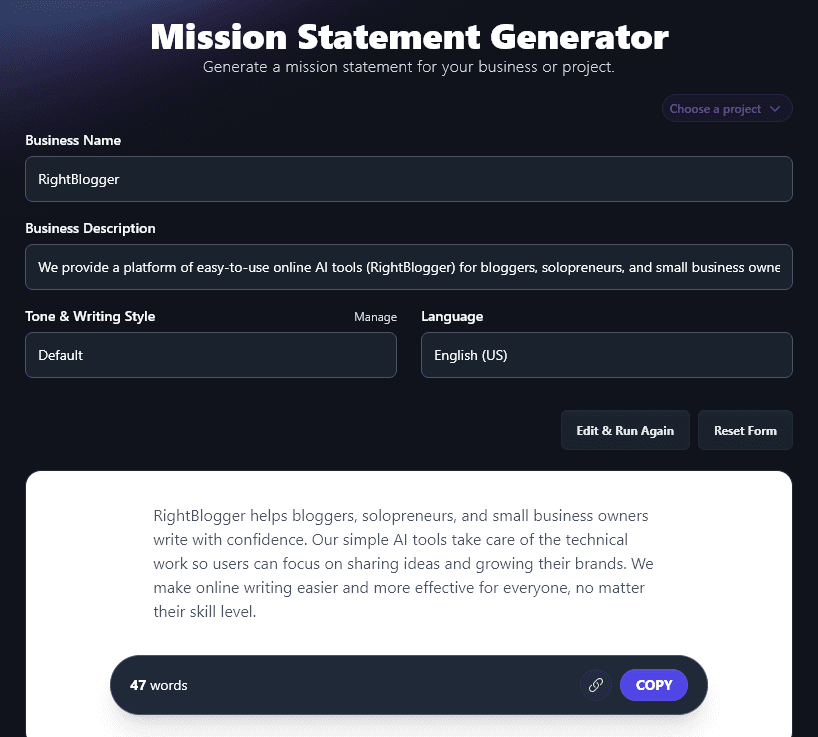
Use the “Copy” button to copy the text of your mission statement: you can then paste it into your About page, a Google doc, etc.
Bonus: Use My Mission Statement Checklist Alongside This Tool
Struggling to get your mission statement just right? Whether you’re writing it yourself or getting AI to draft it for you, here are a few key pointers to keep in mind.
- Focus on the present and the near future in your mission statement: what are you doing now, and what will you be doing soon?
- Read through your mission statement and check it would make sense to someone who knows nothing about your organization
- Think about the language in your mission statement, are all the words/phrases ones that your ideal customers would use?
- Keep your mission statement fairly short and succinct: no more than 3 sentences.
- Check that your mission statement gives a sense of who your product/service is aimed at
- Make sure your mission statement ties in with your organization’s core values
- Ask yourself whether your mission statement is unique enough, does it sound bland and generic, or does it excite you?
- If possible, get feedback from your existing audience on your mission statement (you could even come up with a few different versions and ask which they prefer).
How Does the Mission Statement Generator Work?
The Mission Statement Generator is easy to use … but to create a truly impactful mission statement, it’s helpful to dig deeper into each of its features.
We’re going to take a closer look at every option, including the advanced features of the Mission Statement tool.
1. Business Name
Your Business Name is (hopefully!) straightforward. Remember to enter it as you want it to appear in your mission statement. E.g. your company name might officially be “Acme Ltd” but you may want it to be written as just “Acme” in the mission statement.
Tip: This tool isn’t just aimed at for-profit businesses. If you’re a non-profit organization, such as a charity, then put your charity name here.
2. Business Description
Your business description is important, as this is what the AI will base your whole mission statement on. You could use existing text here, like your About page, or even part of your business plan.
Not sure what to enter? Try telling the AI:
- What your business does, with a strong verb (e.g. “We coach…” or “We build…” or “We design…”)
- Who you do it for (e.g. “for bloggers, solopreneurs, and small online businesses”)
- What the benefit is for your audience, or for the world! (e.g. “to help them…”)
Tip:Want to give the AI lots of information? No problem! You can enter up to 10,000 characters in this box, that’s around 1,500-2,500 words.
3. Tone & Writing Style
Your mission statement might be one of the first things a prospective customer reads about your business. You want it to fully convey your brand, not just in the content, but also through the way it’s written.
That’s why RightBlogger’s AI can craft content in a huge range of styles for you. We’ve got 16 preset styles to choose from. Here’s a quick look at the difference these can make to your mission statement.
“Professional” style:
RightBlogger empowers bloggers, solopreneurs, and small business owners by providing simple AI tools that save time and spark creativity. We help our users share their ideas, grow their brands, and run their businesses with confidence.
“Fun & Quirky” style:
RightBlogger helps bloggers, solopreneurs, and small business owners write smarter, faster, and with less stress. We build friendly AI tools that turn big ideas into great content with a few clicks. Our mission is to make blogging fun, simple, and totally doable, no tech headaches, just creativity and results.
If none of the preset tones are quite right for you, then you can create your own completely custom tone using RightBlogger’s MyTone feature, which is included on every RightBlogger plan. You build each tone from samples of your writing (or even a video), and paid plans save 5 (Solo), 15 (Pro), or 50 (Agency) of them.
Once you’ve created a MyTone, you can select it from the Tone & Writing Style dropdown, just like any other tone:
4. Language (Select Any Language … or a Different Variety of English)
RightBlogger can create your mission statement in any of 100+ languages. Here’s a mission statement written in Spanish:
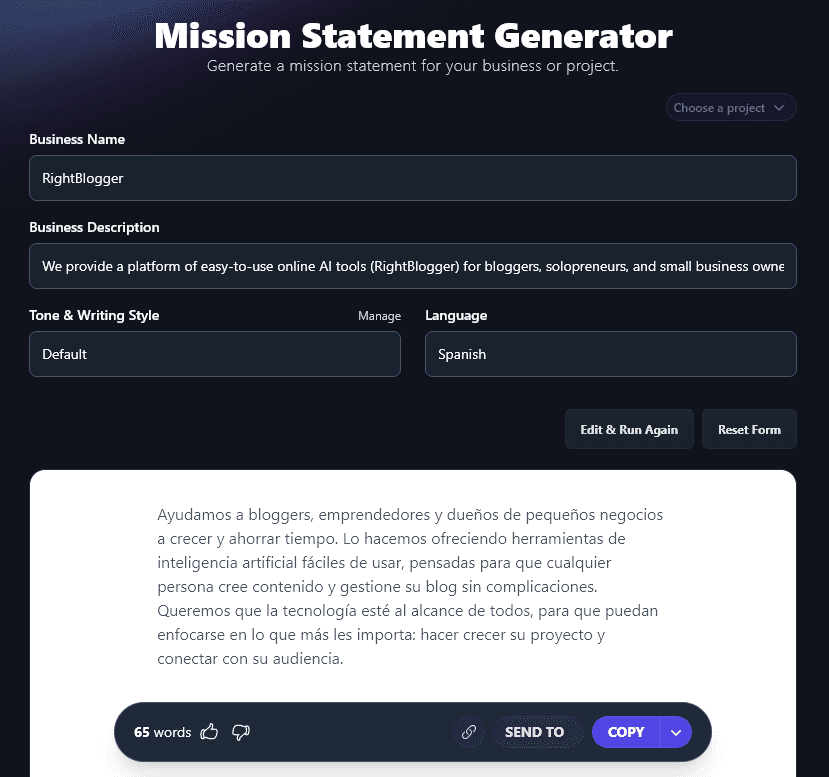
As well as having a huge range of languages to choose from, RightBlogger’s AI can also write in different versions of English. It defaults to US English … but you can also choose UK English, Canada, or Australia, if those varieties will be a better fit for you and your audience.
5. Additional Instructions (Give the AI Any Special Requests for Your Mission Statement)
To open up the 2 advanced options for the Mission Statement Generator, click on the “Additional Instructions and Creativity” link.
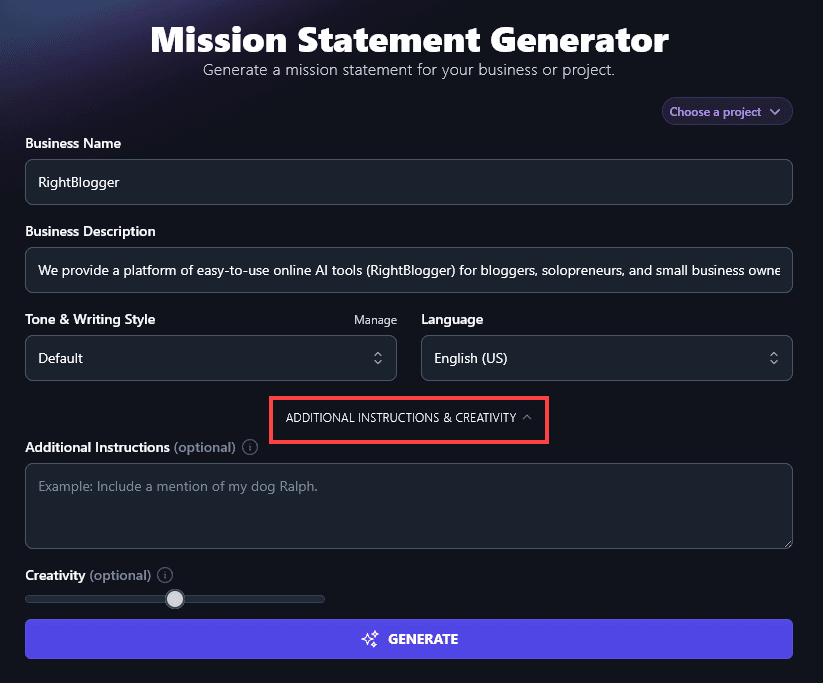
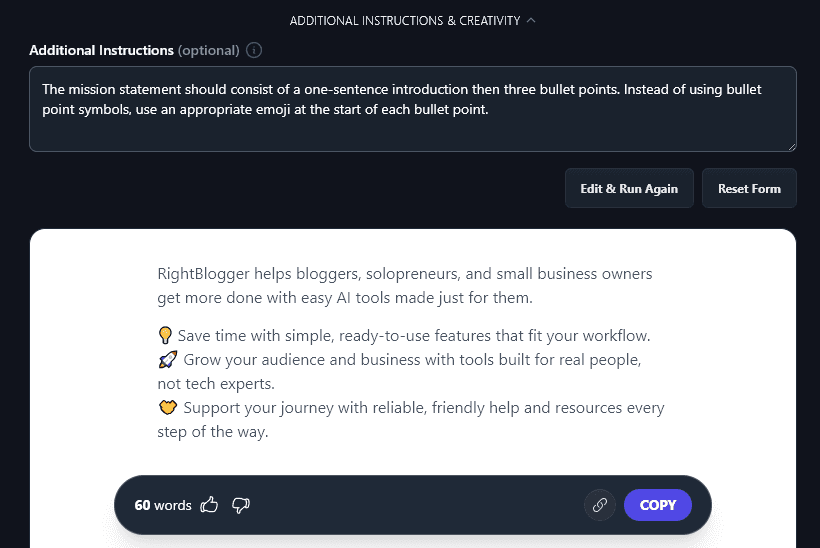
The first new option you’ll see is “Additional Instructions”. This is where you can give the AI any requests or requirements for your mission statement. For instance, you might want it to be written in bullet points, or you may want to incorporate emojis. Just ask the AI for whatever you like.
Here, we asked the AI to give us a one-sentence introduction then 3 bullet points, each starting with an emoji:
6. Creativity (Make Your Mission Statement More Predictable … or More Unusual)
RightBlogger’s AI is automatically set to a midpoint of creativity, so that your mission statement will be unique and interesting, without being overly strange! If you want to experiment with the creativity level, though, go ahead and move the slider left (less creative) or right (more creative).

Mission Statement Generator FAQs (Frequently Asked Questions)
If you’ve got questions about using the AI Mission Statement Generator, or if you’d like some extra help writing a mission statement, we’ve got the answers you need.
What’s the Difference Between a Mission Statement and a Vision Statement?
Some people use the terms “Mission Statement” and “Vision Statement” pretty much interchangeably … but really, they’re two different things.
Your mission statement is focused on the present and the near future. It’s about what your business isdoing, right now, and what it’ll be doing soon.
Your non-profit or company’s vision statement can be more aspirational, looking a long way ahead. It’s about the vision you have for how your business (or non-profit) will impact the world.
What Are Some Powerful Mission Statement Examples?
Here are just a few examples of strong mission statements, of different lengths:
LinkedIn:“To connect the world’s professionals to make them more productive and successful.”
Apple: “To create technology that empowers people and enriches their lives.”
Goodwill:“Goodwill® works to enhance the dignity and quality of life of individuals and families by strengthening communities, eliminating barriers to opportunity, and helping people in need reach their full potential through learning and the power of work.”
Whole Foods: “To nourish people and the planet.”
Who Needs a Mission Statement?
All kinds of organizations (non-profits and for-profit companies) will create mission statements. A compelling mission statement is a great way to share your company values with the world and reinforce your brand identity … whatever your organization’s purpose and whatever its size.
As well as being public-facing, an effective mission statement can also be hugely helpful in codifying your organisation’s goals, this will then feed into strategic decision making.
What Other AI Tools Can I Use to Grow My Business Online?
A well-crafted mission statement is a great place to begin … but AI-powered tools can help you with all kinds of other aspects of your business, too.
- Article Writer: craft high-quality blog posts in seconds with the powerful Article Writer tool: all you need is a topic or keyword
- Keyword Research: find the perfect keywords to reach your target audience when they’re searching on Google (tool gives search volumes & difficulty ratings too)
- Newsletter: quickly generate newsletters to help you stay in touch with your prospects and reach your organization’s goals
- Slogan: speed up the process of brainstorming slogans, and generate the perfect slogan or tagline to draw people in
- Ad Copy: write high-converting copy for ads across a range of platforms, including Facebook, Google, and YouTube
- Product Description: create a compelling product description or landing page for any product/service you sell
Along with these, we have a whole range of blogging tools, social media tools, SEO tools, sales tools, and more. Our tools are all designed for bloggers, entrepreneurs, startups, and small businesses, so they’re quick and easy to use … and best of all, you can try them for as long as you want completely free.
How Do I Sign Up for RightBlogger and How Much Does it Cost?
You don’t have to pay to use RightBlogger: RightBlogger lets you try out our tools at no charge. Free accounts get 2,000 words per month (no credit card); every paid plan includes unlimited words.
If you’d like to create unlimited content, save more MyTones, and make use of our advanced features like Chat, Knowledge, and Projects, then a paid plan is for you. We’ve kept the pricing low and affordable for bloggers and solopreneurs, at monthly Solo $59, Pro $89, or Agency $299 (annual billing, charged monthly, is $49 / $69 / $199).