How to Promote YouTube Shorts: 9 Proven Strategies
Use niche hashtags, early trend timing, creator collaborations, and retention analytics to reach more viewers without overspending on ads.

You made a YouTube Short. Maybe it got 47 views. Maybe it got 4,700. Either way, you’re here because you want more, and simply uploading and hoping isn’t a strategy.
This guide covers 9 proven ways to promote your YouTube Shorts so they actually get seen: from optimizing your content and cross-posting on social media, to collaborating with creators and using YouTube’s own promotion tools.
Why Create YouTube Shorts?
Good content helps, but it’s not enough on its own. Actively promoting your Shorts can multiply your views, and most of these strategies cost nothing.
Short-form video has the highest ROI of any content type right now. TikTok proved the format works, and YouTube responded by pushing Shorts hard in their algorithm. Over 70 billion Shorts are watched daily on YouTube (according to YouTube’s own reporting), so the audience is already there.
The algorithm changes constantly, but Shorts aren’t going anywhere. Use these nine strategies to make sure yours get found.
9 Tactics to Boost Your Shorts Viewership
1. Create High-Quality, Optimized Shorts
The most important part of making shorts is making engaging videos that hold a viewers’ attention. This means getting to the point, having logical visuals, and audio that’s easy to understand. There’s no need to overthink it as well, just filming on your iPhone is what many expect in terms of quality.
Here’s what goes into a high-quality YouTube Short:
- Keep your Short at 3 minutes or less. YouTube treats square or vertical videos up to 3 minutes as Shorts (since Oct 15, 2024). Official rules: three-minute YouTube Shorts. For more on getting the format right, check out our short-form video tips.
- Shoot vertical or square. YouTube classifies square or vertical videos as Shorts (9:16 is the usual phone ratio), and since over 70% of YouTube viewers are on mobile, vertical still meets the audience where they already are. Official: three-minute YouTube Shorts.
- Write a specific title (not clickbait) and front-load your description with relevant keywords or hashtags. A strong thumbnail helps too, since Shorts now display thumbnails in search results and on your channel page.
- Bake captions onto the video. Most people scroll Shorts with sound off, so on-screen captions increase watch time and make your video accessible to viewers who are hard of hearing. Apps like CapCut generate captions automatically with AI.
- Design the ending so it loops back to the start. A clean loop encourages re-watches and pushes up your watch-time signal. Here’s a Short I made where the ending cuts back to the opening with no visible seam.
- Build a story, even a tiny one. A 15-second video with a beginning, middle, and end holds attention way longer than a video that just lists facts.
Storytelling is the most impactful skill to master for short-form videos. You need to be able to interweave the context with the conflict to be able to tell a compelling story. The ability to evoke emotion from an audience is a sure-fire recipe for success.
Roberto Nickson
Get these basics right and the algorithm has something worth recommending.
2. Promote Shorts Across Social Platforms
Cross-posting your Shorts on Facebook, Instagram/Threads, X (formerly Twitter), and LinkedIn puts your content in front of audiences who might never find it on YouTube alone. For a full breakdown of where and how to share, see our content promotion checklist.
- Share Shorts previews or teasers on your other social profiles.
- Use the related video feature in YouTube Shorts to drive viewers back to the full video on YouTube.
- Repurpose Shorts into different formats like static posts, carousels, or Stories.
- Use niche-specific hashtags to help new audiences find your content.
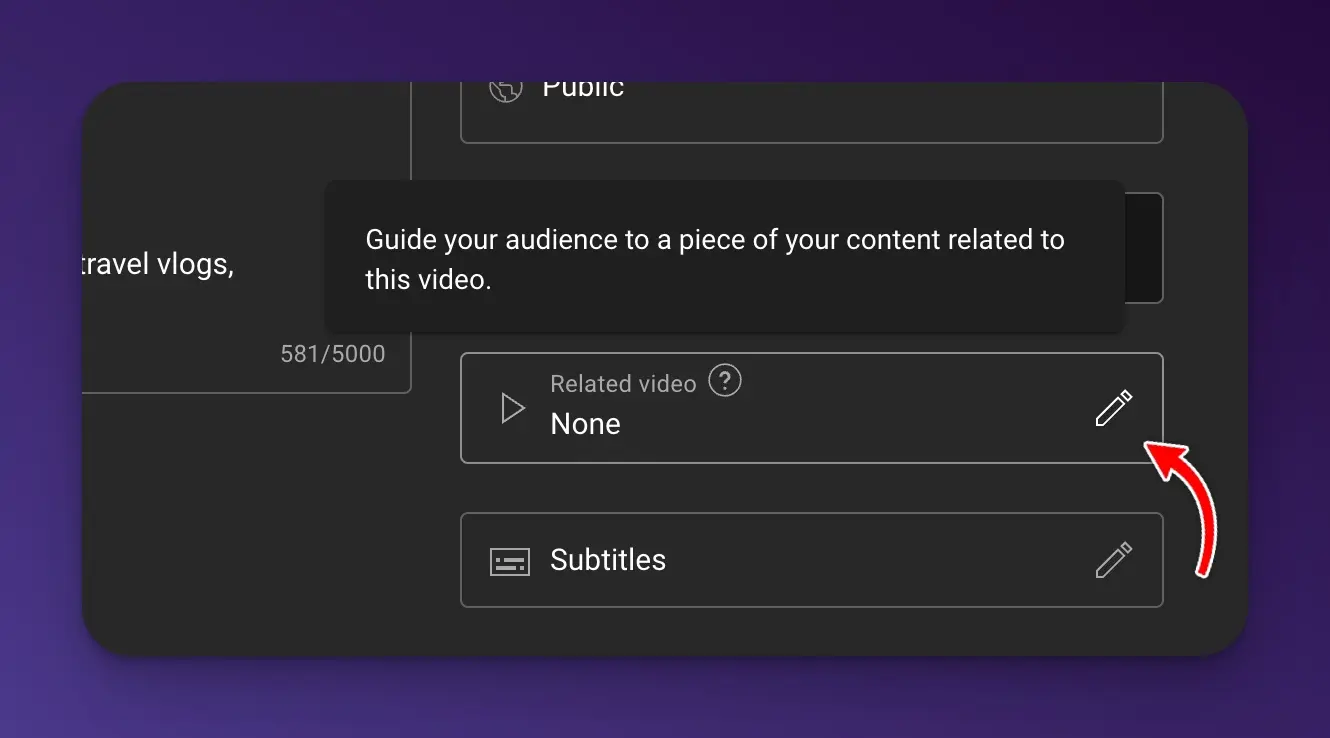
Linking your Short to a full-length video is one of the smartest moves you can make, especially if you have long-form content like a podcast. YouTube shows viewers a button to watch the related video right from the Short.
3. Partner With Relevant Creators
Collaborating with other creators in your niche exposes your content to engaged new audiences.
- Produce “Shorts Remixes” together.
- Shout out or feature each other’s channels.
- Join trending challenges or themes as a group.
- Cross-promote Shorts through guest appearances.
The key is picking creators whose audience would genuinely care about your content, not just anyone with a big following.
4. Engage With Your YouTube Community
Responding to comments and interacting with viewers does two things: it builds loyalty, and it tells YouTube your content sparks conversation. Both help your Shorts get recommended to more people. If you’re still figuring out who your target audience is, start by looking at who’s already engaging with your content.
- Reply to comments frequently.
- Ask questions to spark discussion.
- Run polls related to your content.
- Occasionally go live and chat in real time (you can even go live on YouTube shorts now).
- Use community posts to give behind-the-scenes looks.
5. Make Trend-Focused Shorts
Tap into trending sounds, songs, hashtags and challenges within your Shorts. This increases potential to go viral.
- Check YouTube’s Trending and Music Charts.
- See what’s trending on TikTok and other platforms. TikTok even offers a page to see what’s trending on their app.
- Put your unique spin on trending topics.
- Align trends with your brand voice and audience.
Timing matters here. Jump on trends within the first 24-48 hours for the best chance at visibility.
6. Include Shorts in Playlists
Curate Shorts into thematic playlists around specific topics, styles or series. This increases watch time and helps discoverability.
- Organize Shorts into logical categories.
- Arrange your best or most recent Shorts first.
- Use eye-catching playlist titles, descriptions and thumbnails.
- Share playlists on social media and YouTube Community.
- Embed playlists on your website.
Playlists signal to YouTube that viewers engage with your content and even show up in YouTube search.
7. Run YouTube and Social Media Ads
While I don’t recommend running ads for your content if you are a small creator this is a great option for brands trying to hit specific targets. You can promote your YouTube shorts on YouTube by going to your content tab and clicking promotions in the YouTube studio.
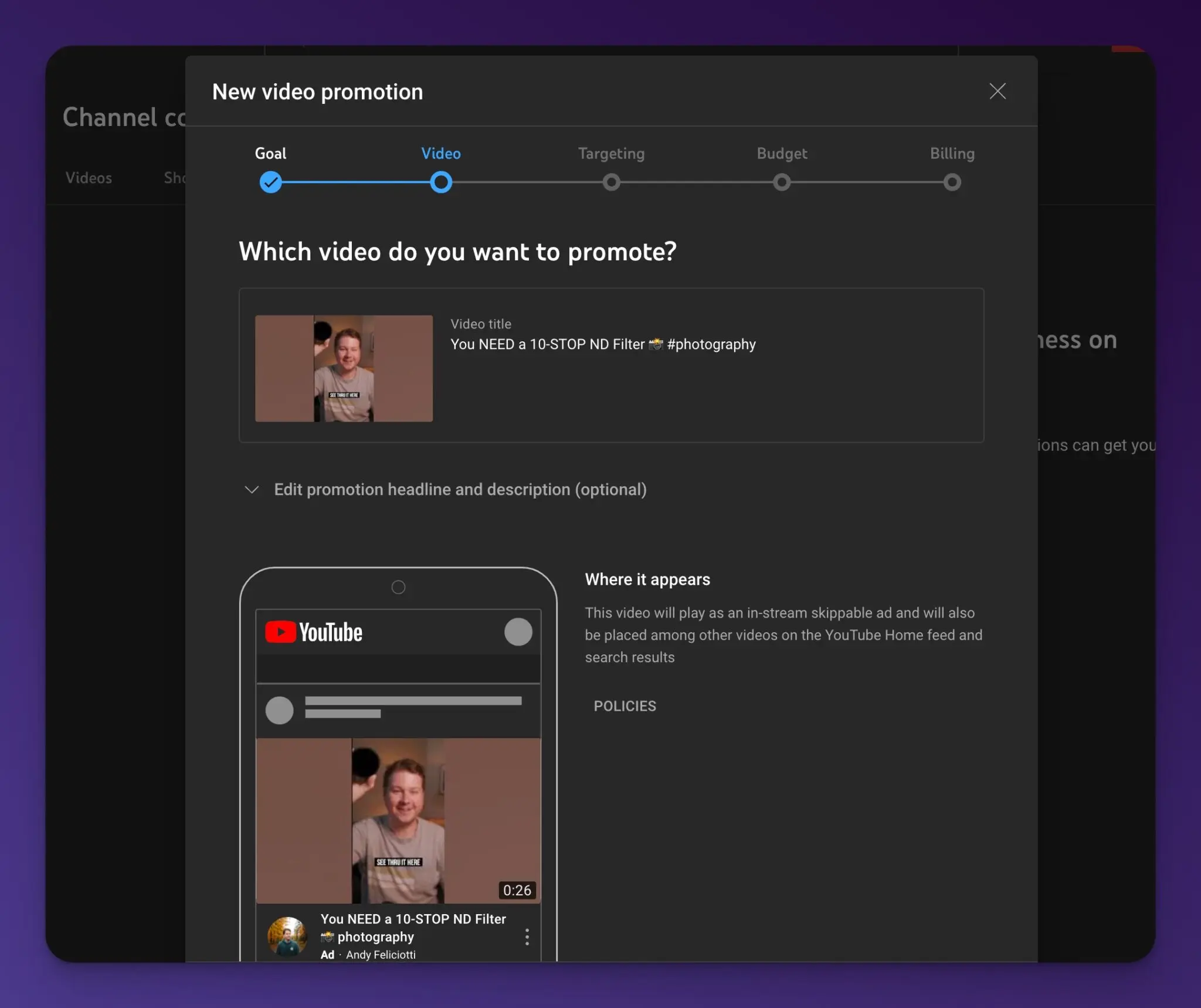
- Use Google Ads to target relevant keywords and demographics, like mobile users.
- Retarget engaged viewers from your channel or posts with additional video ads.
- Promote your Short using YouTube’s built in promotions.
- Boost social media posts featuring your Shorts.
- Experiment with Instagram and Facebook video ads.
Start with a small daily budget ($5-10) and test different targeting options before scaling up. It’s easy to overspend on ads that don’t convert.
8. Analyze Metrics and Optimize
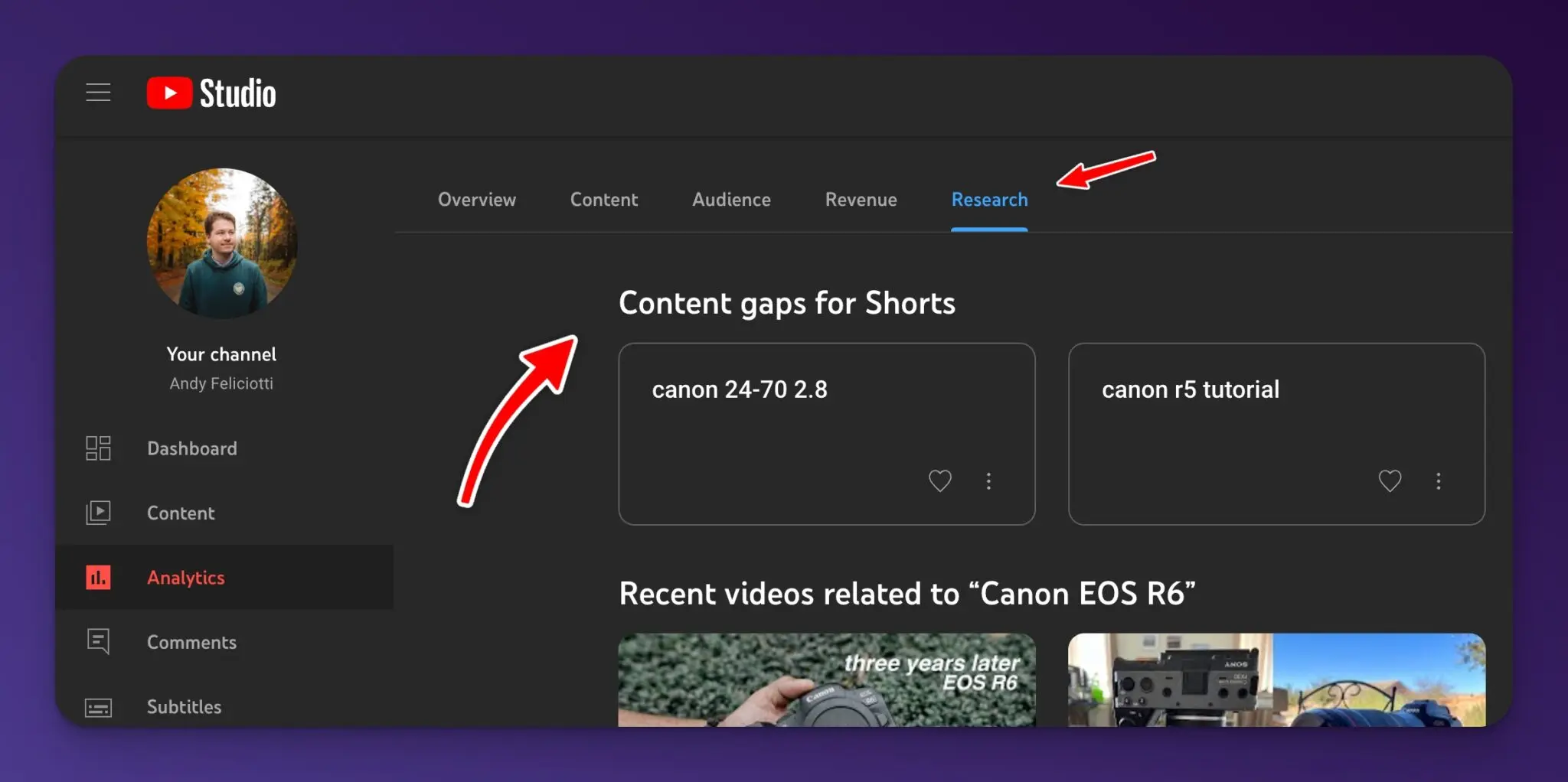
Use YouTube Studio to track your YouTube analytics and even see what content gaps exist for your channel using the “research” tab.
- Traffic sources
- Views, likes, comments, and shares
- Audience retention
- Click-through and conversion rates
- Top videos and playlists
- View content gaps and how people find your content
Double down on what’s working. If your “tips” Shorts outperform your “day in the life” ones by 5x, that’s your audience telling you what they want.
9. Repurpose Your Shorts
You don’t need to create everything from scratch. Content repurposing lets you squeeze more value out of work you’ve already done:
- Turn into blog posts with added tips and context. We have a tool to instantly convert regular YouTube videos and Shorts into blog posts.
- Expand your Shorts into a long-form YouTube tutorial (great for how-to content). You can also use AI tools for YouTubers to speed up scripting and outlines.
- Compile into a weekly or monthly newsletter.
- Create an infographic based on the facts/stats covered.
Frequently Asked Questions about YouTube Shorts
How can I boost my YouTube Shorts?
Start with the basics: write specific titles, add relevant hashtags, and share your Shorts on other social platforms. Collaborating with creators in your niche and responding to comments also signals to YouTube that your content is worth recommending.
Can you advertise YouTube Shorts?
Yes, in the YouTube studio you can use the promotions tab in content to run ads for your YouTube shorts.
How do I make my YouTube Shorts go viral?
There’s no guaranteed formula, so don’t build your strategy around it. That said, your best odds come from jumping on trends early, telling a story that hooks viewers in the first 2 seconds, and creating content people want to share. High watch-time percentage is the strongest signal to the algorithm.
Can I pay to promote YouTube Shorts?
Yes. In YouTube Studio, go to Content, select your Short, and click “Promotions” to run an ad directly. You can also use Google Ads for more advanced targeting options like demographics, interests, and retargeting past viewers.
How often should I post YouTube Shorts?
Consistency matters more than frequency. Posting 3-5 Shorts per week gives the algorithm enough content to work with. Some creators post daily, but quality always beats quantity. Find a pace you can sustain without burning out.
Do hashtags actually help YouTube Shorts get more views?
Yes, but only if they’re specific. Broad hashtags like #shorts or #viral are too competitive. Use 3-5 niche hashtags that describe your content (like #guitarlessons or #mealprep). YouTube uses hashtags to categorize your content and show it to the right audience.
Can I make money with YouTube Shorts?
Yes. YouTube shares ad revenue from the Shorts feed with eligible creators through the YouTube Partner Program. You need at least 1,000 subscribers and either 10 million Shorts views in 90 days or 4,000 watch hours on long-form content. The RPM (revenue per thousand views) for Shorts is lower than long-form video, but the volume can make up for it.
Start Promoting Your Shorts Today
You don’t need to do all 9 of these at once. Pick 2-3 tactics that fit your current setup, test them for a few weeks, and check your analytics to see what moved the needle. Then add more as you build momentum.
The creators who grow fastest on Shorts aren’t the ones with the fanciest equipment or the biggest budgets. They’re the ones who promote consistently, pay attention to what works, and adjust. Your next Short could be the one that takes off, but only if people actually see it.
Want more help with your YouTube strategy? See how RightBlogger’s tools help YouTubers create, optimize, and repurpose content faster.
Blog Automation That Keeps Your Posts Ranking

RightBlogger finds keywords, writes SEO articles, and publishes them to your blog. Then its Site Agent uses your Search Console data to keep older posts in shape, adding internal links, sharpening weak meta descriptions, and fixing stale years and broken links. Join 51,000+ bloggers using it to grow traffic from Google and ChatGPT.

Article by
RightBlogger Co-Founder, Andy Feliciotti creates YouTube videos and shares his photography and travel adventures on his blog.



Automated SEO Blog Posts for Your Site
Research, write, publish, and share from one account.
7-day free trial. Cancel anytime.





Leave a comment
You must be logged in to comment.
Loading comments...