
Grammar & Spelling Fixer
Fix grammar and spelling in a paragraph or phrase.
Are you looking for an AI grammar fixer or grammar checker tool? If you want to avoid punctuation errors, spelling mistakes, and other grammar issues in your text, then AI (artificial intelligence) can help you make sure your work is error-free.
Our AI grammar checker tool doesn’t just spot your mistakes, it fixes them automatically for you. It’s designed to handle all kinds of grammar mistakes, including:
- Typos and spelling mistakes (including when you confuse one word for another)
- Punctuation mistakes (like using a comma instead of a semicolon)
- Grammatical errors (such as incorrect subject-verb agreement)
The AI understands correct grammar rules and can instantly fix issues with your sentence structure, word choices, and more. And while it does catch spelling errors for you, it goes way beyond a simple spell checker.
How to Use the Free Grammar Checker (AI-Powered)
The Grammar and Spelling Fixer is easy and quick to use. Here’s what to do, step by step.
Step 1. Paste in Your Content That You Want to Check
First, paste in any passage of text that you want to check and correct. This could be part of a blog post, an essay, an email, or anything you’ve written or that you need to edit.
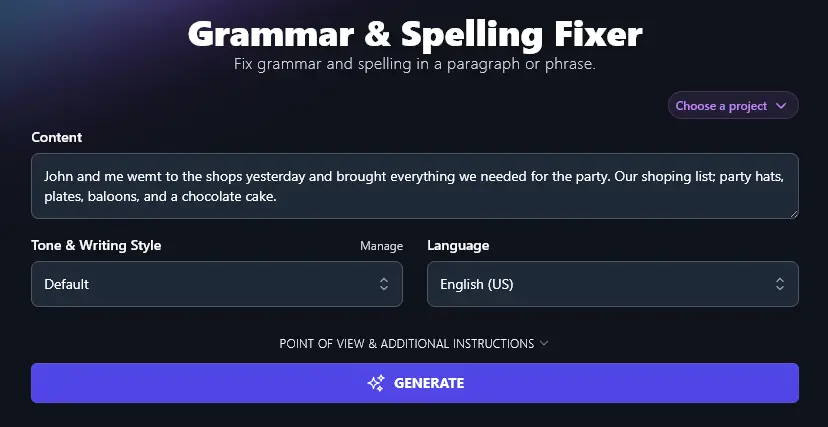
Step 2. Select the Tone and Writing Style for Your Piece
The grammar checker will preserve the style of your original text, only making corrections where these are needed. However, when there’s more than one way to correct a sentence, it will make a judgment based on the tone and writing style you select.
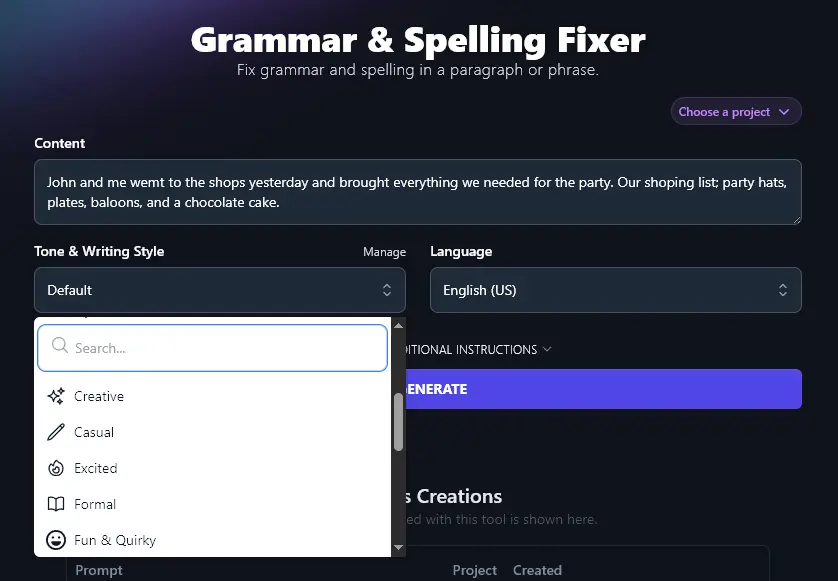
Step 3. Choose Your Language (Other Than US English)
The grammar fixer defaults to US English, even if your input text is in a different language. If you want the output text to be in a language other than US English, select it from the dropdown list. There are over 100 languages to choose from, including several different varieties of English.
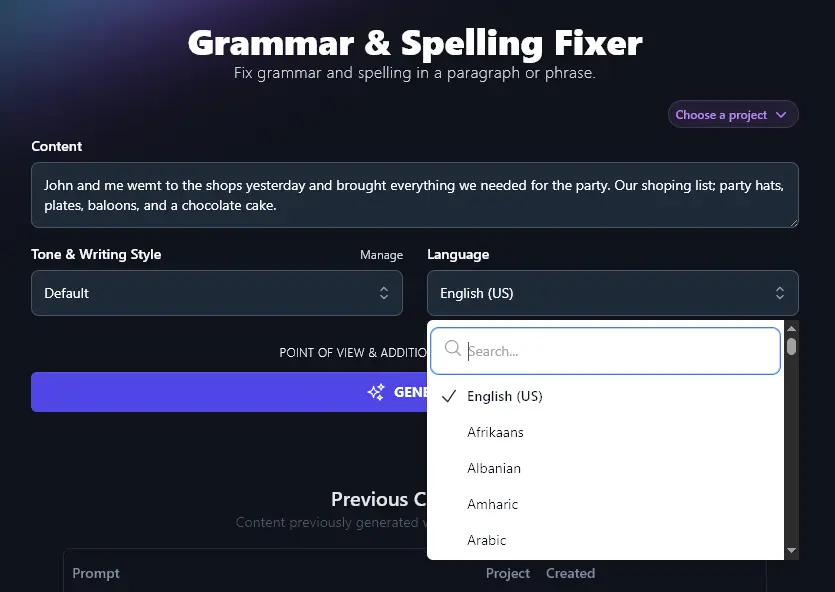
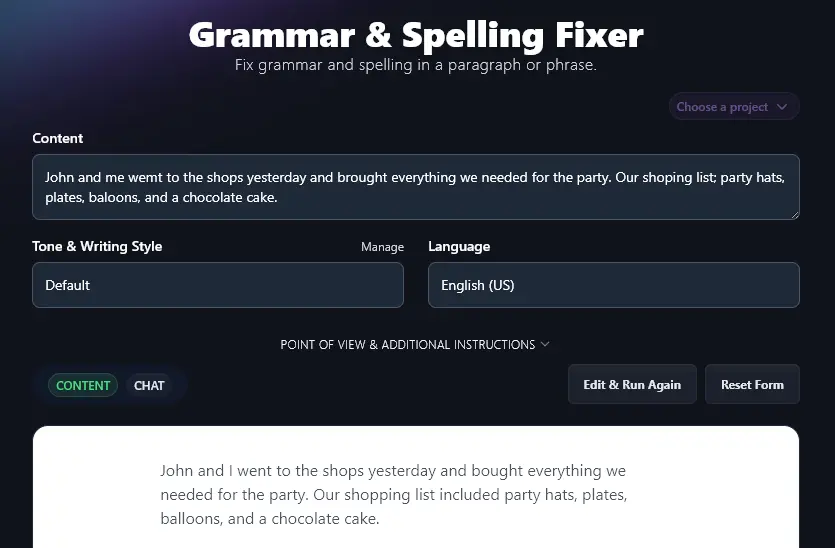
Once you’re happy with the options you’ve selected, go ahead and click the “Generate” button to run the grammar checker.
The AI will instantly fix all mistakes in your text, giving you a corrected version.
Bonus: Use My Free Editing Checklist Alongside This Tool
Even if you’re using the best grammar checker out there, or a world-class writing assistant, you still need to edit your work. As well as making sure that everything is technically correct, you want to be sure your meaning is clear and that your full piece is well structured.
Here’s my personal editing checklist you can use:
- Read through your whole piece, ideally in one sitting, and watch out for anything that’s missing or repetitive
- Include a clear hook at the start of your introduction to draw readers in (the Hook Generator can help here)
- Use the rest of the introduction to tell the reader what to expect from your piece
- Where appropriate, include useful subheadings in your piece to “signpost” the reader through the text
- If you’re giving a fact or statistic, back it up with a high-quality reference (e.g. to an academic journal article)
- Check that you haven’t unintentionally repeated the same word or phrase too often
- Make sure your tone and writing style is consistent throughout your whole piece
- Think about how readable your text is, and make sure this is appropriate for your audience
- Fix grammar and spelling mistakes with the help of an AI grammar checker
- Don’t forget about proofreading one last time before you send/publish your work
How Does the Grammar Check Tool (Grammar and Spelling Fixer) Work?
To get the most from this online grammar checker and fixer, you may want to dive deeper into its advanced features. Let’s take a look at what this tool can do for you. Remember, it’s way more powerful than a simple spell check.
1. Content (Paste Up to 20,000 Characters)
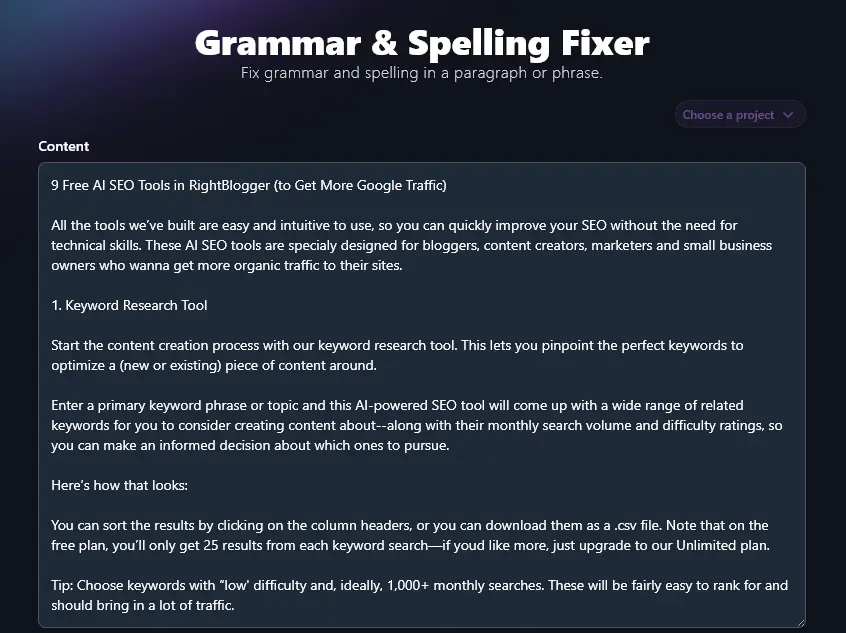
The Content box for the Grammar Fixer lets you paste as little or as much text as you want. It can handle up to 20,000 characters, that’s about 3,000-5,000 words. This means you can paste a whole long-form blog post, or even an essay, into the tool.
Here, we pasted in part of our article 9 Free AI SEO Tools, with some deliberate errors added in.
2. Tone & Writing Style (Optional, But Can Affect Output)
The Grammar Fixer will only change things that are incorrect. It won’t change the tone of your piece. However, where there’s more than one way to correct a sentence, the “Tone & Writing Style” dropdown helps guide the AI on what option to go for.
For instance, here’s a sentence with a typo for either “I’ll” or “I will”. It’s not obvious what the author intended.
In this third section, i’ill discuss the theme of madness in Shakespeare’s King Lear.
The first time, we used a “Casual” tone and the AI corrected the sentence to:
In this third section, I’lldiscuss the theme of madness in Shakespeare’s King Lear.
The second time, we used an “Academic” tone. This time, the AI was more formal, spelling out “I will”:
In this third section, I willdiscuss the theme of madness in Shakespeare’s King Lear.
Note: The Grammar Fixer won’t edit correct writing to change its tone. For that, you’ll need the Rewriter tool or the Improve Writing tool.
3. Language (Match Your Input if Needed)
The Grammar Fixer doesn’t just work for English grammar. You can use it to check grammar and spelling in any language supported by the tool.
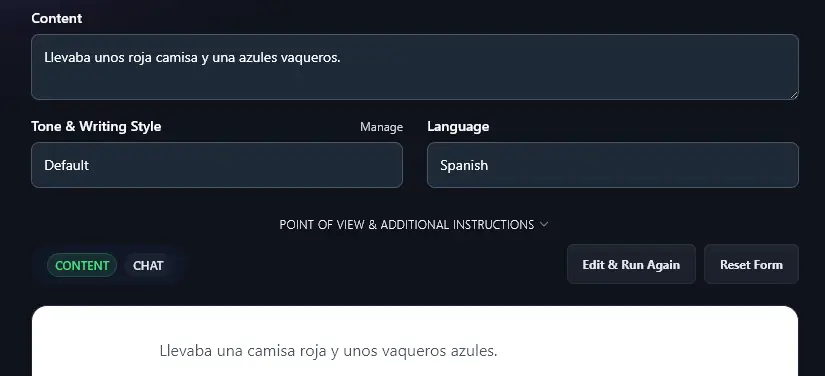
Just make sure you also select the correct output language (e.g. Spanish) to match the text you’re putting in. Otherwise, the tool may change your text to the default language, English (US).
Here, the Grammar Fixer has corrected the gender of the indefinite pronouns and corrected the word order of the sentence in Spanish:
4. Point of View
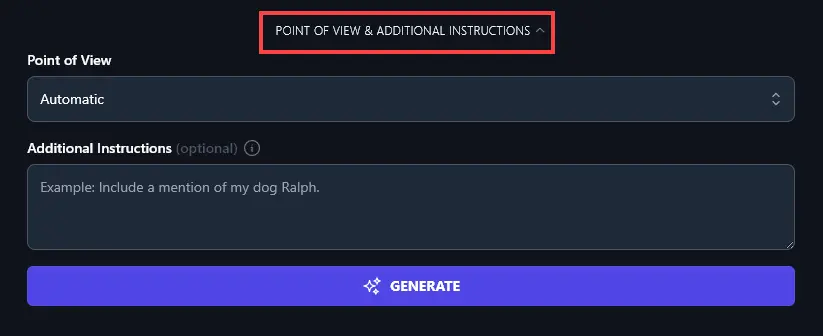
To open up the advanced options, click the “Point of View & Additional Instructions” link.
As the Grammar Fixer won’t be altering your text, you shouldn’t need to change “Point of View” from the default. If you do want to adjust this setting, though, simply click on the dropdown list.
5. Additional Instructions
If you have any special instructions for the Grammar Fixer, just enter them in this box.
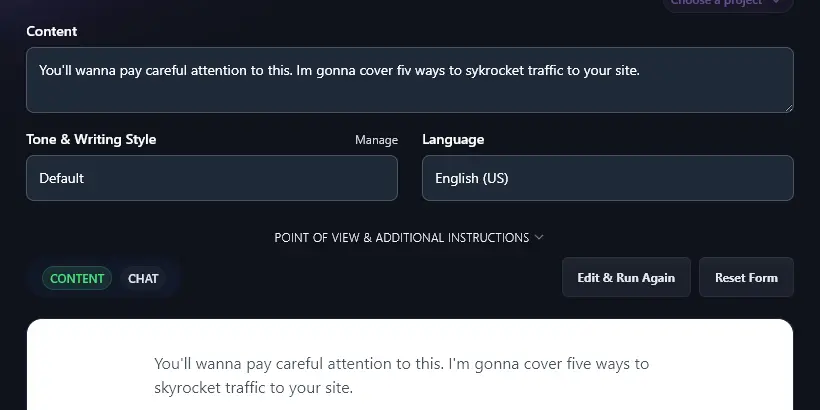
For instance, if you have a very casual writing style, you might want the Grammar Fixer to preserve words like “gonna” or “wanna”. Enter an instruction like this:
Don’t correct the words “wanna” and “gonna”.
The Grammar Fixer will correct other errors while not editing the “wanna” and “gonna”:
AI Grammar Fixer FAQs (Frequently Asked Questions)
Perhaps you’ve got some questions about the grammar fixer or about editing and proofreading your text in general. Here are the answers you need.
What Can and Can’t the Grammar Fixer Do?
The Grammar Fixer can correct grammar mistakes (like incorrect tenses). You can use it as a spelling corrector and a punctuation checker.
The Grammar Fixer can easily handle both very short or very long passages of text. Whether you want a sentence checker or a proofreader for your whole blog post, it’s here to help!
However, it’s not a plagiarism checker or fact checker. The Grammar Fixer will make sure your writing itself is correct, but it doesn’t assess the content of your writing. It also won’t change the readability of your writing (e.g. if your writing is very complex, the Grammar Fixer won’t simplify it).
Can I Use the Grammar Fixer Inside Other Apps?
The grammar correction tool works online within RightBlogger. Currently, it doesn’t have the functionality to be used within a different app, like Google Docs, Gmail, Chrome, or Microsoft Word. Of course, you can copy and paste your corrected text into any app you want.
What Other AI Tools Can I Use to Improve My Writing?
In RightBlogger, we have a whole range of AI writing tools, plus plenty of tools to help you edit and adjust your work.
Some great ones to check out are.
- Paraphrase Tool: great for paraphrasing long or complicated passages of text
- Summarizer Tool: get the key points from a long piece of text (great for fast research)
- Article Writer Tool: create a whole blog post based on a keyword, topic, or title
- Improve Writing Tool: redraft a piece of text to improve flow, structure, and more
- Make Text Punchier Tool: craft more engaging, powerful text that will drive conversions
- Expand Tool: take a short piece of text and expand it (without adding “fluff”)
We also have lots of tools covering blogging, social media, SEO, sales, and more.
Who is the AI Grammar Fixer For?
The AI Grammar Fixer is for anyone who needs a hand editing their writing. Perhaps you’re not fully confident of your writing skills or you just want a user-friendly tool to double-check your work.
It’s a great fit for bloggers, copywriters, digital marketers, content creators, online business owners, students, and anyone who wants a helping hand with editing and proofreading.
How Do I Sign Up for RightBlogger and How Much Does it Cost?
You can use the Grammar Fixer and all of RightBlogger’s tools on any plan. Monthly plans start at Solo $59 (annual billing, charged monthly, is $49), with a 7-day free trial and a 30-day money-back guarantee.
Every paid plan includes unlimited words, brand voices, and AI images. Pro ($69/mo) is the most popular option, adding 3 connected sites and 3 team seats. Save by going annual.