How to Run a Content Decay Audit With Search Console
Compare three-month performance year over year, pinpoint whether rankings, impressions, or CTR fell, then choose the right fix.


Organic traffic doesn’t usually vanish in one dramatic swing. It drifts.
A post that used to pull steady clicks starts slipping, then another follows. A few weeks later, your best work looks tired.
When that happens, I don’t guess. That’s content decay, so I run an audit in Google Search Console because it shows me where the loss started and what kind of fix the page needs.
The full content decay audit workflow I use, step by step:
Key Takeaways for a Content Decay Audit
- Compare organic traffic for the last 3 months against both the previous period and the same period last year.
- Prioritize pages that once had strong search rankings, as they’re often the quickest wins.
- Analyze impressions, clicks, CTR, and position together, since relying on a single metric can be misleading.
- Refresh pages based on search intent, freshness, and usefulness, then request a recrawl.
What Content Decay Looks Like in Search Console
Google Search Console gives the clearest first signal. Open Performance, switch to Search results, and compare the last 3 months against the same 3 months a year ago. That view matters because seasonality can make a healthy page look weak if you only compare month to month. If you would rather not build the comparison by hand, you can run it from Claude by connecting Search Console with RightBlogger’s MCP.
If a page loses impressions and average position slips, that’s classic content decay. If impressions stay flat but click-through rate drops, the page may still rank, but the result isn’t winning the click anymore. If the page vanishes, check indexing first.
A hidden page isn’t a freshness problem, it’s a technical SEO issue. This quick guide on the noindex tag helps sort that out.
Clicks alone don’t tell the full story. They can drop for reasons outside the page, including richer SERP features and AI Overviews on more of your keywords.
Search Console Insights can add a friendlier summary of which posts are gaining or losing traction, but the core analysis still happens in the Performance report.
Don’t start with your entire site. Focus on pages that used to perform well, since they’re the fastest opportunities to recover traffic.
Step by Step Content Decay Audit Process
Set the comparison in the date picker itself. Open the date control, switch to the Compare tab, and choose your two windows. That is the step people miss, and without it the Pages tab has nothing to subtract, so no difference columns appear.
Once the comparison is live, go to the Pages tab and export. Sort by click difference and impression difference so the biggest losers move to the top. One limit worth knowing: the Search Console interface exports up to 1,000 rows, so on a large site, filter to a section or a date slice and work through it in batches.
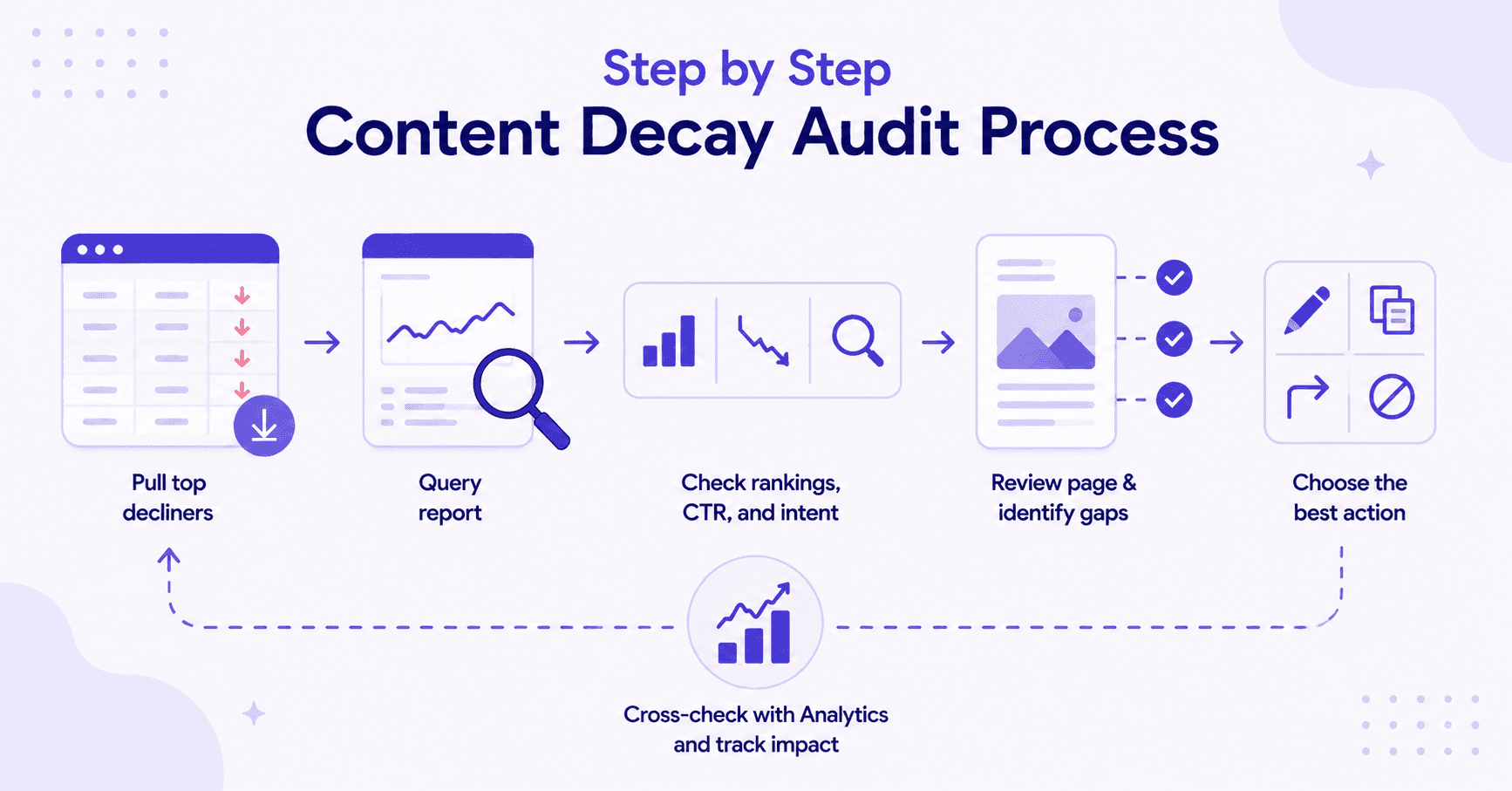
The simple process for historical blog optimization:
- Pull the top decliners from the Pages tab.
- Open each page’s query report.
- Check whether rankings slipped, CTR fell, or intent changed.
- Review the page for freshness, run topical gap analysis against current top results, and check weak sections.
- Pick one action: update, merge, redirect, or leave it alone.
The query report is where the story gets clear. Sometimes a page still ranks for the main term, but it lost the long-tail queries that made it useful. Other times, a newer competitor answers the topic better.
I like comparing a page’s current 3-month average against one of its stronger periods. Ahrefs has a solid primer on what content decay is and how to fix it if you want the bigger picture.
When reviewing the page itself, ask blunt questions. Is the intro weak? Are the stats old? Did the search intent shift from “what is” to “best tools” or “how to”?
Also check whether the post includes original examples, screenshots, or opinions, or if it’s repeating what everyone else already said.
For bigger sites, keep content performance beyond pageviews notes nearby and cross-check with Google Analytics for deeper traffic insights. That keeps you from spending hours on pages that never had much upside.
How to Decide What to Update
Not every loser deserves a rewrite. Some pages need a tighter refresh, some should be merged, and others should disappear with a 301 redirect.
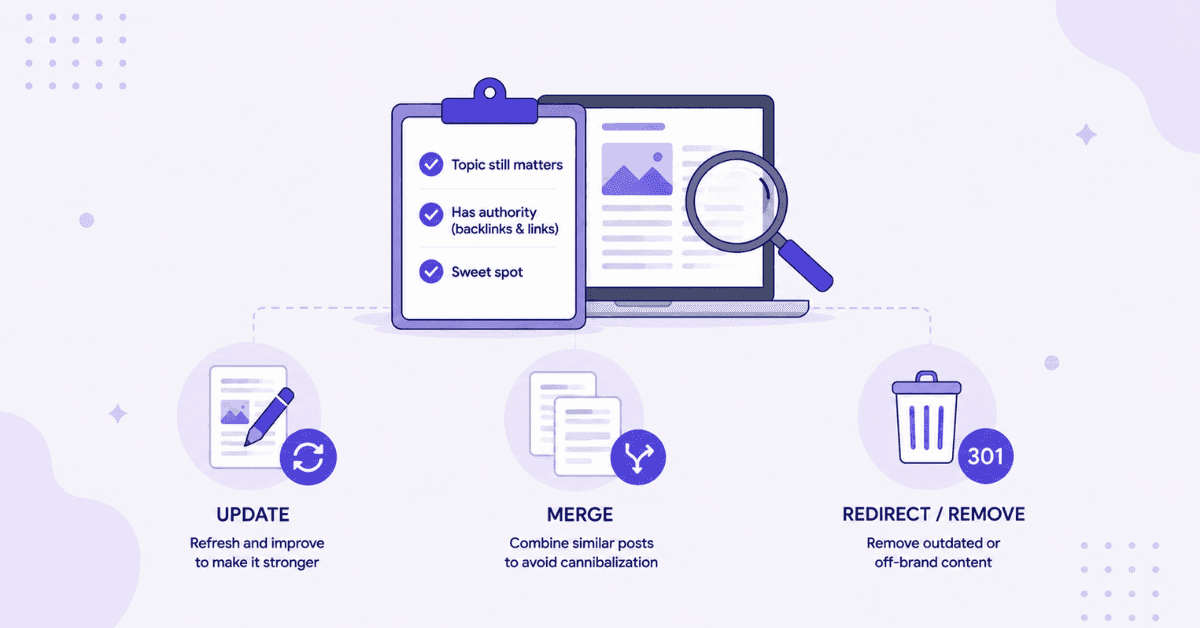
I update a page when the topic still matters and the page already has some authority from backlinks and internal linking. That’s the sweet spot.
A content refresh may include:
- New examples and fresher stats
- Better structure and clearer headings
- Stronger internal linking, which RightBlogger can add automatically
- Improved E-E-A-T signals
- Optimized meta descriptions to support evergreen content
If two posts target the same intent and cause keyword cannibalization by splitting traffic, I merge them. If the topic is outdated or off-brand, I stop feeding it time.
This is where a broader SEO content strategy framework matters. A content decay audit works best as one repeatable part of a larger system. Every update should move the site toward cleaner topic coverage and stronger overall performance.
After updating a page, use Search Console’s URL Inspection tool and request re-indexing. If needed, this short guide on URL inspection in Search Console walks through the steps.
Then monitor the page weekly for impressions, position, and query mix. Strong pages often show movement faster than expected, including regaining featured snippets.
FAQs About Content Decay Audit
The questions readers ask most often:
How Often Do I Run a Content Decay Audit?
Run a content decay audit every quarter, especially after major algorithm updates. If a site publishes a lot, I also spot-check monthly and do a deeper pass every 90 days.
What’s the Best Date Range to Compare?
The best date range is the last 3 months versus the same 3 months last year. I cross-reference organic traffic data from Ahrefs Site Explorer for a cleaner read and to avoid seasonality traps.
What Counts as a Real Decay Signal?
A real decay signal is a mix of falling impressions, lower average position, and lost query breadth. Rising bounce rate and falling conversions support the picture, though you pull those from your analytics rather than Search Console. Flat impressions with lower CTR usually point to a snippet or SERP issue instead.
Final Thoughts on Content Decay Audit
A good content decay audit isn’t about chasing every drop. It’s about finding the pages that already proved they can rank, then fixing the reason they stopped.
That’s why I keep coming back to Search Console for this content audit. It removes the guesswork from organic traffic loss, reveals patterns in search visibility and the content lifecycle, and makes the next move clear.

RightBlogger Co-Founder Andy Feliciotti focuses on website development and shares tips on SEO and blogging. He also loves photography and travel.


Automated SEO Blog Posts for Your Site
Research, write, publish, and share from one account.
7-day free trial. Cancel anytime.





Leave a comment