How I Get Google Featured Snippets Using AI (in Just 5 Days)
The case study reveals which topic signals mattered, how a takeaway box helped, and why the snippet later disappeared.

Google Featured Snippets have long been the holy grail of free organic traffic for content creators & bloggers who care about SEO as a growth channel. This begs the question… can you still get a featured snippet with all the AI summaries out there?
Even in the age of AI Overviews (Google’s AI-generated answers that appear above the organic results), that featured snippet just below the AI Overview is still one of the best ways to attract the most clicks and impressions for any topic you’re trying to rank higher for. I know, because I’ve built my businesses (in part) around perfecting this strategy, and it still delivers a lot of traffic, today.

Today, I’ll show you how I used my own AI tools inside RightBlogger here, to get a featured snippet for a relatively competitive keyword phrase within just 5 days of publishing that content on my blog.

🔑 Key Takeaway: Yes, Google featured snippets are still a thing in the age of AI Summaries. Getting a Google featured snippet (the top ranking position) continues to drive meaningful traffic, and is now particularly useful on long-tail topics & keyword phrases where you can provide some unique personal experience and value based on your insights or expertise.
My AI Featured Snippet Case Study: The Accuracy of Keyword Tools
This case study comes from a topic that was sparked by a killer combo question from a reader email, where they asked: “Are keyword tools accurate? Is search volume data reliable?“
One of my favorite ways to choose new content topics, is by spotting good questions I can answer (with some proven traffic potential) from real people I interact with (a reader, listener, viewer, someone at a coffee shop, or by surfing Reddit forums and Quora threads) to gather inspiration.
Here’s my process for getting a Google featured snippet, broken down step-by-step:
1. Choosing the Right Topic (Research)
Right away, I immediately recognized this as an important question for a lot of people, including my existing readers. I’ve gotten it in various forms and settings over the years, but I hadn’t recognized it as a widely held question in my niche. Even though I’d emailed with readers about this question, I hadn’t answered it in a public format… yet.
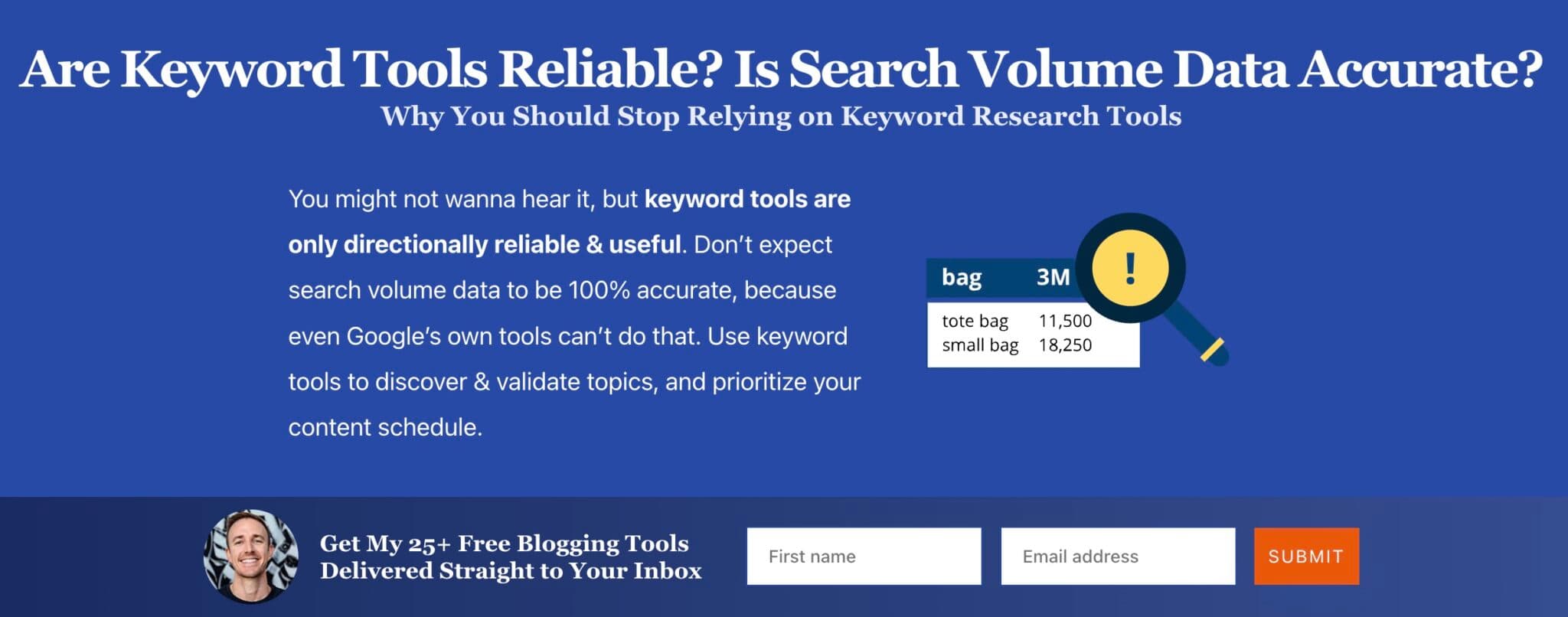
Doing some quick keyword research, I was able to validate that this topic has what appeared to be a relatively small, but highly targeted amount of monthly search activity (likely around 50 to 150 searches per month).
This isn’t a ton of traffic potential, but since it’s a very specific question, there also isn’t much competition, which makes it a sweet spot topic where I can build relationships with new potential readers, based on providing value up-front. My favorite.
💡 Big Insight: When I saw there were Reddit threads and Quora questions galore in the top ranking spots on this topic, I knew this was ripe for a deep dive by an industry expert. Seeing Reddit threads and Quora questions ranking near the top of the results for a search query is a huge signal that a topic can support helpful answers from people with direct experience.
This topic is also very relevant to my experience as a content creator who’s been working with keyword tools for over a decade, so I was uniquely positioned to answer this one.
🕵️♂️ Authority is important. I can’t highlight enough, how important it is that I (and my blog) have topical authority on this subject matter. For years, I’ve published in-depth content related to blogging, SEO, and keyword research. This helps tremendously in the eyes of Google, when their algorithm is considering which pieces of content (and sites) will get featured snippets, and where you’ll sit in organic rankings.
When you publish regularly for months (and years) about topics you’re genuinely interested in, search engines like Google recognize & reward that.
The more often you’re able to spot these kinds of crossover topics where you have a unique perspective, there’s some meaningful traffic potential, and not a ton of competition, the better.
2. Understanding the Problem & Solution
Next, I wanted to really put myself (back) into the mind of someone asking this question: are keyword research tools reliable?
By stepping into that beginner’s mindset again, I was able to feel my way back to what it’s like when you’re new to blogging and content creation… you really don’t know where to start or what to do next. Based on the advice you read in these formative moments, you could make really big decisions based on what a keyword research tool suggests, or disregard them completely. And so we arrive back at…
- The problem. Are these keyword research tools reliable enough for me to make decisions based on their data?
- The solution. As with many things, the truth lies somewhere in the middle, rather than with an absolute yes and no. These tools have always been directionally reliable (never perfectly accurate) and useful.
But that solution sounds boring. So, how do I punch this up a bit?
After refining the problem and solution, it’s time for the fun part: structuring a way to deliver my solution that’ll both educate and entertain my peeps.
3. Creating the Content to Get an AI Featured Snippet
I’m big on trying to bring my perspective to my community in formats that not only educate, but also entertain them. I don’t nail it every time, but I’ve been incorporating these two factors into my creation process, and it’s become a common thread in almost all of my most successful content.

One of my tried and true, predictable ways to entertain readers while educating them, is with an experiment. Almost every time I do this, I win big time.
🧪 Experiment: I already have a pretty solid opinion about how I thought I’d answer this question, but I wanted to challenge my assumption. So, I decided to run an experiment that’d form the foundation of how I’d illustrate my perspective. The activity would be simple: test several of the same queries across multiple popular keyword tools and see what we get.
I started my research by comparing four different popular keyword tools (for a fuller comparison, our roundup of free keyword research tools covers more options):
- Google’s Keyword Planner
- Ubersuggest by Neil Patel
- Free Keyword Research Tool on my blog
- Ahrefs Keyword Explorer
- (Bonus) Keyword Tool inside RightBlogger
🔬 Findings: While the results varied across each tool with pretty much every query I tested, there were some consistently clear ranges that all the results were falling into.
This led me to conclude that keyword tools, on the whole, are only directionally reliable but can still be very useful when used with the right level of understanding.
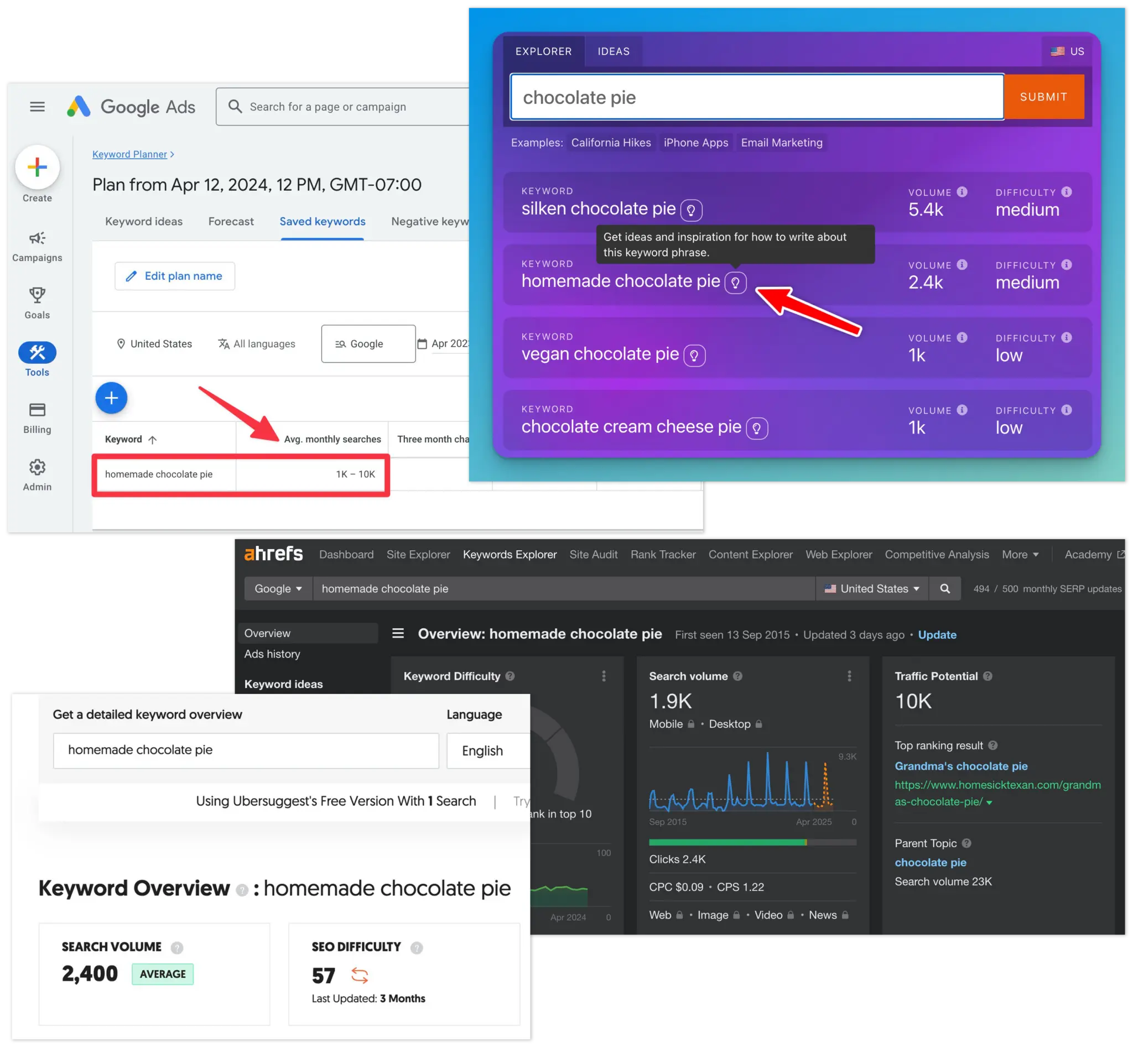
This means you shouldn’t make decisions based on exact numbers from keyword tools. Instead, you should use them to discover new ideas and prioritize when to cover the content topics you know you already wanna discuss (or that your audience is asking about).
Generating a First Draft Blog Post with RightBlogger
Now that I had my findings, I wanted to put this post together quickly. It was a topic I hadn’t planned on writing about in the moment this idea came to me (on a busy day), but I’m a major advocate of taking as much action as possible on inspiring ideas, right away.
So, I popped over to the Article Writer inside RightBlogger, one of my favorite ways to tackle a first draft when I don’t have all the time in the world at the moment. Below is the exact prompt I used:
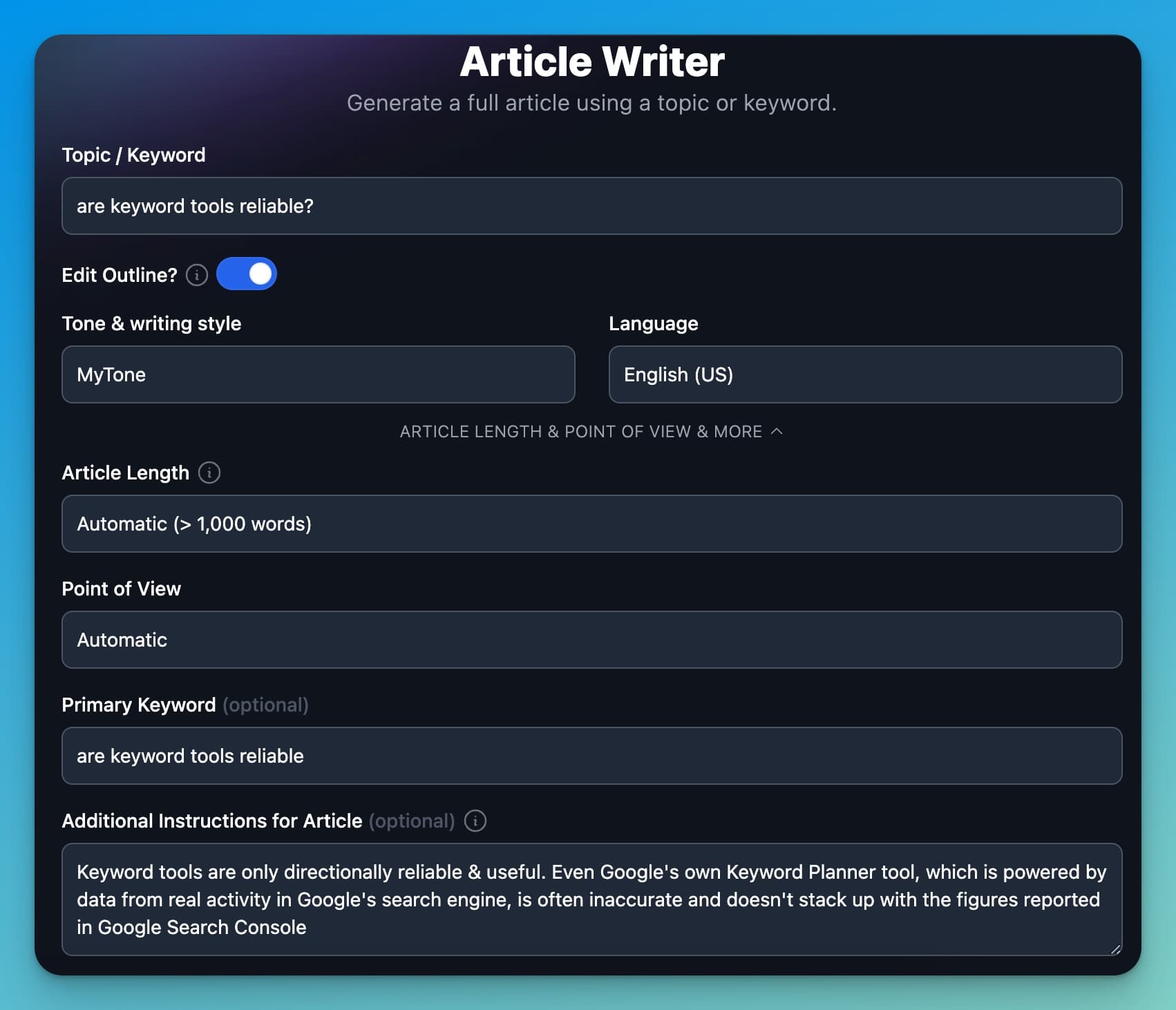
Here’s what I did with the Article Writer to get a killer first draft reply:
- Clearly define the topic. I started with the topic “are keyword tools reliable?” and kept the edit-outline function toggled on, so I’d have the chance to personally structure how the AI approached my answer. I selected MyTone so the AI would write in my voice and style, added the primary keyword phrase so the article would be SEO-optimized, and added a few sentences with my key takeaway clearly articulated so the Article Writer would align its take with the results of my experiment.
- Edit the outline. At this stage, I almost always make tweaks to each section of the outline our AI begins with, just to make sure the sequencing is right and the additional instructions for each section match my perspective. Good AI output requires good inputs, so it’s worth taking the extra time here, truuuuust me.
- Generate the article. In less than a minute, I generated a 1,400-word first draft of my take on this topic, already SEO-optimized and in a format I could paste right into my blog (where I like to do my editing). I strongly advocate for never copying and pasting AI-generated content directly without taking your pass as an editor to weave yourself into the piece. And here’s where AI shines: this draft gave me a foundation to build upon, very quickly.
- Refine the draft. I copied the draft and pasted it into my blog’s CMS (WordPress), added screenshots, rewrote the introduction, and injected my personality, style, and examples throughout.
During my editing process, I’ll often add and remove a lot of content. I’ve always done that as an editor when I have a clear vision for what I want to publish, whether I’m working with a human or AI.
An example of something I added during the editing process for this particular article, was the three most practical uses of keyword research for bloggers and content creators:
- Discovering new topics: finding new ideas to create content about.
- Validating demand: confirming the topics you want to cover actually have a real audience seeking answers.
- Prioritizing content: ranking the topics I’m planning to pursue, based on the level of people’s interest (monthly search volume as a decent proxy for that).
Now, this brings us to one of my favorite formatting moves to encourage getting content swopped up into Google featured snippets.
My Secret (Formatting) Weapon for AI Featured Snippets: The Key Takeaway Box
While it doesn’t guarantee you’ll land a featured snippet, this little formatting mechanism is something that’s worked for me on many occasions, so in my experience, it certainly helps. The key takeaway box.
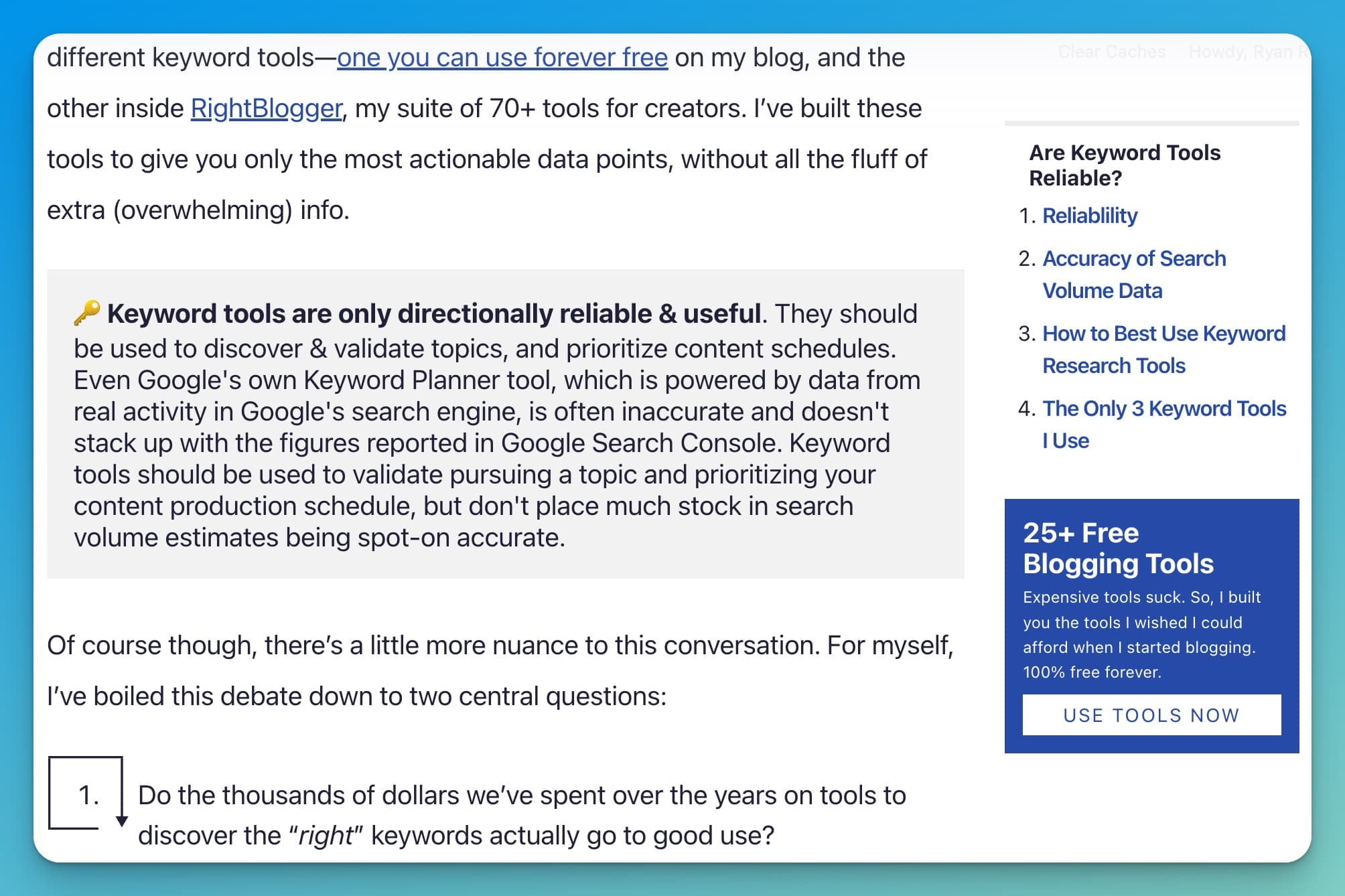
Adding a clear key takeaway-style box that’s also visually formatted for real readers to get their answers, gives search engines like Google an ultra clear sense of the main points in from my article.
Rather than an AI summary, it’s a human summary… which will (gulp… always?) remain a uniquely valuable thing. Especially on topics where there isn’t a ton of data, if there’s controversy, disagreement, or there just isn’t a commonly held belief yet, we really crave learning with & from other humans.
And even if (when) this topic eventually gets an AI summary from Google, my article will almost certainly be cited as the top source for where readers can go to learn more about this subject. If you aren’t sure where to start we created a key takeaways tool on RightBlogger that will let you generate a quick summary.
AI Featured Snippet Results: How Much Traffic Does this Featured Snippet Get?
Ok this is cool and all, but what’s the point if it doesn’t actually drive any traffic?
Thankfully, it does. And funny enough, the monthly traffic it’s getting is right around the upper range all my keyword tools suggested, generating between 150 to 200 monthly readers in the months after it went live in April 2024 (there was an initial spike when I sent an email to some of my readers about this post).

Update, August 2026: we re-checked this search result nearly two years on. The article still ranks, holding position 3 for “are keyword tools accurate,” but there is no featured snippet on that query today. The results above it are a Reddit thread, a Quora answer, and a HubSpot community post. That is the same forum-heavy pattern Ryan used to pick the topic in the first place, and it cuts both ways: the discussions that signalled an expert answer was needed now sit above the expert answer. Snippets are worth chasing and worth re-checking, because they move.
This case study is getting a little meta now, but it’s a really good example of a repeatable traffic strategy I’ve used and benefited from for years. Now, you can even use AI to do more of it, faster. Try RightBlogger if you haven’t, I think you’ll love it.
The best part: you can take this strategy right now, follow it, add your own spin, and use it to grow your own blog (or business), too. The same core principles apply to educating & entertaining over video too, but that’s a topic for another day.
I’ll be right here when you’re ready to come back for a hi-five together 🙏
Final Takeaways: Are Google Featured Snippets Still Worth it?
Getting a Google featured snippet can still significantly boost your organic traffic, especially if you’re consistently delivering high-quality education and entertainment within your blog’s niche. For the broader picture on how featured snippets fit alongside AI search citations, see our GEO vs SEO guide.
Today, featured snippets will likely be chosen by Google (rather than an AI Overview summary) on topics where there’s a lot of ongoing human discussion online: think search queries that tend to have Reddit threads and Quora answers somewhere near the top of results. When you see that, you may be onto something.
When thinking through your approach to creating content around your take, always slow down for a moment to put yourself in the shoes of someone searching the term. Do your best to answer questions clearly, provide actionable takeaways, and weave your beautifully weird self into it all.
Not only will you see the traffic benefits, you’ll have more fun along the way 😉
Blog Automation That Keeps Your Posts Ranking

RightBlogger finds keywords, writes SEO articles, and publishes them to your blog. Then its Site Agent uses your Search Console data to keep older posts in shape, adding internal links, sharpening weak meta descriptions, and fixing stale years and broken links. Join 51,000+ bloggers using it to grow traffic from Google and ChatGPT.

Article by
RightBlogger Co-Founder Ryan Robinson teaches readers how to grow online businesses and shares tested SEO strategies, including how he earned a featured snippet in five days.


Automated SEO Blog Posts That Work
Try RightBlogger for free, we know you'll love it.
7-day free trial. Cancel anytime.





Leave a comment
You must be logged in to comment.
Loading comments...