How to Find Blog Posts With High Impressions and Low CTR
Use Search Console’s three-month report to spot posts with 1,000+ impressions, promising rankings, and titles searchers skip.

High impressions low CTR means a post gets tons of impressions and barely any clicks. I do not see bad news there. I see a near-miss.
Google is already giving that page shelf space with plenty of impressions. Your post is showing up, but people just are not choosing it yet.
That is frustrating, sure, but it is also one of the easiest traffic problems to fix once you know where to look. I use this pattern all the time to find quick wins, and the process is simpler than most bloggers think.
Key Takeaways for High Impressions and Low CTR
If you only remember a few things, make it these:
- Start in Google Search Console. I start in Google Search Console, not Google Analytics, because impressions and CTR live there.
- Do not chase every low CTR page. I do not chase every page with a low click-through rate. I look for posts with strong impressions, decent rankings, and clear intent.
- Fix the search snippet first. I fix the search snippet first, then I check whether the post matches what people wanted.
- Review fresh data before making calls. I review fresh data before I act, because a reporting bug inflated Google Search Console impressions from May 2025 to late April 2026, so older counts can read higher than reality.
Why High Impressions and Low CTR Matter
A post with high impressions and low CTR is like an organic listing that is a storefront with foot traffic but no one walking in. People see it, but they keep moving.
That is why I like this report so much. It tells me two things at once: the impressions show Google already trusts the page enough to show it, while the title, description, or angle is not delivering the click-through rate it should.
For bloggers and content creators, that is gold. Fixing a weak snippet is usually faster than building authority for a brand-new post because you are not starting from zero. You are improving something that is already getting seen.
That said, I do not treat every low CTR page like a broken page. Position matters, and SERP layout plays a role in variable performance. If a post ranks in spot 14, the click-through rate may be low because it is halfway down the page.
If it ranks in spots 2 through 8 and still gets ignored, now I have a real opportunity. Search Engine Land has a good breakdown of how to interpret SEO data and anomalies if you want a clean reminder that CTR always depends on rankings, SERP features, intent, and traffic sources.
So the goal is not “find low CTR.” The goal is “find low CTR where clicks should already be happening.”
Use Google Search Console to Spot the Right Posts
I keep this process simple. If I overcomplicate it, I stop doing it.
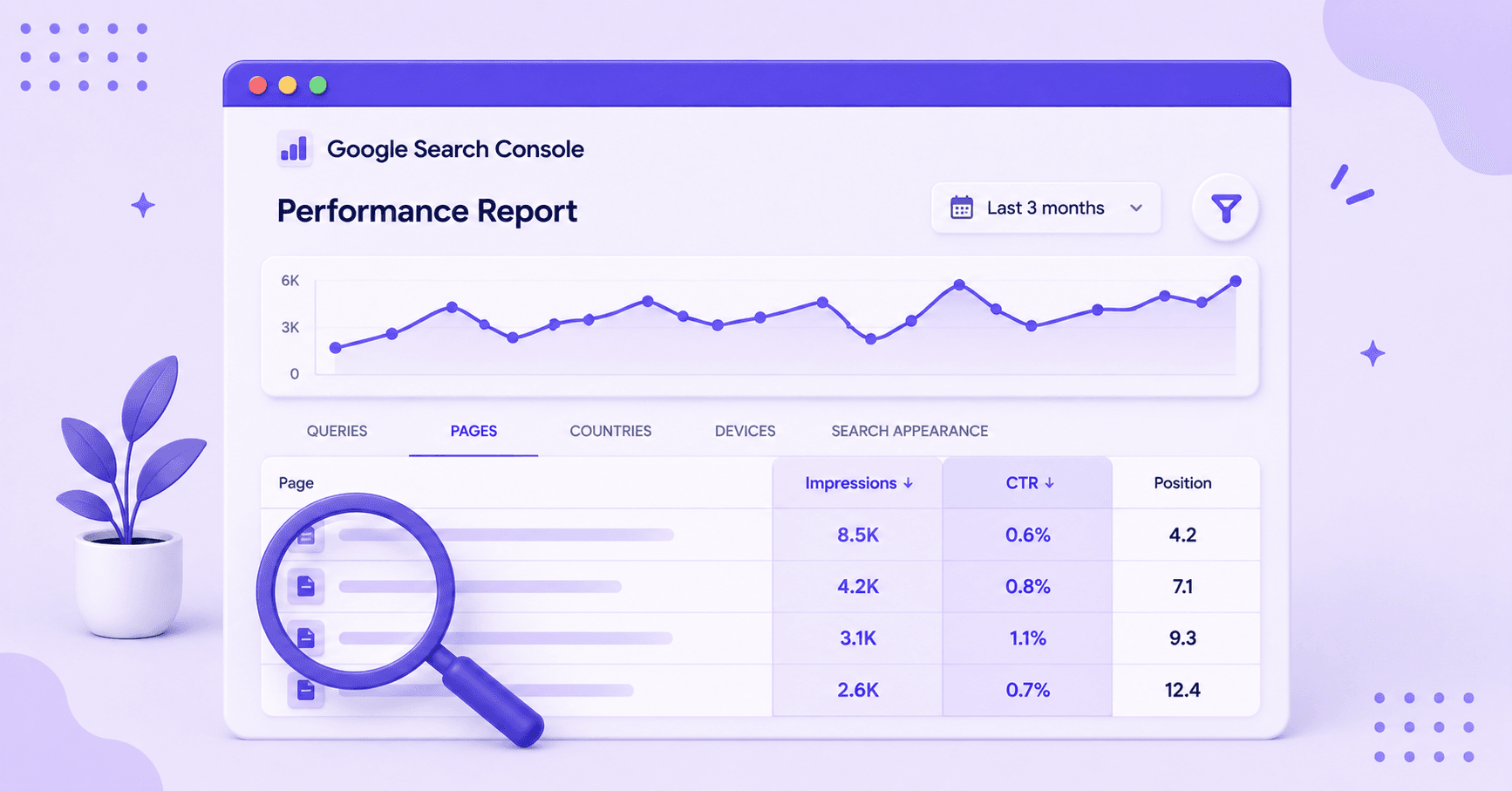
Here is the basic process:
- Open Google Search Console and go to Performance, then Search Results.
- Set the date range to the last 3 months.
- Turn on clicks, impressions, click-through rate, and average position.
- Go to the Pages tab and sort by impressions, highest first.
- Scan for pages with lots of impressions and weak click-through rate, usually under 1% or 2%.
- Click into a page, then switch to the Queries tab to see which searches are getting views but not clicks.
I usually start with pages that have solid search volume, at least 1,000 impressions in the last 3 months. On smaller sites, 300 to 500 can still be worth it. The point is to look for pages with enough data to mean something. If clicking through the report gets old, you can also pull these pages into Claude and ask for them in plain language.
One more thing, and it changes how you read older numbers. Google Search Console over-reported impressions from May 13, 2025 until late April 2026 because of a logging error, which Google has since fixed. Clicks stayed accurate the whole time, so during that window your click-through rate often looked worse than it really was.
So if you are comparing older numbers, recheck the last few weeks before rewriting half your site. If you want a refresher on what impressions, clicks, and average position actually mean, this explainer on Google Search Console clicks, impressions, and position is worth a read.
What Counts as a Real Opportunity
This is where most people waste time. They find a page with low CTR, then start editing without asking why it is low.
I use three filters:
- The page has enough impressions to matter.
- The page ranks close enough to win clicks, usually positions 1 through 10, sometimes 11 through 20.
- The search intent makes sense for my post.
If a page shows up for a lot of loose-match queries, low CTR might be fine. Some posts might naturally attract a broad audience, which dilutes CTR. Maybe Google is testing it for searches that do not fit well.
I do not force a fix when there is a keyword intent mismatch. If a post ranks on page two, CTR usually is not the first problem. Getting it higher is, and that is more of a search engine positioning problem than a CTR one.
I also separate page-level issues from query-level issues. A page might look weak overall, but one long-tail keyword inside that page could be the real opportunity. That is why I always click into the page and then inspect the query list.
For example, let’s say I have a post about blog post ideas. It gets 8,000 impressions, 0.8% CTR, and sits around position 4 for “blog ideas for beginners.” That is a page I want to work on.
But if the same post gets impressions for “content marketing jobs,” I ignore that noise because that query does not fit the page. When I want a wider view of this stuff, I like measuring content performance beyond pageviews. It helps keep me from treating clicks as the only thing that matters.
Fix the Reason People Aren’t Clicking
Once I have found a real candidate, I do not start with a full rewrite. I start with the smallest change that could boost the click-through rate.
Rewrite the Title First
Most of the time, the title is the problem.
I ask myself one blunt question: if I saw this result in Google, would I click it over the other nine? If the answer is no, I rewrite it. I make it clearer, sharper, and more useful, without resorting to clickbait.
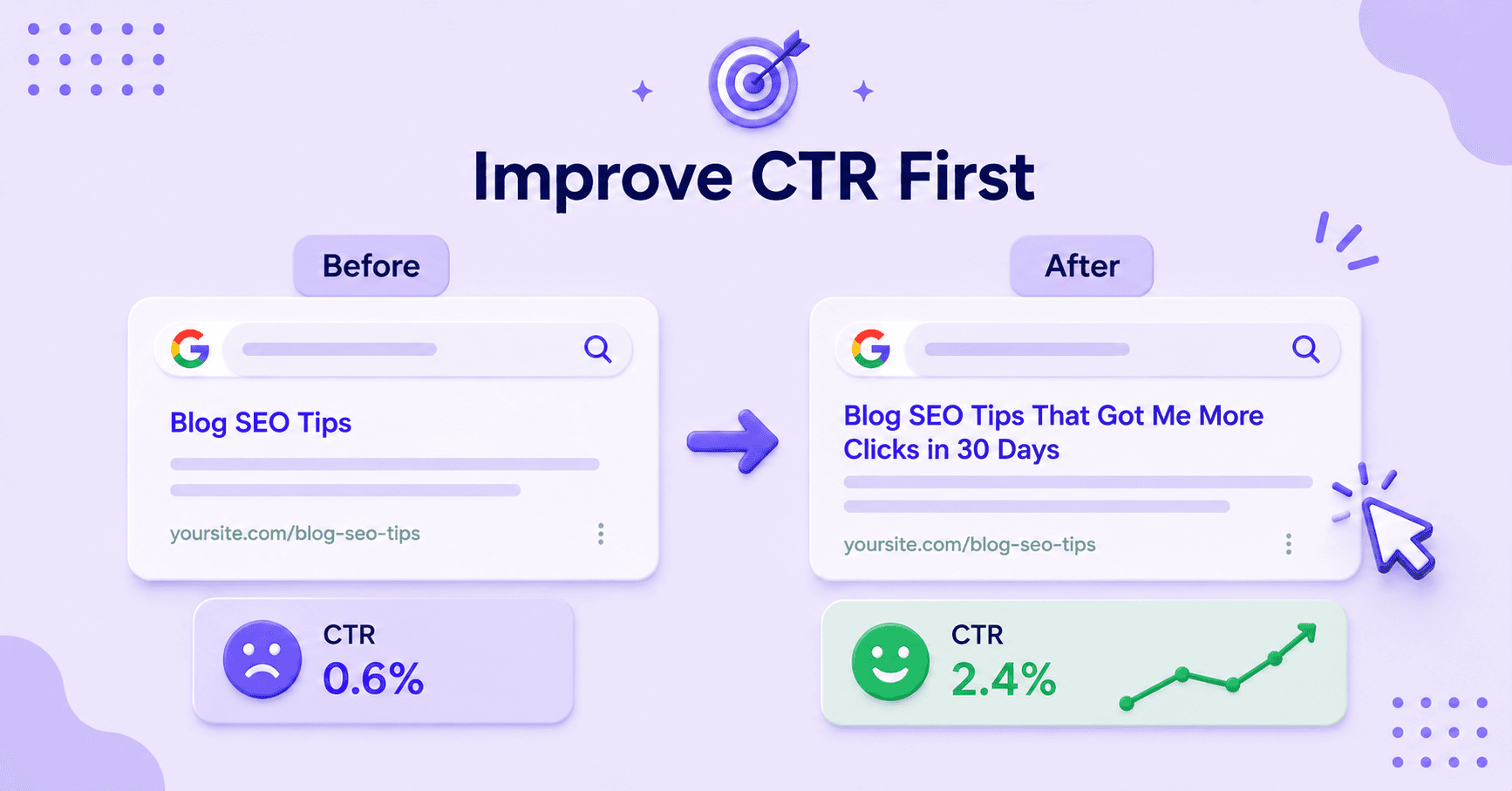
Just like a thumbnail and title combo on YouTube needs to entice clicks, your title must promise a result, show a time frame, or call out the angle fast to improve click-through rate. “Blog SEO Tips” is vague. “Blog SEO Tips That Got Me More Clicks in 30 Days” gives me a reason to care.
I also preview titles before publishing changes. A clipped title can kill the whole point, which is where a Google SERP preview tool helps.
Check Intent Before You Blame the Snippet
Sometimes the title is fine. The post is the mismatch.
If the query suggests people want a template, and my page is a broad guide, the low click-through rate makes sense. Google might be testing my page, but searchers want something else.
In that case, I either adjust the post to match the query better or stop trying to win that query. Search Engine Journal has a solid guide on improving organic CTR in Google, and one point I agree with is starting with pages that already rank well enough to earn clicks.
Look at the Search Results Page
I always search the query myself before changing anything and examine the search results. Why? Because sometimes the problem is not my copy.
It is the search results around it. Are there Reddit results everywhere? Video packs? Big brands? Featured snippets promoting zero-click SEO?
If the search results page is crowded, a low CTR may be normal. Search Engine Land makes that point well in its piece on what a good click-through rate looks like.
If the page still looks winnable, I focus on metadata optimization by updating the meta description, tightening the intro, adding the missing angle, and moving on. I do not throw six fixes at one post at once because I want to know what changed the result.
Track Results and Turn This Into a Habit
This part is boring, which is why it works.
After I update a page, I wait at least 1 to 2 weeks before judging it. Then I compare the last 28 days to the previous 28 days in Search Console. I look at impressions, click-through rate, clicks, and position together.
One number alone can lie, just as in YouTube Analytics, where average view duration, watch time, and retention rate provide a fuller picture of performance across traffic sources.
I also keep a simple log:
- Page URL
- Old title
- New title
- Date changed
- Result after 14 days
That is it. After a few rounds, patterns in user behavior show up fast. Maybe list posts get better click-through rate with numbers. Maybe “how to” posts do better when I make the outcome clearer with a strong thumbnail and title combination.
That is the stuff I can reuse across the site. If you want to make this part of a bigger publishing system, it helps to track impressions, clicks, and engagement from a variety of traffic sources instead of staring at rankings alone.
A lot of bloggers chase new content because it feels productive. I get it. But sometimes the fastest win is already sitting in Google Search Console, waiting for a better title, a sharper angle, or a cleaner match to search intent.
If doing this by hand every month sounds like a chore, RightBlogger’s Site Agent can watch for these low click-through pages and draft fresh titles and meta descriptions for you, so the habit keeps running even when you forget.
FAQs About High Impressions and Low CTR
Below are additional questions you might be curious about.
What Is a Good CTR for a Blog Post?
A good CTR for a blog post depends on the query, ranking factors, and search results page. A post in position 2 should usually earn a higher click-through rate than a post in position 9. For a rough sense of scale, the Search Engine Land CTR guide shows a top organic result pulling around 40% in some industries, close to 19% at position 2, and under 10% by position 3. A 2% CTR can still be competitive on a crowded query.
I do not chase one magic number. I compare pages against others with similar rankings and intent.
Should I Fix the Meta Description or the Title First?
You should fix the title first almost every time. It is the biggest visual hook in search results.
If the title improves and click-through rate still stays flat, then I test the meta description or the post angle.
How Many Impressions Should a Page Have Before I Care?
A page should usually have at least 1,000 impressions over 3 months before I care, especially for pages targeting a broad audience, like your homepage. For deep blog posts on niche topics aimed at your core audience, smaller sites can work with fewer impressions.
I mostly want enough data, such as a solid impression share, to trust the pattern in search results. Fifty impressions and one bad week will not tell me much.
How Long Should I Wait After Updating a Page?
I usually wait 1 to 2 weeks before checking early movement, then I review again at 28 days. Search results can shift around after an edit.
If I check too soon, I end up reacting to noise.
Final Thoughts on Finding High Impression, Low CTR Posts
When I want faster traffic gains, I do not always write something new. I look for posts that already have visibility and fix the reason people skip them.
That is the whole play here. Find the pages with high impressions low CTR, filter for real opportunities, then improve the click-through rate before you rebuild the post.
Small edits can do more than a month of guessing, especially when Google is already showing the page to the right audience.

RightBlogger Co-Founder, Andy Feliciotti shares practical website and SEO tips. He also loves photography and travel.


Automated SEO Blog Posts for Your Site
Research, write, publish, and share from one account.
7-day free trial. Cancel anytime.





Leave a comment
You must be logged in to comment.
Loading comments...