SEO Maintenance: What to Do, How Often, and Which Pages to Touch First
Compare Search Console clicks year over year, then prioritize declining pages, low-CTR snippets, and positions 4–15.


SEO maintenance is the ongoing work of keeping already-published pages ranking. You watch Search Console, fix what is slipping, and refresh the posts that already earn traffic. It is not a one-time audit, and it is not publishing more. For most blogs the bottleneck is old posts, not a missing article.
Here is the embarrassing part, coming from someone who has been blogging for more than a decade. I am very good at telling other people to fix their internal links, refresh their old posts, and tighten their meta descriptions. I have been pretty bad at doing it on my own sites.
ryrob.com has hundreds of posts. My hiking blog keeps growing. RightBlogger’s own blog is doing well. The maintenance just piles up, and it is always the thing that loses to whatever is on fire that week.
So I handed the repetitive half of the job to our own AI SEO agent and let it work while I got on with other things. Here is the full walkthrough, including what it actually shipped across my sites:

That is the shortcut. What follows is the work itself: what to actually do, how often, and which pages to touch first. All of it holds whether you run the passes by hand or hand them off.
What Is SEO Maintenance?
SEO maintenance is the recurring work of protecting and improving pages you have already published. In practice that means a short list of jobs: internal links, meta titles and descriptions, stale dates, dead outbound links, content refreshes on declining posts, and a check that your important URLs are still indexed.
It helps just as much to be clear about what it is not. It is not a full technical site audit, it is not your content calendar, it is not your Google Business Profile, and it is not reading SEO news every morning. Those are all real jobs. They are just different jobs, and blending them is why most maintenance checklists collapse into something nobody finishes.
| Job | What it covers | How often | Who needs it |
|---|---|---|---|
| SEO maintenance | Published pages: links, metas, refreshes, stale dates, dead links | Continuous, in small passes | Any blog with history |
| SEO audit | A full point-in-time inspection of the whole site, including architecture | Once, then yearly or after a migration | Sites with unexplained, sitewide problems |
| Publishing more | Net-new articles targeting new queries | On your content calendar | Sites with thin topical coverage |
| Content refresh | A deep rewrite of one specific post | When a page declines or the topic moves | Individual decaying posts |
A refresh is one task inside maintenance. An audit is the thing you do when maintenance has been neglected for years and you no longer know where the bodies are buried.
Why Rankings Slip Even When You Did Everything Right
Pages decay for four reasons, and only one of them is out of your hands.
- The results page moved. A competitor published something better, the query started meaning something slightly different, or an AI Overview now answers the easy version of it and takes the click.
- The page went stale. A year in the title that has passed, a screenshot of a tool that got redesigned, a statistic from a study nobody cites anymore.
- Nothing new links to it. You published twelve posts since, none of them pointed back, and the old URL quietly lost internal authority.
- Technical debt piled up. Dead outbound links, pages that fell out of the index, a template that got slower with every plugin.
If you want the diagnosis walkthrough rather than the causes, I would start with our guide to running a content decay audit in Search Console. It covers the date comparison and the page-level triage in detail, so I am not going to repeat it here.
Which Pages Should You Fix First?
Pick pages from Search Console, not from a calendar. This is where most maintenance advice gets the order backwards. Telling someone to review every post every six months produces a spreadsheet nobody opens. Telling them to open Search Console and sort by lost clicks produces a list of ten URLs they can actually work through.
In the Performance report, open the Pages tab with Compare turned on, and sort in this order:
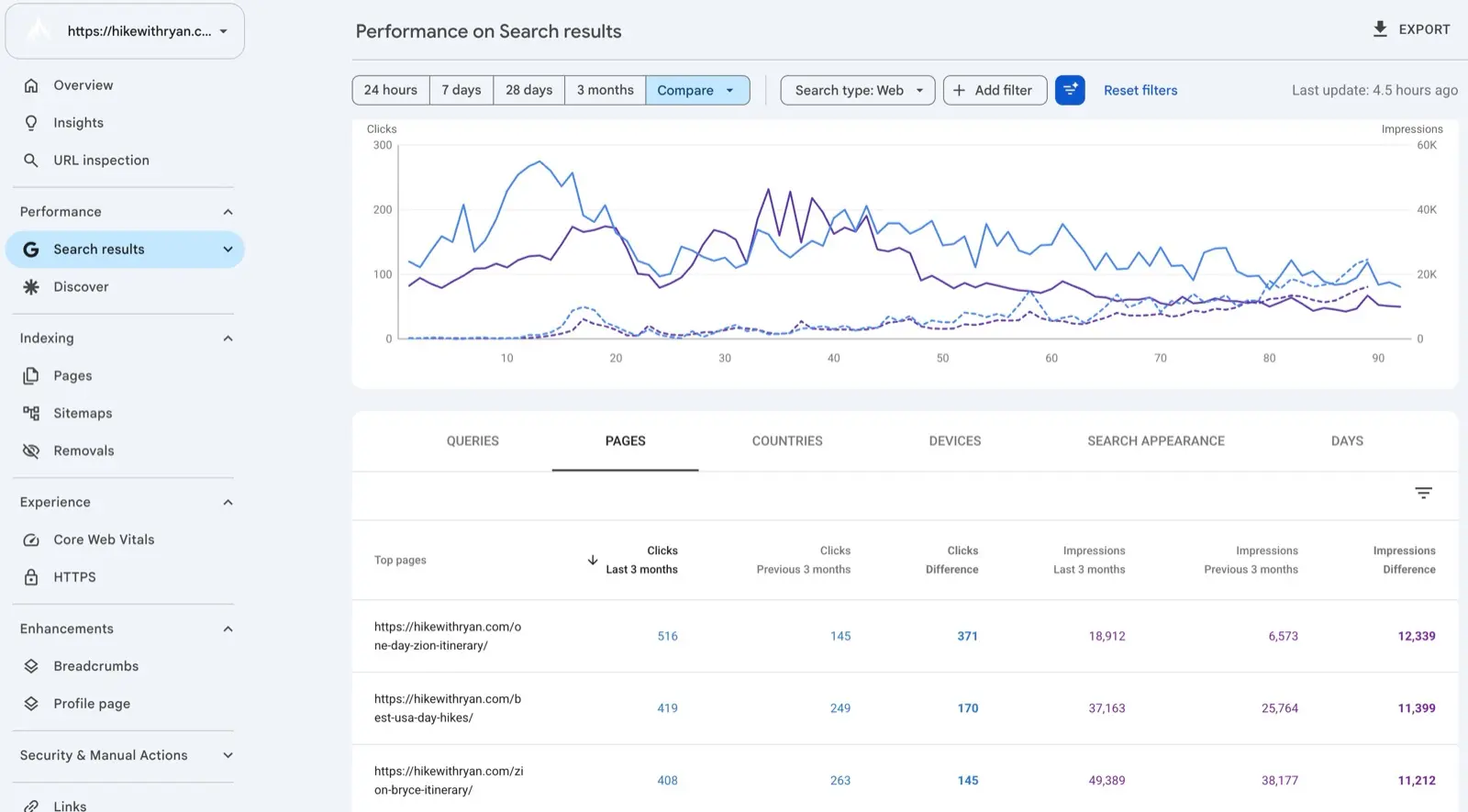
- Biggest click losses versus the same period last year. These pages already proved they can rank.
- High impressions, low CTR. The ranking is fine and the snippet is losing the click, which is usually a title and description problem rather than a content problem.
- Positions 4 to 15. Close enough that a real improvement moves them, far enough that there is room to move.
Then sort every page you pulled into three buckets: refresh it, fix the meta only, or leave it alone. Leaving things alone is a real decision and most people skip it.
If you only have an hour this month, spend it on pages that already get impressions. For pulling the data itself, the interface export caps at 1,000 rows, so on a larger site use Search Console bulk exports to BigQuery, or query Search Console conversationally and let the AI assemble the comparison for you.
The SEO Maintenance Checklist
This is the whole list. Seven jobs, each with the place you look, how often it is worth doing, and how you know you are finished.
| Task | Where you look | How often | Done when |
|---|---|---|---|
| Internal links from new posts to older ones | Your post library plus GSC top pages | Weekly, or as you publish | Every new post points at 2 to 3 relevant older posts |
| Meta titles and descriptions on high-impression, low-CTR pages | GSC Performance report, Pages tab, sorted by CTR | Monthly | CTR moves, and the snippet reads like a human wrote it |
| Stale years in titles and headings | A title scan for last year’s number | When the calendar flips, then monthly | No dead years on live URLs |
| Dead outbound links | A crawl, or an agent that checks for you | Monthly | Broken links removed, replaced, or redirected |
| Content refresh on decliners | GSC click drop versus last year | Monthly for top traffic, quarterly for the rest | Stats, intent, and examples are current |
| Index and crawl errors | GSC Page indexing report | Monthly | Your important URLs are still indexed |
| Speed and Core Web Vitals | PageSpeed Insights plus the GSC report | Quarterly | Fixed at the template level, not URL by URL |
Two deliberate omissions. Local listings and review replies are not on here, because if you run a Google Business Profile that is a genuinely separate checklist with a different cadence. And Core Web Vitals is a quarterly, template-level job. Chasing it per post is how a maintenance habit turns into a month of yak shaving.
How to fix stale years in titles
- Search your post titles for last year’s number, then the year before. On WordPress, the search on the Posts screen works.
- Ask whether the post is about that year or just current as of it. “Best Travel Cameras 2025” is a freshness claim, so refresh it. “My 2025 Income Report” is about that year, so leave it.
- Update the content before the number. A 2025 product list with 2026 in the title is worse than an honest old one. Check the picks, prices and links first.
- Change the SEO title too. Yoast and Rank Math store it separately from the post title, and it is the title tag Google usually shows.
- Keep years out of URLs. If an old slug has one, leave it rather than breaking links.
If a title never needed a year, delete it instead of bumping it.
How Often Should You Do SEO Maintenance?
It depends almost entirely on how many published posts you have, not on how competitive your niche is.
| Library size | Realistic cadence | What you actually do |
|---|---|---|
| Under 50 posts | 1 to 2 hours a month | Open GSC, refresh your top 10, add internal links as you publish |
| 50 to 300 posts | 30 minutes weekly on GSC, plus a monthly pass | Weekly triage, monthly link and meta sweep, quarterly refresh batch |
| 300 or more posts | Honestly, you will not keep up by hand | Automate the mechanical passes and spend your time on judgment calls |
That last row is the honest one. I have five sites and hundreds of posts, and the reason my maintenance kept slipping was never that I did not know what to do. There was just more mechanical work than any human was going to do on a Tuesday.
A One-Hour Monthly SEO Maintenance Plan
If you do nothing else in this guide, do this once a month. It takes about an hour on a mid-sized blog.
- Open Search Console and compare the last 3 months against the same 3 months last year.
- List 10 URLs: the 5 biggest click losers, and the 5 with the most impressions and the worst CTR.
- Rewrite the titles and meta descriptions on the low-CTR five.
- Refresh or add internal links to the click-drop five.
- In the URL Inspection tool, request indexing for the pages you changed most. There is a quota, and asking twice for the same URL will not speed it up.
- Write down what you are deliberately skipping. Skipping is part of maintenance, and writing it down stops you from re-litigating it next month.
Once this is a habit, the next step is fitting it into a real publishing plan. Our SEO content strategy guide covers how maintenance and new publishing share a calendar without one starving the other.
How Much Does SEO Maintenance Cost?
It depends on whether you are buying someone’s time or buying software. In Ahrefs’ pricing survey of 439 SEOs (last updated in 2024), the most popular monthly retainer was $501 to $1,000, charged by about one in five respondents. Overall, 42.8% charged between $501 and $2,000 a month, and about 31% charged more than $2,000.
| Option | Typical cost | What you get | Best for |
|---|---|---|---|
| Do it yourself | 1 to 4 hours a month | Full control, and the work only happens when you have time | Under 50 posts |
| Agency retainer | Commonly $500 to $2,000 a month, often more | Strategy, reporting, and a person accountable for results | Businesses where search is a primary revenue channel |
| Software that does the on-page pass | Bundled into a tool subscription | The mechanical fixes, queued and applied on a schedule | Bloggers and small teams with a large back catalog |
Most bloggers do not need a package. What they need is a queue of the next ten URLs and a reason to look at it. If you are considering a retainer, ask which of the seven jobs above it actually covers. That tells you more than the price does.
FAQs About SEO Maintenance
What is SEO maintenance?
SEO maintenance is the ongoing work of keeping published pages ranking, including internal links, meta titles and descriptions, stale dates, dead outbound links, content refreshes, and indexing checks. It applies to content that already exists, which is what separates it from publishing new articles.
How do you do SEO maintenance?
Open Search Console, compare the last 3 months to the same period last year, and pull the pages with the biggest click losses and the worst click-through rates. Fix the metas on the low-CTR pages, refresh or add internal links to the decliners, then request indexing for the pages you changed most. Repeat monthly.
How often should you do SEO maintenance?
Monthly is the right default for most blogs. Under 50 posts you can get away with 1 to 2 hours a month. Between 50 and 300 posts, a weekly 30-minute Search Console check plus a monthly link and meta pass works well. Past 300 posts, you will need to automate the mechanical parts.
Do I need ongoing SEO if I already rank?
Yes, because rankings decay even when you do nothing wrong. Competitors publish, search intent shifts, AI Overviews absorb clicks, and your own newer posts stop linking back to older ones. Maintenance is what keeps a page that already won from quietly giving the position back.
What is the difference between SEO maintenance and an SEO audit?
An audit is a point-in-time inspection of the whole site that produces a list of problems. Maintenance is the recurring work of fixing a small number of pages on a schedule. You audit once and then maintain continuously, and if you maintain properly you rarely need another full audit.
How much does SEO maintenance cost?
Doing it yourself costs 1 to 4 hours a month. Agency retainers commonly run $500 to $2,000 a month, and about 31% of the SEOs in Ahrefs’ pricing survey charge more than that. Software that handles the on-page pass is usually bundled into a subscription.
Can AI do SEO maintenance?
Yes, for the mechanical half: internal link suggestions with anchor text, meta rewrites for pages losing clicks, stale years, and dead outbound links. Automating it means running those passes on a schedule, alongside a crawler that reruns your technical audit and flags new errors. What AI should not decide is whether a post deserves to exist or whether two posts should merge. Keep a human on approvals for anything structural; an approval or smart mode and a 30-day undo are what make that safe.
Does website maintenance include SEO?
Usually not. A website maintenance plan typically covers hosting, plugin updates, security patches, and backups. Those keep your site online, which matters, but none of them improve where a page ranks. Ask any provider which of the seven maintenance jobs above they actually perform.
How I Handle This Across Five Sites
Everything above is doable by hand until it is not. My honest answer for a large back catalog is the agent from the walkthrough at the top of this post: it takes the mechanical passes, I keep the judgment calls. Here is what that looks like in practice.
Site Agent does not write new posts. It reads your published posts and your connected Search Console data on a schedule, then queues the highest-impact fixes it finds: internal links with suggested anchor text, meta rewrites on pages that rank but lose the click, stale years after the calendar flips, and dead outbound links. When a suggestion comes from Search Console data, it shows an estimated clicks-per-month gain so you know which approvals are worth your attention.
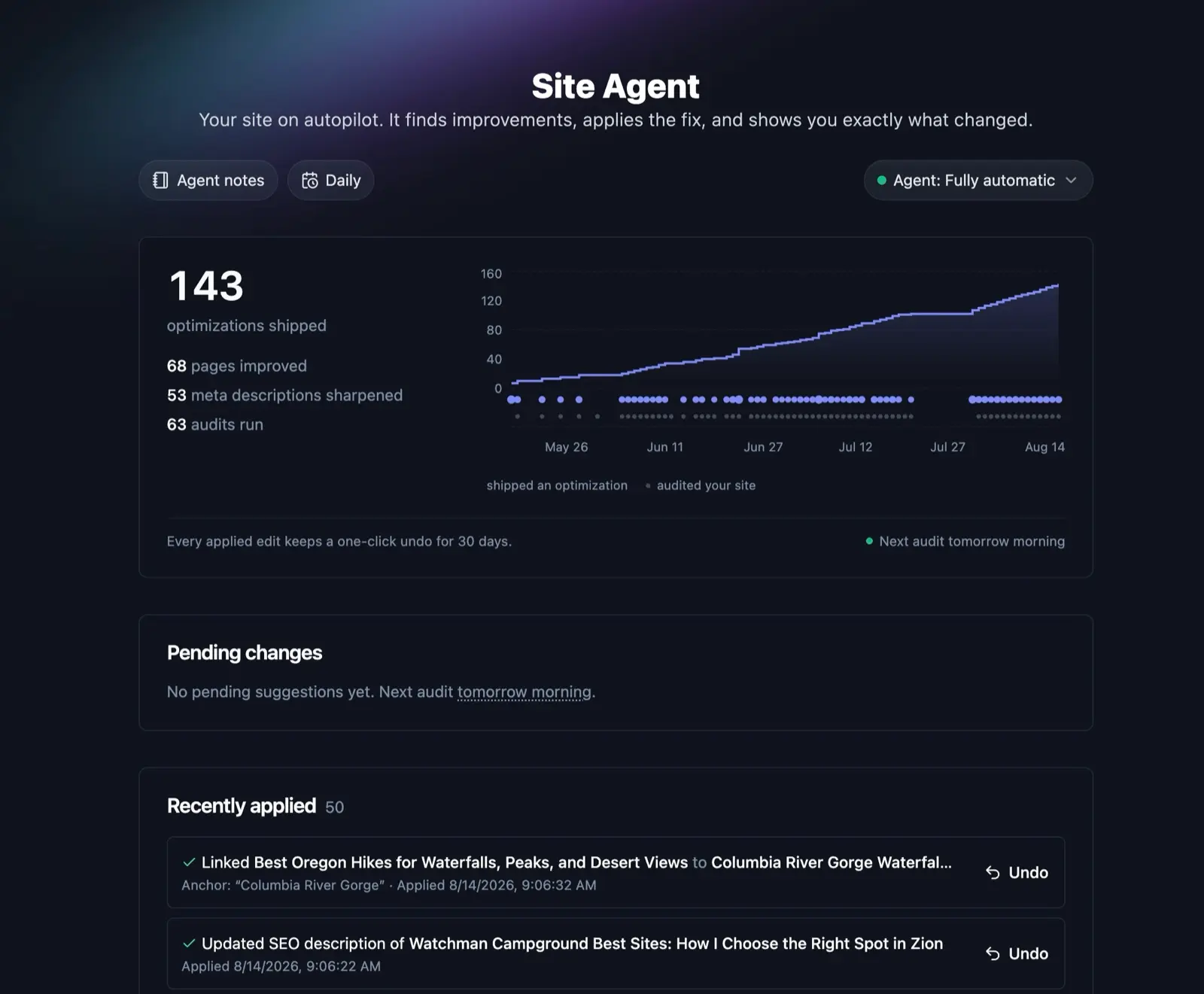
You choose how much rope it gets, per project. Approval mode changes nothing without your click. Smart mode, which is what I run, applies low-risk fixes like internal links automatically and holds bigger edits such as a full meta rewrite for review. Automatic ships everything. You can switch modes or pause a project at any time, and you can set how often it runs, from weekly up to daily depending on your plan.
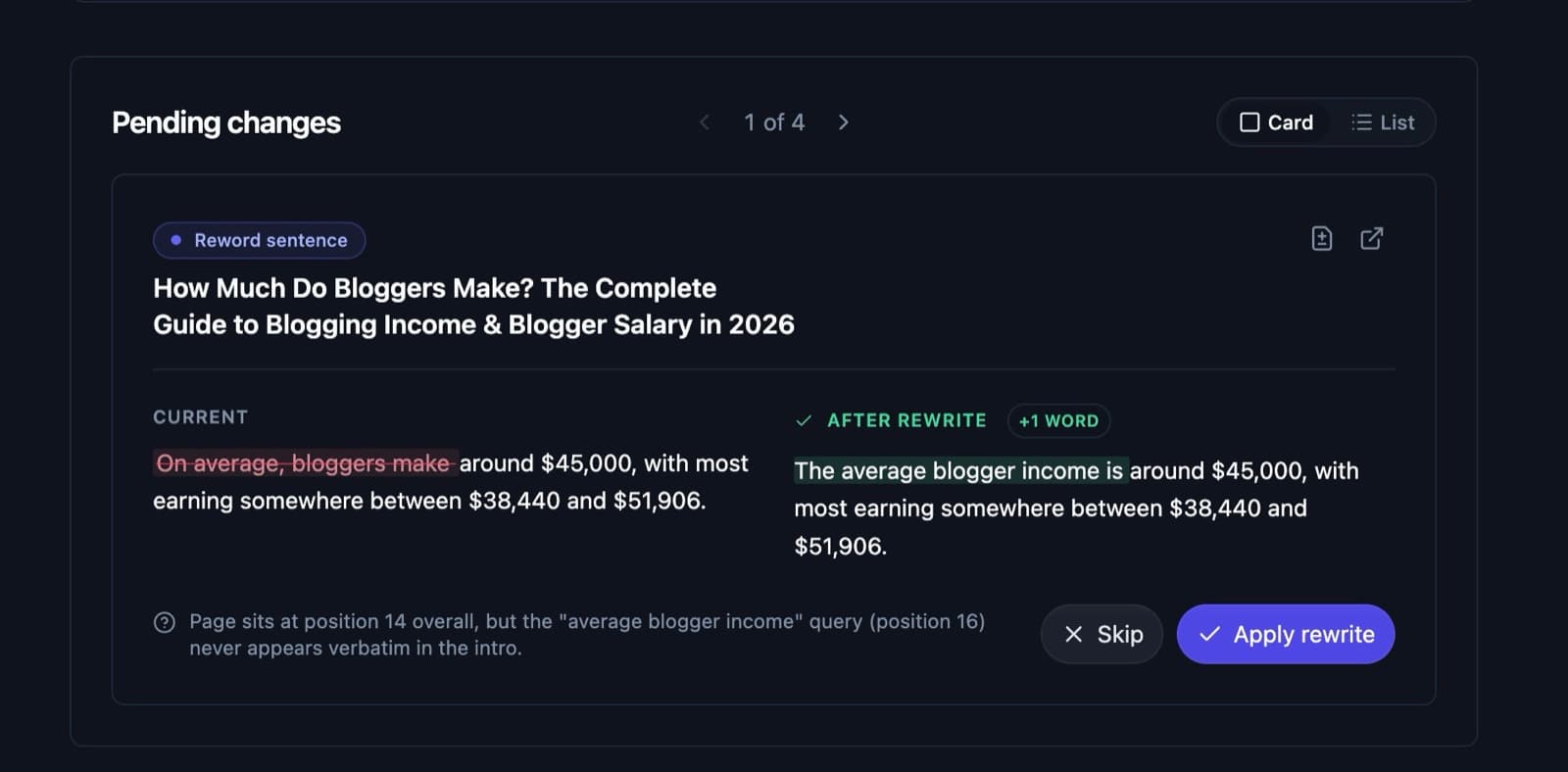
What made me comfortable turning it on: every edit is reversible for 30 days. It snapshots the original before touching a post, keeps two backup copies, and gives each applied edit its own one-click undo. It also respects your own edits: if the text it planned to change has changed since, the suggestion is dropped, and it refuses any undo that would wipe out a later edit of yours. It works with WordPress, Ghost, Webflow, Wix, Shopify, and Framer, and it is included on the Solo, Pro, and Agency plans with no per-edit fees.
If you would rather keep the work manual but move faster, our guide to SEO automation covers what is worth automating and what is not.
Your Next Step
Open Search Console, sort your Pages report by lost clicks, and fix three URLs this week. Not thirty. Three. The habit is the thing that compounds, and it is a lot easier to keep going once you have watched a page you had written off climb back.
That is the maintenance I spent a decade telling everyone else to do. It finally happens on my sites now, and mostly it happens while I am doing something else.

RightBlogger Co-Founder Ryan Robinson teaches 500,000 monthly readers to grow online businesses and blogs. He’s a recovering side project addict.




Automated SEO Blog Posts for Your Site
Research, write, publish, and share from one account.
7-day free trial. Cancel anytime.





Leave a comment