27 SEO Prompts for ChatGPT and Claude (and Which Ones Need Your Data)
Copy-ready prompts cover keyword research, content and technical SEO, while test results show why search volumes need real data.

The best SEO prompts for ChatGPT and Claude give the model one specific job, the context it needs, and the format you want back. They never ask it for numbers it can’t see, like search volume or your own rankings. Below are 27 copy-and-paste SEO prompts: 15 that work in any chat, and 12 that run on your real Search Console and keyword data.
Why the split matters: I asked GPT-6.1 and Claude Opus 5.5 for the monthly search volume of 10 keywords, and both models missed most of them by more than 2x compared with a real keyword tool. GPT-6.1 guessed 1,500 searches a month for “seo prompts”. Ahrefs says 100.
Every prompt has a copy button. Swap the parts in [brackets] for your own details. For three of the data prompts (17, 18 and 25), I’ve included what the data step returned on my own sites.
What Makes a Good SEO Prompt?
A good SEO prompt is a short brief: what to do, what to work from, what to return, and what to avoid. Most weak prompts skip the second part, so the model fills the gap with guesses.
| Part | What it does | Example |
|---|---|---|
| Job | One task, stated plainly | Write 10 title tags for this page |
| Context | The material to work from | The post text, a keyword list, a Search Console export |
| Format | What the answer should look like | A table with the character count for each title |
| Limits | What it must not do | Keep each under 60 characters. Don’t invent search volumes. |
Two habits make any prompt better. Add “Ask me questions first if anything is unclear” to big jobs like a content brief, so the model asks about your audience instead of assuming. And keep the follow-ups in the same chat: “make them shorter” or “drop the third one” is faster than rewriting the prompt.
Can ChatGPT or Claude Do SEO? We Tested Their Search Volume Guesses
ChatGPT and Claude can do a lot of SEO work: writing titles, outlining posts, writing schema, spotting gaps in a draft. What they can’t do on their own is know your numbers. Plenty of prompt lists still ask them for search volume and keyword difficulty, so I measured how close they get.
On November 11, 2026, I sent the same prompt to GPT-6.1 (twice, with web search off and on) and to Claude Opus 5.5: “You’re an experienced SEO professional. Give the estimated average monthly US Google search volume for each keyword.” Then I looked up the same 10 keywords in Ahrefs and in RightBlogger’s keyword database.
| Keyword | GPT-6.1 (no web) | GPT-6.1 (web search) | Claude Opus 5.5 | Ahrefs | RightBlogger |
|---|---|---|---|---|---|
| wordpress login | 90,000 | 90,000 | 49,500 | 44,000 | 49,500 |
| kebab case | 12,000 | 12,000 | 4,400 | 1,800 | 4,400 |
| best wordpress plugins | 4,000 | 3,600 | 3,600 | 800 | 390 |
| wordpress versions | 5,000 | 2,400 | 1,000 | 300 | 480 |
| how to start a blog | 22,000 | 40,000 | 27,100 | 217,000 | 8,100 |
| blog post ideas | 6,000 | 5,400 | 6,600 | 1,000 | 320 |
| meta description length | 9,000 | 8,100 | 2,900 | 2,600 | 390 |
| title case converter | 74,000 | 8,100 | 22,200 | 8,800 | 9,900 |
| seo prompts | 1,500 | 1,000 | 880 | 100 | 40 |
| google search console | 550,000 | 260,000 | 90,500 | 291,000 | 450,000 |
What the test showed:
- GPT-6.1 was within 2x of either tool on 2 of the 10 keywords with web search off, and 3 of 10 with it on. Claude Opus 5.5 managed 3 of 10.
- With web search off, GPT-6.1 guessed higher than both tools on 9 of the 10 keywords, including 15x Ahrefs’ figure for “seo prompts” and 17x its figure for “wordpress versions”. It put “title case converter” at 74,000; both tools say under 10,000.
- Asked the same question a second time (it didn’t search the web either time), Claude changed most of its numbers and got 4 of 10 within 2x: “google search console” went from 90,500 to 40,500, and “seo prompts” from 880 to 1,300.
- With web search on, GPT-6.1 pointed to public figures for two keywords and called the rest “my rough planning estimates rather than verified tool readings”.
The real tools disagree with each other too: Ahrefs and RightBlogger were within 2x on only 4 of the 10. So pick one data source and compare keywords against each other inside it. Just don’t take a number from a chat that has no tool behind it. Use the plain-chat prompts below for writing and structure. When numbers matter, paste in your own data or connect the source.
SEO Prompts That Work in Any Chat
These 15 prompts work in ChatGPT, Claude, Gemini or any other chat assistant. None of them ask the model for data it doesn’t have. When a job needs numbers, the prompt tells you what to paste.
Keyword research and search intent
1. Sort keywords by search intent. Paste the list from your keyword tool, and the model handles the judgment part.
2. Group keywords that one page can cover.
3. Find the follow-up questions. AI answers and Google’s People Also Ask both break a topic into smaller questions. Your post should answer the important ones.
Content briefs and outlines
4. Build a brief from the pages that already rank. Copy the headings from the top 3 results (any browser extension that lists headings will do) and paste them in.
5. Outline a post that answers first.
6. Find what your draft adds. Pages that only repeat the top results have little reason to rank. This prompt points out what’s generic and asks about your own experience instead of making it up.
For more outline styles, see these AI blog outline prompts.
Titles, meta descriptions and headings
7. Write title tags.
8. Write meta descriptions.
9. Fix vague headings.
Our guide to writing a meta title covers what Google does with them.
Content refreshes and E-E-A-T
10. Plan a refresh before rewriting.
11. Find where a post sounds second-hand.
Schema and technical SEO
12. Write schema markup from the page itself. Telling the model to use only facts from the page keeps it from adding ratings or prices you don’t have.
13. Build a redirect map.
Internal links and Search Console exports
14. Suggest internal links from your own list. Without a list of your real posts, chatbots tend to invent URLs. Giving it the list fixes that.
For links from other sites, our backlink outreach templates cover the emails.
15. Analyze a Search Console export. Export the Queries and Pages tables from Search Console as a CSV and paste them in. With your own numbers in the chat, the model has real data to work from.
SEO Prompts That Use Your Real Data
Pasting exports works, but it’s slow and the data goes stale. Connecting your data to ChatGPT or Claude lets the model fetch it, read your live posts and make the change you approve. The prompts below use the RightBlogger MCP connector, which is included on every RightBlogger plan (the Search Console, AI Brand Monitor and Site Agent prompts need a paid plan). It brings in Search Console, a keyword database, your posts on WordPress, Ghost, Webflow, Wix, Shopify or Framer, and AI answer tracking. Our guide to connecting Google Search Console to Claude walks through setup, including ChatGPT.
Start each prompt with “Using RightBlogger” so the assistant picks the right connector. Publishing asks for your confirmation, and edits to a post’s text come with an undo you can run in the same chat. Title and meta description changes don’t, so keep a note of the old wording (prompt 19 does this for you). Every prompt here that changes something asks the AI to show you the change first.
Find what’s broken in Search Console
16. Refresh the post that’s losing clicks. This is one prompt for the whole job: find the page, read it, check its links, then edit it.
17. Explain a traffic change.
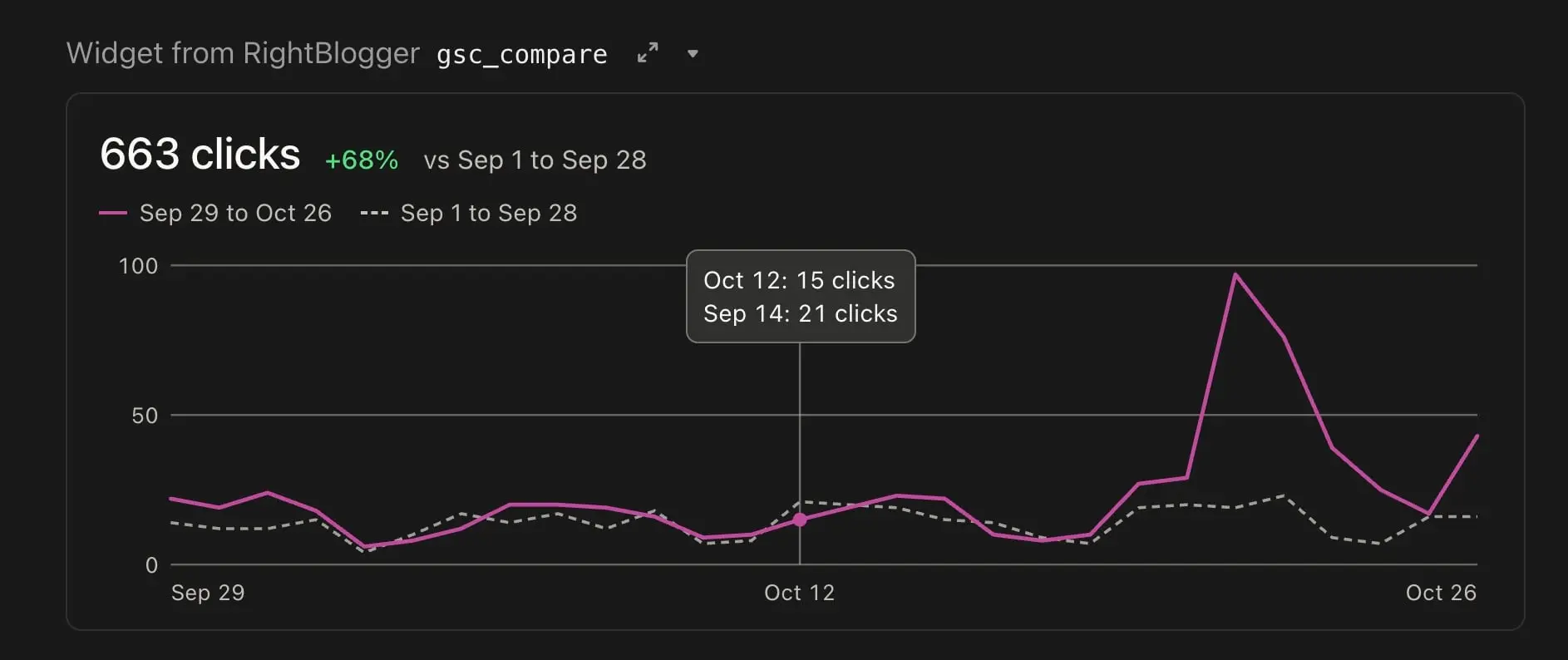
When I ran the comparison step on smartwp.com (October 11 to November 7, 2026, against the 28 days before), clicks went from 435 to 802. It came back “mixed”: 65 pages gained and 30 lost, with one page, a guide to checking your PHP version, accounting for 118 of the 367 extra clicks after moving from position 16.6 to 7.0. That tells you where to look before you touch anything.
18. Find pages competing for the same search.
On smartwp.com, the check found 16 queries split across 20 pages over the last 90 days (through November 8, 2026). A few of them:
| Search | Page A (avg. position) | Page B (avg. position) |
|---|---|---|
| wordpress tips and tricks | Homepage (8.1) | /wordpress-tips-and-tricks/ (12.6) |
| wordpress tricks | Homepage (7.9) | /wordpress-tips-and-tricks/ (40.4) |
| wordpress 7 changelog | /wordpress-versions/ (19.8) | /wordpress-7-0/ (69.5) |
| wordpress 7 | /wordpress-7-0/ (43.7) | /wordpress-7-1/ (55.3) |
The homepage outranking the dedicated tips post is the kind of thing you’d never spot from a keyword tool.
19. Test new titles on pages people skip.
20. Check whether the titles worked. Run this about four weeks later and paste in the table from prompt 19. Title and meta changes have no automatic undo, so that table is your record of the old wording.
Keyword research with real volume
21. Look up real volume instead of guessing. This is the prompt to use instead of the one from the test above.
22. Plan posts you haven’t written yet.
Work on your own posts
23. Link a new post from older ones.
24. Fill the gaps Search Console shows you.
Track AI answers
25. Find the AI answers you’re missing from. This one needs an AI Brand Monitor on your project, which asks ChatGPT, Gemini, Perplexity, Claude and Google’s AI Overviews your tracked questions.
Run on rightblogger.com (scan of November 11, 2026), the answer was humbling: across 27 tracked questions on 5 platforms, AI answers named RightBlogger in 26 of 135. The split by platform:
| Platform | Questions where RightBlogger was named |
|---|---|
| Perplexity | 9 of 27 |
| Google AI Overviews | 7 of 27 |
| Claude | 5 of 27 |
| Gemini | 3 of 27 |
| ChatGPT | 2 of 27 |
In the answers that left us out, Surfer SEO was named 51 times, Frase 44 and Jasper 31. That’s a to-do list: the questions, the competitors winning them, and the sites the AI cited instead.
Turn findings into work
26. Get a Monday briefing.
27. Hand the fixes to Site Agent. If you’d rather not make each edit in chat, Site Agent (on Solo, Pro and Agency plans) can pick them up as tasks on its next run.
ChatGPT or Claude for SEO Prompts?
Use whichever you already pay for. Every prompt on this page works in both, and both can connect to outside data through MCP connectors. On Claude’s free plan you can add one custom connector (per Anthropic’s help center), which is enough for one data source like Search Console.
The bigger difference is the data. A chat without data will guess numbers whichever model you use: in the test above, GPT-6.1 and Claude Opus 5.5 both missed most search volumes by more than 2x. If you’re on Claude and want the full setup, including audit skills and other SEO connectors, read how to use Claude for SEO.
How to Write Your Own SEO Prompts
- Give one job per prompt. “Audit my SEO” gets a generic checklist; “find pages ranking 4 to 15 with low CTR” gets an answer.
- Paste or connect the material. A prompt with your post, your export or your keyword list in it beats any clever wording.
- Ask for the format you’ll use: a table, a CSV, character counts, a ranked list.
- Say what it must not do: invent numbers, change your meaning, add experience you don’t have.
- Ask it to show changes before making them, especially once it can edit your site.
For writing prompts outside SEO, see our ChatGPT prompts for bloggers, or browse every prompt from our guides in the RightBlogger prompt library.
SEO Prompts FAQs
Can AI do my SEO for me?
It can do much of the work: research, briefs, titles, schema, refreshes and internal links. It still needs your data for anything involving numbers, and your judgment on what to publish. Treat its suggestions like a fast assistant’s draft, and check anything it states as fact.
Will Google penalize content written with these prompts?
Google’s position is that it rewards helpful content however it’s made, and that using automation mainly to manipulate rankings breaks its spam policies (Google Search Central). Prompts 6 and 11 exist for that reason: they push you to add what only you know.
Do these prompts work in Gemini?
The 15 plain-chat prompts work in Gemini, Copilot or any other assistant. The 12 data prompts need an assistant that supports MCP connectors, such as Claude, ChatGPT or Cursor.
Is it safe to let AI edit my posts?
Only if you can see and reverse each change. With the RightBlogger connector, publishing asks for your confirmation, and edits to a post’s text come with an undo you can run in the same chat. Title and meta description changes have no undo, so save the old wording first. Even so, ask it to show each change before making it, as prompts 16, 19 and 23 do.
Blog Automation That Keeps Your Posts Ranking
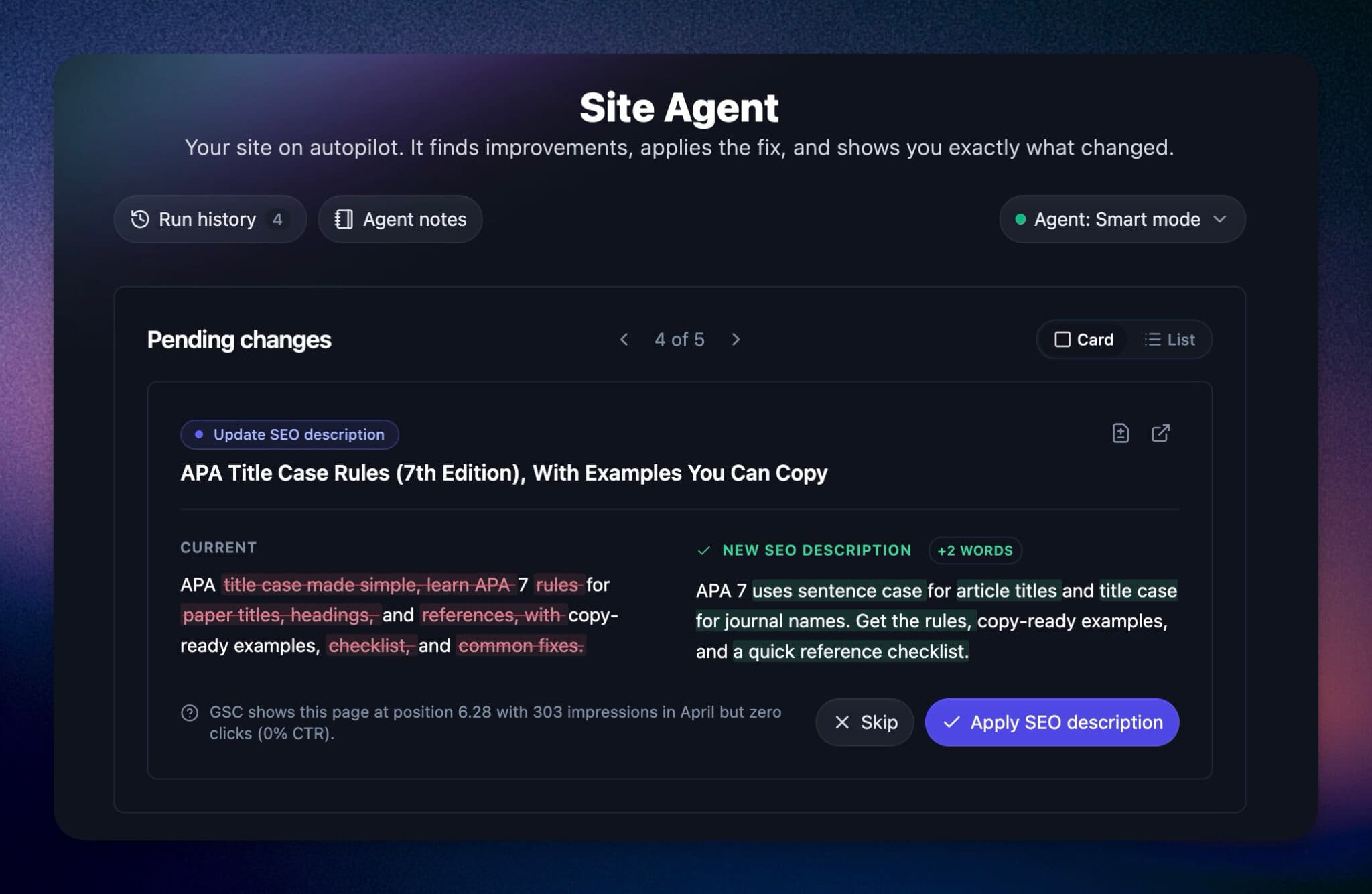
RightBlogger finds keywords, writes SEO articles, and publishes them to your blog. Then its Site Agent uses your Search Console data to keep older posts in shape, adding internal links, sharpening weak meta descriptions, and fixing stale years and broken links. Join 51,000+ bloggers using it to grow traffic from Google and ChatGPT.

RightBlogger Co-Founder Andy Feliciotti builds websites and shares his expertise in SEO, photography, and travel.



Automated SEO Blog Posts for Your Site
Research, write, publish, and share from one account.
7-day free trial. Cancel anytime.





Leave a comment