Query Fan-Out SEO: Build Content That AI Search Cites
Map the questions behind a broad search, then decide which belong on one page and which need their own URL.

One keyword no longer tells you the whole story. A buyer who searches project management software may also need pricing, security details, setup help, alternatives, and a clear answer to will this work for a 10-person team?
That is where query fan-out SEO comes in. Instead of planning one page around one phrase, you plan for the related questions and next steps that modern search engines and answer engines may explore while building a comprehensive response for AI search.
You don’t need to publish a hundred shallow posts. You need a smarter content map, stronger pages, and clear links between them.
Key Takeaways for Query Fan-Out SEO
- Query fan-out SEO plans for the many subquestions behind one broad search, not only the first keyword.
- A strong content plan combines a broad pillar page with focused pages that address search intent through comparisons, costs, setup, objections, and use cases.
- Each section should answer a real question early, using short, source-backed language that can stand alone.
- Existing high-ranking pages are the best place to start. Upgrade them before building a massive new content library.
- Rankings still matter, but track citations, search visibility, and the query groups that bring qualified visitors.
How Query Fan-Out SEO Changes Content Planning
Query fan-out is Google’s name for the way an AI search system can break a complex question into smaller searches, run them at the same time, and pull together a useful response.
Google has said that AI Mode uses a query fan-out technique to split questions into subtopics and issue multiple queries at once. Its search documentation scopes this to AI Overviews and AI Mode, and hedges that they “may use” it, so treat it as an AI-surface behaviour rather than something driving classic blue-link ranking. That matters because your audience rarely has one neat, isolated question.
One caveat worth setting early: Google does not publish the fan-out queries. They are not in Search Console, and no report separates them from ordinary search traffic. Every list of fan-out queries you have seen, including the ones tools generate, is a reconstruction rather than a readout, and two runs of the same tool will not return the same list.
They start broad. Then their real needs spill out.
Someone looking for employee onboarding software might also wonder:
- What does it cost?
- Does it work with Slack or Microsoft Teams?
- How long does setup take?
- What features matter for a remote team?
- Which tools work for a 50-person company?
- What are the best alternatives?
A traditional keyword plan may pick one of those phrases and write one post. A fan-out plan sees the full thread. It plans content that can meet the reader at several points in the decision.
Think of the main query as the trunk of a tree. The branches aren’t random keywords. They’re the sub-queries a person asks as they learn, compare, doubt, and decide.
That distinction matters. Best CRM for startups and CRM pricing for startups share a topic, but the reader wants different things. One needs a shortlist. The other needs budget context, billing details, and likely a comparison of plans.
The best fan-out plans don’t try to answer every possible question on one page. They give each important intent a clear home.
This doesn’t replace keyword research. It makes keyword research more useful. Search volume can show demand, but it won’t always show what readers need next. Your plan needs both.
Start With a Real Customer Problem, Not a Keyword Export
A spreadsheet full of keywords can look productive and still lead nowhere. The rows may be related by wording but disconnected from how customers think.
Start with a high-value problem your product, service, or expertise can actually help solve. For a B2B payroll company, that might be switch payroll providers. For a creator platform, it could be start an email newsletter. For an agency, it may be improve local SEO.
Now map the job behind that problem.
What does the reader need to understand? What are they comparing? What could stop them from moving forward? What happens after they choose an option?
A simple planning conversation can surface more than a keyword tool alone:
- Ask sales, support, onboarding, and customer-success teams what prospects repeat.
- Review calls, chat logs, demo notes, product reviews, and site search data.
- Pull search suggestions, People Also Ask questions, and long-tail keywords from competitor page headings.
- Group each question by user intent, then decide whether it belongs on a pillar, a support page, or a product page.
- Mark the questions that show buying intent or appear late in a customer’s research.
Let’s use email marketing for small businesses as an example. A useful fan-out map could include:
- How to choose an email marketing platform
- Email marketing pricing and subscriber limits
- Email newsletter ideas for local businesses
- Email automation examples
- Email marketing vs. social media
- How to grow an email list without paid ads
- Email deliverability basics
- Email marketing metrics that matter
Those are not eight random blog ideas. Together, they support one business problem.
A keyword clustering strategy helps here because it groups close queries by meaning and intent. But don’t let a cluster tool make the final call. Two keywords can look near-identical in a keyword tool and still need separate pages, because the searcher behind each one wants a different thing.
How much does email marketing cost? needs a direct cost guide. Best email marketing software needs a comparison and a decision path. Give them separate homes.
Build a Query Fan-Out Map Around Intent
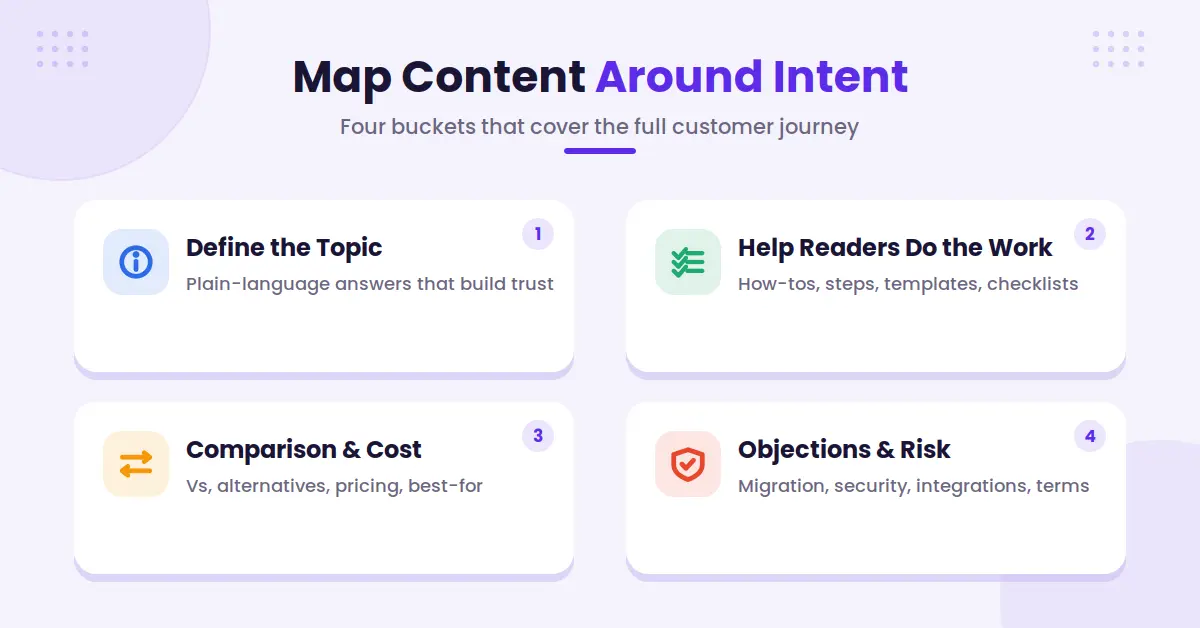
Once you have the question set, organize it by the reader’s stage of awareness. Don’t overcomplicate it. Most content falls into a few practical buckets.
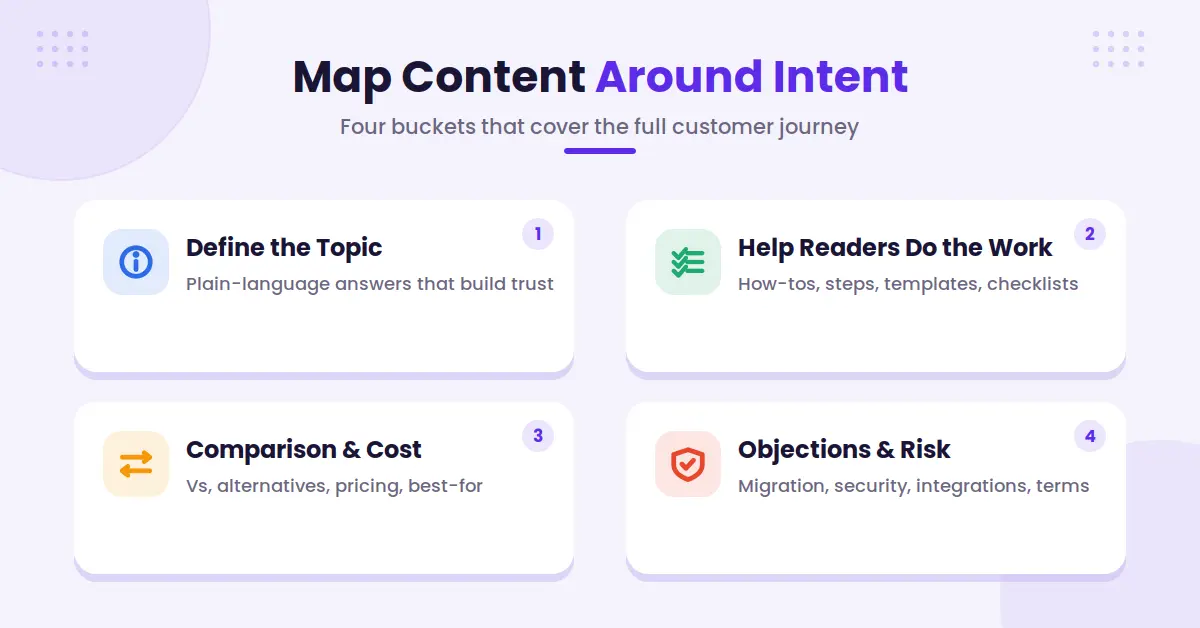
Define the Topic and Build Trust Early
These are the what is it? questions. Readers need plain language before they can evaluate options.
For example, a payroll site may need pages for what is employer of record, how payroll tax works, and what is payroll compliance. Each one should answer the question in the opening paragraph.
Keep the definition tight. A 40 to 60-word answer often works well for a question-based section. Then add the details, examples, caveats, and linked next steps below it.
This format helps real readers too. Nobody wants to scroll through five paragraphs of throat-clearing before they get the answer.
Help Readers Do the Work
Next come process questions. These include how to, template, checklist, steps, and examples searches.
A practical page on creating an editorial calendar should cover the steps, but it should also deal with the friction:
- How often should you publish?
- Who owns updates?
- What happens when an SME misses a deadline?
- Which topics should get refreshed instead of rewritten?
Good how-to content doesn’t pretend the work is frictionless. It gives readers enough detail to move.
Answer Comparison and Cost Questions
Comparison content is where many editorial teams get timid. They write broad educational posts, then avoid the questions that buyers care about most.
Don’t do that.
Publish useful pages for X vs. Y, alternatives to X, pricing, best for, and is X worth it? Be fair about trade-offs. A reader can spot a fake comparison page in seconds.
The strongest pages explain who each option fits, where it falls short, and what to consider before choosing. If your own offering is relevant, include it honestly. If it isn’t a fit, say so.
Cover Objections and Risk
This is often the most overlooked branch.
A prospect may want your tool but worry about migration, security, training time, contract terms, integrations, or failure risk. These concerns may not have huge search volume. They still block revenue.
Turn repeat objections into useful pages, help-center articles, product documentation, and sections within your commercial pages. Your sales team will thank you.
A solid topical authority map makes these gaps easier to spot. It shows whether you have ten awareness posts and nothing for readers ready to compare, buy, or implement.
Decide What Belongs on One Page and What Needs Its Own URL
The goal isn’t to split every subquestion into a new post. That creates thin pages, duplicate angles, and a messy site structure.
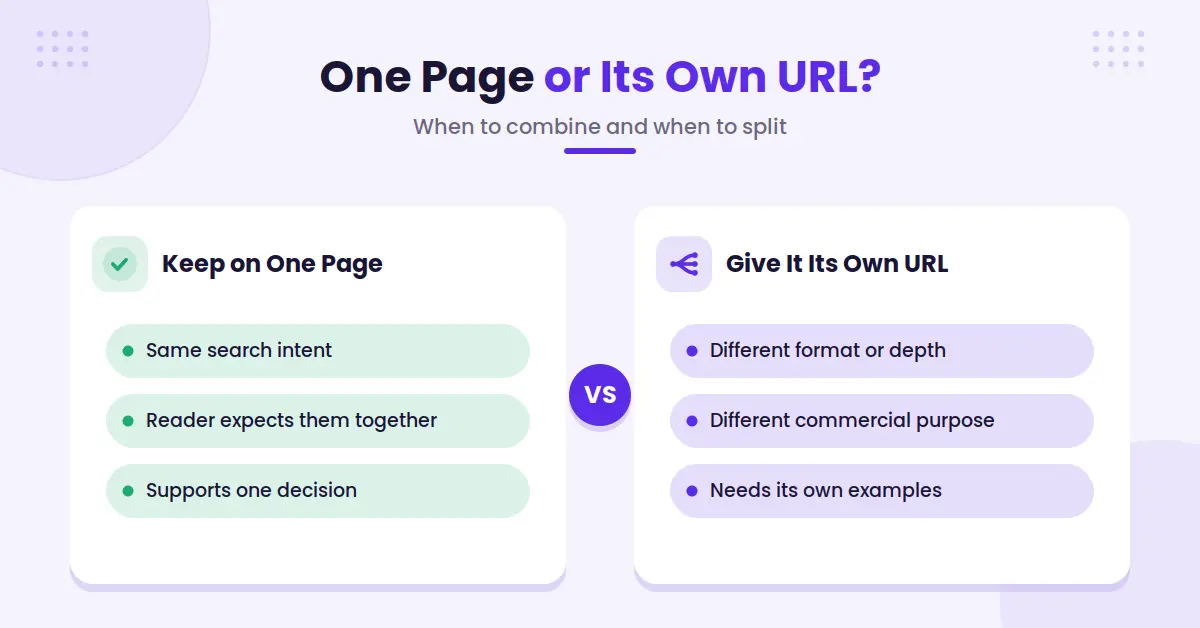
Use one page when the questions share the same intent and a reader would expect them together. When planning topic clusters, keep sections together in comprehensive guides when they naturally support one decision.
For example, a complete guide to how to choose project management software can include sections on features, pricing models, onboarding, integrations, and team size. The reader is still trying to choose.
Create a separate page when the question calls for a different format, depth, or action. Project management software pricing may deserve its own page. So might Asana alternatives for marketing teams or how to migrate project data.
Here are a few signs a query needs its own URL:
- The searcher expects a distinct answer, not a short section.
- The query has a different commercial purpose.
- You need examples, screenshots, research, or expert input that would overwhelm the parent page.
- A separate page gives you a clearer internal-linking path.
- You can offer original value beyond rewriting what already exists.
Watch out for the opposite problem too. Addressing granular sub-queries with a 300-word post for every People Also Ask question won’t build trust. It often creates pages with no depth, no original point of view, and no reason to rank.
Your pages should feel like a well-organized guide, not a stack of index cards.
Write Pages That Are Easy to Read and Easy to Cite
AI-generated results pull ideas from pages that are clear, relevant, and credible. Fancy language doesn’t help. Clear answers do.
Start each major section with the answer. Then prove it.
If the H2 asks, How long does a CRM migration take? don’t begin with a broad history of customer data. Give a direct range or explain the variables that affect timing. Then add the details.
Use headings that match the question in the reader’s head. Add concise definitions. Keep paragraphs focused on one idea. Use lists when the reader needs steps or options.
That structure also supports featured snippets and voice-style answers. The same rule applies either way: a page that answers one question cleanly, without padding, is easier for a person to scan and easier for an AI system to lift an answer from.
Original evidence matters even more.
Add firsthand experience, product data, expert quotes with names and roles, customer examples, tested workflows, and dated sources. Generic summaries are easy to produce. They are also easy to ignore. Winning AI citations often depends on this extra layer of proof.
For example, don’t write, Good onboarding improves adoption. That’s empty. Explain what your onboarding team changed, how long the rollout took, what users struggled with, and what fixed it. If you don’t have data, share a clear expert perspective and label it as such.
SEO consultant Rich Sanger has argued that query fan-out is not entirely new. He’s right to a point. Search has always rewarded content that answers connected questions. The difference is that AI search makes those connections more visible.
Structured data and schema markup can help search engines understand what a page contains, but it isn’t a shortcut. Add Article, FAQ, Product, Review, Organization, or Person schema only when it matches the page. It won’t rescue a vague page with no proof.
To see how your own pages hold up, our guide to getting cited by ChatGPT includes a 10-minute audit that shows whether AI already quotes your site and where the fan-out coverage falls short.
Link the Content Like a Helpful Guide
Internal links are where a fan-out plan becomes a working system.
Your pillar page should link to the most useful supporting pages. Each cluster page should link back to the pillar when it helps the reader understand the larger topic. Related support pages can link sideways when the next question is obvious.
A reader on an email deliverability guide may need your email authentication guide next. Someone comparing software options may need a pricing guide or implementation plan. Give them that route.
Use plain, descriptive anchor text. Email authentication guide is useful. Click here is not.
Avoid stuffing every paragraph with links. One strong, relevant link beats five distracting ones. You are building a path, not laying breadcrumbs everywhere.
A broader SEO content strategy brings this work together. Your topics, internal links, commercial pages, and update schedule should support the same business goals.
Also check the technical details. Important pages must be crawlable, indexable, canonically correct, and included in your sitemap. Great content only helps if search engines can reliably reach it.
Prioritize the Pages Most Likely to Move the Needle
Don’t begin by rebuilding your entire blog. That’s how good plans die in project management.
Start with pages that already have momentum. Look for high-value URLs that rank on page one or page two, earn impressions, convert visitors, or support key sales conversations.
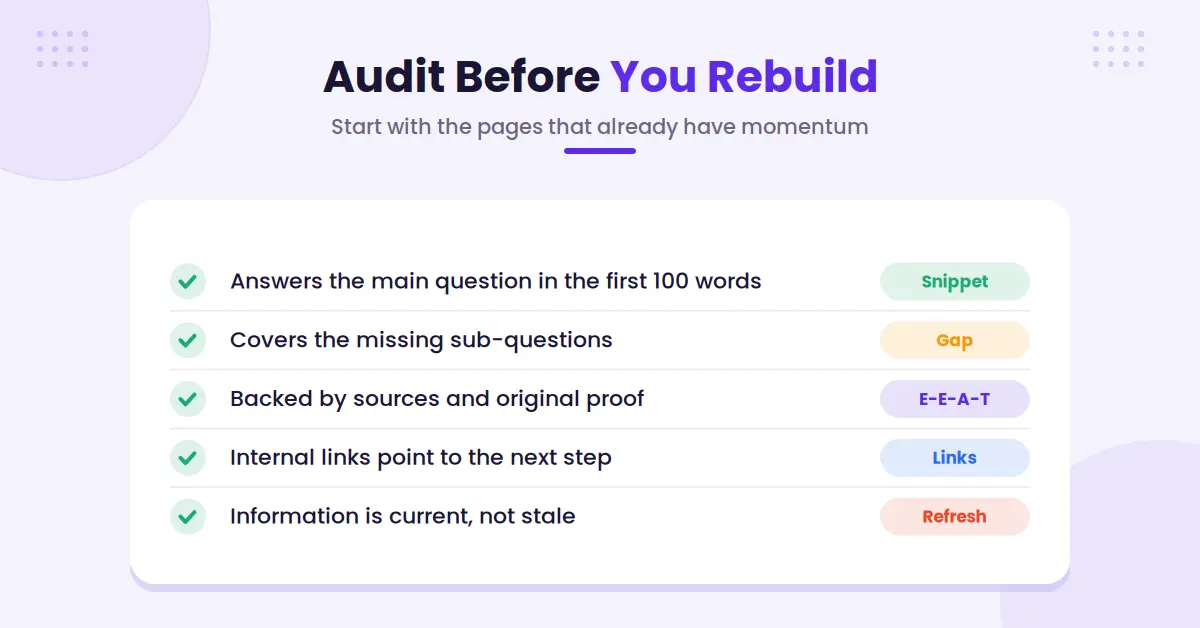
Then ask a few hard questions:
- Does the page answer the main question in the first 100 words?
- Which related questions are missing?
- Does it have sources, expert input, or original examples?
- Are its internal links helping readers find the next step?
- Has the information gone stale?
- Does the format match the intent?
If a page ranks for best HR software for small businesses, don’t automatically add 2,000 words. First look at what the page lacks. It might need a sharper buyer guide, current pricing context, a real feature comparison, or clearer recommendations by company size.
You also need a weekly habit of checking the search results themselves. Search the terms your customers use. Note whether Google shows AI Overviews, videos, shopping results, forums, comparisons, or standard blue links.
Then record what appears and what gets cited. Ahrefs’ analysis of AI Overview citations found the large majority come from pages already ranking on page one, so classic ranking is still the entry ticket. Treat any single screen capture as a snapshot rather than a rule: results change by query, location, device, and time. For the AI-answer half of that habit, the AI Brand Monitor runs your priority prompts on ChatGPT, Gemini, Perplexity, and Claude on a schedule and keeps the history, including which pages the answers cited, so you are comparing scans instead of screenshots.
Track patterns across a focused set of priority queries. Good measures include:
- Organic clicks and conversions by content cluster
- Rankings for the main query and high-intent sub-queries
- AI Overviews appearances for your target searches
- Citation presence when AI answers appear
- AI mentions and overall brand visibility
- Assisted conversions from informational pages
- Content gaps uncovered by sales and support teams
- Which sub-queries your priority pages now appear for, compared with your baseline
A falling click-through rate isn’t automatically bad news. If impressions climb on qualified research queries while clicks hold steady, you are being seen earlier in the journey. Just know that fan-out itself produces no impressions you can see, so don’t read Search Console as a fan-out report. And visibility without business impact isn’t enough either. Tie your reporting back to leads, demos, signups, revenue, or the action that matters to your team.
FAQs About Query Fan-Out SEO
Here are a few common questions about query fan-out SEO.
Is Query Fan-Out SEO Different From Keyword Clustering?
They overlap more than most posts admit. Keyword clustering groups terms by measured search volume and shared intent. Fan-out planning groups the questions a model is likely to generate, most of which have no measurable volume and won’t show up in any keyword tool. The research inputs differ. The deliverable, a topic covered thoroughly across well-linked pages, is largely the same. If you already do topic clusters well, this is a change of emphasis rather than a new discipline.
Clusters organize keywords. Fan-out planning forces you to cover the questions around a topic, not just the one you targeted.
Do I Need a Separate Page for Every Related Question?
No. Put related questions on one page when they share search intent and a reader expects them together.
Create a separate page when the query needs a different format, a deeper answer, or a different next step. A detailed comparison, pricing guide, migration tutorial, and troubleshooting article usually need their own URLs.
Can Existing Content Be Used for Query Fan-Out SEO?
Yes, and it’s often the fastest route. Audit your top pages first. Add missing subquestions, improve weak answer sections, update claims, add original proof, and connect pages with useful internal links.
Old content with existing authority can respond faster to query fan-out than a brand-new post.
Does Query Fan-Out SEO Mean Writing Only for AI Overviews?
No. Write for people who need clear answers. AI search and traditional search engines may cite your content, but the same structure helps standard search results, featured snippets, sales teams, and readers who land directly on the page.
Keep your focus on useful content that earns trust.
Final Thoughts on Query Fan-Out SEO
A content calendar full of disconnected keywords can keep a team busy for months. It won’t always help a customer make progress.
Query fan-out SEO gives each topic a job. One page introduces the problem. Another helps with the work.
Another handles the comparison, cost, or concern that gets in the way.
Build around the questions that lead somewhere, then keep improving the pages that already matter.

RightBlogger Co-Founder, Andy Feliciotti builds websites and shares SEO insights, with a passion for travel and photography.

Automated SEO Blog Posts for Your Site
Research, write, publish, and share from one account.
7-day free trial. Cancel anytime.





Leave a comment