AI Crawler Access for Blogs: What to Allow and Block
Block training crawlers selectively, preserve search discovery for useful public pages, and use logs and WAF rules to verify access.

AI crawlers turn every bot request into a trade. You might gain SEO visibility in AI search results, or hand over content without a clear return.
Good AI crawler access isn’t about allowing every bot or blocking them all. It’s about knowing what each crawler does, what it can actually reach, and whether that access fits your content and business goals.
Start with the bot’s job, then make every AI bot access decision one you can explain six months from now.
Key Takeaways for AI Crawler Access
- GPTBot and OAI-SearchBot have different jobs, so they may need separate rules in your robots.txt file.
- A rule in that file is a request to compliant crawlers. It isn’t a security tool for private pages or customer data.
- Check server or CDN logs before changing anything. A name in the request alone doesn’t prove it came from that company.
- A 403 response, rate limit, JavaScript-only page, or WAF rule can stop a crawler even when access is allowed.
- Don’t block product and pricing pages by default. Keep public, accurate pages available when AI search visibility supports your goals.
Know What AI Crawlers Actually Do
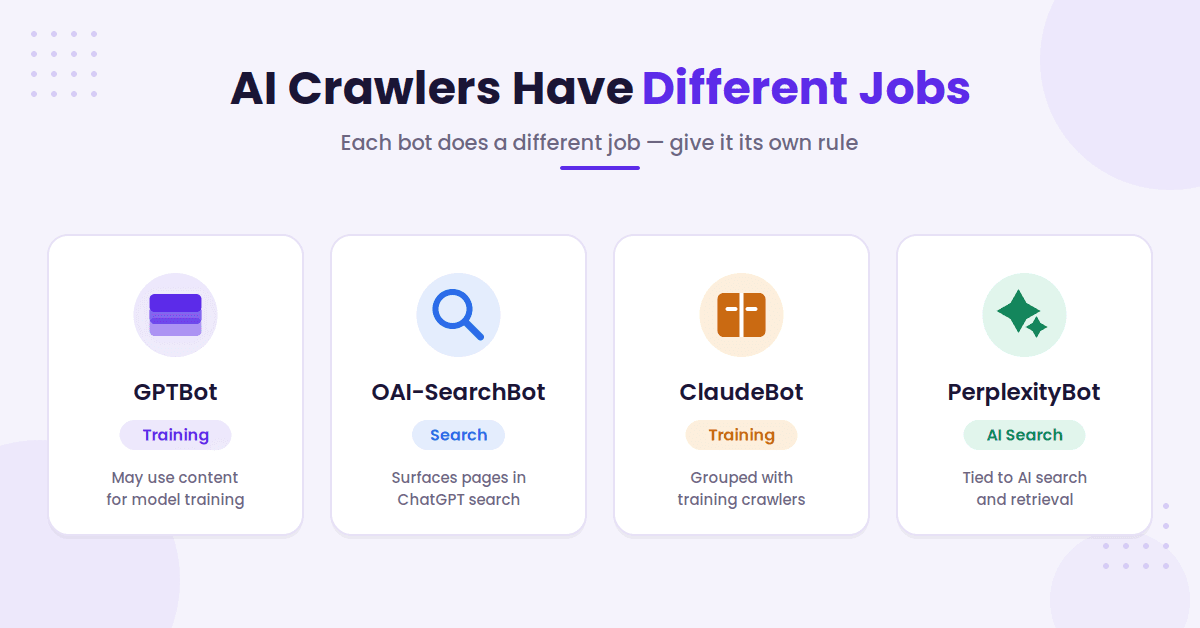
AI crawlers have different purposes. Some collect content for training, while others discover pages for AI search answers.
Treating them as one group is how a small access change turns into a messy policy problem.
GPTBot and OAI-SearchBot Have Different Jobs
OpenAI separates its bots for a reason. According to OpenAI’s crawler documentation, the training crawler handles public content that may be used for model training. OAI-SearchBot supports search discovery.
That distinction gives publishers a useful middle ground. OAI-SearchBot can support live retrieval and help pages qualify for inclusion in a search index. Search-oriented live retrieval differs from training access, so you can block the training crawler while keeping search discovery available.
Don’t lump ChatGPT-User with another user-agent merely because their names appear related. Each bot can have its own access policy.
Treat ClaudeBot and PerplexityBot as Separate Decisions
ClaudeBot is commonly grouped with training crawlers. PerplexityBot is often discussed in connection with AI search and retrieval. Still, don’t rely on a year-old bot chart for a permanent decision.
Provider behavior, names, and documentation can change. Check current guidance, confirm the exact bot name in your logs, and document why you allowed or blocked it.
Allowing a crawler is not the same as earning a citation, referral visit, or conversion. Access is only the first gate. To see whether Perplexity actually sends visits, our guide to checking Perplexity referral traffic in GA4 shows where to look.
Review Bot Access Before You Change Rules
Don’t edit robots.txt because someone on X posted a new list of bots to block. First, inspect how AI crawlers are already using your site.
A blog with a few thousand posts needs a different policy than a small SaaS site with sensitive documentation and a lean server.
Start With Logs, Not a Browser Test
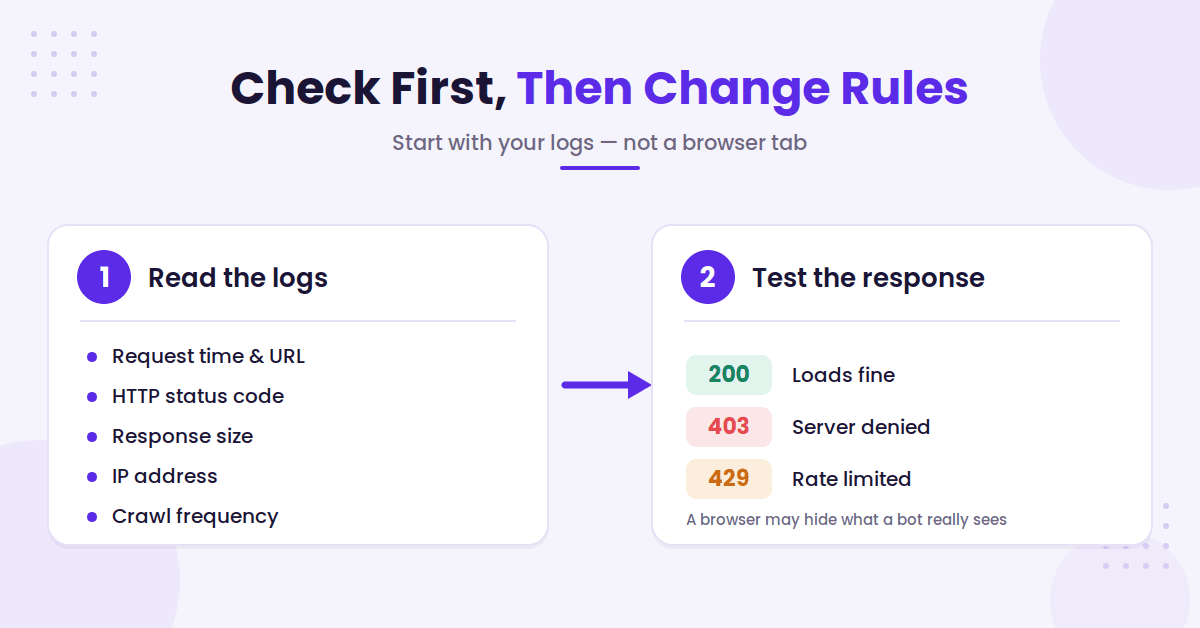
Open your server, CDN, or hosting logs and filter for the exact user-agent. Review the request time, URL, HTTP status, response size, IP address, and crawl frequency.
Log patterns can reveal crawlability signals and distinguish AI traffic from search engine crawlers.
A request that claims to be a provider’s crawler may be spoofed web scraping rather than verified provider traffic. Verify high-volume traffic against published IP information or reverse DNS when the provider supports it.
If you don’t have a regular log review process, learn how to use server logs to analyze bot activity. You’ll spot crawl spikes, wasted requests, and accidental blocks far faster than you will from a browser tab.
Test the Exact Response a Bot Gets
Your browser may load a page perfectly while a crawler gets a 403, 429, redirect loop, or blank JavaScript shell.
Use a crawler access checker to test the requested URL and response status during live retrieval, rather than relying on a browser test.
Check the full request path through your CDN, security plugin, host firewall, and origin server. A 403 means the server denied the request. A 429 means the bot hit a rate limit. Both responses can reduce crawlability, regardless of the site’s crawler directives.
Also check canonical URLs, redirects, and mobile rendering. If your blog’s useful text appears only as JavaScript-rendered content, some crawlers may see far less than your visitors do.
Control AI Crawlers With robots.txt and a WAF
Your robots.txt file is usually located at yourdomain.com/robots.txt. It tells cooperating AI crawlers which paths they may request.
It doesn’t hide content. If a URL must stay private, protect it with login controls or remove it from public access.
Use Small, Clear robots.txt Rules
Keep each decision readable. A future developer should understand your policy without decoding a giant catch-all block.
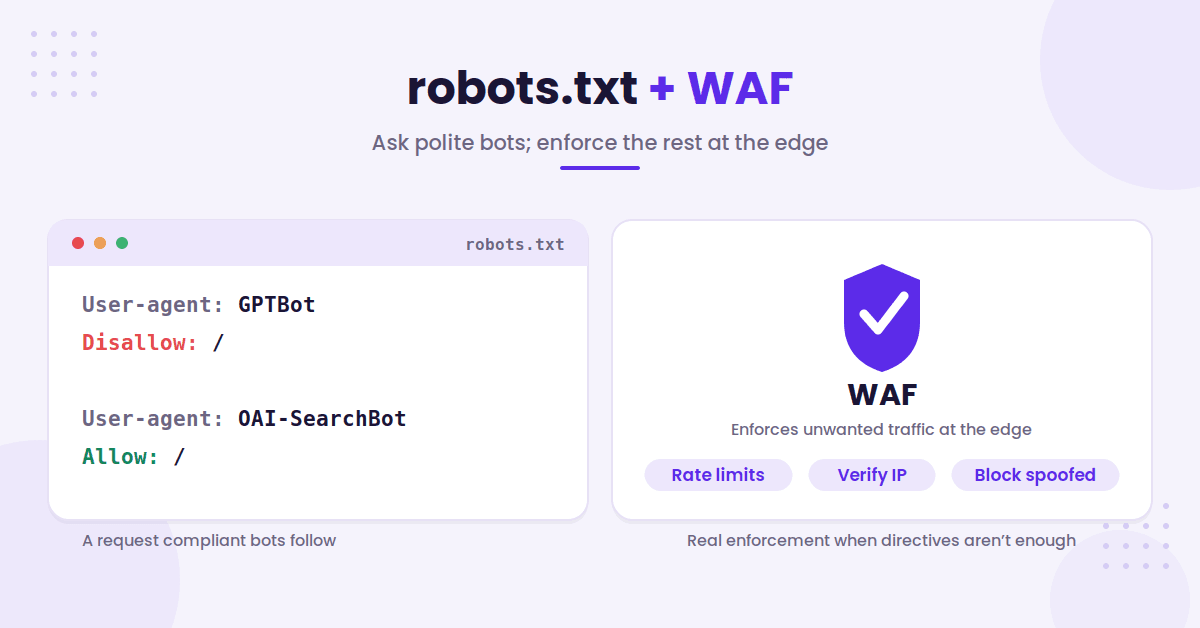
- To opt out of model training access, place
User-agent: GPTBotandDisallow: /in the same rule group. - To allow OpenAI search discovery for live retrieval, give
User-agent: OAI-SearchBotits own group. If no conflicting rule exists,Allow: /makes that choice clear. - For a low-value public path, use narrow, understandable disallow rules such as
Disallow: /internal-search/, not a sitewide block.
Be careful with User-agent: *. A broad Disallow: / can block far more than intended. Review your live robots.txt policy after every CMS, CDN, or security-plugin change. Check the live file, response behavior, and crawlability afterward.
For the basics, this robots.txt file guide explains why crawler directives are useful but never a replacement for real access control.
Since October 30, 2026, robots.txt can also carry an AI training preference that Google and Bing plan to read, through a shared __usage_ai-training group. That group describes how fetched content may be used and leaves crawling alone. Our guide on how to opt out of AI training without losing AI search traffic covers it, along with Bing’s new grounding tags.
Use a WAF for Real Enforcement
Those directives work when a crawler chooses to honor them. A web application firewall enforces unwanted traffic at the edge, including live retrieval requests.
Cloudflare AI Crawl Control can monitor AI crawlers and track compliance with published directives. For tougher cases, pair that view with WAF rules and rate limits to enforce AI bot access.
Don’t allow traffic based on a user-agent string alone. That string is easy to spoof. Use verified crawler controls where available, then inspect the logs after the rule goes live.
A targeted WAF exception is better than turning off bot protection for your entire site.
Decide Which Pages Deserve Access
The right access policy is rarely “allow all” or “block all.” Your best pages, weak pages, sensitive pages, and high-cost pages don’t need the same treatment.
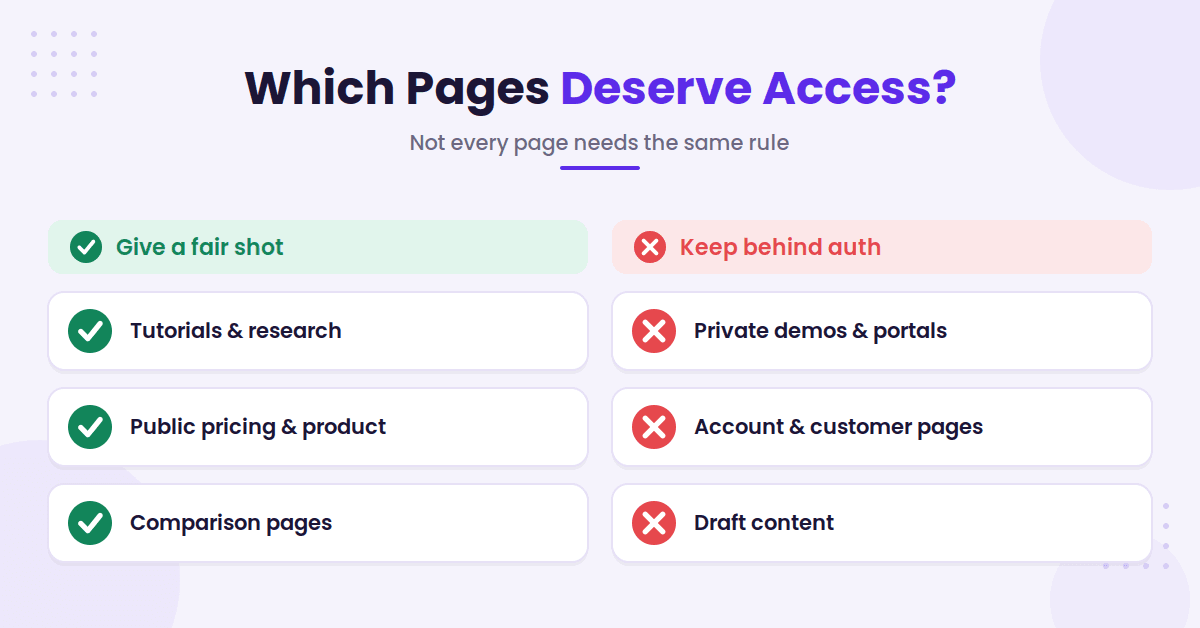
Write down the decision by content type and reflect it in robots.txt. This keeps one rushed technical edit from affecting your entire publishing strategy.
Give Helpful, Public Pages a Fair Shot
Original tutorials, data-backed research, glossary pages, and well-maintained comparisons are good candidates for live retrieval by AI crawlers.
These pages answer real questions in generative AI results. They give AI systems clear facts to reference and may earn inclusion in a search index. Pair crawlability with concise answers, strong headings, working canonical tags, and direct internal links. This supports SEO visibility in generative results.
Your generative engine optimization guide is also a useful LLM SEO guide. It connects technical access with content that AI search systems can understand and cite.
If the concern is lost traffic, don’t react with panic. A publisher-focused view of AI traffic protection is a useful reminder to measure referrals, branded searches, and conversions before changing sitewide rules. Review those signals before blocking public pages that support discovery or buyer intent.
Don’t Hide Every Sales Page
Bottom-of-funnel pages often answer the questions buyers ask before they convert. Pricing, product, services, and comparison pages can deserve live retrieval by AI crawlers when the information is public and current.
Blocking GPTBot while allowing OAI-SearchBot or PerplexityBot can be a reasonable policy for many brands. It separates model training concerns from possible AI search discovery.
Keep private demos, account pages, customer portals, and draft content behind authentication. Never depend on AI crawler restrictions to protect content you wouldn’t want publicly accessible.
Also remember that Googlebot and other search engine crawlers are governed separately from AI-specific decisions. A Google-Extended rule isn’t the same thing as blocking Google Search.
A Sensible Blog Policy
The goal isn’t to fight every bot. Review how AI crawlers affect your content and server load.
Your policy should reflect the live retrieval opportunities and SEO visibility your business actually wants.
Review AI crawler access in logs first. Then use robots.txt for clear guidance and a WAF when traffic controls must be enforced, while monitoring crawlability.
A good policy stays small, documented, and easy to revise when bots change.
FAQs About AI Crawler Access
These answers explain how AI crawlers are handled in common blog scenarios.
Does Blocking GPTBot Block ChatGPT Search?
Not necessarily. GPTBot and OAI-SearchBot are separate OpenAI crawlers with separate robots.txt controls. You can block the training crawler while allowing OAI-SearchBot to discover pages for search-related live retrieval. That discovery may help a page reach a search index, but it doesn’t guarantee citations or rankings.
What Happens When AI Crawlers Get a 403?
A 403 tells the crawler that the server denied access to that request. Check your CDN, WAF, hosting firewall, security plugin, user-agent rules, IP rules, and bot settings before assuming the issue came from another source.
Should I Block PerplexityBot From Product Pages?
Not by default. If a product page is public, accurate, and built to answer buyer questions, it may be worth allowing search-oriented discovery and live retrieval. Block access when the content is private, expensive to serve, incomplete, or not meant for public reuse.
Final Thoughts on AI Crawler Access
The goal isn’t to fight every bot. Review how AI crawlers affect your content and server load.
Your policy should reflect the live retrieval opportunities and SEO visibility your business actually wants.
Review AI crawler access in logs first. Then use robots.txt for clear guidance and a WAF when traffic controls must be enforced, while monitoring crawlability.
A good policy stays small, documented, and easy to revise when bots change.

RightBlogger Co-Founder Andy Feliciotti focuses on website development and shares his photography and travel adventures on YouTube and his blog.



Automated SEO Blog Posts for Your Site
Research, write, publish, and share from one account.
7-day free trial. Cancel anytime.





Leave a comment