How to Migrate Your Blog Without Losing Rankings in 2026
Map every old URL to its closest match, preserve trusted content and metadata, then monitor Search Console daily for weeks.


I’ve seen blog moves wreck organic traffic and search engine rankings faster than a bad algorithm update. Most of the damage didn’t come from Google. It came from rushed launches, missing redirects, and pages that lost their history overnight.
The good news is that blog migration SEO is still manageable in 2026 if you plan the move like a publisher. Whether you’re switching domains, swapping platforms, or doing a full site migration, the playbook is the same: keep the pages Google already trusts easy to find, easy to crawl, and clearly connected to their new homes.
Key Takeaways for Blog Migration SEO
- Save a full backup before you change domains, platforms, themes, or URL paths.
- Map every old URL to the best new URL, then use 301 redirects.
- Keep high-performing content, titles, canonicals, and internal links stable at launch.
- Submit fresh sitemaps and watch Google Search Console daily during the first few weeks.
Plan the Move Before You Touch Anything
A migration should start with an SEO audit and a full content inventory. Export top pages, rankings, backlinks (the Backlink Checker works for this), conversions, and crawl data to get a clean before-and-after view and avoid guesswork later. If you also need to audit keyword positions, the free keyword research tools roundup covers the options worth using.
Pages should also be sorted by value. Some posts bring most of the traffic, others attract backlinks, and a few drive signups or sales. Those priority pages deserve extra care because they carry the site. If you’re using the migration as a chance to restructure, a topical authority map is a clean way to decide what stays, what merges, and what gets cut.
The basics still win. Google wants clear signals, stable content, and crawlable pages. That’s why it’s best to keep design changes, URL structure changes, and CMS migration separate when possible.
Changing everything at once makes every problem harder to trace.
Before launch, a staging environment should be built and blocked from indexing. Then crawl it and check:
- Title tags and metadata
- Canonicals and internal links
- Mobile layout and page speed
- Structured data as part of technical SEO
Keep a spreadsheet with every planned URL change.
For a solid pre-launch framework, Bruce Clay’s SEO migration plan makes the same case: measure first, then move.
Build a URL Map and Redirect Every Moved Page
The biggest mistake I see is skipping a proper redirect map and resorting to lazy 301 redirects. A post about email marketing gets sent to the homepage, or ten old URLs all point to one category page.
Google can tell when the match is weak, especially when the URL structure doesn’t align, and rankings often slip.
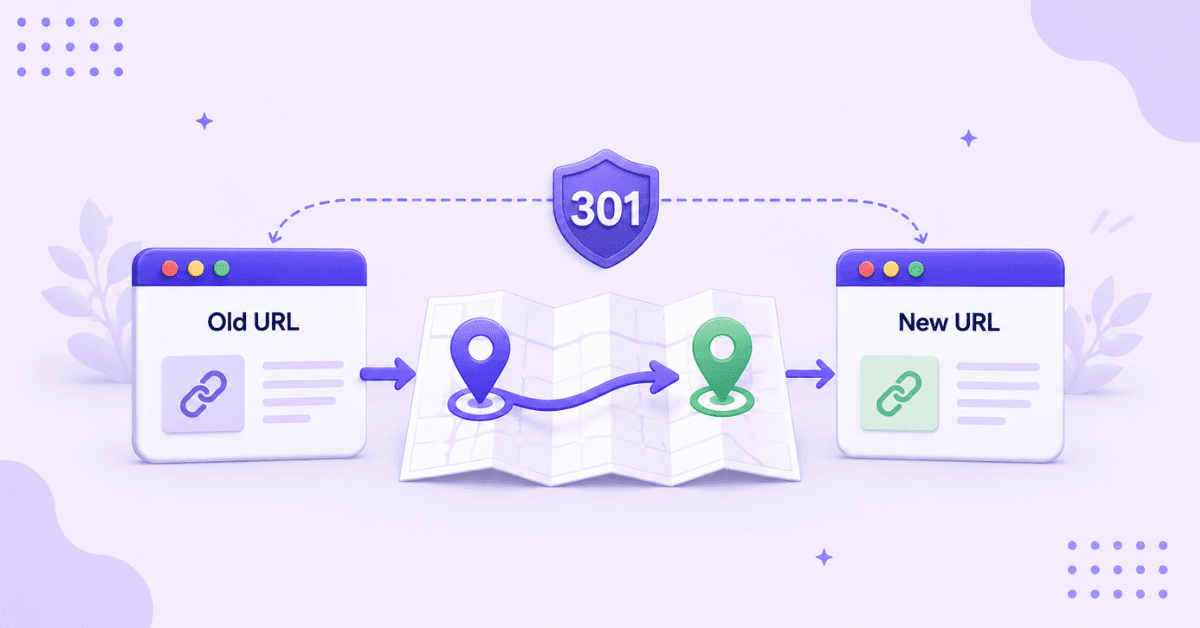
I map each old URL to the closest new URL. If the post still exists, I set up one-to-one 301 redirects. If I merged two thin posts into one stronger page, I point both old URLs to that new post.
When a page has no good replacement, I let it return a real 404 or 410. A proper redirect map like this helps preserve your site structure and link equity.
A homepage redirect is not a recovery plan. It leaks trust and confuses readers.
I test redirects before launch and after launch. I look for:
- Redirect loops and chains
- Mixed protocols
- Uppercase quirks
- Trailing slash problems
Internal links should also be updated to point directly to new URLs (the internal linking playbook covers how to do this in bulk). A site full of internal redirects wastes crawl time and slows recovery.
If you’re moving to a new domain, keep the old domain live and the redirects in place for a long time. Google’s own site move guidance says to keep them for at least a year, long enough for it to transfer every signal to the new URLs. For a domain change, also use the Change of Address tool in Google Search Console, which tells Google the move is intentional and helps it shift your rankings to the new site faster. The same patience applies to any large migration: even when only the platform changes and the URLs stay the same, the crawl pattern shifts and Google needs time to reconfirm everything.
Protect the Signals Google Already Trusts
A migration is not the best time to rewrite top-performing content. If a post ranks, its topic, headings, and key metadata like title tag and meta description should stay close to the original version.
Once traffic stabilizes, improvements can be made with less risk. It’s also important to carry over:
- Canonical tags
- Schema markup
- Image alt text
- Publish dates (when relevant)
These elements help preserve topic authority and prevent indexing confusion. Small technical misses can create duplicate pages or disrupt rankings.
XML sitemaps matter here, too. After the move, configure blog sitemaps for faster indexing after migration, then submit them in Google Search Console. Keep the sitemap clean, with only live, canonical URLs.
One more thing, don’t orphan key posts. If the old site linked to a guide from multiple places, the new site shouldn’t bury it in an archive. Internal links pass context along with clicks.
Launch Quietly and Watch the Right Reports

Calm launches early in the week are ideal. This gives enough time to fix issues while the team is available. Right after go-live, test:
- High-value pages
- Redirects and canonicals
- Robots.txt file and sitemap access
- Google Analytics and Google Search Console verification
Post-launch monitoring should happen daily. Track clicks, impressions, crawl errors, coverage, and server response codes. Running SEO reports on your top moved pages is a fast way to spot which ones lost keyword coverage in the move; the SERP Preview tool also helps you verify titles and metas render correctly after launch.
Some fluctuation is normal. A temporary dip doesn’t mean the migration failed.
The delayed drop is often more important. Search traffic can dip a few weeks later, after Google finishes recrawling your site and matching every old URL to its new home. That is normal reprocessing, so keep monitoring instead of reacting to the first wobble.
If something looks off, compare live pages against the baseline. Missing titles, broken 301s, and lost internal links usually show up quickly when monitored closely.
FAQs About Blog Migration SEO
The questions readers ask most often:
How Long Does Recovery Take After a Blog Migration?
Small blogs can see organic traffic and search engine rankings settle in a few weeks. Bigger sites often take longer because Google needs time to crawl, process redirects, and replace old URLs in the index.
Should I Redesign and Migrate at the Same Time?
No, it’s better to avoid redesigning and migrating at the same time when possible. If traffic drops, having one likely cause instead of multiple changes makes it easier to debug and fix.
Can I Delete Old Posts During a Migration?
Yes, but only when the page has no real value or a better replacement exists. If an old post has links, rankings, or steady traffic, I either keep it or set up a 301 redirect to the closest matching page.
Final Thoughts on Blog Migration
A good migration feels boring. That’s a compliment. The safest moves are planned, mapped, tested, and watched.
When I migrate a blog, I don’t chase clever tricks. I protect old URLs, preserve trusted signals, and fix issues fast. That’s still the cleanest path to strong blog migration SEO in 2026.

RightBlogger Co-Founder, Ryan Robinson teaches 500,000 monthly readers how to grow online businesses and writes about protecting blog traffic and rankings.


Automated SEO Blog Posts for Your Site
Research, write, publish, and share from one account.
7-day free trial. Cancel anytime.





Leave a comment