SEO Reports in RightBlogger: Optimize Content for Google + AI
See how competitor analysis, keyword gaps, and an 80–95% score target guide edits that can earn rankings and AI citations.


Getting your content to rank at the top of page one on Google (and recommended in AI platforms like ChatGPT and Google’s AI Overviews) can feel like a moving target. Truth is, ranking high takes more than just words on a page, but it’s not an impossible equation to figure out.
🔑 Never agonize again over whether your blog posts are truly SEO-optimized for both Google and the new breed of AI search engines (like ChatGPT). Whether you’re using our full Autoblogging feature or creating blog content one-at-a-time, I’ll give you a tour of RightBlogger’s SEO Reports that’ll help you create highly optimized content that not only ranks, but also gets cited by large language models like ChatGPT and Google’s AI Mode. If you wanna reach more people on Google and beyond, watch my quick tutorial to using SEO Reports today (there’s a full detailed training video from our live class that goes even deeper, below):

The struggle of SEO (and LLM) optimization is one every blogger, marketer, and business owner wrestles with, especially when you don’t know where you stand or what’s missing.
👋 Included on every paid plan. SEO Reports are available to all paid RightBlogger customers, from 30 reports/mo on Solo up to 300 reports/mo on Agency.
Looking for a report on how your whole site is doing in Google Search instead? That’s our Search Console reporting, covered further down.
What are SEO Reports and Who Can Use Them?
First, a quick note on access: every paid RightBlogger plan includes SEO Reports. The Solo plan ($49/mo billed annually) comes with 30 per month, Pro ($69/mo billed annually) gets 90, and Agency ($199/mo billed annually) includes 300. The Reports Used counter shows how many you have left, and reopening one of your Previous Reports doesn’t use another. The reports rely on detailed research and technical analysis from multiple data sources running behind the scenes, and they are well worth the investment.
Here’s a quick preview of what an SEO Report looks like inside RightBlogger. You can activate an SEO Report using any tool that has an Editor tab, including our Article Writer, Video to Blog Tool, Rewriter, Paragraph Tool and more:
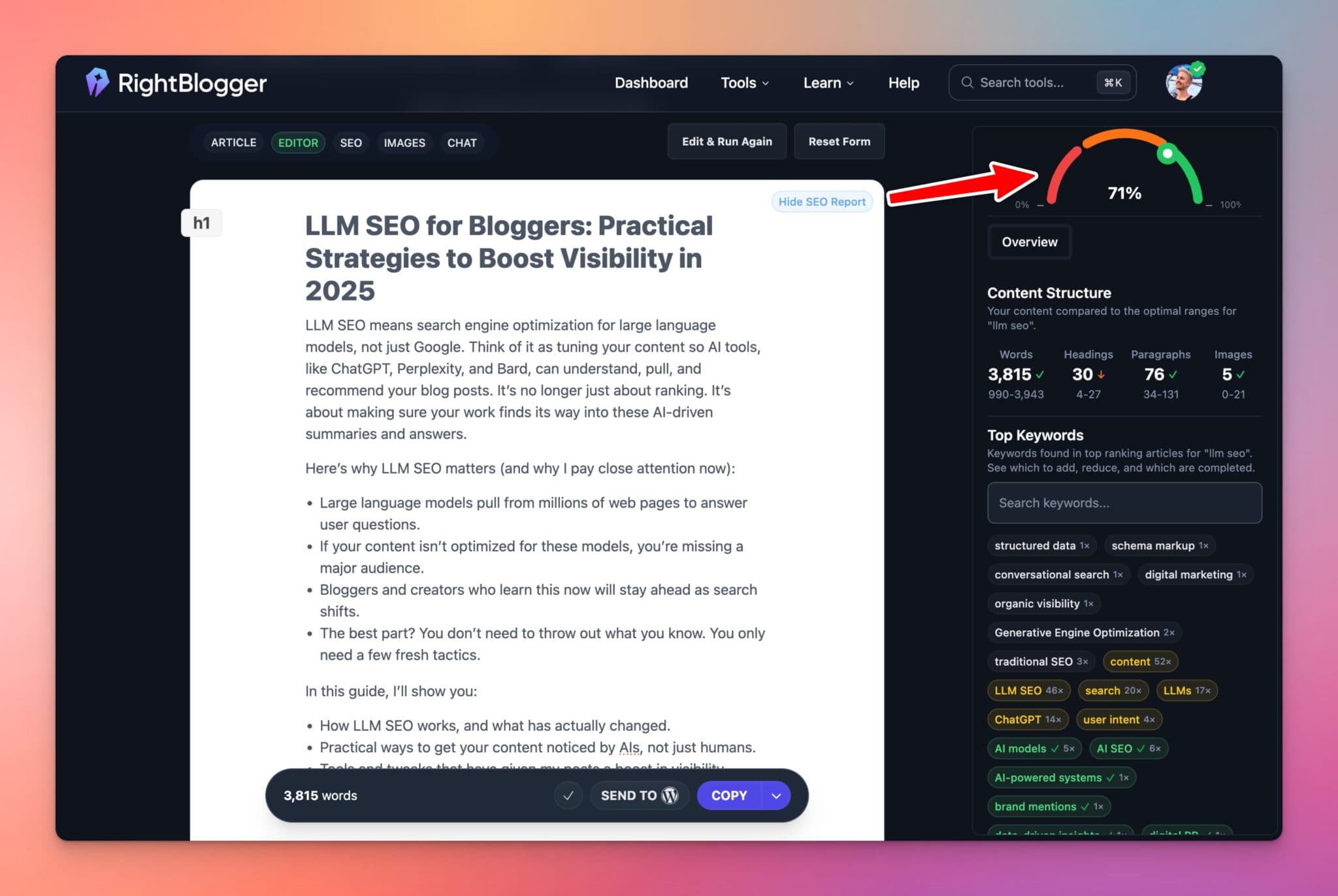
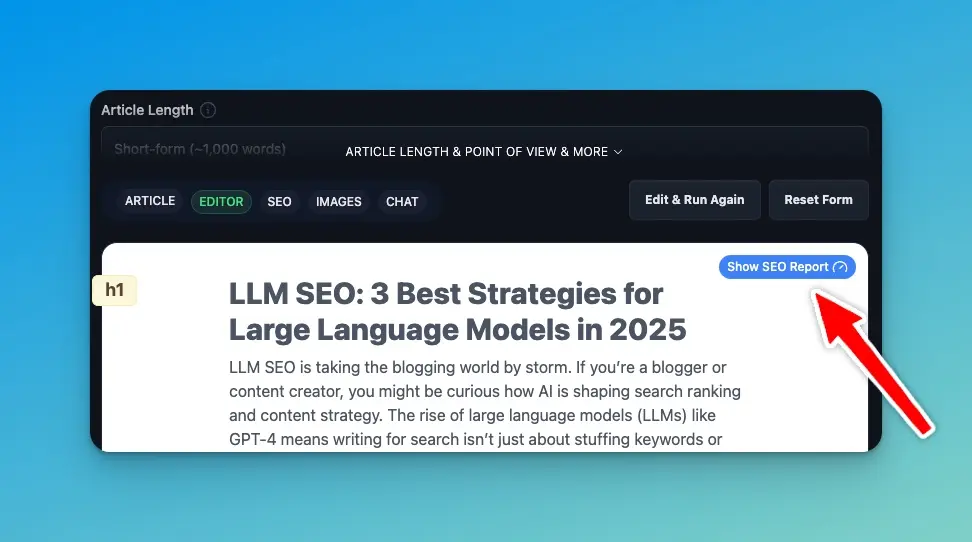
Here’s a quick breakdown of how SEO Reports work. Once you’ve written a blog post or piece of content (whether it’s generated from scratch using the Article Writer, from a video you’ve made, or just a quick rewrite), click the SEO Report button (the gauge icon) at the top right of the Editor tab:
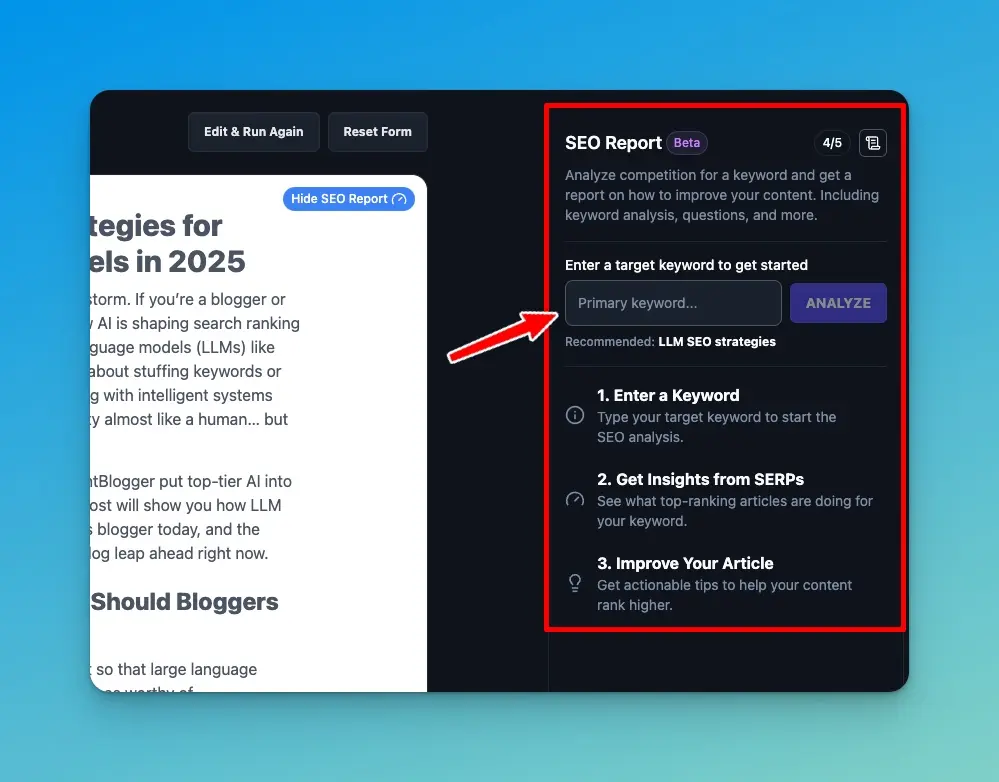
That opens the SEO Report panel. Click Create SEO Report, and you’ll enter the keyword phrase you’d like to optimize your content to rank for:
Be sure you’re choosing a keyword phrase that people actually search for, so you’re meeting a real need with your content. Turn to our Keyword Research and Keyword Cluster tools for data-backed suggestions.
Now, to generate an SEO Report here’s what you’ll do:
- Enter your Target Keyword (RightBlogger always recommends one in case you’re feeling unsure), then pick your Target Country and Target Language
- Click Generate Report and the SEO Report will analyze all the top-ranking content for this topic, understand the intent of the keyword, look at average word count, headings, content structure, and more, to learn why these competitors are currently ranking at the top of Google search results.
If you’re drawing a blank when it comes to keyword ideas, I recommend taking our Keyword Research tool for a quick spin. It’ll give you relevant suggestions that are tailored to your niche and already have proven search demand. And if you want further reading, I also wrote a world-class guide to keyword research, packed with insights.
Understanding the SEO Report Elements: What You See & What Matters
The real strength of RightBlogger’s SEO Report is how clear it makes your optimization process, backed with easily understandable insights.
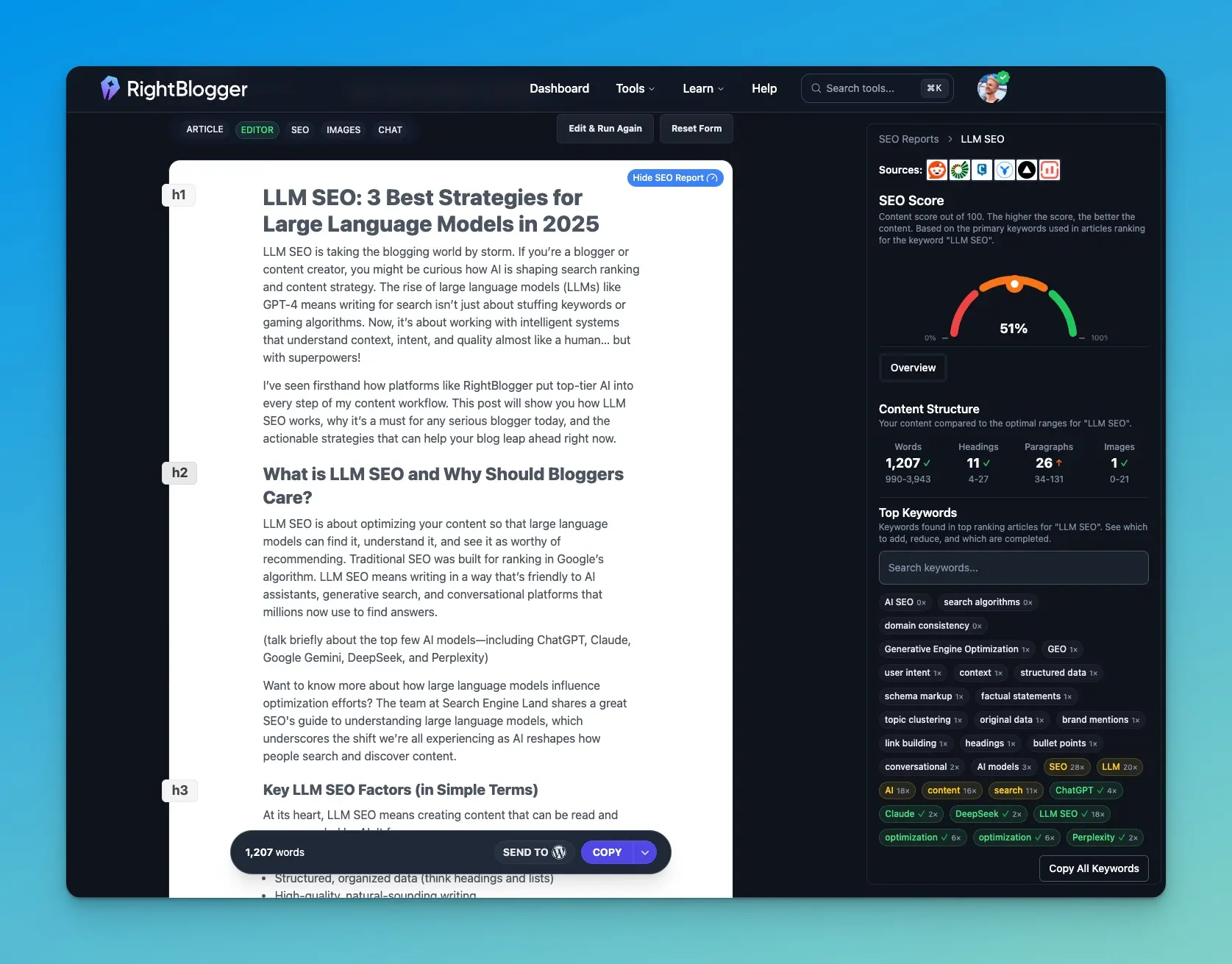
Let’s break down each of these elements, so you fully understand how they’ll impact the potential for your content to rank high and get AI recommendations.
Top Sources
Right at the very top of your SEO Report, you’ll see 5-6 top sources. These are the articles (or pages) that currently rank highest in Google search for the keyword phrase you’re optimizing for:
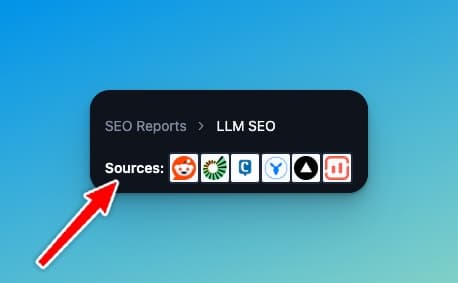
Hover over any of those source icons to get a preview of the article’s headline. You can also click on any of those icons to open them in a new tab and study what’s working so well with this content.
There’s always something to learn here. Are they using numbers in the headline, do they have the current year, is there a variation of your keyword phrase in the headline, or is there something else to take away about the article as a whole? Watch my full in-depth tutorial for a real life example of this analysis.
SEO Score
Your post automatically gets a score based on how well it uses the report’s suggested keywords: how often each one appears compared with the top-ranking pages, with the most important keywords weighted higher. Using a keyword too often lowers the score, too. It shows red from 0 to 30, orange from 31 to 70, and green above 70.
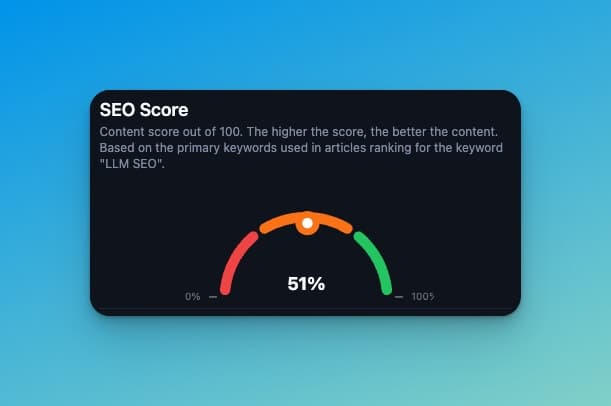
👋 Important: The goal isn’t to optimize your content to 100%. I find that landing in the 80-95% score range puts you in the strongest position to have content that ranks well (while still writing for real humans too), without over-optimizing.
Content Structure
This section lays out the major structural elements of your content (word count, headings, paragraphs, and images) compared to the sources that are already ranking at the top of Google search results.
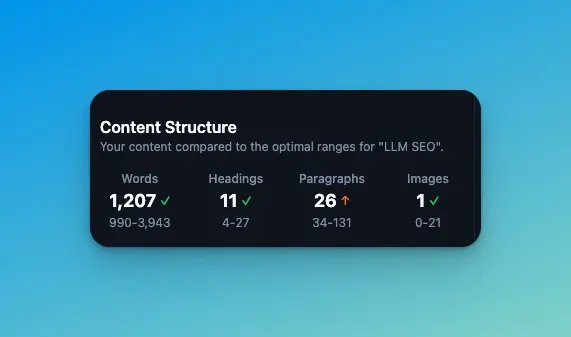
The goal here isn’t to always be exactly in the middle of these ranges. Sometimes your content will turn out a little shorter or a little longer than the averages, based on what you feel it really needs in order to be useful to people. That’s a good thing. Just make sure you’re generally within or somewhat near these ranges for key structural elements, and Google will be primed to consider your content for quicker ranking.
Top Keywords
These matter a lot, in fact this is by far the most important element of the SEO Report. Your report shows the must-have terms and the ideal number of mentions you’ll want to aim for, in order to position your content for SEO success.
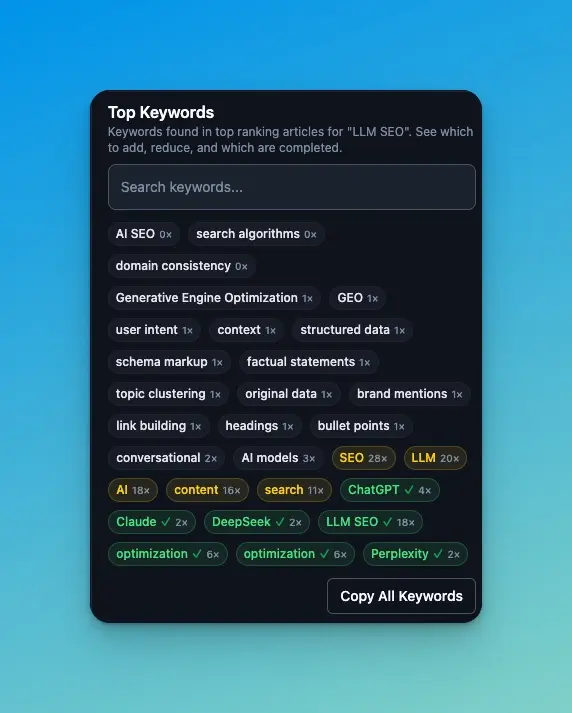
For example with the report above, you can see that the report suggested a specific number of uses of the keywords “ChatGPT,” “Claude,” and “structured data” for my sample post on the topic of LLM SEO.
🚨If you see zeros next to any of the keyword suggestions from your SEO Report, it’s time to add some new content to your article that’ll help fill those gaps. Each missing keyword is a chance to improve your content and potentially leapfrog the existing top ranking competitors. Watch my full video tutorial for guidance on how to do this.
If you want a bigger picture for your strategy or need inspiration for new content angles, check out our list of free AI SEO tools to try this year, a guide that’s packed with useful resources.
Making Strategic SEO Edits & Improvements for Google and LLMs
Once I see what’s missing based on the analysis of my SEO Report, I’ll get to work on specific improvements that give my content a greater shot at ranking straight out the gates. Watch my full tutorial video below to see how I do this.
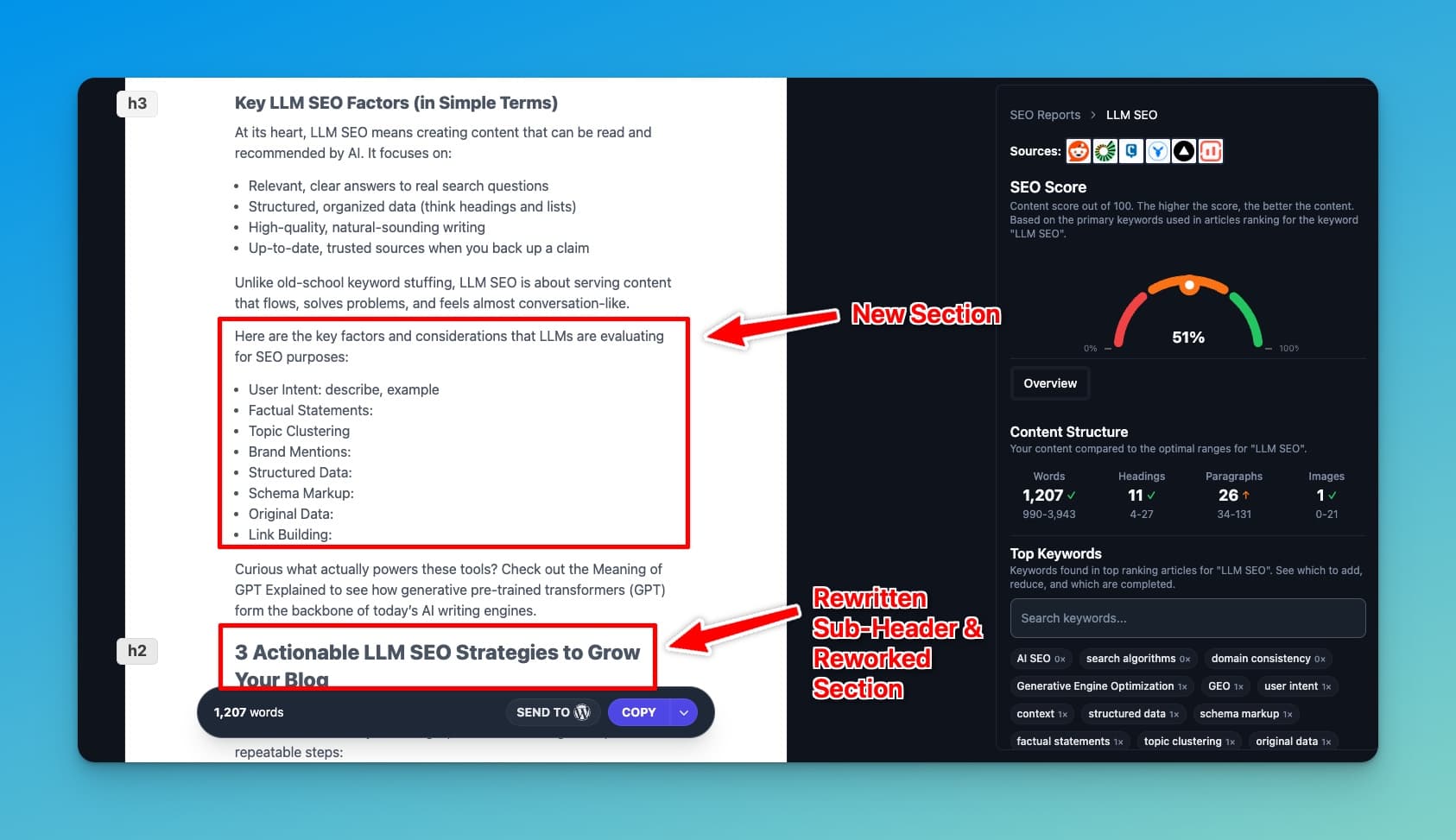
Here are some specific actionable changes I’d make to our example article on LLM SEO, based on the SEO Report we’ve used in this guide:
- Adjust the title and meta description. Use the SERP Preview tool to see how the snippet will render in search results and make sure it isn’t too long.
- Add meaningful new content for the underused keywords. Don’t just stuff them into the article. Create new header sections, add bullet lists, and drop in a comparison table where it helps clarity.
- Check whether the post actually answers the main questions people ask. A clear intro with bullet takeaways satisfies readers and AI LLMs alike, since both want immediate answers.
- Use numbers and the current year in your headlines and header sections where it fits (for example, “3 Best Strategies for LLM SEO in 2026”). Google, AI models, and readers all favor the clarity of lists, and AI systems seem to cite them more often than other content formats.
Bonus Tip: Add visuals, screenshots, or a quick video explanation of the topic you’re creating content about. Even if you use just one AI-generated image or a short screencast showing your process for the topic at hand, having standout imagery (and ideally video) will almost always bump up engagement and time on page. Increasing these figures will translate directly to higher ranking potential.
Full In-Depth SEO Report Training (Video Tutorial)
For a much more in-depth tutorial on using SEO Reports, including a behind-the-scenes look at the ways we turn report insights into actionable improvements to a piece of content, watch the recording of our recent live class right here:

If you’re serious about getting more search traffic or standing out as a recommended source in AI engines, SEO Reports are a cheat code to getting there faster.
Recent Updates and What’s Next
SEO Reports have evolved since launch. Here’s what has shipped:
- Auto-Optimize (shipped). Automatically improve and SEO-optimize your content with the click of a button, based on the analysis of an SEO Report. Saves the time that used to go into making edits by hand. By default it also adds an FAQ section and Key Takeaways if your article doesn’t have them (change that with the gear icon, where you can also add your own instructions), and it finishes once your score reaches 85%. See our walkthrough on auto-SEO-optimizing content with AI.
- SEO Reports during creation (shipped). Check Use SEO Report During Creation? in the Article Writer or Video to Blog Post, and RightBlogger analyzes your article with an SEO Report and auto-optimizes it right after it’s generated, using one SEO Report credit. Automations can do the same for every post they write.
- What else? Anything else you’d like to see from SEO Reports? Tell us in the comments or email contact@rightblogger.com.
RightBlogger now also lets Pro and Agency plan users add team members to your account, which is perfect if you have a virtual assistant or collaborator you’d like to invite in to help streamline your content processes (without password sharing).
Sharing Google Search Console Results with Clients: White-Label SEO Reports
Quick clarification, because these terms get mixed up: the SEO Reports covered in this post are the in-tool optimization reports that score and improve a single piece of content while you’re writing it. They’re for the writer, not the client.
If you’re an agency or freelancer who also needs to share performance data with clients (the GSC traffic, ranking changes, top pages, and search visibility over time), that’s a separate product: RightBlogger’s white-label SEO reports. Connect a client’s Google Search Console and you get a live report with clicks, impressions, rankings, and top pages and queries, plus views that flag quick wins, content decay, keyword cannibalization, and traffic by site section. Share it as a live link or a PDF with your logo and colors (and on the Agency plan, from your own domain) instead of the monthly spreadsheet export. If you’d rather ask questions about that data yourself, you can connect Search Console to Claude with the RightBlogger MCP.
The two work well together. Use in-tool SEO Reports to optimize the content you’re publishing for a client. Use white-label SEO reports to show that client what the published content is actually doing in search.
Final Takeaways on Using SEO Reports to Drive More Traffic
Use RightBlogger’s SEO Reports to spot gaps in your content, improve your existing library of blog posts for higher SEO rankability, and understand what will actually help your content get ranked & cited faster.
If you want a head start, try an SEO Report with your next article. Experiment with headline formats, make sure you’re using all the most important keywords throughout your article, and follow the actionable insights from your report. I know you’ll see a difference in the results.
Remember that SEO doesn’t have to be mysterious or overwhelming, even as AI continues to shake things up. Stay current with these changes by joining our premium SEO Mastery Course (for Pro and Agency plan subscribers), where I share over 3.5 hours of actionable instruction on where to focus your SEO efforts in the age of AI.
We’ve also learned a ton over here about getting content in front of both Google and LLMs, and we share more in our guide to Generative Engine Optimization Techniques if you want to stay ahead.
Blog Automation That Keeps Your Posts Ranking

RightBlogger finds keywords, writes SEO articles, and publishes them to your blog. Then its Site Agent uses your Search Console data to keep older posts in shape, adding internal links, sharpening weak meta descriptions, and fixing stale years and broken links. Join 51,000+ bloggers using it to grow traffic from Google and ChatGPT.

Article by
RightBlogger Co-Founder, Ryan Robinson teaches hundreds of thousands of readers how to grow online businesses and create content that ranks.




Automated SEO Blog Posts That Work
Try RightBlogger for free, we know you'll love it.
7-day free trial. Cancel anytime.





Leave a comment
You must be logged in to comment.
Loading comments...