How to Fix Soft 404 Errors Without Losing SEO Rankings
Match the URL to its purpose: improve valuable pages, redirect close substitutes, or return 404/410.


Nothing tanks trust faster than a blog page that looks live but acts dead to Google. I’ve seen soft 404 error show up in Google Search Console after content pruning, weak redirects, and thin archive pages.
The good news is simple: when I fix soft 404 issues the right way for search engine optimization, rankings usually settle because Google gets a cleaner signal. The goal isn’t to hide the warning, but to make the URL tell the truth.
Once that logic is clear, the cleanup becomes much easier and more effective.
Key Takeaways for Fixing Soft 404 Blog Pages
- A soft 404 usually means the URL returns 200 OK, but the page looks empty or like thin content.
- If the page still matters, improve it and keep the URL.
- If a close replacement exists, use a 301 redirect.
- If the page is truly gone, return 404 Not Found or 410 gone.
- After the fix, update links, sitemaps, and request a recrawl.
Why Google Flags a Blog Page as Soft 404
A soft 404 error is Google’s way of saying, “This page claims to exist, but it doesn’t look useful.” The HTTP status code should match the page’s real state to avoid triggering a soft 404 error.
On blogs, I usually see this after deleting posts, leaving empty tag pages or category pages live, or publishing search-result URLs that say “no posts found” while returning a 200 server response code. A page can load in the browser and still get flagged if it shows thin content or low-quality content, or if the redirect target feels irrelevant.
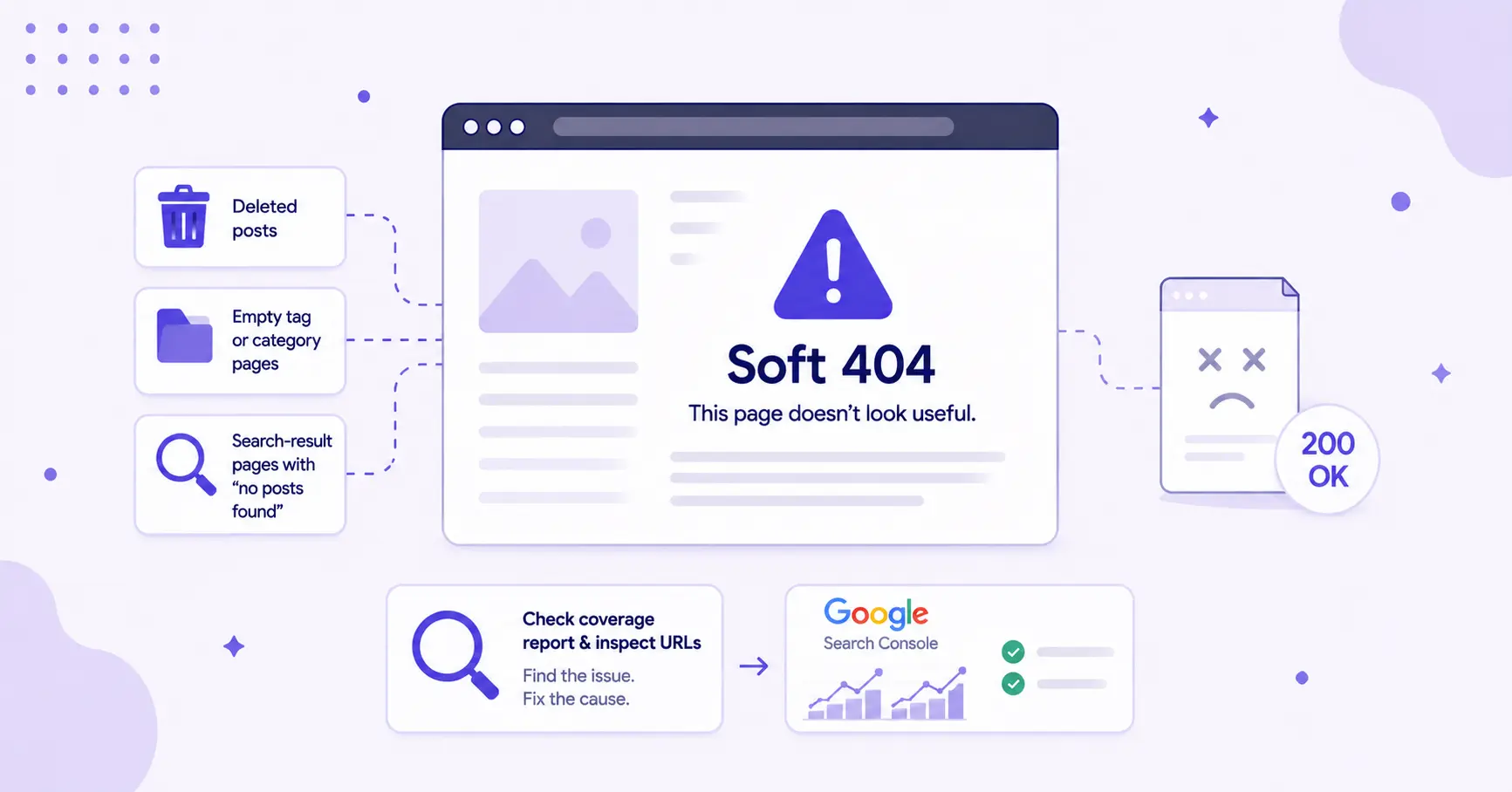
These junk URLs can spread quickly and waste crawl budget, especially on large blogs. That’s why I keep crawl controls tight, and a quick read on robots.txt explained helps if you’ve never audited archive or search paths before.
Google’s 404 guidance is still the best gut check. A real 404 is fine when the page shouldn’t exist, but problems start when a dead or useless page keeps pretending it’s healthy.
In Google Search Console, I check the Page Indexing report and review affected URLs one by one using the URL Inspection tool. This helps determine whether the issue is a content problem, a status-code problem, or both.
Choosing the Right Fix for Each Soft 404 URL
Fixing soft 404 pages should never rely on a single blanket solution. Sending every soft 404 to the homepage is the SEO version of hiding a crack with paint, and Google notices it.
This approach also hurts user experience, since readers don’t benefit from being redirected to an unrelated page. Each URL should be evaluated based on its intent, content value, and relevance.
Improve the Page When the Topic Still Matters
If the post still targets a keyword or question I care about, I keep the URL and rebuild the page. Usually that means stronger headings, fuller answers, fresher examples, and a clearer match to search intent. The Article Writer is useful here for spinning up a refreshed draft in minutes; just remember the fix for a thin page is usually more substance.
Use a 301 When a Better Page Already Exists
Sometimes I merge two overlapping posts to avoid duplicate content or replace an outdated tutorial with a better version. Then I set up a 301 redirect via CMS settings to the closest matching post. The category page is too broad, and the homepage is worse. Relevance matters most if you want to fix soft 404 without bleeding traffic. I always confirm the 301 redirect is live before moving on.
Return 404 or 410 When the Content Is Gone for Good
If the page has no replacement and no future value, I let it die cleanly. A proper 404 Not Found, or 410 gone if I want to be explicit, is better than serving a blank shell with a cheerful theme header on top.
For pages that need to exist for users but shouldn’t rank, like empty searches or thin utility archives, I usually add a noindex tag and keep them out of the sitemap. That prevents Google from treating junk URLs like core content.
The best fix is the accurate one.
Protect Rankings While Google Reprocesses the Page

After the main fix, run a site audit using tools like Screaming Frog to identify indexing issues. Supporting signals should then be cleaned up by updating internal links and removing dead URLs from the sitemap. Canonicals should also point to the final version.
If needed, an XML sitemap setup guide can help reinforce proper structure and indexing signals. These updates ensure Google receives consistent and accurate information across the site.
Next, inspect the URL in Google Search Console, click validate fix, and request indexing for pages that matter. This can speed up re-indexing while supporting overall site health, including mobile-first indexing and Core Web Vitals.
Indexing requests should be used selectively and only after meaningful changes. Overusing them does not improve results and can dilute their effectiveness.
Performance should then be monitored over the following weeks by tracking impressions, clicks, crawl status, and indexing issues. If a redirect was applied, confirm that the destination page is capturing the traffic. For ongoing pre-publish optimization on the rebuilt pages, our guide on SEO Reports in RightBlogger covers how to score and improve content before it ships.
Focusing only on error counts can miss the bigger picture. The goal is to ensure rankings, traffic, and relevance are properly maintained.
FAQs About Fixing Soft 404 Errors
Here are a few questions that may help you.
Can a Soft 404 Error Hurt Rankings?
Yes, a soft 404 error can hurt rankings if the flagged URL was supposed to rank. It can lead to reduced crawl attention or unintentional deindexing because Google sees it as low-quality content that’s empty, misleading, or weak.
Should I Redirect Every Soft 404 to My Homepage?
No, you should not redirect every soft 404 to your homepage. Redirects should only be used when the destination is a close substitute, since weak homepage redirects create a poor user experience and can keep the problem alive.
Why Does the Page Load but Still Show as Soft 404 Error?
A page can load and still show as a soft 404 error because Google judges more than raw availability or HTTP status code. It may still look low-value, and this Search Central Community thread on live pages flagged as soft 404 shows how common that is. The flag itself comes from Google Search Console’s Page Indexing report (the “Soft 404” reason). Yoast and similar plugins can help you fix 404s once you’ve identified them, but the detection happens in GSC.
Is a Real 404 Better Than a Fake Healthy Page?
Yes, a real 404 is better than a fake healthy page when the content is gone. A true 404 or custom 404 page is cleaner than a 200 page with almost nothing on it, and honest signals are easier for Google to process.
Soft 404 error cleanup is mostly about honesty. When the page, content, and status code match the real situation to fix soft 404 issues, Google usually responds well and rankings have a fair shot at recovering.
If you’re trying to fix soft 404 problems on a blog, don’t chase the label. Fix the page’s purpose, and the label usually follows.
Final Thoughts on Fixing Soft 404 Errors
Fixing a soft 404 error isn’t about removing warnings, but about aligning the page, content, and status code with reality. When each URL reflects its true purpose, search engine optimization becomes more stable and rankings are more likely to hold or recover.
The long-term win comes from consistency across the site. When content quality, redirects, and crawl signals all point in the same direction, Google processes the site more efficiently and rewards it with clearer visibility.
Blog Automation That Keeps Your Posts Ranking

RightBlogger finds keywords, writes SEO articles, and publishes them to your blog. Then its Site Agent uses your Search Console data to keep older posts in shape, adding internal links, sharpening weak meta descriptions, and fixing stale years and broken links. Join 51,000+ bloggers using it to grow traffic from Google and ChatGPT.

Article by
RightBlogger Co-Founder Andy Feliciotti focuses on website development and shares practical SEO tips. He also loves photography and travel.




Automated SEO Blog Posts That Work
Try RightBlogger for free, we know you'll love it.
7-day free trial. Cancel anytime.





Leave a comment
You must be logged in to comment.
Loading comments...