7 Best Autoblogging Tools for AI Blog Automation in 2026
Compare seven tools by workflow, pricing, and editing demands, then match one to your publishing volume and budget.

Autoblogging software sounds fancy, but it’s actually pretty simple. I tell my autoblogging tool which topics I want to cover (or let its AI handle the keyword research and decide for me), select how often I want to automatically publish, and it drafts high quality posts for me on autopilot.
The best autoblogging tools help me save time each week, keep my content schedule full, send relevant content straight to my WordPress site (or any connected blogging platform) and actually grow my traffic without staring at a blank page every day.

Heading into 2026, the right AI blog automation tools are driving real SEO and ChatGPT traffic growth for bloggers and lean marketing teams. Most of us are juggling blog posts, email, social, and even a YouTube channel, so we need to be automating tasks in order to stay ahead. Content automation for the repetitive parts of blogging, like drafting posts for content creation and scheduling them, frees up time for strategy and real creativity.
In this guide, I’m breaking down the 7 best autoblogging tools I’ve used and tested, with current 2026 pricing for each. I’ll walk through the actual workflow each one supports, who it fits, where it falls short, and how to match it to your blog or marketing team.
I’ll walk through the features, ideal use cases, pros, cons, and pricing, so you can match each autoblogger tool to your workflow. At the end, I’ll also share a simple framework to pick the right autoblogger for your blog or marketing team.
Key Takeaways for Choosing Your Best Autoblogging Tool:
- Autoblogging tools can plan research-backed topics, instantly draft AI SEO-optimized blog posts, and automatically publish content on a schedule so that you stay consistent.
- The right autoblogging tool depends on your stage. Solo bloggers and small teams usually need a blogging-focused suite with a content planner and CMS publishing built in. Agencies and bulk publishers often need volume-first tools with looser quality requirements.
- Other AI-powered autoblogging tools like Autoblogging.ai and Jasper are designed for enterprise size companies and large scale content teams (with bigger budgets), while Writesonic, Rytr, and Arvow target the small to medium size business market.
- Human editing and involvement in the content creation process still matters a lot for voice, accuracy, including real examples, and establishing trust with your audience. AI can do most of the heavy lifting with drafting your blog content and auto-posting for you, but we recommend all website owners review the content any automated blogging tools create on your behalf.
Quick Comparison of the Best Autoblogging Tools
Here’s how all 7 autoblogging tools compare at a glance, with the starting prices you’ll find in each full review below.
| Tool | Best for | Starting price |
|---|---|---|
| RightBlogger | Blogger-focused, all-in-one workflow (research, writing, publishing, upkeep) | $49/month with unlimited articles |
| Autoblogging.ai | Bulk AI articles and agency workflows | From $19/month (credit-based) |
| Jasper | Marketing teams that want flexible AI content | $59/month billed annually, per seat |
| Writesonic | AI search visibility (repositioned in 2026) | $79/month billed annually |
| Rytr | Low-cost AI writing with light autoblogging support | Free plan; paid from $9/month |
| Arvow | Multi-platform autoblogging and social syndication | $69/month on monthly billing ($39/month billed yearly) |
| Outrank | Keyword-driven SEO articles on autopilot | Around $99/month |
1. RightBlogger Autoblogging for a blogger-focused, all-in-one workflow
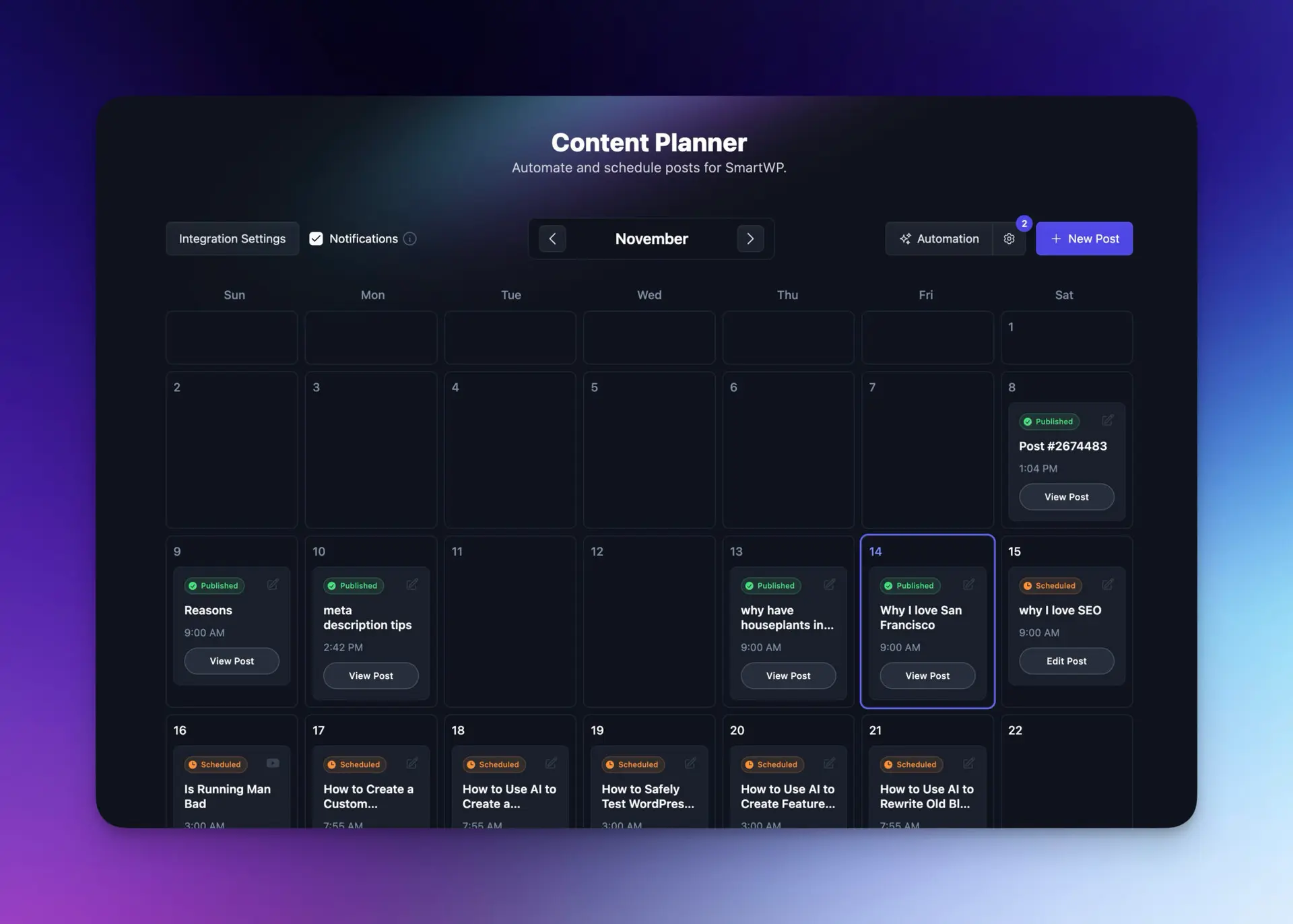
RightBlogger bundles AI article writing, keyword research, an SEO editor, content gap analysis, autoblogging, and CMS publishing into one toolkit aimed at bloggers and small marketing teams. The Content Planner gives you a visual calendar where Autoblogging drafts queue up automatically. Disclosure: this is our tool, so weigh accordingly.
Standout features
- Autoblogging on a calendar: Set a recurring “weekly post about X” rule. The tool suggests topics, drafts the articles, and queues them on your Content Planner.
- Keyword research and clustering built in, so you don’t have to bounce between SEO tools to pick what to write.
- One-click publishing to WordPress, Shopify, Webflow, Ghost, Wix, and Duda.
- SEO editor with on-page optimization reports, plus internal linking suggestions and AI Overviews / GEO formatting cues.
- A Site Agent that improves old posts, not just new ones: Beyond drafting, it scans your published content on a recurring schedule and ships high-impact fixes (internal links between related posts, sharper meta descriptions on low-CTR pages, stale year references, broken outbound links), each with a 30-day one-click undo. It is the only tool on this list built to maintain the content you have already published, not just generate more.
- Social auto-posting: When an article publishes, RightBlogger writes a native caption for X, LinkedIn, Facebook, Threads, and Pinterest in your brand voice and shares it automatically, on the timing you pick. Blog and social run from the same Content Planner schedule, so there is no second scheduler to fill by hand.
- A built-in Backlink Exchange: Opt into a network of verified blogs (Google Search Console verified, Domain Rank 15+) and earn relevant, in-content backlinks as you and other members publish, with no outreach. Most autoblogging tools stop at the draft; this helps your published posts actually earn links.
Best for, pricing, and tradeoffs
Best for: bloggers, niche site owners, and small marketing teams who want one tool for the whole publishing workflow without article caps. Plans start at $49/month (Solo) and $69/month (Pro), with unlimited articles on every tier and a 30-day money-back guarantee.
Skip if: you need bulk programmatic generation across hundreds of niche sites (Autoblogging.ai is built for that volume), you want a single-purpose SEO editor like Surfer, or you need dedicated ad-copy and email-marketing tools alongside blog content (Jasper is the better fit there).
2. Autoblogging.ai for bulk AI articles and agency workflows

This autoblogging software is designed around creating lot of content in a short period of time. Agencies, affiliate marketers, and large site owners tend to use this tool because it excels at bulk content output and can generate articles by the dozens or even hundreds at once.
This tool is all about scaling blogging output quickly. The interface is more complex than blogger-focused tools, but the tradeoff is significant power-user control over volume, modes, and topical maps.
Heads up: publishing high volumes of AI-generated content on autopilot without editorial review can hurt how Google and AI search engines evaluate your site. The tool itself is fine; the workflow around it matters.
Key features that make Autoblogging.ai stand out
Autoblogging.ai leans hard into bulk content creation. You can load up a list of keywords, choose a mode, and generate tons of articles in one AI-powered workflow.
Some helpful features:
- Bulk content creation so I can fill out whole content silos fast.
- Different writing modes, like news-style articles, Amazon-style reviews, or more generic blog posts.
- Topical and semantic SEO options to help produce SEO optimized content covering related subtopics and entities across a niche.
- WordPress posting that lets me send content to my sites instead of downloading everything as files.
For a marketing team managing 10 small sites or a network of niche blogs, this kind of content automation by setting up automated workflows can fill the pipeline quickly. Just be sure to double check the quality of what you’re publishing, as I’ve seen the results vary quite a bit.
Best use cases, pricing overview, and where it falls short
I recommend Autoblogging.ai to:
- Agencies that manage content for many clients.
- Affiliate site owners who rely on volume and topical maps.
- Larger marketing teams that need batches of SEO articles.
Pricing is credit-based and starts low: $19/month Starter (40 credits), $49/month Regular (120 credits), and $99/month Standard (300 credits), where a Quick Mode article costs 1 credit and a Godlike Mode article costs 2, plus 10 free credits a month to test it without a card. Since this tool is built for power users, costs can climb at high scale, but that is often still cheaper than hiring a big writing team. Our Autoblogging.ai vs RightBlogger comparison breaks down credits per plan.
Where it falls short: the interface can feel complex compared to more guided tools, and bulk drafts still need human editing to ensure they sound natural, match brand tone, and avoid over-optimization issues.
3. Jasper for marketing teams that want flexible AI content

Jasper is one of the best-known powerful AI writing assistants, and for good reason. It’s strong at producing many content types, not just blogs. I use it for blog posts, landing page copy, ad copy, emails, product descriptions, and social captions.
It’s not a pure autoblogging tool though. When you mix Jasper with a connected WordPress site or Zapier API integration, you can create automated workflows that get close to semi-automatic blogging.
How Jasper helps speed up blogging without fully replacing a CMS
Jasper includes:
- A long-form editor that helps me write full articles with artificial intelligence support.
- Dozens of templates for intros, outlines, product pages, and more.
- An SEO mode that works alongside tools like Surfer SEO.
In a blogging workflow, I usually draft AI generated content in Jasper, export the post, then paste or sync it into my CMS. With some setup, a team can push Jasper drafts into WordPress using integrations, which cuts down on manual work but does not fully run the blog.
This setup fits teams that already have a strong content system and just want AI to speed up writing.
Who should pick Jasper, plus pricing and limitations
I recommend Jasper for:
- Bigger blogs that publish many content types.
- Marketing teams that need AI to speed up various forms of content creation for ads, emails, and sales pages.
- Agencies that want a single AI tool across different client projects.
Jasper has retired its cheaper Creator tier, so entry is now the Pro plan at $69/month ($59/month billed annually), per seat, with a 7-day trial and no permanent free tier. You are paying for flexibility, templates, and brand voice features. For many solo bloggers, Jasper can feel heavy and more than they need, especially if the main goal is hands-off blog automation.
Jasper also doesn’t provide direct, calendar-based autoblogging. You still move content into your CMS by hand or with extra automation tools (Zapier, Make, etc.).
4. Writesonic for budget-friendly AI blog writing with WordPress publishing

Writesonic, one of the effective autoblogging tools, is a good fit when I want affordable AI blogging plus simple WordPress publishing. It is lighter than Jasper and not as volume-focused as Autoblogging.ai, which supports faster content creation for solo creators.
You can build semi-autoblogging flows by using its blog tools, then scheduling posts in WordPress itself.
What Writesonic does well for simple autoblogging workflows
Writesonic gives me:
- A long-form blog writer that can create AI generated content for blog posts in a few minutes.
- SEO features like templates for outlines, intros, and meta descriptions.
- A seamless integration with WordPress that connects to your site without needing complex WordPress plugins and lets me publish drafts directly.
In my workflow, I often generate an outline in Writesonic, expand sections into full paragraphs, then push the draft to WordPress for publishing content. From there, I use WordPress’s own scheduling to control the calendar.
This is not as hands-off as a dedicated autoblogging planner, but it is simple, quick, and works well for smaller blogs.
Update, August 2026: Writesonic has repositioned around AI search visibility, with self-serve plans from $79/month billed annually, and its old budget writing plans are discontinued. The writing features above still exist inside the bigger platform, but if you used Writesonic mainly as an affordable article writer, see our guide to the best Writesonic alternatives.
Ideal users, pricing snapshot, and main downsides of Writesonic
Writesonic is best for:
- Brands that want AI search visibility tracking and an article writer in one tool.
- Marketers already tracking mentions in ChatGPT, Gemini, and Google AI Overviews.
- Creators who only need a few posts each month.
Pricing: Starter is $79/month billed annually or $99 month to month, with 15 AI articles a month and a free trial. The old budget writing plans are gone. The tradeoffs: planning and workflow tools are lighter than dedicated platforms, collaboration features are limited, and you need extra manual steps for true “set it and forget it” autoblogging.
If you’re fine scheduling inside WordPress and doing edits yourself, this is a solid starting point.
5. Rytr for low-cost AI writing and light autoblogging support
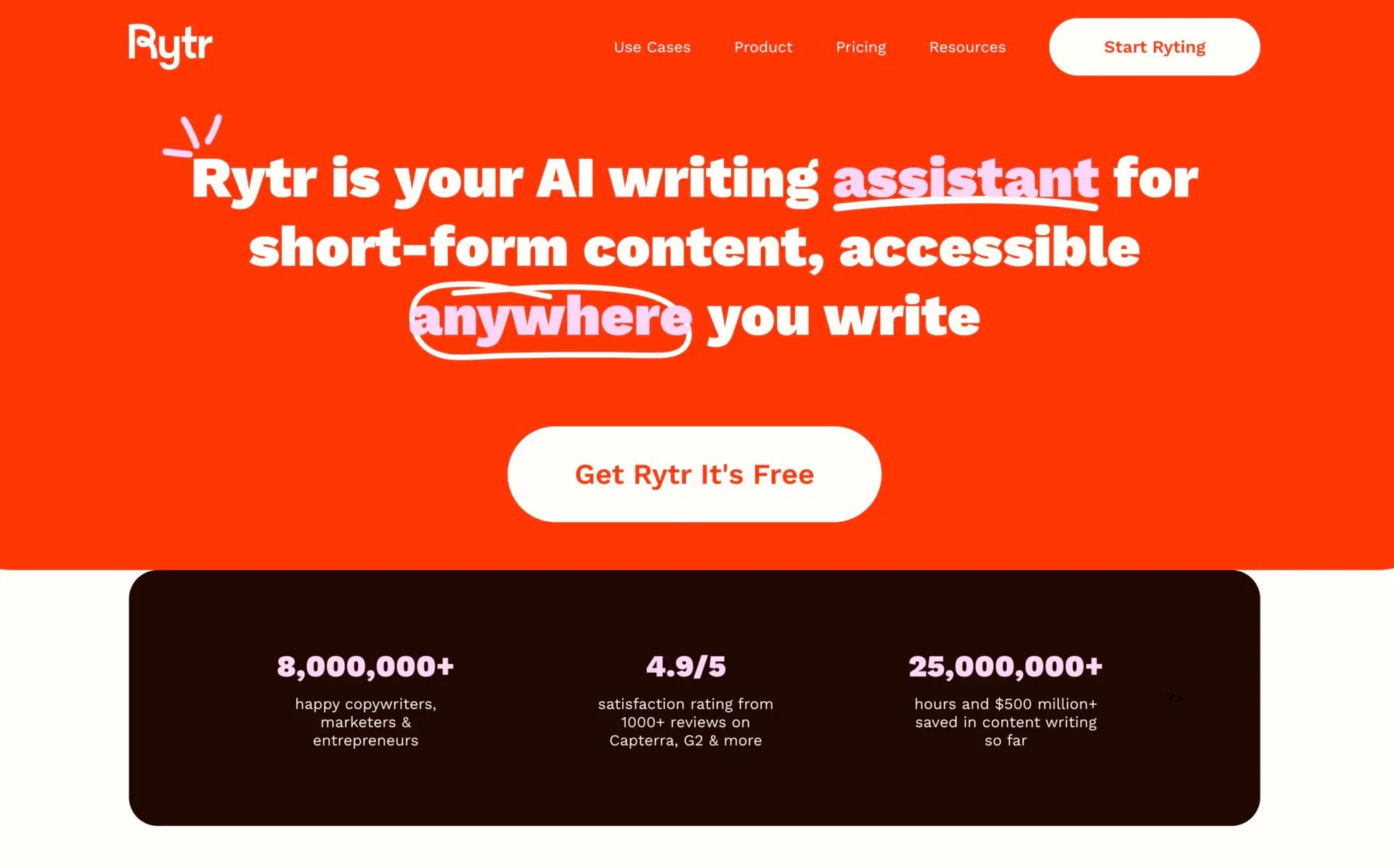
Rytr is one of the most budget-friendly tools on this list. That said, it’s a lean AI content generator, not a full autoblogging platform, but it can still play a role in a lean blogging setup.
I see it as a fast drafting partner. It helps me get words on the page, then I handle edits to the structure, SEO-optimization, and publishing in my CMS. It doesn’t have a full SEO optimization layer, so Rytr typically takes longer to get content actually ready for driving traffic.
How Rytr can fit into a lean blogging workflow
Here’s how a solo blogger might use Rytr to help automate blogging:
- Brainstorm topic ideas and angles.
- Generate outlines and short drafts for customizable content.
- Rewrite tricky paragraphs or expand bullet points into full sections.
After that, I copy the content into WordPress or another CMS, run it through editing, and schedule it. This flow is more manual than a proper autoblogging setup, but the cost stays very low. Rytr has a free plan (10,000 characters a month), Unlimited at $9/month, and Premium at $29/month, or $7.50 and $24.16/month billed yearly.
If I pair Rytr with a strong planning system, like keyword clusters (for that I use this keyword clustering guide), I can still improve SEO ranking on a small budget to produce high quality content.
Who Rytr is right for and what you give up at this price
Rytr is ideal for:
- New bloggers testing AI without a big spend (see our guide to starting a blog if you’re just getting going).
- Hobby sites that post once or twice a month.
- Writers who want help beating writer’s block and drafting faster.
At this price level, you give up quite a bit:
- No robust content planner or visual calendar.
- Weaker built-in SEO guidance.
- Very limited publishing integrations.
- Fewer advanced features for teams, approvals, or workflows.
For casual or early-stage projects, that tradeoff can be fine. For serious autoblogging, it is not enough on its own.
6. Arvow for multi-platform autoblogging and social syndication

Arvow (formerly Journalist AI) is an AI SEO writer with a pretty strong Autoblog feature. It’s built to write and publish content for you, to help your blog grow on autopilot. It supports WordPress, Shopify, Webflow, Wix, Ghost, and more, which makes it interesting if you run multiple sites or different CMS platforms.
In practice, you can set your niche, tone of voice, and keyword preferences, then let Arvow generate long-form SEO-optimized posts complete with images, internal and external links, and formatted sections. Their Autoblog system can auto-publish to your CMS and even submit pages to Google Search Console for faster indexing, which goes beyond what most basic AI writers offer.
What Arvow does well for hands-off autoblogging
Here is where Arvow stands out in an autoblogging workflow:
- 100% automated content and publishing: It can generate and publish articles daily to WordPress and other platforms, including titles, thumbnails, and on-page SEO elements.
- SEO-style formatting: While not always well SEO-optimized, Arvow’s content does a good job of including headings, bullets, tables, quotes, images, and internal/external links so the content looks more like a crafted article than your average AI slop.
- Knowledge base and brand training: I can feed Arvow brand documents or URLs so the AI learns my tone and product details, which helps it stay closer to my voice at scale.
- Automatic indexing and syndication: Arvow can submit new posts to Google Search Console and syndicate them to social media, which helps new articles get discovered faster.
For niche site owners and agencies, this starts to feel like a “content engine” rather than just a writer.
Ideal users, pricing, and where Arvow falls short
I see Arvow as a good fit for:
- Niche site builders who want to publish across several CMS platforms.
- Agencies that manage blogs for multiple clients and care about SEO formatting.
- Marketers who want auto-publishing, indexing, and social syndication in one stack.
Arvow’s pricing (Solo is $69/month on monthly billing or $39/month billed yearly, for 1,000 credits) is positioned more like a serious SEO tool than for budget-conscious bloggers & creators. Their pricing plans tend to make the most sense if you’re actually using the autoblogging and publishing features to support an existing business at scale, not just publishing a handful of blog posts each month. For plan-by-plan numbers, see our Arvow vs RightBlogger comparison.
Tradeoffs:
- The automation is powerful enough that you can over-publish if you’re not careful. You still need an editorial eye for quality, fact-checking, and brand safety.
- The interface and feature set can feel heavy if you only run one blog or website and just want a simple calendar and automated blog posts.
- Because Arvow’s AI writer follows a pretty clear formula, it’s easy to slip into “templated” generic sounding AI content if you don’t add your own examples and stories into the content creation process.
If you already have a strong editorial process and just want a more automated engine running in the background, Arvow is worth testing alongside the other autoblogging tools on this list.
7. Outrank for keyword-driven SEO articles on autopilot

Outrank focuses on SEO-driven autoblogging. The pitch is simple: you choose your keywords, and it delivers research-based, SEO-optimized articles to your blog on a recurring schedule, often positioned as “30 SEO articles per month while you focus on your business.”
Instead of being a general AI writer, Outrank leans into keyword research, SERP analysis, and automatic publishing. If you are weighing it against other options, we compared the field in our guide to Outrank alternatives. It’s designed so your blog grows on autopilot with daily or weekly posts targeting search terms your audience is actually using.
👋 Heads up: In taking Outrank through some extensive testing with their autoblogging feature, I found it to be pretty disappointing on the quality front. I had to make a lot of edits before their content felt close to ready. If you want to publish native-English sounding content on your site, tread carefully here. Check out our full Outrank vs RightBlogger comparison for even more detail.
What Outrank does well for SEO-first autoblogging
Here are the strengths I notice when I look at Outrank as an autoblogging tool:
- Keyword-driven content plans: You feed it keywords and it builds out SEO-optimized article briefs and drafts around those topics, often with competitive analysis baked in. You will 100% need to proofread and edit your content from Outrank, though, be prepared for that.
- Fully automated publishing: Outrank can create and publish articles directly to major CMS platforms like WordPress and Webflow, so you are not manually copying content into your site all the time.
- Built-in SEO workflows: Features like on-page optimization, internal/external linking, and AI-generated images are all geared toward ranking and improving organic traffic.
- Predictable output: Some plans are structured around a certain number of articles per month (for example, around 30 long-form articles), which makes it easier to forecast content volume and plan your content calendar.
For startups and small teams that care a lot about SEO but don’t want to hire a full content team, that “done-for-you keyword to article” model can be attractive. Like I said though, what you trade for time saving on the creation side, you may pay for when it comes to editing and proofreading to ensure your AI-created content passes the sniff test.
Who Outrank is best for, rough pricing notes, and downsides
Outrank makes the most sense for:
- Startups on a tight budget that want AI and SEO traffic but lack an in-house content team.
- Marketing teams that already think in terms of keyword lists and content clusters.
- Site owners who want a “SEO + publishing” bundle rather than just an AI text generator.
Pricing usually starts higher than entry-level AI writing tools, with plans around the ~$99/mo mark for a set number of long-form articles, then scaling up for more volume or more sites. That can still be cheaper than hiring writers, but it’s not a micro-budget option.
Main tradeoffs:
- Cost vs experimentation: If you are just testing autoblogging, committing to a monthly article quota may feel like a lot.
- Quality is lacking: Even with SEO research, you absolutely must edit your drafts from this tool for tone, accuracy, and originality. Depending purely on their automated SEO content will almost certainly lead to bland posts if you don’t add your own expertise into the content.
- Setup time: You need to set up your brand voice, targeting, and integrations properly before the “autopilot” experience really works.
If your main goal is SEO growth on autopilot, Outrank sits in a sweet spot between a pure AI writer and a full agency. Just like the other autoblogging tools here, you get the best results when you keep a human in the loop for strategy and final edits.
How I Choose the Best Autoblogging Tool for My Blog (and Marketing Team)
Picking among the best autoblogging tools is easier when I use a simple framework for successful content creation. I look at my content goals, my budget, and how many moving parts I want to manage.
Then I match each autoblogging software on this list to those needs instead of chasing every feature.
Key factors I look at before picking an autoblogging platform
Here are the factors I pay attention to most:
- Content quality: Do the drafts sound close to how I want my brand to speak and produce SEO optimized content, or do I have to rewrite everything?
- SEO support: Does the tool have SEO features to help with keyword research tool, topic clustering, and on-page SEO to satisfy search engines, or do I need separate software?
- Publishing integrations: Can I connect WordPress, Webflow, or Ghost in a few clicks and schedule posts directly?
- Ease of use: If I hate tech, I want a planner that feels like a simple calendar for automating tasks, not a developer tool.
- Team collaboration: For agencies, I need roles, approvals, and shared workspaces.
- Total monthly cost: I look at how many posts I need, then compare cost per useful article, not just subscription price.
If a tool hits my top three needs, I test it with a small content batch before I commit.
Which tool I’d pick for solo bloggers vs marketing teams
Here is how I break it down in real life:
- Solo bloggers and niche site owners: a blogger-focused suite with a calendar and unlimited generation tends to win. RightBlogger fits this profile, as do simpler combinations like Writesonic plus WordPress’s native scheduler.
- Agencies and bigger teams: I look at Autoblogging.ai or Jasper, depending on whether I care more about bulk SEO content or multi-channel marketing.
- Budget-friendly simple workflows: Writesonic works well if I am okay doing some scheduling inside WordPress.
- Very tight budgets or hobby projects: Rytr is usually the cheapest way to get AI drafts, as long as I do all the planning and publishing myself.
Whichever tool I choose, I always keep human editing in the loop. I also like using tools that help me rewrite and optimize blog posts with AI, like the ones highlighted in RightBlogger’s guide to improving and polishing drafts.
FAQs About Autoblogging Tools (Frequently Asked Questions)
What is autoblogging in simple terms?
Autoblogging means using AI and content automation to plan, draft, and sometimes handle publishing content for you. I choose topics, set a schedule, and the tool generates articles that I can edit and approve. This helps save time while keeping my blog active without writing every word from scratch.
Are autoblogging tools good for SEO?
They can be, if I use them the right way, leading to improved SEO ranking. Tools like RightBlogger pair autoblogging with SEO research so I target keywords people actually search for. I still need to add my own insights, internal links, and proper formatting so the posts feel useful and original to both readers and search engines.
Can autoblogging tools fully replace a writer?
AI tools are helpful for first drafts, outlines, and reusing content, but they should never completely replace a skilled writer. Human insight is key to creating high-quality content and keeping it trustworthy, unlike some user-generated content. AI still falls short on deep knowledge, original ideas, and brand tone. I get the best results when a writer or editor reviews each post before publishing.
How much human editing do AI-generated blog posts need?
For most sites I manage, I plan at least one full edit for every piece of AI-generated content. I fact-check each section, improve openings and transitions, add images and examples, and adjust the tone to match the brand. Some posts take only 10 minutes to polish, while others need some meaningful rewrites, especially on sensitive subjects or topics I have strong convictions about.
Is it safe to rely on AI for long-term content?
Yes, as long as I treat artificial intelligence as a helper, not a shortcut. I keep my content accurate, add my own experience, and update posts as things change. If I do that, AI becomes a long-term asset rather than a risk to my brand. One mistake people make with AI content is just posting without even looking at or editing their content.
Final Takeaways on Autoblogging and Content Automation

Autoblogging tools give bloggers and marketing teams a way to publish more without burning out. The right setup helps you plan topics, sharpen your content strategy, and keep traffic growing while quality stays high.
The seven tools above each fit a different stage and budget. Pick by your actual workflow friction, not by the longest feature list.
Other tools have their place, too. Autoblogging.ai and Jasper are good choices for agencies and large teams, while Writesonic and Rytr serve creators who need to save money and don’t mind more manual steps. The key is matching the tool to your goals, content volume, and budget.
My suggestion is simple. Pick one tool that fits your stage, test it on a small batch of posts, and refine your process as you go. Keep a human editor in the loop so every blog post feels accurate, helpful, and on brand. That mix of automation and human insight applies to creating and editing blog posts and is what wins in 2026, with artificial intelligence playing a pivotal role.
Blog Automation That Keeps Your Posts Ranking

RightBlogger finds keywords, writes SEO articles, and publishes them to your blog. Then its Site Agent uses your Search Console data to keep older posts in shape, adding internal links, sharpening weak meta descriptions, and fixing stale years and broken links. Join 51,000+ bloggers using it to grow traffic from Google and ChatGPT.

Article by
RightBlogger Co-Founder, Ryan Robinson helps creators grow online businesses and tests autoblogging tools to find what works.




Automated SEO Blog Posts That Work
Try RightBlogger for free, we know you'll love it.
7-day free trial. Cancel anytime.





Leave a comment
You must be logged in to comment.
Loading comments...