How to Use the Link Exchange in RightBlogger
Sites need a paid plan, verified Search Console ownership, and Domain Rank 15; relevant links appear in drafts for you to review.
The Link Exchange matches your site with other verified RightBlogger sites in your niche. When you write an article with RightBlogger, a relevant page from a partner site can be suggested as a link in your draft, and partners get the same suggestions pointing to your pages. There is no outreach, no negotiating, and no approval step.
This guide covers who can join, how links are suggested and confirmed, and how to track or leave the exchange.
Open the Link Exchange
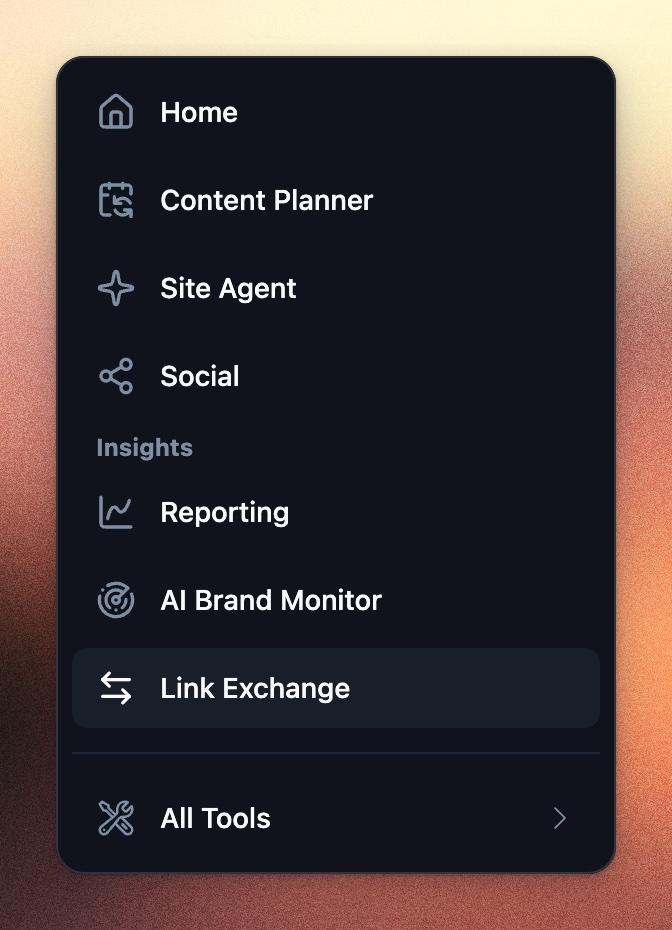
Click Link Exchange in the sidebar, under Insights. The exchange runs per project, so each site joins on its own. If no project is selected, pick one on the page first.
Who Can Join
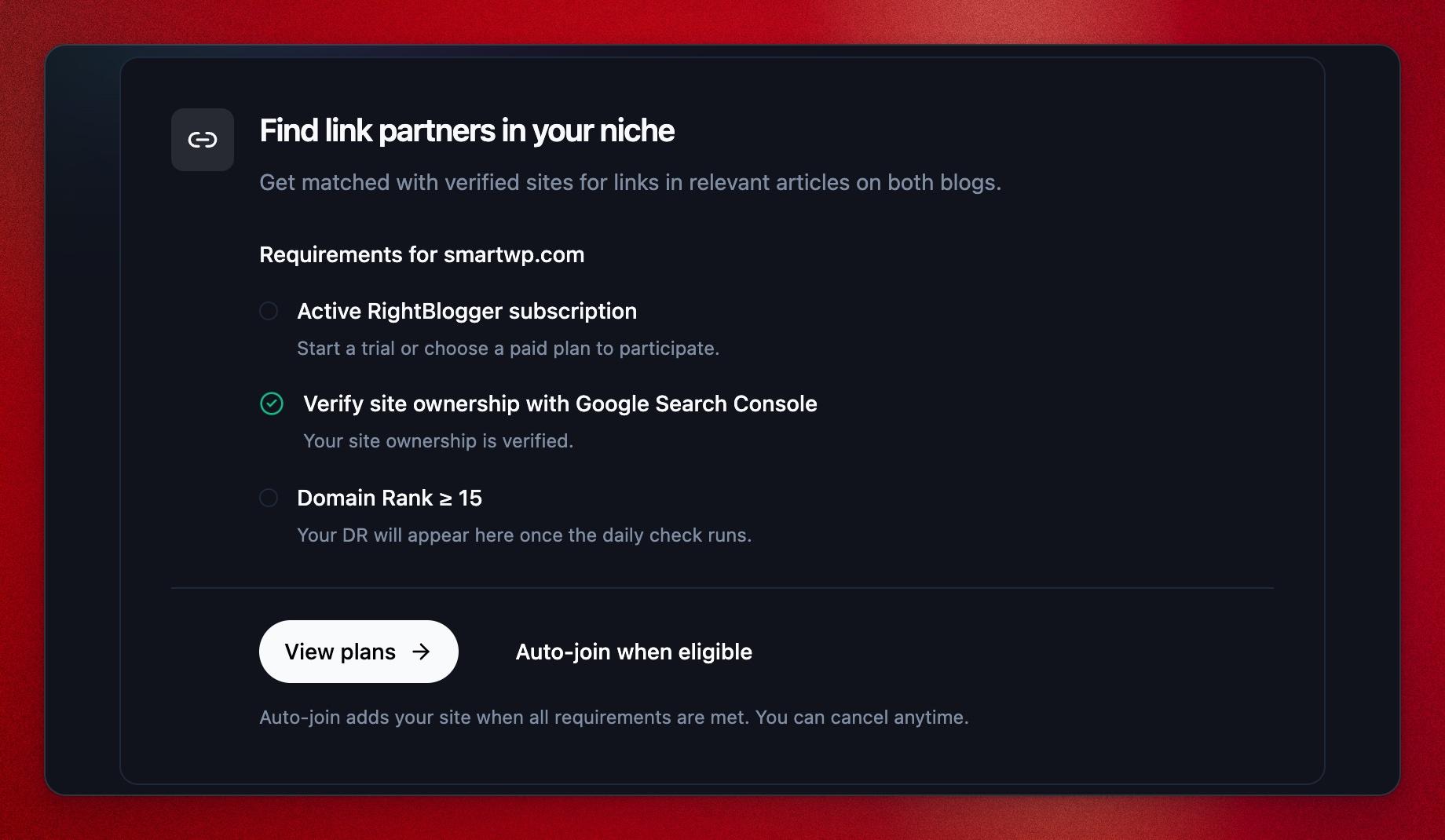
Before you join, the page shows a Requirements checklist for the selected site. A project needs all three:
- Active RightBlogger subscription: any paid plan, including a free trial. The Link Exchange is included at no extra cost.
- Verify site ownership with Google Search Console: connect the site’s Search Console property to the project. This proves you own the domain. See How to Connect Google Search Console. RightBlogger only checks that the site is verified here; it does not read your search queries for the exchange.
- Domain Rank ≥ 15: RightBlogger’s 0 to 100 backlink strength score for your site. The checklist shows your current rank.
Adult sites cannot join the Link Exchange.
To join or leave, you need a project role that can publish from the project. Viewers cannot change it.
Join the Exchange or the Waitlist
If every requirement has a check mark, click Join the exchange. RightBlogger then scans your site’s pages so they can be matched with partners.
If your site does not qualify yet, for example because its Domain Rank is under 15, click Auto-join when eligible. RightBlogger checks every day and adds your site as soon as it meets all three requirements. The card then shows On the waitlist, and you can click Leave waitlist at any time.
RightBlogger keeps checking after you join. If your site stops meeting a requirement, for example your subscription ends, Search Console is disconnected, or your Domain Rank drops below 15, it is paused from new matches until it qualifies again and you rejoin.
How Links Are Placed
Partner links are placed by the Article Writer, both when you write an article yourself and when an automation writes one for you. They are not added by Site Agent or inserted into posts that are already on your site.
- While writing, RightBlogger looks for partner pages that closely match the topic of the article. It compares your pages with other members’ pages by topic, prefers sites in the same niche, and only matches sites in the same language.
- A partner link only fills an external link spot the article was already going to have. It is never added as an extra link, and it is skipped when it does not fit the section.
- Sites you list as competitors under the Competitors tab in your project settings are never suggested.
- The anchor text is descriptive wording or the page’s name, never exact-match commercial phrases or “click here”.
- Other members’ articles work the same way. When one of their drafts is a strong match for one of your pages, it can link to you.
Partner links use your article’s normal external links, so keep External Links turned on in the Article Writer settings. Nothing reaches your site until you publish the article, and you can edit or delete the link in your draft before you do.
Giving and Receiving Links
The exchange is two-way: the links you give out in your articles help keep links flowing back to your site. There is no credit to buy or spend. A monthly limit keeps your link growth gradual so it looks natural to search engines.
Expect it to be slow. Most sites wait a month or more for their first link, longer in small niches. After that it depends on how much you and other members in your niche publish.
Track Your Links
Once you join, the Link Exchange page shows:
- Domain Rank: your site’s current rank.
- Links received (30d) and Links given (30d): links confirmed in the last 30 days. When a partner link is waiting in a draft, the tile shows how many are in progress.
- Backlinks to your site: partner pages that link to you, with the partner’s Domain Rank and the page on your site they link to.
- Links you give out: your posts that link to a partner, and where each link points.
After you publish an article with a partner link, RightBlogger rechecks your site every couple of days and confirms the link automatically, usually within a few days. Live links are checked again over time. A link that was missing at the last check shows Not found, and one that stayed missing for several checks in a row shows Removed.
Skip or Remove a Link
You never have to place a partner link. Remove it from your draft, or don’t publish the draft, and the match quietly expires after a couple of weeks. Partners are not told about matches you skip, and there is no penalty.
To remove a link that is already live, edit the post on your site. It will show as Not found, then Removed, on your Link Exchange page.
Leave the Exchange
Click Leave the exchange at the bottom of the Link Exchange page. You stop getting new matches right away. Links already published stay where they are, since RightBlogger cannot unpublish anyone’s posts. You can join again at any time.
Frequently Asked Questions
Do I need to approve matches?
No. Partner links are suggested in your drafts and you decide whether to publish them. Nothing is negotiated between members.
Can I choose which sites or topics I am matched with?
Not directly. Matching is based on the topics of your pages and the article being written. You can block sites by adding them as competitors in your project settings, and you can remove any suggested link from a draft.
Is this safe for SEO?
The exchange is built to look like normal editorial linking: in-content links between relevant, verified sites, with descriptive anchors, a monthly limit, and long gaps before the same two sites are matched again.
Why does my Domain Rank not show yet?
Domain Rank is refreshed regularly for sites on paid plans. If it is missing, check back after the next update.
I have several sites. Do they all join?
No. Each project joins separately and needs to meet the requirements on its own.
Related Guides
Still need help?
Ask the AI assistant for an instant answer, or reach us directly and we will get back to you as soon as we can.
Automated SEO Blog Posts for Your Site
Research, write, publish, and share from one account.
7-day free trial. Cancel anytime.