JavaScript SEO for Blogs in 2026: A Step-by-Step Guide
Keep posts indexable by serving the body, links, metadata, and schema in initial HTML, then checking rendered output before publishing.

JavaScript can make a blog feel polished. It can also hide the parts that search engines need most.
Google does render JavaScript in 2026. If your post body, links, or schema only appear after scripts run, you are making Googlebot work harder than it should to understand your content.
This step-by-step guide keeps the focus on what matters most, what search engines see first, and how to maintain indexability.
Key Takeaways for JavaScript SEO
- Google crawls and renders content in two distinct stages, so your raw HTML matters more than many blog owners realize.
- Put essential content in your static HTML, including the post body, internal links, headings, and schema, so it is immediately available to Googlebot for faster indexing.
- Server-side rendering, static generation, or pre-rendering are significantly safer for blogs than client-side only pages, which are slower to index and easier to miss.
- Test before you publish: Search Console, page source, and JavaScript-off checks catch indexing problems quickly.
- If your post reads well with JavaScript turned off, you are already ahead.
How Google Sees JavaScript on a Blog
Google’s own JavaScript SEO basics documentation outlines the process clearly. When Googlebot fetches a URL, it begins by analyzing the initial HTML.
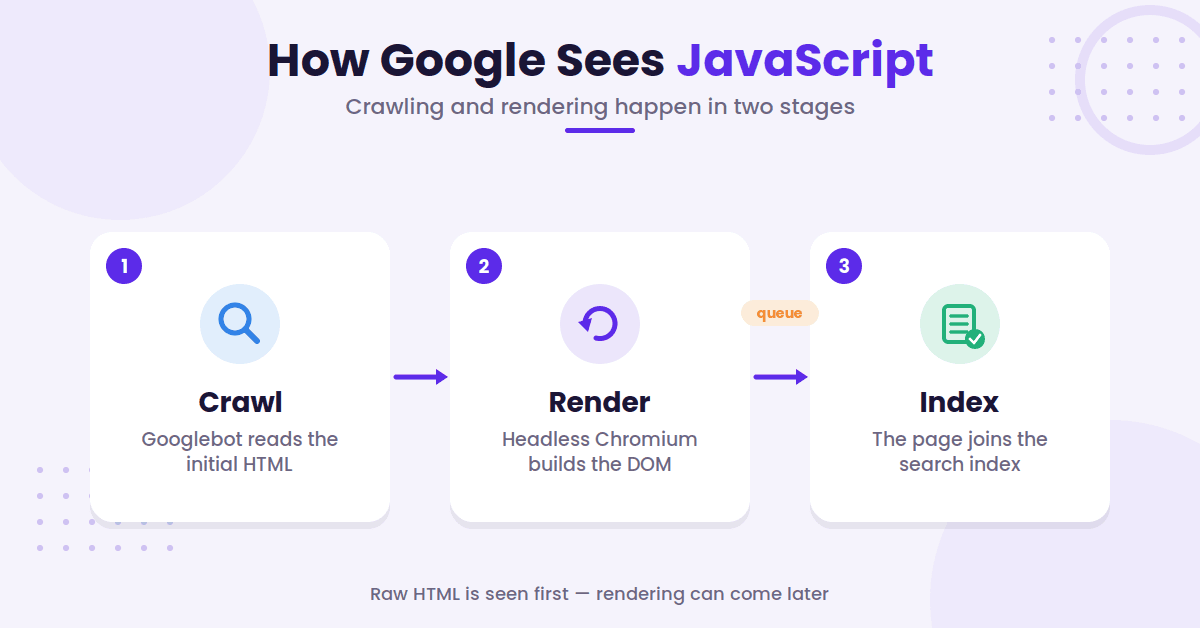
However, because modern blogs rely heavily on dynamic content, Google uses a web rendering service powered by an evergreen version of headless Chromium to execute the scripts. This process involves building the Document Object Model (DOM) during rendering, which allows the search engine to see the page much as a first-time visitor would.
Google’s in-depth guide to how Search works describes three phases: crawling, rendering, and indexing. The crawl fetches your raw HTML and extracts links. Rendering runs your JavaScript in an evergreen version of Chromium. Indexing then works from the rendered HTML, not the raw source.
Timing matters less here than people assume. A page may sit in the render queue for a few seconds, though it can take longer. The queue is rarely what keeps a post out of the index. Blocked resources and content that never renders at all are the real culprits.
You should also ensure your server returns correct status codes. Google queues every page that returns a 200 for rendering, unless a robots meta tag or header tells it not to index the page. A soft 404 error or a blocked resource can significantly hinder your visibility.
The safest takeaway is simple. If the page can tell its story using the initial HTML before the rendering service kicks in, you are in a much better position to achieve consistent search performance.
Start With HTML That Carries the Whole Post
The safest move is simple. Put the article body, subheads, links, and schema in the initial HTML response.
While client-side rendering relies on the browser to execute code, server-side rendering or static HTML ensures your content is delivered instantly to the crawler. If the page still makes sense with JavaScript off, you are on the right track.
If it turns into an empty shell, Google has more work to do. That extra rendering time can delay indexing for your posts.
For blogs, static generation usually wins because posts do not change every second. Server-side rendering works well too. Pre-rendering is a solid choice when you need a fast path for crawlers while maintaining a rich front end for readers.
The main rule is not complicated. Do not make the article depend on hydration before the core copy appears. Put the introduction near the top of the HTML, keep the main headings visible, and expose the internal links early so crawlers can discover your content without waiting for a secondary rendering pass.
If you keep seeing crawled but not indexed pages, the fix is often less dramatic than people expect. Tighten the opening, move the main point higher, and remove any delay between the request and the actual article text.
The first 100 words matter here too. If your opening reads like a warm-up act, the crawler has to work harder to verify your content. Readers are more likely to bounce before the page is fully ready.
Remove the Rendering Bottlenecks
The part most people miss is not the framework. It is the friction.
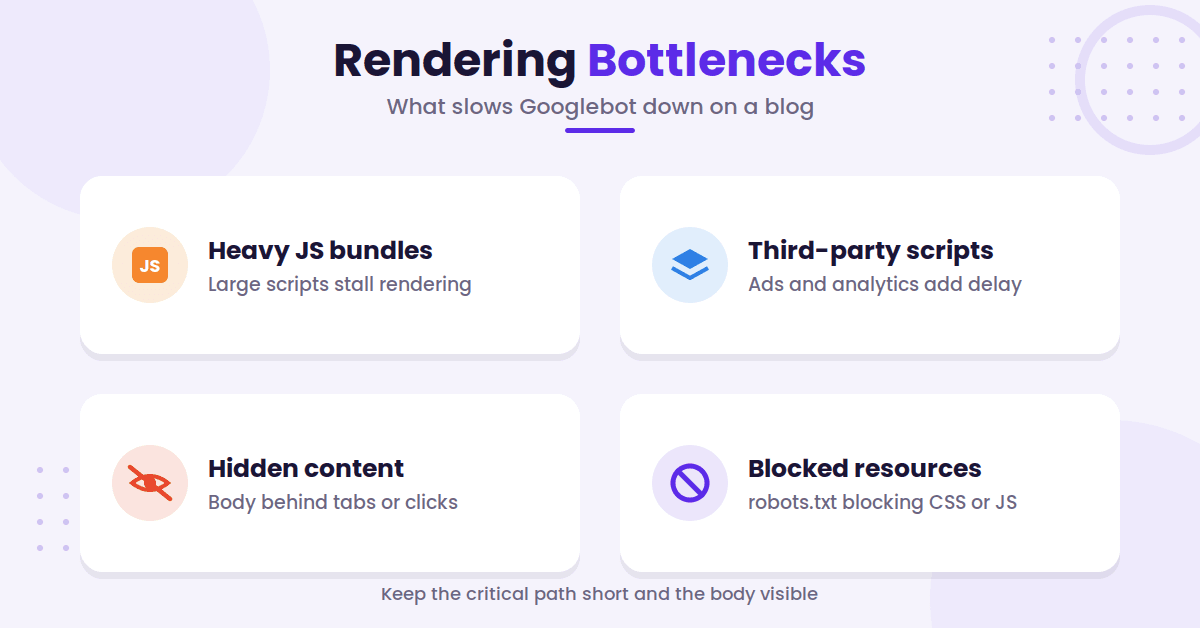
Heavy JavaScript bundles slow down rendering. So do third-party scripts, lazy loading, and UI pieces that hide the article body behind clicks or tabs.
Googlebot is not likely to click around your page the way a person does. That does not mean tabs and accordions are off limits. If the content is in the rendered HTML and only hidden with CSS, Google indexes it and gives it full weight. What Google will not see is content that only loads when someone clicks, scrolls, or expands, because the crawler never performs that interaction. The test is not whether the content is visible, it is whether it is in the DOM without anyone touching the page.
Keep the first screen light and load the post content early. Push non-essential extras lower on the page. If a related post module, newsletter pop-up, or video embed blocks the main copy, move it back.
Ensure your robots.txt file is not inadvertently blocking critical CSS or JS files. This will stall the rendering process for search crawlers.
Third-party APIs can also cause trouble. A flaky pricing call, slow ad script, or broken analytics dependency can leave the rendered page incomplete. That is a bad trade for a blog post that only needs to inform and rank.
Google also works with limits. Googlebot fetches only the first 2MB of any individual URL, and every CSS or JavaScript file it references is fetched against its own 2MB counter. Most blogs will never come close, but inline base64 images, huge blocks of inline CSS, or megabytes of menu markup ahead of your article can quietly push real content past the cutoff. If your front end feels like it is dragging a suitcase, it probably is.
The clean fix is boring, but it works. Keep the page fast, keep the critical path short, and keep the article body visible without waiting on fancy code.
Google can render JavaScript, but it does not owe you instant rendering. Make the important parts visible before the script pile kicks in.
Keep Links, Metadata, and Schema Out of the Shadows
A blog post does not rank on copy alone. It needs clear signals.
Use real anchor tags for your internal links in menus, related-post blocks, tags, and pagination. If a link only works after a JavaScript event, do not count on it being discovered quickly. Google only crawls a link when it is a real anchor element with an href attribute, so an onclick handler with no href gives the crawler nothing to follow. If JavaScript injects the link, Google can still find it after rendering, but expect it to take longer.
Metadata matters just as much. Google still measures title tags and meta descriptions by pixels, not just character count.
A title tag near 600 pixels is a safe target, and a meta description near 920 pixels usually fits search results better.
These are not hard walls, but they are smart guardrails.
Keep the title honest and tight. Keep the description useful and specific. If the opening text and the metadata disagree, search engines and readers both have to guess.
Structured data should also be easy to find. Server-side schema markup is the safer default for author data, article data, and anything else you want Google to trust quickly. Google can read JSON-LD that JavaScript injects, so this is not a hard rule, but it adds a dependency: the markup only exists if rendering succeeds. If you inject schema with JavaScript, validate it with the Rich Results Test rather than assuming it landed.
If your blog leans on lazy-loaded images, an image sitemap for lazy-loaded images gives crawlers a cleaner path to assets that modern themes often hide behind scripts.
The point is not to stuff more tags into the page. The point is to stop hiding the signals that help Google understand what the post is.
Audit the Blog Like Google Does
Testing beats guessing every time.
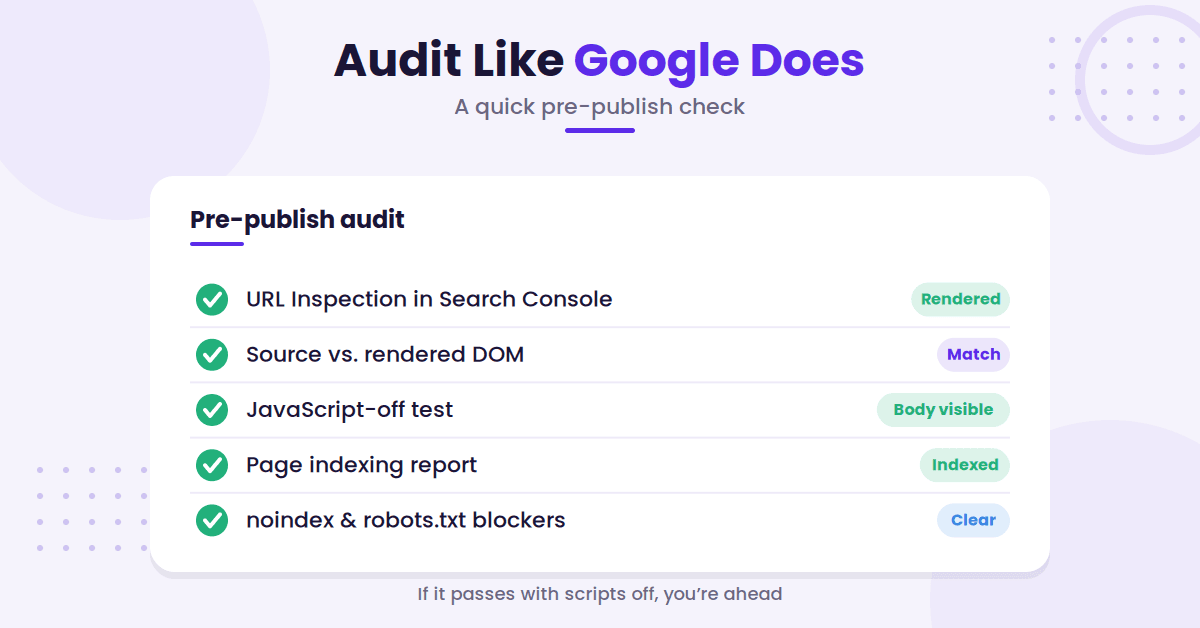
Start in Google Search Console. Use the URL inspection tool on a live page, and compare the raw code from view source with the final rendered DOM found through inspect element.
If the rendered version looks complete but the source is thin, that indicates your content relies entirely on client-side rendering. If the rendered version is missing the main article, that is a critical sign that your JavaScript is failing to load content for the crawler.
Next, open the page with JavaScript disabled. If your body copy disappears, the page is too dependent on scripts.
If the navigation vanishes too, that is a hint that the crawler may have a harder time moving through your site. For larger sites, use Screaming Frog to crawl your pages with JavaScript rendering enabled to identify gaps across the entire domain.
Then, look at the Page indexing report. A page can sit in a crawled but not indexed state for a while if Google does not see enough value yet.
This is not a penalty. It is a sign that the page needs a stronger opening, clearer structure, or better internal support.
Do not forget the basic blockers. A noindex tag, a nosnippet rule, or a restrictive robots.txt file can look like a JavaScript problem when it is really an indexing problem. These mistakes are easy to miss on large blogs.
The best habit is simple. Check the source, inspect the rendered output, monitor the index status in Google Search Console, and then fix the first thing that actually breaks the chain.
Choose a Stack That Keeps Content First
The tech stack you choose matters, but not in the flashy way people often discuss.
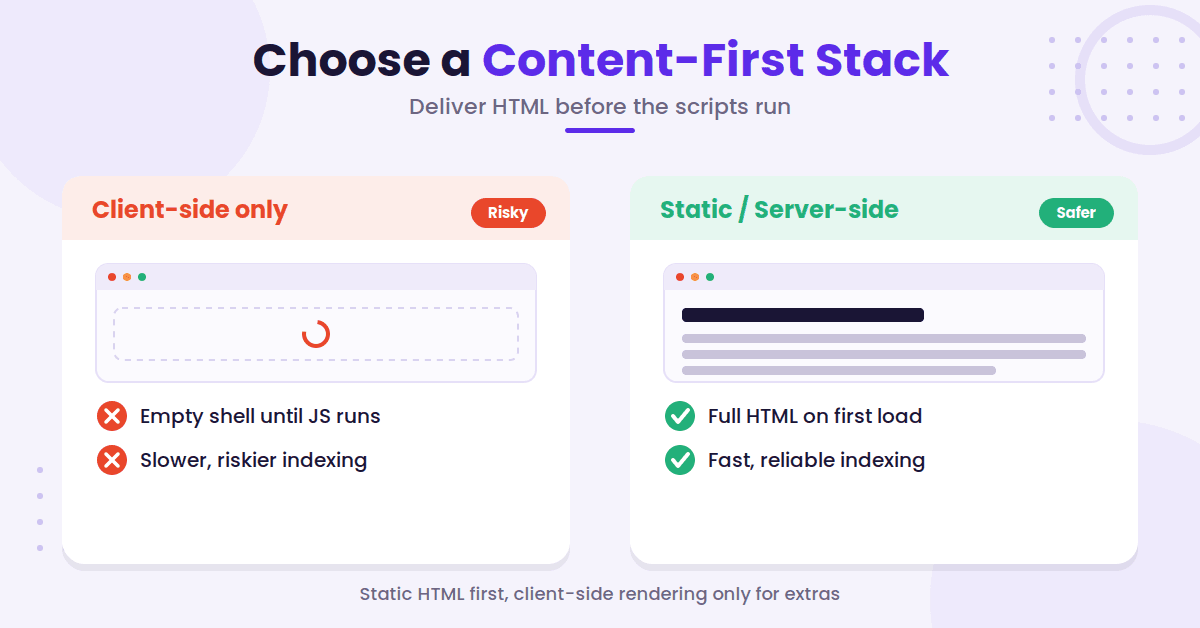
If you are selecting a modern setup, start with one fundamental question: does the blog ship clean, static HTML? If the answer is yes, you have a solid foundation. If the answer is no, the process of optimizing for search engines becomes complicated very quickly.
For most content sites, static site generation for blog posts and server-side rendering for dynamic elements provide the best results.
You should prioritize static HTML for your core content, relying on client-side rendering only for non-essential features like comments, theme toggles, or minor UI flourishes. If your project needs more than that, reach for server-side rendering, static rendering, or prerendering. Google now describes dynamic rendering as a workaround rather than a recommended solution, because it adds complexity and resource requirements, so treat it as a stopgap for legacy setups rather than something to build on.
This advice remains consistent whether you use Next.js, Nuxt, Remix, or Astro. These frameworks are not the problem. The issue arises when the page only becomes useful after the hydration process finishes.
When implementing modern navigation, ensure your setup correctly utilizes the history API so that users and crawlers can traverse your site without relying solely on heavy JavaScript execution.
The cleanest blog templates are often the most straightforward from a rendering perspective. These templates load quickly, expose your primary copy immediately, and minimize the risk of search engines missing the intent of your page.
Ultimately, your rendering strategy should prioritize readability. If a section of your site only functions after a click, a fetch request, and multiple scripts, ask whether it truly belongs there. Regardless of the framework, your blog should read like a blog first, with the post body, headings, and metadata delivered clearly and immediately to the browser.
FAQs About JavaScript SEO for Blogs
Here are a few common questions that come up about JavaScript SEO for blogs.
Is JavaScript bad for blog SEO?
No. JavaScript is not the enemy. Implementing effective JavaScript SEO is entirely possible, but relying on client-side only content is the problem. If Google has to wait too long to process your scripts, or if the main text never appears in the initial HTML, your indexing speed and reliability will suffer.
Do I need server-side rendering for every page?
Not always. Many blogs perform well using static generation for articles and server-side rendering for pages that change frequently. The rule is simple: use the rendering method that makes your post body visible as early as possible.
How can I tell if Google sees my content?
Start by using the URL inspection tool within Google Search Console. It is also helpful to compare the rendered version of your page with the raw source code and test your blog with JavaScript disabled. If your post turns into an empty shell when scripts are off, Google may encounter the same issue while crawling your site.
Should schema and metadata be server-side too?
Yes, as much as possible. Important elements like title tags, meta description fields, canonical tags, and schema markup are safest when they are present in the initial rendering response. Keeping these items in the raw HTML makes them easier for Google to read immediately and significantly easier for you to debug later.
Final Thoughts on JavaScript SEO
Mastering JavaScript SEO is not about stripping your blog down to bare bones. Instead, it is about removing the technical barriers that force Google to wait without any clear benefit.
If your main copy, links, metadata, and schema are visible directly in the static HTML, the rest of your optimization efforts become much easier. When these elements only appear after a complex chain of scripts, you force search engines to navigate a scavenger hunt.
Proper crawling and rendering should never be a guessing game.
The most successful blogs in 2026 follow one simple rule. They let people read content instantly, and they provide search engines with clean, static HTML to ensure fast indexing.

RightBlogger Co-Founder, Andy Feliciotti builds websites and shares tips on SEO, photography, and travel.



Automated SEO Blog Posts for Your Site
Research, write, publish, and share from one account.
7-day free trial. Cancel anytime.





Leave a comment