How to Create Author Pages That Support E-E-A-T
Build a 60–150-word bio around verifiable experience, consistent profile links, recent work, and matching Person schema.

A strong article can still feel anonymous. If readers cannot tell who wrote it or why that person deserves trust, the page loses credibility.
I’ve seen that problem on good blogs more than once. Weak bios and vague “editorial team” labels make it harder for readers and search engines to evaluate the people behind the content.
That is why author pages matter. They help demonstrate experience, expertise, authority, and trustworthiness while giving readers a clear reason to trust the information they are consuming.
Key Takeaways for Creating Author Pages That Support E-E-A-T
- Author pages should prove identity, not simply fill space.
- Real experience and credentials carry more weight than broad claims.
- Consistency across bylines, bios, and profile links strengthens trust signals.
- A strong author page makes every article under that byline easier for readers and AI to trust, even though it is not a direct ranking signal.
Why Thin Author Bios No Longer Work
For author pages, E-E-A-T is not some abstract model. It is a plain trust test.
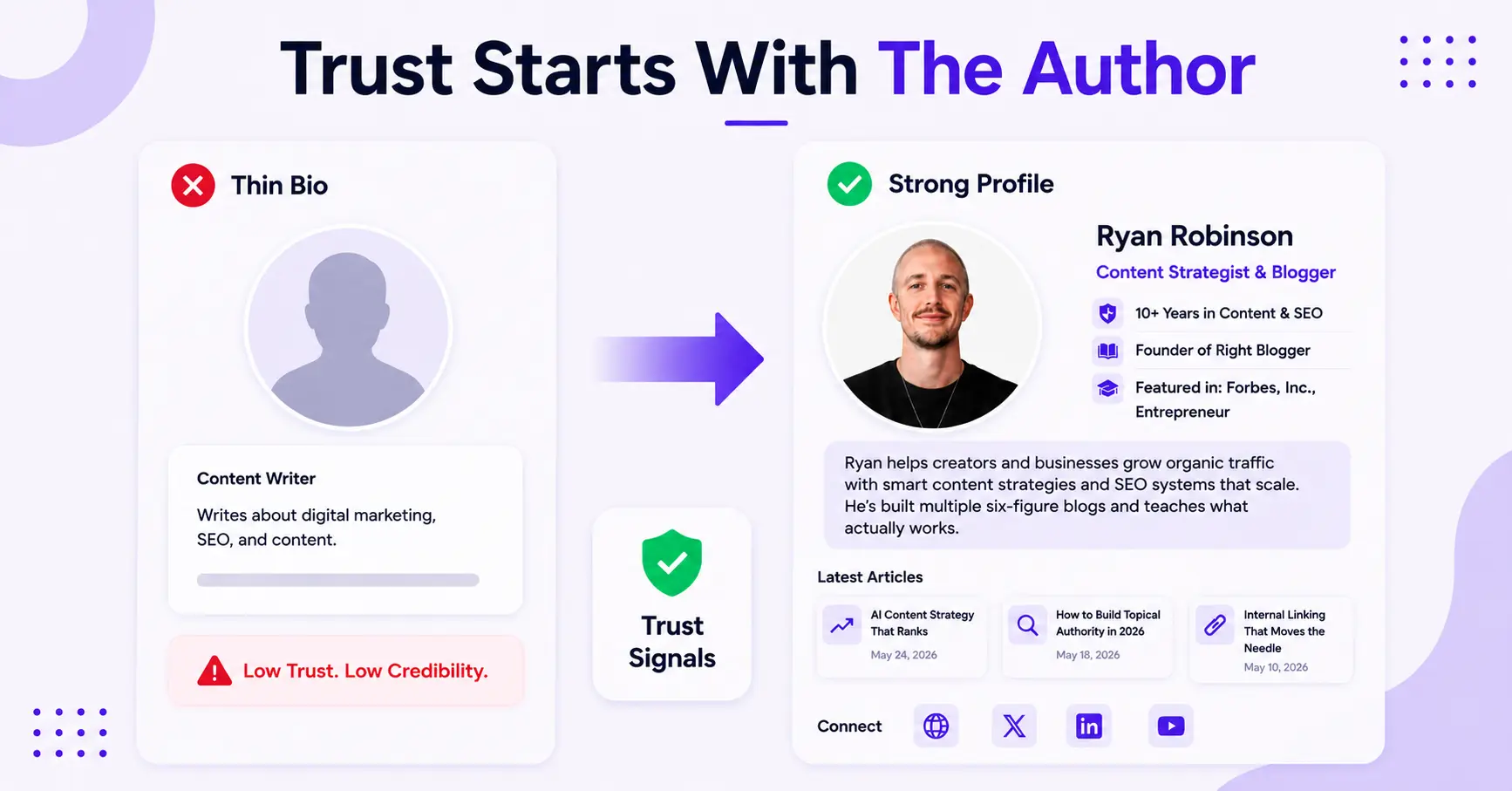
If a bio says little more than “content writer,” readers are being asked to take a blind leap. That used to slide by on some sites, but it does not work as well now.
One thing to be clear about: E-E-A-T is not a direct ranking factor. Google says there is no E-E-A-T score and that E-E-A-T itself is not a specific ranking factor. It is the lens quality raters use, and the quality Google’s automated systems try to reward. An author page does not flip a ranking switch. It gives readers and raters a clear way to see who stands behind the content, which is exactly the trust that Google’s E-E-A-T guidance and its 2026 core updates keep pointing back to.
Weak authorship still has a real cost, though. A vague profile gives readers and AI systems nothing to verify, so even your best content has to work harder to earn trust.
If an author page reads like a placeholder, every post under that name feels weaker.
This matters even more for blogs in competitive niches. A thin author page makes solid content look rented, while a strong one tells readers and search systems that a real person stands behind it.
What Every Author Page Should Include
An author page should function like a mini proof file. It should be simple, but it cannot be empty.
The basics come first: a real name, a clear photo, a short bio, and links to recent posts. After that, the page should show why the author writes on the topic.
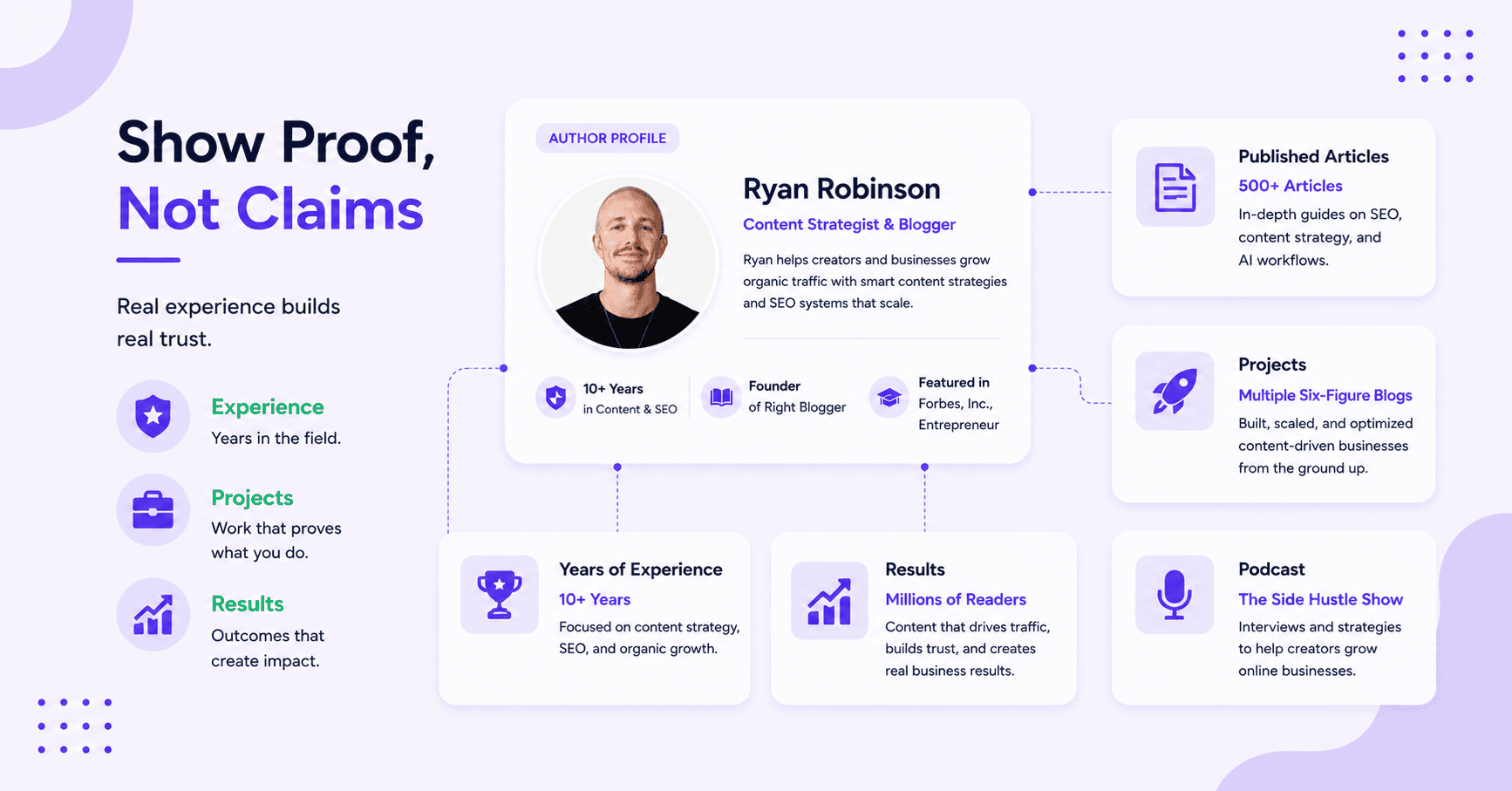
That might mean years in the field, publications, projects, client work, a podcast, or a strong niche focus.
Ryan Robinson’s author page and Ali Luke’s writing on AI and blogging provide strong examples. Both pages make the person visible quickly, then connect that person to real work.
Here is a checklist you can build straight from, top to bottom:
- Full name, spelled the same way everywhere you appear online.
- Role and employer, for example “Senior SEO writer at Example Co.”
- A real headshot, an actual photo of a real person, not a logo, stock image, or avatar.
- A third-person bio, 60 to 150 words, longer for health or finance topics.
- Proof, with numbers: years in the field, named credentials, publications, or specific work (“reviewed 60 chef’s knives,” not “passionate about cooking”).
- The topics you cover, three to five areas you genuinely have authority on.
- Links to your best work and any talks, books, or press.
- Profile links to LinkedIn, X, and, if you have one, Wikipedia or Wikidata.
- A recent-posts feed, and make sure every byline links back to this page.
- Person schema that matches the visible byline (covered below).
The top section should stay concise, with deeper proof placed lower on the page. That way, readers get the quick answer first and can explore more detail if they choose.
If schema is used, it should connect to the same identity details shown on the page. That is one reason author schema and E-E-A-T matter. The page and the data should tell the same story.
Show Real Experience, Not Empty Claims
This is where many author pages fall apart. They claim expertise, but they do not show it.
Author pages become much stronger when they include first-person proof. Examples might include managing editorial calendars, testing content workflows, or growing a blog in a competitive niche.
Those details carry more weight than vague labels such as “expert” or “thought leader.”
Compare these two bios:
- Weak: “John is a passionate writer who loves all things tech and has been blogging for years.”
- Strong: “John Smith is a senior staff writer at Example covering consumer electronics. Over eight years he has tested more than 200 laptops and phones, his reviews have run in [Outlet] and [Outlet], and he holds a B.S. in Computer Science. He writes about laptops, mobile hardware, and battery life.”
The strong version wins on every clause: third person, a named role and employer, verifiable experience, a real credential, and specific topics. Each one is something a reader, a Google quality rater, or an AI assistant can actually check.
The same rule applies to topic focus. If an author writes about SEO, content systems, and AI workflows, the page should reflect that pattern.
It should not also claim authority in finance, fitness, and web design.
A focused archive helps here. Andy Feliciotti’s SEO strategy posts show how a clear topical lane makes an author profile stronger.
Consistency matters across every byline:
- Same name
- Same headshot style
- Same core bio
If an author’s identity changes from page to page, trust drops fast.
Add Author Schema So Machines Connect the Dots
Everything so far is for humans. Author schema is the version search engines and AI systems read. Adding Person markup to the author page, with sameAs links to your real profiles, helps Google and tools like ChatGPT and Perplexity tie all of your work to one identity. It does not rank the page on its own, but it makes you recognizable as a real entity rather than a name on a page.
A minimal version looks like this:
{
  "@context": "https://schema.org",
  "@type": "Person",
  "@id": "https://example.com/author/john-smith/#person",
  "name": "John Smith",
  "url": "https://example.com/author/john-smith/",
  "image": "https://example.com/authors/john-smith.jpg",
  "jobTitle": "Senior Staff Writer",
  "worksFor": { "@type": "Organization", "name": "Example", "url": "https://example.com" },
  "knowsAbout": ["Laptops", "Mobile hardware", "Battery life"],
  "sameAs": [
    "https://www.linkedin.com/in/johnsmith",
    "https://x.com/johnsmith",
    "https://www.wikidata.org/wiki/Q00000000"
  ]
}
Use the same @id and name on every post so all of your work consolidates into one entity, then check the markup in Google’s Rich Results Test. For the full Article-plus-Person setup, including multi-author sites and WordPress, see our author schema markup guide. The rule that matters most: the schema has to match the byline a reader actually sees.
How AI Search Decides Who Wrote It
In 2026, it is not only Google reading your author page. ChatGPT, Perplexity, Gemini, and Google’s AI Overviews all try to work out who is behind a piece of content before they trust or cite it. They do that through entity consolidation: matching the name, bio, photo, and links across every place you appear.
That is why consistency and sameAs links matter so much. When those details line up across your site, LinkedIn, and Wikidata, these systems can treat you as one recognized person instead of a string of text. The payoff is getting cited as a credible source, and eventually earning a Knowledge Panel. Our guide to GEO vs SEO goes deeper on how that answer-engine visibility works.
Keep the Page Updated Like a Living Asset
An author page is not a set-it-and-forget-it asset. It should be reviewed regularly, just like an About page.
If the author has published somewhere new, completed a notable project, or shifted niches, the page should be updated accordingly.
Regular checks should include:
- Broken profile links
- Old bios
- Stale article feeds
Small fixes make a big difference because old proof expires quietly.
For multi-author sites, create a separate page for every writer. One shared team page can support the brand, but it cannot replace a real profile tied to a real byline.
Common Author-Page Mistakes
A few patterns quietly undercut otherwise good author pages:
- First-person, overly casual bios with no verifiable claims
- A missing photo, or a stock image instead of a real headshot
- Bylines that do not link back to the author page, leaving it orphaned
- A name spelled or formatted differently across profiles, which breaks entity consolidation
- Schema that does not match the visible byline
- One boilerplate bio reused for every writer on the site
- Fabricated or AI-inflated credentials, which are easy to disprove and quietly destroy trust
FAQs About Author Pages and E-E-A-T
A few questions that come up a lot:
Do I Need a Separate Author Page for Every Writer?
Yes, each writer should have a dedicated author page. A separate page with a byline, bio, and recent work creates stronger trust signals than a shared team page.
How Long Should an Author Bio Be?
A short author bio is usually enough at the top of the page. In most cases, 60 to 120 words works well, with additional proof such as experience, publications, or topic areas placed lower on the page.
Is Schema Enough on Its Own?
No, schema is not enough on its own. Schema helps search engines connect the dots, but readers still need visible proof of experience and expertise.
If the page looks weak, code alone will not solve the problem. The strongest author pages combine author schema with clear identity and real proof of experience.
Should an Author Bio Be First or Third Person?
Third person is the safer default for an author page. It reads as an objective credential rather than a personal note, and it matches how schema and most author boxes present the byline. A first-person line can work as a short, warmer touch, but keep the credentials and proof in third person.
Will AI Search Engines Know I Wrote an Article?
Only if you make it easy for them. AI systems infer authorship from consistent names, bios, and sameAs links across the web. A complete author page with Person schema and matching profiles is how you become a recognizable author entity that tools like ChatGPT and Perplexity can attribute and cite.
Final Thoughts on Creating Author Pages That Support E-E-A-T
Author pages are no longer optional trust signals. They help readers and AI search engines understand who created the content and why that person is qualified to write about the topic.
The strongest author pages do not rely on broad claims. They combine clear identity, relevant experience, consistent bylines, and up-to-date proof. When done well, an author page will not rank a page on its own, but it makes every article under that name easier to trust, for readers, Google’s quality raters, and the AI systems that now summarize the web.

Article by
RightBlogger Co-Founder, Andy Feliciotti builds websites and shares insights on SEO, blogging, photography, and travel.
Automated SEO Blog Posts for Your Site
Research, write, publish, and share from one account.
7-day free trial. Cancel anytime.





Leave a comment
You must be logged in to comment.
Loading comments...