How to View Invoices and Manage Your Billing
Find dated charges, download invoice PDFs, and update your card or billing email through Stripe.
Need to find an invoice, update your payment method, or check your billing details? RightBlogger uses Stripe for subscription billing, so you can manage everything from your account page in a few clicks. If you subscribed through our Shopify app, Shopify handles your billing instead.
How to Access Your Billing Portal
- Log in to RightBlogger and go to your Account page.
- Click the “Manage Subscription on Stripe” button.
- This opens the Stripe billing portal where you can manage your subscription details.
How to View and Download Invoices
Once you’re in the Stripe billing portal, scroll down to the Invoice History section. You’ll see a list of all your past charges with the date, amount, and payment status.
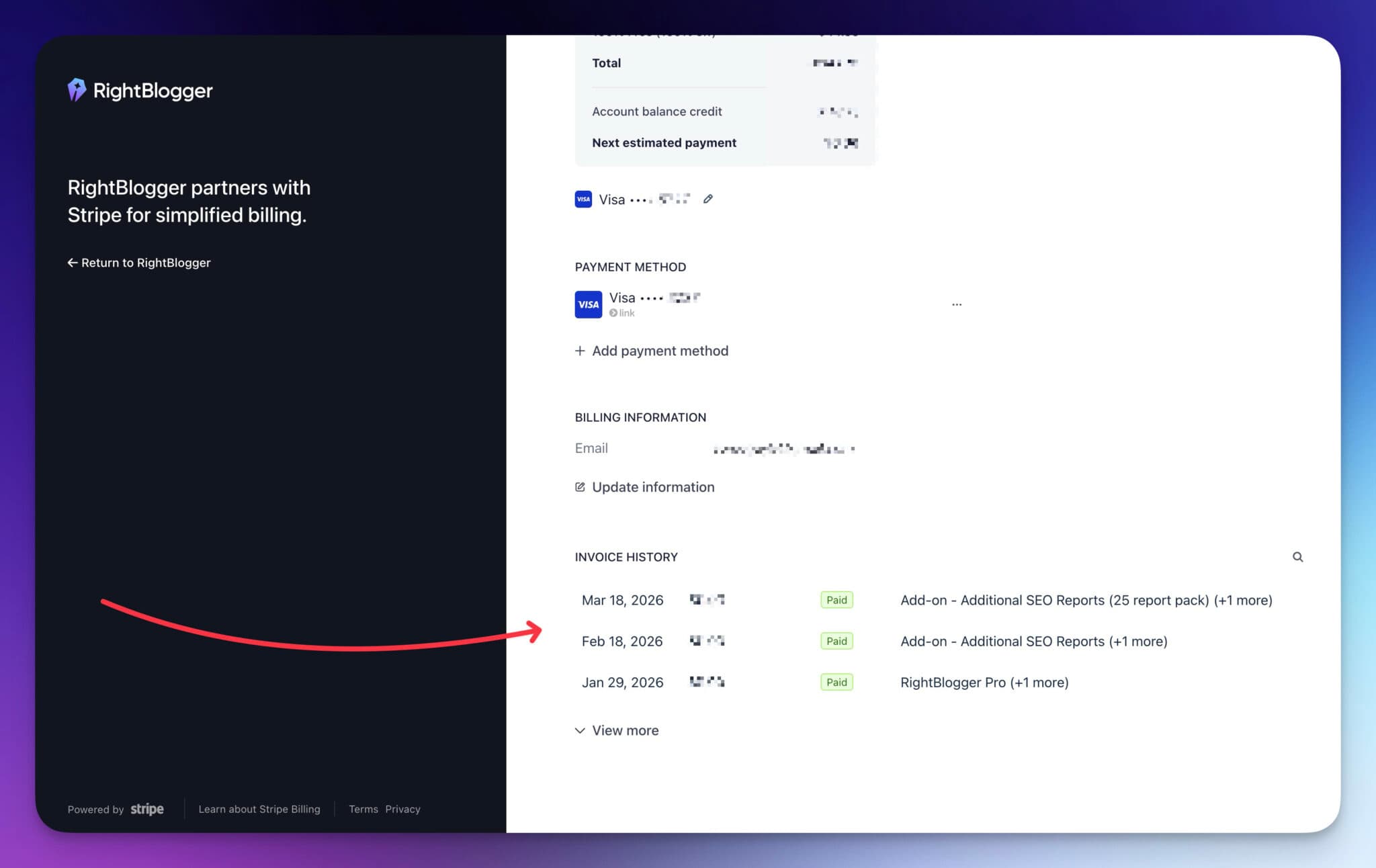
Click on any invoice to open the full details. From there, you can download the invoice as a PDF for your records or to share with your accountant.
How to Update Your Payment Method
From the same Stripe billing portal, you can update your card on file:
- Find the Payment Method section.
- Click the three-dot menu (…) next to your current card.
- Select “Add a payment method” to add a new card, or update the existing one.
How to Update Your Billing Email
Your billing email (where Stripe sends receipts) is shown under Billing Information in the portal. Click “Update information” to change it.
This is separate from your RightBlogger login email. If you need to change your login email, see How to Change Your Email Address.
Common Questions
Where is my billing or subscription section?
Go to rightblogger.com/account and click “Manage Subscription on Stripe” to access all billing, invoices, and payment details.
Can I get a receipt for a specific charge?
Yes. In the Stripe portal under Invoice History, click on any invoice to view or download a PDF receipt.
I don’t see a “Manage Subscription on Stripe” button.
The button only shows on accounts with their own paid subscription. On the Free plan you’ll see View pricing instead, and if your plan comes from a team, the team owner handles billing. If you subscribed through Shopify, click Manage in Shopify. Otherwise, make sure you’re logged in to the account that pays. If you have multiple accounts, you may be logged into the wrong one. If you’re still having trouble, reach out to us at contact@rightblogger.com.
Automated SEO Blog Posts That Work
Try RightBlogger for free, we know you'll love it.
7-day free trial. Cancel anytime.




