How to Use AI Brand Monitor in RightBlogger
Track brand visibility across four AI platforms, then pinpoint missed prompts, competitor mentions, citations, and scan costs.
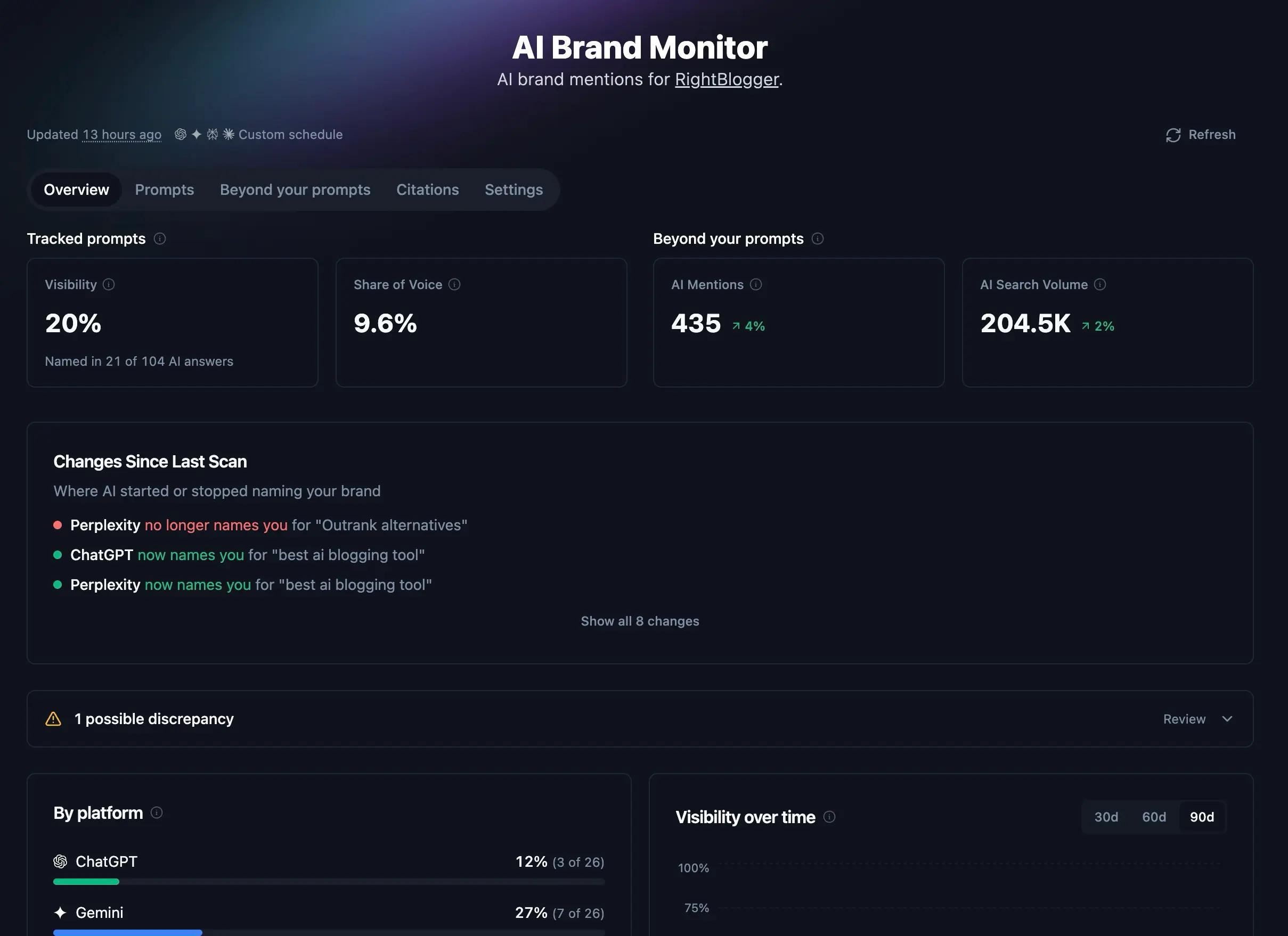
The AI Brand Monitor shows when ChatGPT, Gemini, Perplexity, and Claude name your brand while answering questions related to your market. It also shows which competitors appear, what sources the AI cites, and how those results change over time.
Each monitor belongs to one RightBlogger project and uses that project’s website, country, competitors, and Site Agent connection. The monitor is included on current Solo, Pro, and Agency plans.
Before You Set Up AI Brand Monitor
Your project needs a website URL because the monitor uses its domain to identify your brand and citations. Open Projects and add the correct website if the AI Brand Monitor asks you for a domain.
Project owners and editors can change prompts, competitors, schedules, and settings. Viewers can read existing results but cannot change the monitor or retry its setup.
Set Up Your First Monitor
- Open AI Brand Monitor.
- Choose the project and domain you want to track.
- RightBlogger creates the monitor and prepares a set of starter questions based on the site.
- Wait for the first scan to collect the AI answers. This can take several minutes, and you can leave the page while it runs.
- When the results arrive, review the starter questions and open an answer to see whether the AI named your brand or cited your site.
The first results are saved automatically. If the first scan takes longer than expected, use Check for results. A project owner or editor can retry the scan if it failed.
Understand the Two Types of Monitoring Data
The dashboard keeps tracked questions separate from broader mentions. This distinction matters because the two sections answer different questions.
Tracked Prompts
Tracked prompts are the exact questions you choose. RightBlogger asks each active AI platform those questions on your schedule, then records whether it named your brand, which tracked competitors appeared, and which pages were cited.
Visibility and Share of Voice come from discovery prompts that do not already name your brand. Brand-specific questions still appear in the Prompts tab, but they do not inflate those headline percentages.
Mentions Beyond Your Prompts
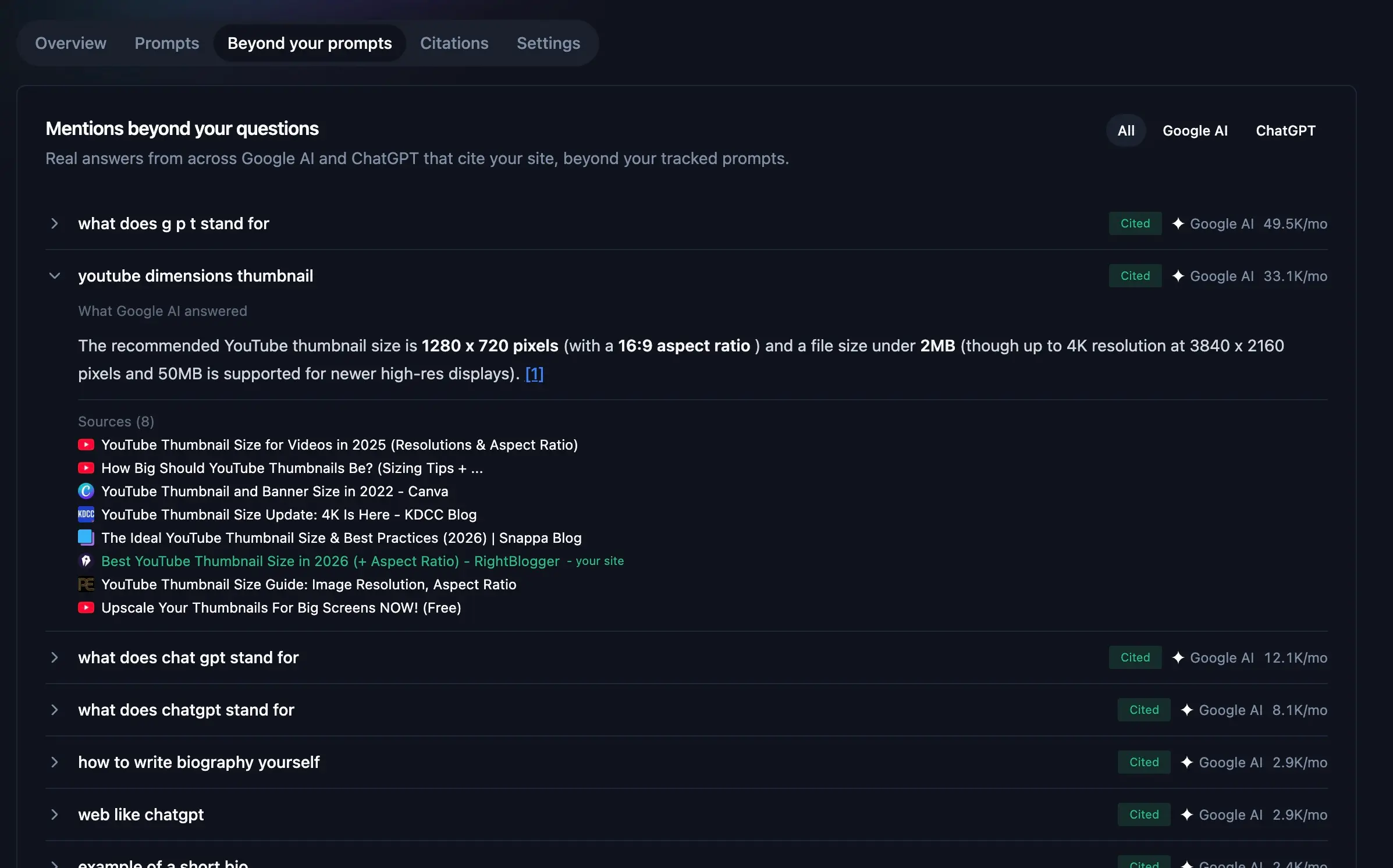
This is a separate collection of real Google AI and ChatGPT answers that cite your site outside the questions you track. It can be empty even when your tracked questions mention your brand, and the reverse can also happen.
Use the Beyond your prompts tab to review those answers and filter them by platform. Use the Citations tab to see their cited domains and pages.
Read the Overview Metrics
- Visibility is the percentage of discovery answers that named your brand. The sample size below the score shows how many answers it represents.
- Share of Voice is your share of all mentions of you and the competitors you track across discovery answers. Add at least one competitor before using this metric.
- AI Mentions counts broader Google AI and ChatGPT answers that reference your site outside your tracked prompts.
- AI Search Volume estimates the monthly volume of the broader queries whose answers reference your site.
The Overview also shows changes since the previous scan, a platform breakdown, a visibility chart, competitor Share of Voice, and sentiment for answers that named your brand. Percentage changes for Visibility and Share of Voice are shown in percentage points.
Review Possible Factual Discrepancies
The monitor can flag a possible discrepancy when an AI makes a factual claim about your brand or its own offering that conflicts with evidence on your site. Open the item to compare the AI quote with the source text.
Treat these as items to review, not final verdicts. General advice and claims about other companies are outside this check. Accuracy is also separate from sentiment, so a positive answer can still contain a factual mistake.
Manage Your Tracked Prompts
Open the Prompts tab to add, edit, or stop tracking questions. A useful discovery prompt asks for recommendations without putting your brand name in the question. For example, a recipe site might track “Which blogs have reliable gluten-free recipes?”
Expand a prompt to read the answer from each platform. The row shows whether your brand appeared, whether your domain was cited, which competitors were named, the average position among tracked brands, and the overall visibility for that question.
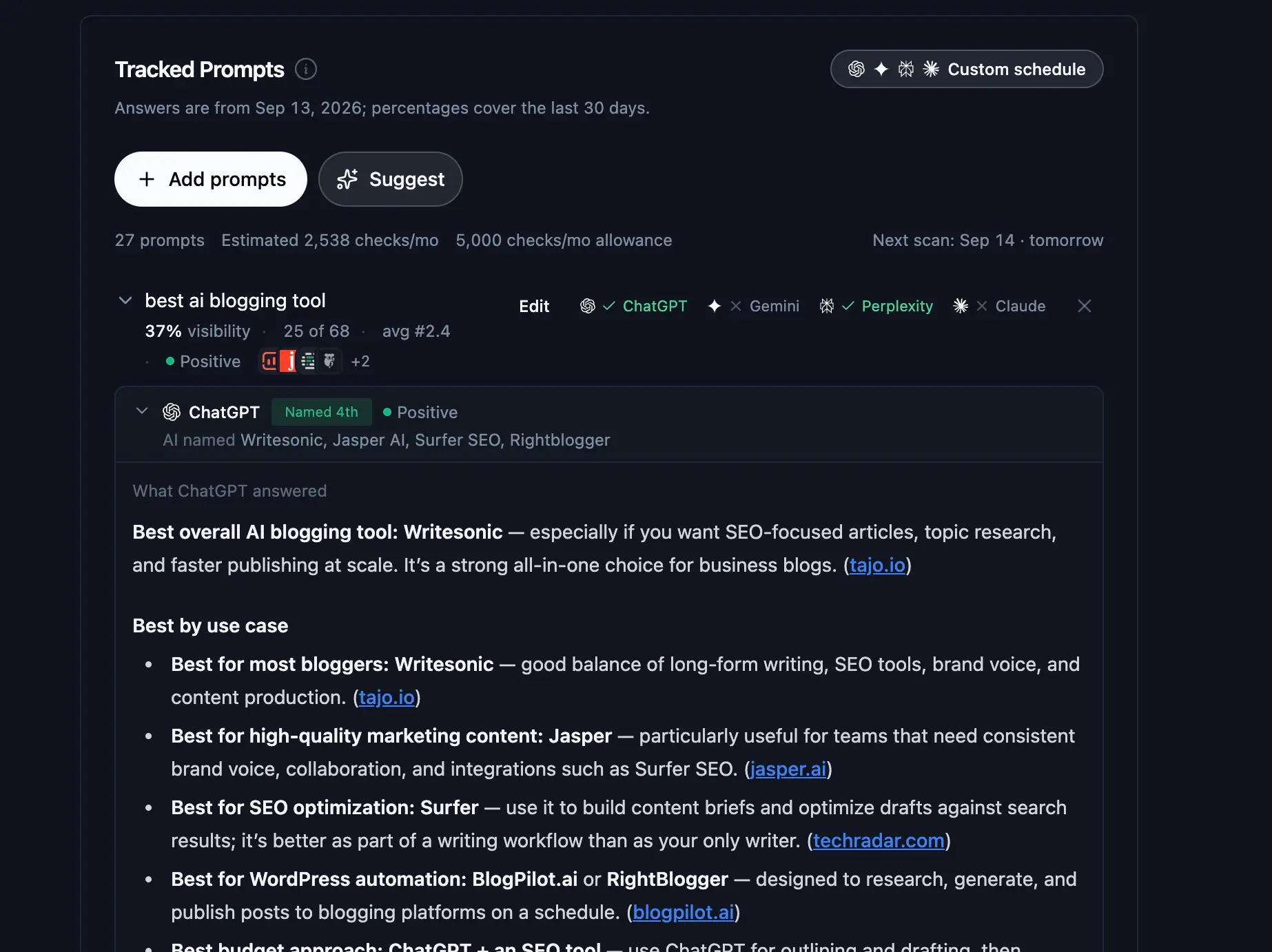
A monitor can hold up to 50 prompts, although your monthly check allowance can set a lower practical limit. RightBlogger removes duplicate questions that differ only by capitalization, spacing, or punctuation, so you do not spend checks on the same prompt twice.
Turn a Missed Prompt Into an Action
The Where Competitors Are Winning section puts the largest gaps first. Open a prompt to see the answer that named a competitor instead of you.
If the Site Agent is active for the project, select Fix with agent, review the brief, and click Add task to queue a focused task. The agent looks for the closest existing post and adds a direct answer when there is a natural fit. If no suitable page exists, use Write an article to open the Article Writer with the question already filled in.
Add and Compare Competitors
Add competitors from the Share of Voice card. Use the brand name an AI would say, such as “Ahrefs,” rather than only entering a domain. You can use competitors saved in the project, add monitor-specific brands, or combine both lists.
RightBlogger can track up to nine competitors per monitor after duplicate names are removed. The dashboard may also suggest brands that appeared in recent answers. Add the ones you compete with to include them in future Share of Voice comparisons.
Use the Citations Tab
The Cited for Your Prompts section lists the pages AI used while answering your tracked questions. Filter the list by prompt, page format, platform, or whether the citation points to your own site. This helps you see which sources and content formats appear for a specific question.
Below that, Cited Domains and Cited Pages summarize sources found in the broader Google AI and ChatGPT mention collection. These results are separate from the tracked-prompt citation list.
Control the Scan Schedule and Checks
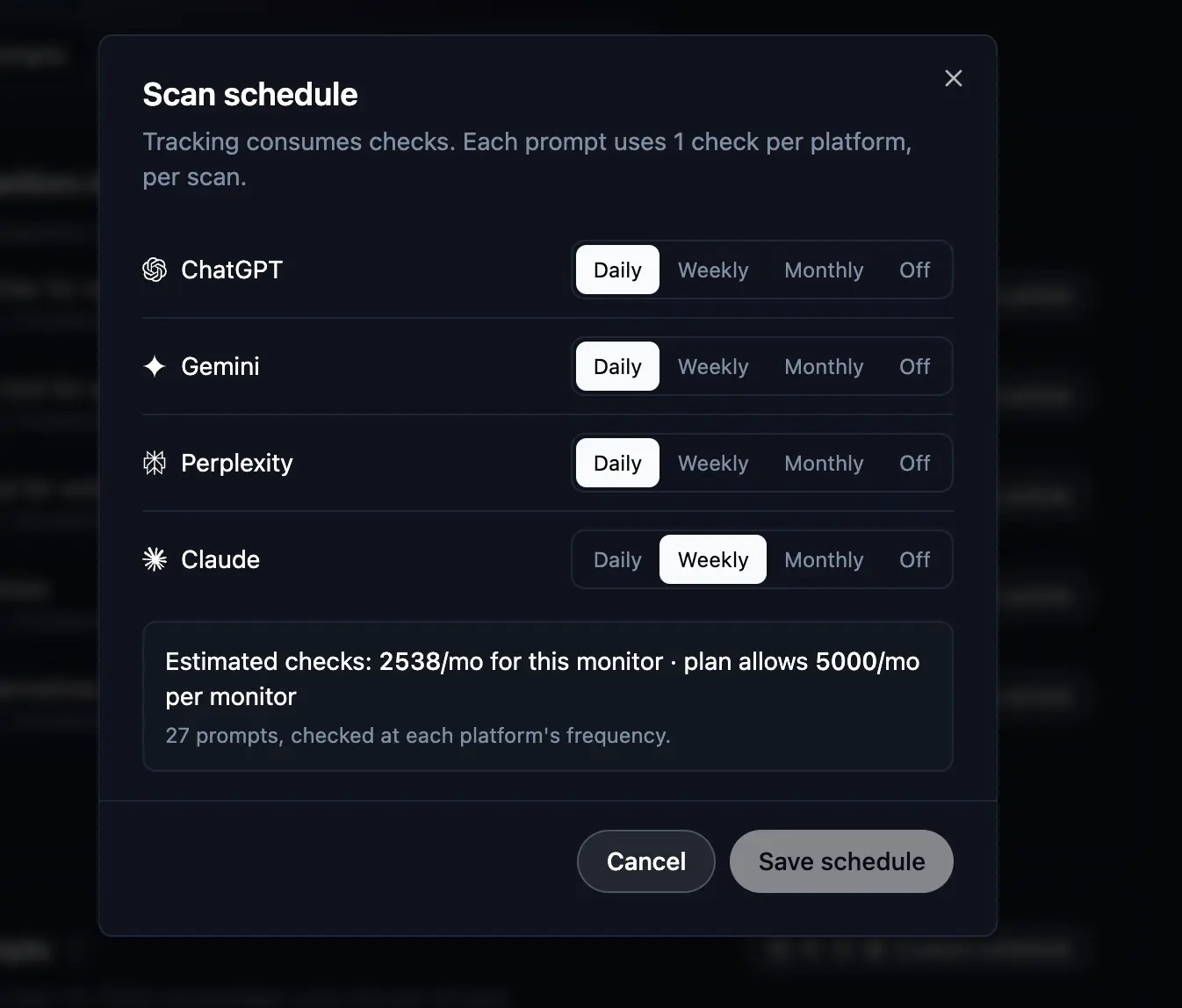
Open the schedule control near the latest update time or go to Settings > Scan schedule. ChatGPT, Gemini, Perplexity, and Claude each have their own Daily, Weekly, Monthly, or Off setting.
One check means one prompt asked once on one platform. Eight prompts checked monthly on three platforms use 24 checks: 8 prompts multiplied by 1 run and 3 platforms. Current plans include 25 checks per site each month, so daily schedules don’t fit.
The schedule dialog estimates your monthly use and shows the allowance for that monitor. If the estimate is over the allowance, lower a platform’s frequency, turn one off, or remove prompts before saving. Turning every platform off stops scheduled scans.
Your scan country comes from the project’s country setting. Change it in Project settings so keyword data, Site Scan, and AI monitoring use the same audience location.
Pause or Delete a Monitor
Select Pause in Settings to stop future scans without removing the monitor. You can still read the saved history and resume monitoring later. Changing the schedule while paused does not resume it.
Deleting a monitor permanently removes its settings and historical data. Use Pause when you expect to track the project again.
Common AI Brand Monitor Questions
Why Does a Prompt Have No Result for One Platform?
Each platform has its own schedule, so one may not be due yet. A platform can also fail to return an answer during a scan. The dashboard excludes failed checks from percentages and shows when some data was unavailable.
Why Is Share of Voice Empty?
Add at least one competitor before using Share of Voice. If competitors are already present, an empty value can mean the latest discovery answers did not name you or any tracked competitor.
Why Are Broader Mentions Empty?
The broader collection only shows Google AI and ChatGPT answers that cite your site outside your tracked questions. An empty collection does not mean your tracked prompts have no results. Check the Prompts tab for those answers.
Start With a Focused Monitor
Keep the starter questions that match how a real customer would search, then replace the rest with focused discovery prompts. Add your closest competitors and use a monthly or weekly schedule that fits your check allowance. After the next scan, act on one missed question instead of chasing every number at once.
Still need help?
Ask the AI assistant for an instant answer, or reach us directly and we will get back to you as soon as we can.
Automated SEO Blog Posts for Your Site
Research, write, publish, and share from one account.
7-day free trial. Cancel anytime.




