Blog Performance Report (Weekly Email)
Each Monday’s email tracks clicks, impressions, rankings, and pages or keywords that could benefit from a focused update.
Every Monday morning, RightBlogger sends you an email breaking down how your blog performed in Google Search over the past week. It surfaces what matters most so you know where to focus your time.
To get the report, you’ll need Google Search Console connected on at least one project and the weekly performance report turned on in your notification preferences. If you just connected Search Console, give it about a week before your first report arrives.
What’s in the Report
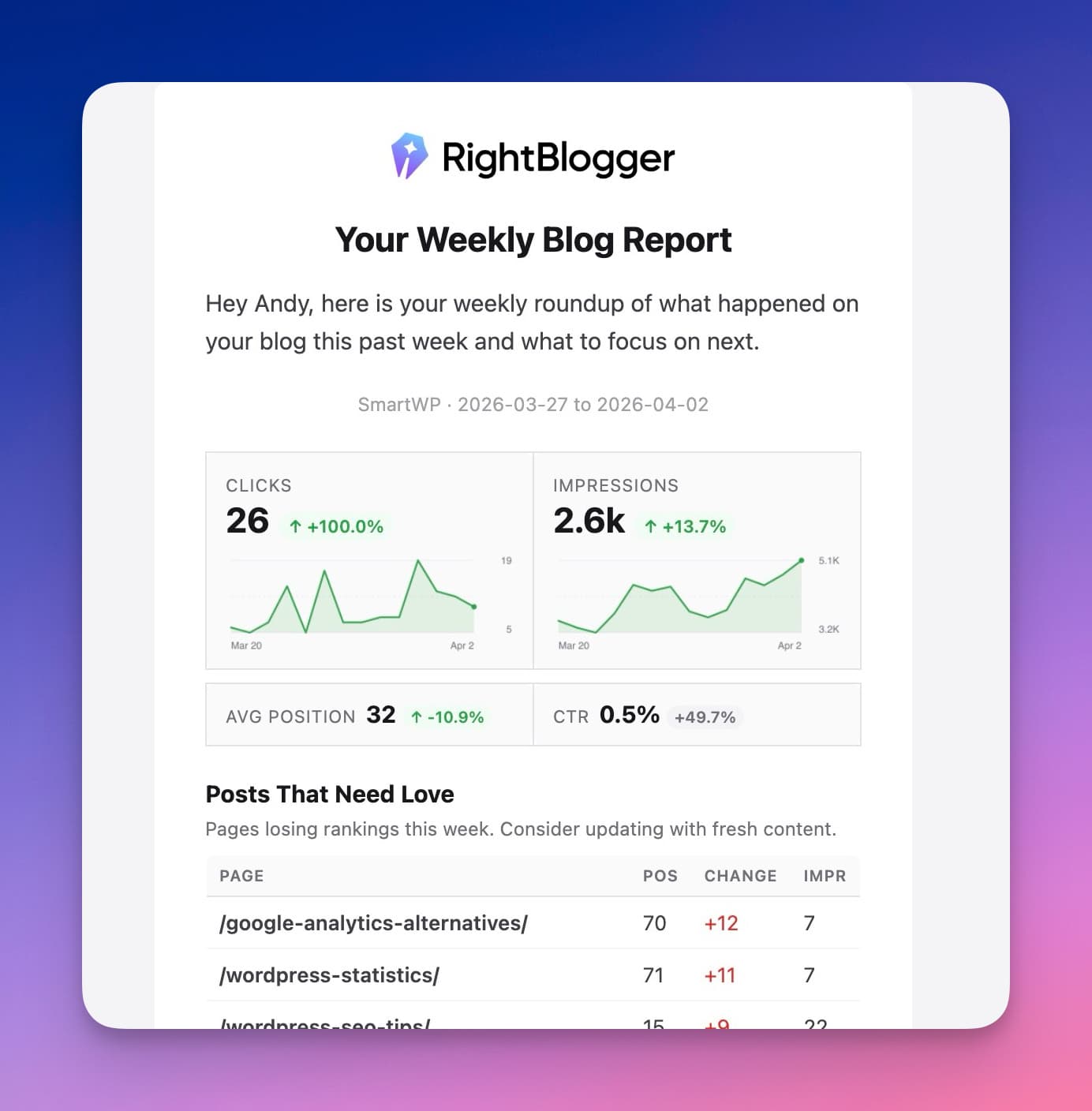
The email starts with a performance snapshot showing sparkline charts for clicks and impressions over the past 14 days, along with your average position and click-through rate. All metrics include week-over-week changes so you can spot trends at a glance.
Below that, you’ll see your top page for the week and total keywords your site ranks for.
The report then highlights areas that need attention:
- Pages To Keep An Eye On listing pages that moved down a few positions, so you know what needs a content refresh
- Almost Page 1 showing keywords close to page one where a small push could make a difference
- Low click-through flagging queries where people see your site in results but aren’t clicking, suggesting your titles or meta descriptions could use work
The report also includes This Week’s Note, a personalized observation about your data with a specific next step, and Content Ideas, blog post suggestions based on what your site covers and what it’s missing.
Turn It On or Off
You can manage the report from two places:
- Account level: Go to Account > Notifications > Performance Report to turn the report on or off for your entire account
- Project level: Toggle notifications per project in your project settings to control which projects are included
- Per teammate: If the project has members, use Also send to in the project’s Notifications settings to pick who else receives this report. Members get nothing until you check the box, and each person can switch their own copy off.
Common Questions
When does the email arrive?
Monday mornings. The exact time may vary slightly, but it covers the seven days ending three days before the email (Search Console data takes a few days to finalize), compared with the seven days before that.
I connected Search Console but didn’t get a report. Why?
It can take up to a week after connecting for enough data to generate your first report. Also double-check that Get the weekly performance report is turned on under Account > Notifications > Performance Report.
Can I get reports for multiple projects?
Yes, but each weekly email covers one project, picked at random from those with Search Console connected and the report turned on. Turn the report off for any project you want left out.
The data looks different from what I see in Search Console. Is that normal?
Google Search Console data has a 2-3 day delay, so the numbers in your report reflect the most recent complete data available. Minor differences are expected.
Still need help?
Ask the AI assistant for an instant answer, or reach us directly and we will get back to you as soon as we can.
Automated SEO Blog Posts for Your Site
Research, write, publish, and share from one account.
7-day free trial. Cancel anytime.




