Squarespace for Blogging: Honest 2026 Review + API Catch
Its missing blog API means every post, SEO update, and content refresh must be handled manually, making scale costly.

Short answer: Squarespace is fine for blogging if you blog occasionally and care about how the site looks. It hits a ceiling fast if you blog seriously, mostly because of one thing nobody talks about: it has no API for your blog content, so almost no third party tool can help you maintain or scale it.
This question comes up a lot, and the answer depends almost entirely on what kind of blog you’re trying to build. I’ve watched solo creators stay on Squarespace for years and do great. I’ve also helped writers migrate off it once they outgrew the platform.
Here’s the honest read on Squarespace for blogging in 2026, broken into the parts that actually matter: SEO, pricing, templates, the API problem, and how it stacks up against WordPress.
Key takeaways
- Squarespace is great for design-led blogs run by one person. Setup is fast, the editor is clean, and templates look modern out of the box.
- SEO is workable but not strong. You can rank, but you have less control than on WordPress.
- There is no free Squarespace blog tier. Plans start at about $19 per month on Basic (annual billing; US list price). New plan names are Basic, Core, Plus, and Advanced.
- Squarespace has no public API for blog posts. You cannot programmatically create, update, or refresh content from outside the dashboard, which kills almost every third party automation, AI workflow, or content tool.
- If your goal is a serious traffic blog you want to scale and maintain over years, WordPress is a better long term home.
Where Squarespace works well for blogging
Most negative reviews of Squarespace skip past what it does well, so let me start there. If your blog matches the description below, Squarespace is probably the right call:

- Solo blog tied to a portfolio, studio, or small business. Photographers, designers, consultants, restaurants, wedding venues. The visual quality of Squarespace templates does real work for you.
- You publish a few posts a month, not a few a week. Manual publishing through the editor is fine at low volume.
- You want a real site, not just a blog. Pages, scheduling, an integrated store, a contact form, all in one subscription with no plugin maintenance.
- You do not want to think about hosting, backups, plugin updates, or security. This is the main reason people pick Squarespace and it is a legitimate reason. Self hosted WordPress costs you a few hours a month in maintenance you may not want to spend.
Inside the editor, Squarespace handles the basic blog things well: scheduled publishing, categories, tags, a built in author system, RSS feeds, comments, and image galleries. The interface is also clean enough that a non technical client can publish a post without breaking the site.
Types of blogs that work well on Squarespace
Looking at the Squarespace blogs that actually grow over time, the same archetypes keep coming up. If your idea fits one of these, Squarespace is rarely the bottleneck:
- Photography and travel journals. Image first, low post volume, shareable on social. Squarespace’s gallery blocks and image handling are some of the best in the industry.
- Studio or agency case studies. Design firms, branding studios, video production. The blog runs as a portfolio extension and Squarespace’s polish reads as professionalism.
- Wedding, hospitality, and venue blogs. Editorial roundups, behind the scenes, vendor lists. Often built by a solo owner who needs the blog to look beautiful, not to scale to thousands of posts.
- Personal essay or newsletter style blogs. Lower frequency, voice driven, no need for advanced SEO infrastructure.
- Local service business blogs. Therapists, law practices, fitness studios, restaurants posting menus and stories. The blog supports local SEO without needing a full editorial operation.
The pattern: low-to-moderate post volume, design as a competitive advantage, one or two people running the whole thing. Squarespace was built for these. You can browse real examples in Squarespace’s template gallery to see how each archetype looks in production.
The catch: Squarespace has no blog API
This is the part most reviews skip and the part that quietly matters most over time.
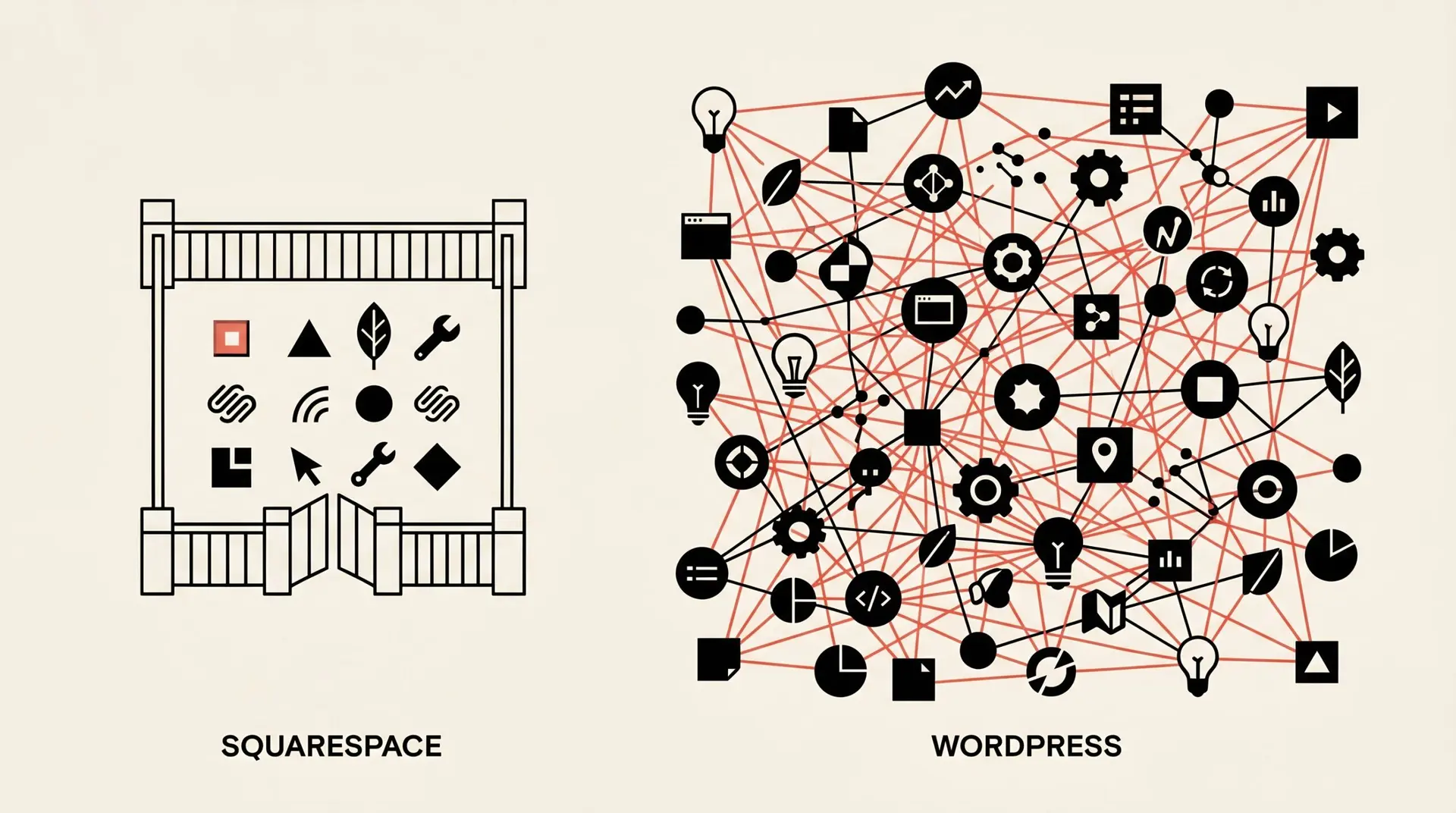
Squarespace publishes developer APIs for commerce, contacts, analytics, webhooks, and custom code. There is no public API for blog posts or pages. You cannot create a post, update a post, set a featured image, or change a meta description from anything outside the Squarespace dashboard.
That sounds technical. Here is what it means in practice for a blogger.
- You cannot use AI tools to draft and publish in one flow. Every post has to be copy pasted into the editor by hand.
- You cannot run automated content refreshes. If you have 80 old posts you want to update with this year’s stats, that is 80 manual edits.
- You cannot use bulk SEO tools. Things like updating internal links across a site, fixing meta descriptions in bulk, or rewriting titles based on Search Console data have to be done one post at a time.
- You cannot wire up most editorial workflows. Notion to blog, Google Doc to blog, scheduled imports from a spreadsheet, none of it works without a brittle Zapier hack.
- If you ever want to leave Squarespace, your export is limited. Squarespace’s blog export hands you an XML file that imports cleanly into WordPress, but anything beyond a basic blog (custom blocks, gallery layouts, member areas) does not come with you.
Tools and workflows that work on WordPress but not Squarespace:
- RightBlogger’s WordPress integration (AI drafts straight to your CMS, automated SEO refreshes, internal link agents)
- Yoast SEO and Rank Math (the two leading on-page SEO plugins)
- Bulk schema generators and structured data tools
- Editorial CMS bridges like WP All Import, WPGraphQL workflows, or any Notion-to-blog pipeline
- AI autoblogging and bulk publishing tools
- Most agency reporting tools that pull live post data
This is the difference between a blog that grows by adding more of your time and a blog that grows by adding leverage. The future of blogging is the second one. Tools like RightBlogger, AI writers, automated internal link agents, scheduled refreshes, and bulk schema generators all need a way to write back to your CMS. Squarespace does not give them one.
WordPress, by contrast, ships with a full REST API that lets any tool create, update, or delete posts. That is why almost every AI blogging tool, including the RightBlogger WordPress integration, works on WordPress and not on Squarespace. If you blog seriously enough that an extra 30 hours a month of manual work matters, this is a structural ceiling you will hit on Squarespace.
Squarespace SEO for blogs
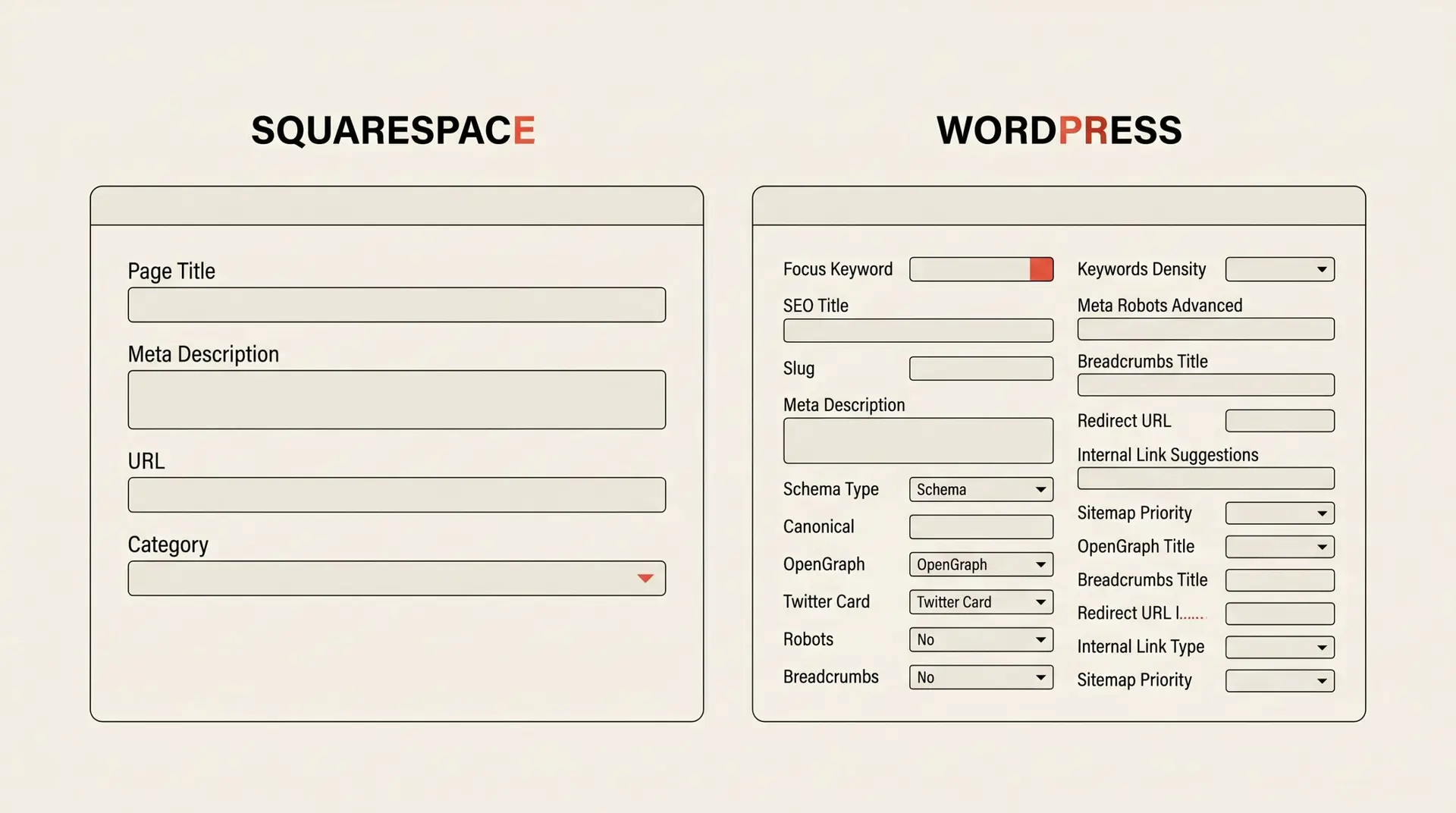
Squarespace SEO is workable. It is not great. The honest summary is: you can rank with Squarespace, but you have less control than you would on WordPress, and the platform makes some technical SEO choices for you that you cannot override.
What Squarespace does fine:
- Auto generates a sitemap at
/sitemap.xml - Lets you set per page meta titles and descriptions
- Adds Open Graph tags by default
- Connects to Google Search Console without extra plugins
- Loads reasonably fast on modern templates, with image optimization built in
Where it falls short for serious SEO:
- URL structure is rigid. Blog post URLs include
/blog/by default and you cannot fully customize them the way you can in WordPress permalinks. - Schema markup is limited. You get basic article schema. There is no easy way to add FAQ, HowTo, Product, Recipe, or other schema types without injecting custom code.
- No Yoast or Rank Math. The two best on-page SEO plugins are WordPress only. Squarespace’s built in SEO settings cover the basics and not much more.
- No control over robots.txt. You can block individual pages but you cannot edit the file directly.
- Internal linking has to be manual. Without an API you cannot run an automated tool to find and add relevant links across old posts. On WordPress this is a few clicks.
- No native control of indexing rules at scale. You can noindex one page at a time, not by rule.
The blunt version: if you publish twice a month and write good content with smart titles, Squarespace will not stop you from ranking. If you are running a 500 post site that needs technical SEO maintenance every quarter, you will outgrow it.
Squarespace blog pricing (is there a free plan?)
No, there is no free Squarespace blog plan. Squarespace offers a 14 day free trial, then a paid subscription is required to publish a live blog.
Plan tiers (annual billing, US pricing, subject to change):
- Basic: about $19 per month (annual billing; about $228/year). Includes blogging; two contributors. See Squarespace pricing and Squarespace plans explained.
- Core: about $29 per month (annual; about $348/year). Unlimited contributors, custom code, Google Workspace email, and 0% online store fee.
- Plus and Advanced: about $49 and $99 per month (annual). Lower payment fees and more video storage — geared at stores, not blogs. Skip unless you are selling at volume. Plus may be unavailable where Squarespace Payments is not offered.
For a serious blogger, the realistic pick is Core at about $29 per month, around $348 per year. Compare that to a typical self hosted WordPress setup: hosting at $5 to $15 per month plus a domain at around $12 per year. WordPress wins on raw cost, but loses on the time you spend maintaining it.
Pricing is rarely the deciding factor. The deciding factor is what you want to do with the blog over the next five years.
Squarespace vs WordPress for blogging
This is the comparison everyone really wants. The short version, by category:
| Category | Squarespace | WordPress (self hosted) |
|---|---|---|
| Setup time | Under an hour | 1 to 3 hours |
| Design out of the box | Excellent | Depends on theme |
| Maintenance | Zero | Updates, backups, security |
| SEO control | Limited | Total |
| Scaling past 200 posts | Painful | Comfortable |
| API for automation | None for blog content | Full REST API |
| Plugins or extensions | Small built in catalog | 60,000+ |
| Cost per year | $228 to $348 | $80 to $200 plus your time |
| Migration out | Limited XML export | Full content portability |
If you want a deeper look at the WordPress side of this, the Ryan Robinson team has a step by step guide to starting a WordPress blog and I run SmartWP for ongoing WordPress tutorials and tips. Both are good next reads if WordPress is the direction you are leaning.
Best Squarespace blog templates
If you have decided on Squarespace, the template you pick matters. Squarespace template families on Fluid Engine all support blogging, so you have flexibility, but a few are noticeably better tuned for content first sites.
- Beaumont and Reece: editorial layouts with strong typography. Best for written blogs.
- Almar and Hayle: image heavy templates. Best for photographers, food blogs, and travel writers.
- Bedford family: the classic Squarespace blog template. Reliable, clean, and easy to customize.
- Brine family: the most flexible legacy family. Still popular with designers, but Squarespace is steering new sites toward Fluid Engine instead.
Two practical tips when choosing a template: pick based on the blog list page first since that is where most readers land from social shares, and remember that on Squarespace 7.1 you can switch templates more freely than on 7.0. Do not over commit early.
How to add a blog to your Squarespace site
If your Squarespace site does not have a blog page yet, adding one takes about a minute:
- From your dashboard, open Pages.
- Click the plus icon under Main Navigation and pick Blog.
- Choose a layout (grid, side by side, alternating, or basic) based on how you want the blog index page to look.
- Name the page (Blog, Journal, News, whatever fits) and the URL slug Squarespace generates from it.
- Open the new blog page and click Add Post to publish your first one.
That is it. The post editor is straightforward: title, body, featured image, categories, tags, and a publish or schedule toggle. Set the SEO title and description in the post settings panel before you publish so Google has something specific to show.
If you are brand new to all of this and want a wider walkthrough that covers picking a niche, planning your first posts, and growing traffic, Ryan’s guide on how to start a blog is the most thorough one I send people to.
Who Squarespace is right for (and who should skip it)
Pick Squarespace if:
- You are a designer, photographer, restaurant, consultant, or small business and the blog is supporting a portfolio or service site.
- You will publish 1 to 4 posts a month and would rather spend time writing than maintaining software.
- Visual polish out of the box is more important to you than absolute control.
- You expect the blog to stay under a few hundred posts in total.
Skip Squarespace if:
- You want to grow a content site to traffic levels that pay you back. SEO ceilings and the missing API will both bite.
- You plan to use AI tools, automation, or any third party content workflow. Almost none of them work with Squarespace.
- You publish more than once a week. Manual entry will eat your time.
- You expect to integrate the blog with custom systems, CRMs, or membership tools beyond what Squarespace ships natively.
The honest meta point: blogging is still one of the best long term traffic plays available, and worth doing in 2026. The leverage in modern blogging comes from systems that maintain and refresh content for you so your time goes into the things only you can do, like first hand research, voice, and judgment. That is the whole reason RightBlogger exists. The platform you pick decides whether you can plug into that future or have to keep doing everything by hand.
Squarespace blogging FAQ
Is Squarespace good for SEO blogging?
It is okay, not great. You get the basics (sitemap, meta tags, decent page speed) but you lose granular control over schema, URLs, and bulk SEO maintenance. For most one author blogs publishing on a low cadence, that tradeoff is fine. For sites trying to scale into hundreds of posts and serious organic traffic, WordPress gives you more headroom.
Can you blog on Squarespace for free?
No. There is a 14 day free trial, then you need a paid plan starting at about $19 per month on Basic (annual billing). The cheapest free options for blogging are WordPress.com’s free tier (with strong limits and ads) or a self hosted WordPress install on cheap hosting.
Does Squarespace have an API for blog posts?
No. Squarespace publishes APIs for commerce, contacts, analytics, and webhooks, but not for blog content. You cannot create, edit, or delete posts programmatically. This is the main reason third party AI writing and automation tools cannot integrate with a Squarespace blog the way they can with WordPress.
Who has better SEO, Wix or Squarespace?
Both are similar in capability. Squarespace has a slight edge on clean URLs and schema defaults. Wix has improved a lot in recent years and offers more granular SEO controls in some areas. Neither matches WordPress for full control, but for casual blogs both are fine.
What platform do most bloggers use?
WordPress, by a wide margin. WordPress powers more than 40% of all websites and the majority of independent blogs. Squarespace is one of the larger hosted competitors but sits well behind WordPress in market share.
Can I move my blog from Squarespace to WordPress later?
Yes, but with limits. Squarespace supports a blog export to a WordPress compatible XML file. Posts, pages, images, and basic categories come over. Custom layouts, gallery blocks, member areas, and store data do not. If you suspect you might migrate later, keep your blog templates simple to make the move easier.
Is blogging still worth it in 2026?
Yes, but the way you do it has changed. Generic AI content gets nowhere. The blogs winning right now combine real first hand experience with systems that handle the repetitive work (drafting, internal linking, refreshes, schema, distribution). That combination is what makes blogging compound over years instead of running flat.

Article by
RightBlogger Co-Founder, Andy Feliciotti shares practical blogging and website insights, plus his passion for photography and travel.



Automated SEO Blog Posts That Work
Try RightBlogger for free, we know you'll love it.
7-day free trial. Cancel anytime.





Leave a comment
You must be logged in to comment.
Loading comments...