How to Teach the AI in Your RightBlogger Project
Three to five specific comments teach lasting project rules within seconds, including scheduled posts.
Every RightBlogger project has its own AI memory. When you leave feedback on a piece of generated content, the AI uses that feedback to shape future content in the same project. This guide covers where to leave feedback, what makes a comment useful, and how the learning actually shows up in your next generation.
What “Learning” Means Inside a Project
Each project keeps a running set of preferences derived from your feedback. Think of it as a private style guide the AI reads before it writes anything new for that project. You don’t see this style guide directly. You shape it by leaving feedback on the content the AI produces, and the AI does the rest.
Two important things to know up front:
- Feedback is scoped to one project. If you leave a comment in your “Coffee Blog” project, it won’t change how the AI writes in your “Real Estate Newsletter” project. Switch projects and the AI uses a different memory.
- Comments matter more than thumbs alone. A bare thumbs-down doesn’t tell the AI why. The comment is what teaches it.
Where to Leave Feedback
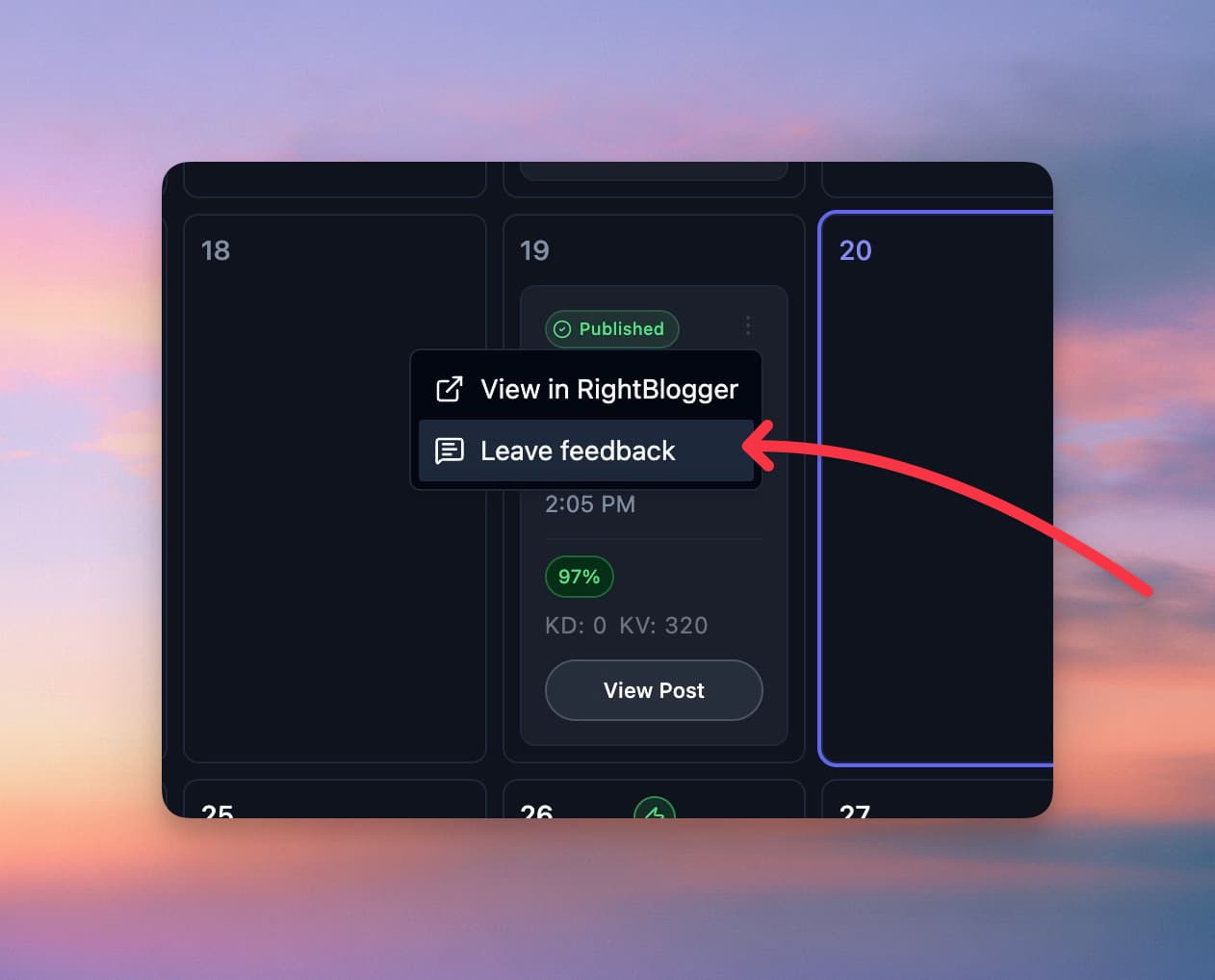
There are four places to give feedback today:
- The thumbs on any generated article. When you run a tool and see the finished content on desktop, the thumbs-up and thumbs-down icons sit next to the word count. Article tools open in the Editor tab, so switch to the Original tab to see them. Click either one and a feedback box opens where you can add a comment.
- The Content Planner. On any scheduled post card in the planner, open the three-dot menu and pick Leave feedback. Pick Liked, Mixed, or Off, write a short note, and click Save feedback. The note is required here.
- Single-post digest emails. One-click Liked / Mixed / Off opens the same feedback dialog for an optional note. That feedback trains the writer for the project.
- Social posts. In the Social Planner, posts from your social automations have thumbs up and down in the post details and the review dialog, which open the same feedback dialog.
All four paths feed into the same project memory.
Write a Comment That Actually Teaches
The AI reads your comment alongside the actual content you reacted to, so it can spot the pattern you’re pointing at. The clearer you are, the better the rule it derives.
Examples of comments that work well:
- “Avoid the word ‘crucial.’ Use ‘important’ or ‘needed’ instead.”
- “Spell our brand as one word: RightBlogger, never Right Blogger.”
- “Stop opening posts with ‘In today’s fast-paced world.’ Open with a concrete scene or anecdote.”
- “Keep paragraphs to three or four sentences. The current ones are too dense.”
- “More personal anecdotes like the one in paragraph two. Less generic statistics.”
Examples that don’t teach much:
- “Good.” or “Bad.” (No pattern to learn.)
- “This isn’t what I wanted.” (What did you want?)
- “Better.” (Better than what, and how?)
If you want to set a baseline voice up front rather than teach the AI piecemeal, you can also use MyTone to define a writing style the AI matches from the start. Feedback then fine-tunes from there.
A good rule of thumb: if a new writer on your team read only your comment plus the piece of content, would they understand what to change next time? If yes, the AI will too.
What Happens After You Hit Save
- Your comment is saved to the project. If the rule is ready right away, the confirmation shows it (“Saved as a rule for this project’s future content”). Otherwise you’ll see “Thanks, we’ll use this for future content” and the rule is added in the background. Comments about the app itself go to our team instead of becoming rules.
- Within a few seconds, the AI reads your comment and the content you reacted to, then writes a single specific rule it can apply later. (For example: “Avoid back-to-back bulleted sections in process-driven content; prefer flowing prose for transitions.”)
- That rule is added to your project’s running preferences.
- The next time you generate anything in this project (manual generation, an article from the planner, or a scheduled automation), the AI reads those preferences before writing.
You don’t have to wait long. By the time you click “Generate” on your next post, your feedback is already in the project’s memory.
Yes, Automations Learn Too
If you’re using Automations to schedule recurring posts, your feedback applies there as well. Every scheduled post the AI generates reads the same project preferences. So if you teach the AI in the morning that your brand voice is casual and avoids exclamation marks, the post that auto-generates that afternoon will reflect it.
How Much Feedback Is Enough?
You’ll see meaningful change after just a handful of comments. Three to five specific notes early on tend to do more than a single long one. As your project’s library grows, the AI keeps refining the rules and consolidating overlapping patterns automatically, so you don’t have to repeat yourself.
If your project’s voice changes over time (say, you take on a new client or pivot the blog), just leave fresh feedback. The AI weighs newer signals heavier than older ones, so it adapts.
Still Stuck?
If your feedback doesn’t seem to be applied, double-check that you’re working in the same project where you left the comment. Different projects keep separate memories, so feedback in one won’t carry over to another. If you’re certain the project is right and the AI still isn’t picking up the rule, reach out to contact@rightblogger.com with the project name and an example, and we’ll take a look.
Automated SEO Blog Posts That Work
Try RightBlogger for free, we know you'll love it.
7-day free trial. Cancel anytime.




