Auto Optimize in RightBlogger: AI SEO for LLM & SEO Traffic
See how an SEO Report guided a one-click rewrite that raised a draft’s score from 23% to 82%.


An incredible new AI SEO tool just landed inside RightBlogger: Auto Optimize is live and will automatically SEO-optimize your blog posts, to help drive more SEO and LLM traffic. For years, I’ve been waiting for an SEO tool like this, and it’s finally here… taking the guesswork out of SEO-optimization for your content.
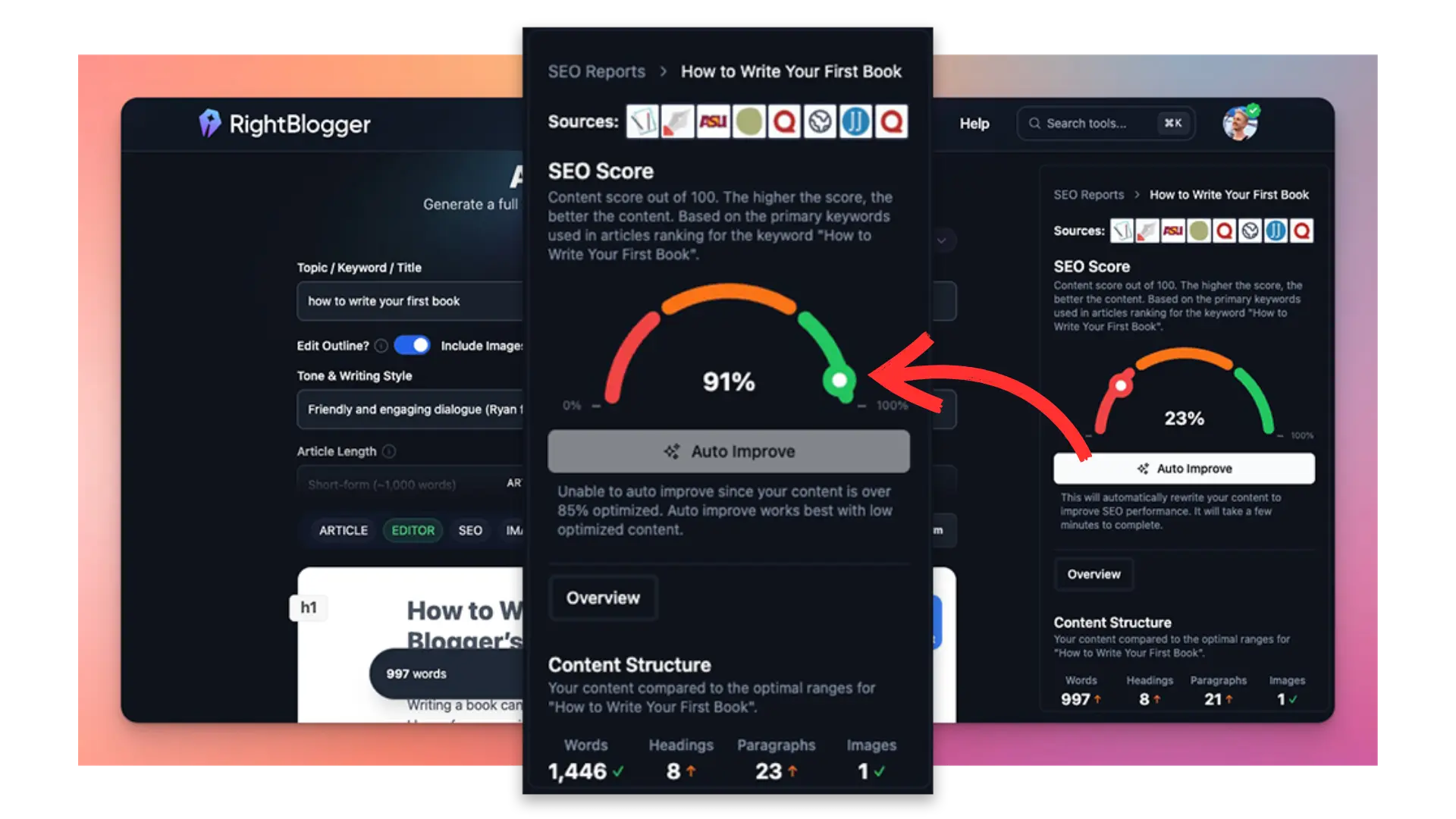
If you want your blog posts and landing pages to rank higher on Google and get more traffic from LLMs like ChatGPT, Claude, Perplexity, and Google Gemini, you’ll wanna take this new feature for a spin.
Does this work with AI written content? Yes! Whether you’re writing content yourself, creating AI-generated articles, or turning your videos into blog posts, Auto Optimize by RightBlogger will help you climb search rankings & appear in LLM platforms like ChatGPT. Check out this video where Andy & I break down exactly how our Auto Optimize AI SEO tool (and SEO reports) function:

Peep the video above for our deep dive explanation of how this AI SEO tool learns from Google search results and AI Overviews to help your content stand out, grab attention, and deliver real results.
🚨 Look out for our upcoming new feature offering the ability to import existing blog posts for automatic SEO-optimization. If you’d use this feature, drop us a comment below that says “import” and we’ll add your vote to the tally for this feature.
If you’re more of the read-it type, I’m sharing below from my own hands-on experience using Auto Optimize across different types of content. Let’s dive in.
Blog Automation That Keeps Your Posts Ranking

RightBlogger finds keywords, writes SEO articles, and publishes them to your blog. Then its Site Agent uses your Search Console data to keep older posts in shape, adding internal links, sharpening weak meta descriptions, and fixing stale years and broken links. Join 51,000+ bloggers using it to grow traffic from Google and ChatGPT.
Meet Auto Optimize: A Powerful New AI SEO Tool in RightBlogger
Andy & I just introduced our new AI SEO tool, Auto Optimize, and I’ve already been using it to transform how I approach content creation (and how I update my existing blog content to get more SEO & LLM traffic).
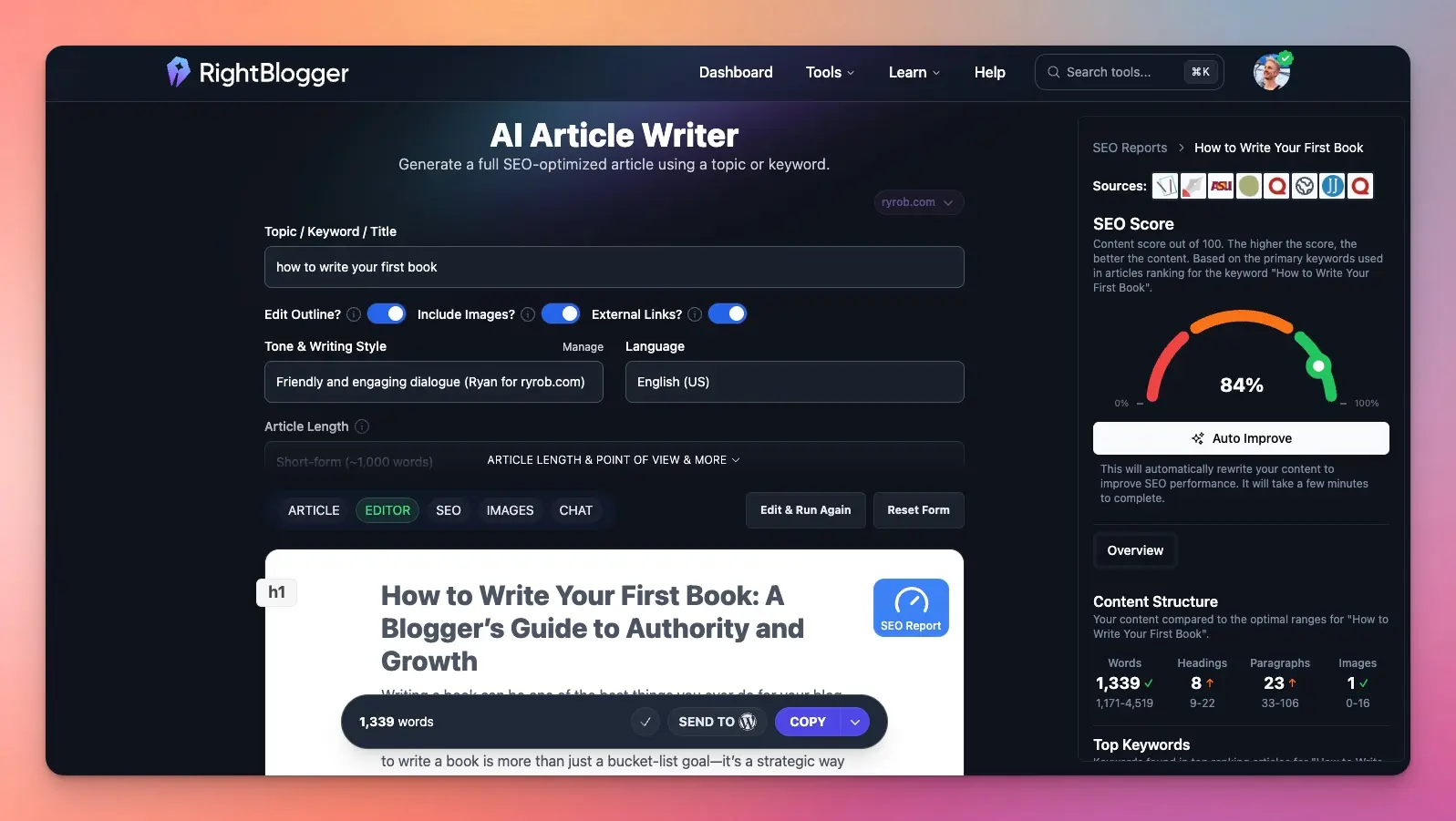
With just a couple of clicks, I can turn any blog draft, whether generated by the AI Article Writer, created using the Video to Blog tool, or typed directly into the editor, straight into SEO-optimized content that’s not only readable, but also designed to get more traffic from both Google and large language models (LLMs) like ChatGPT.
Here are two of my favorite things about this AI-powered SEO tool:
- Auto Optimize supports SEO-optimization for both new and existing content, making it useful for updating & improving the content across your entire website.
- You can attach an SEO Report to any piece of content in RightBlogger in seconds, using this AI tool to help guide your content optimization efforts either manually or with Auto Optimize.
RightBlogger’s auto SEO optimization tool combines actionable SEO data reports, AI research insights, writing, and editing capabilities, into one streamlined tool that automatically simplifies your content optimization process.
Before you can use Auto Optimize, you’ll need to create an SEO Report to optimize your content against…
How to Create an SEO Report in RightBlogger
Great SEO starts with the right data. Here’s how I use RightBlogger to create a detailed SEO Report that analyzes all the top-ranking pages for a topic, and actually improve the SEO-friendliness of my content, step-by-step.
In any RightBlogger tool that has Editor functionality, like the Article Writer, Video to Blog tool, Rewriter, and Paragraph Generator, start by getting your content into the Editor.
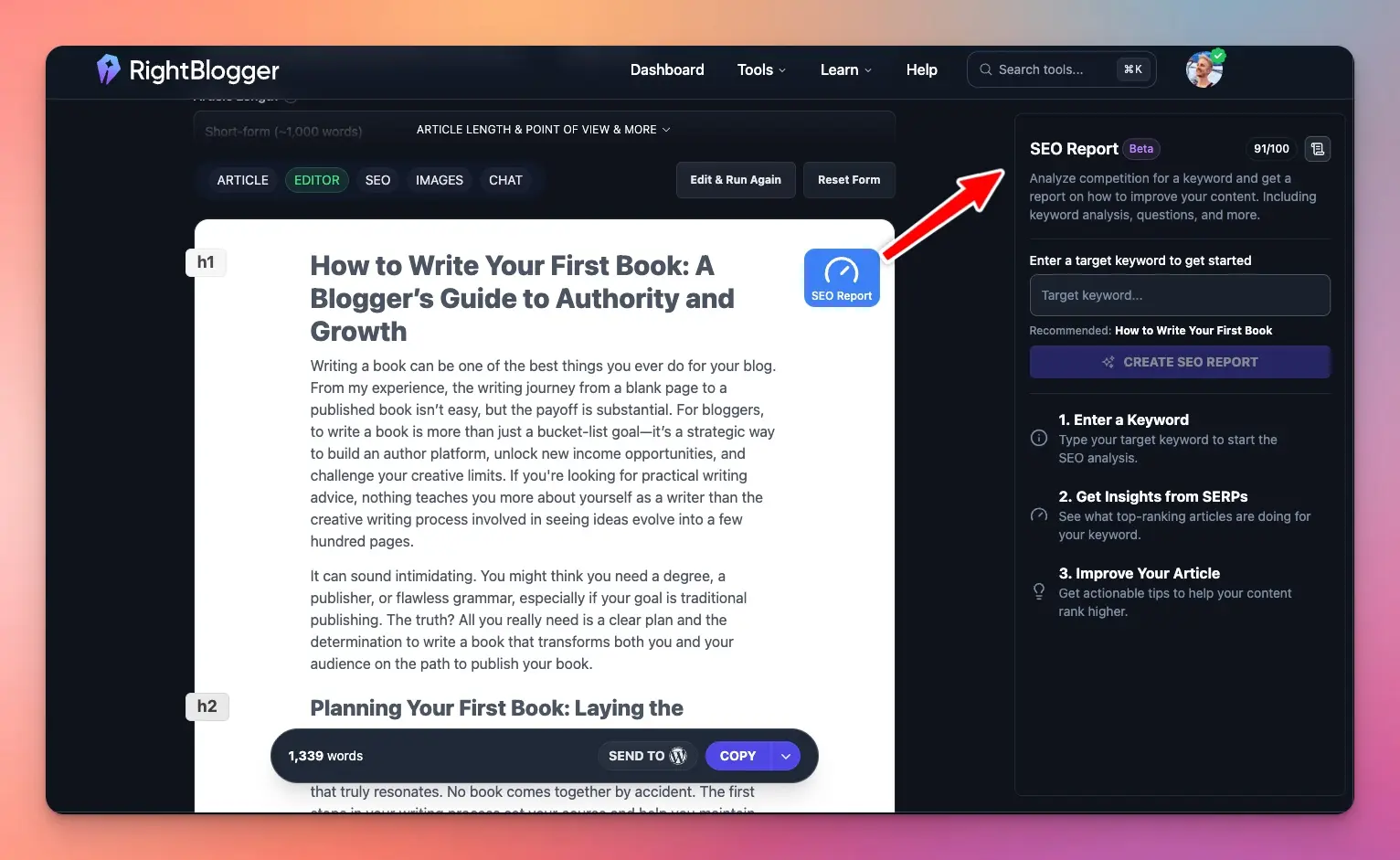
Click ‘SEO Report’ to create an SEO report on any the topic you want your content to rank for:
Next, you’ll need to pick your primary keyword phrase to optimize the content for. If you’re not sure which keyword to choose, don’t worry, you’ll get a recommendation from AI:
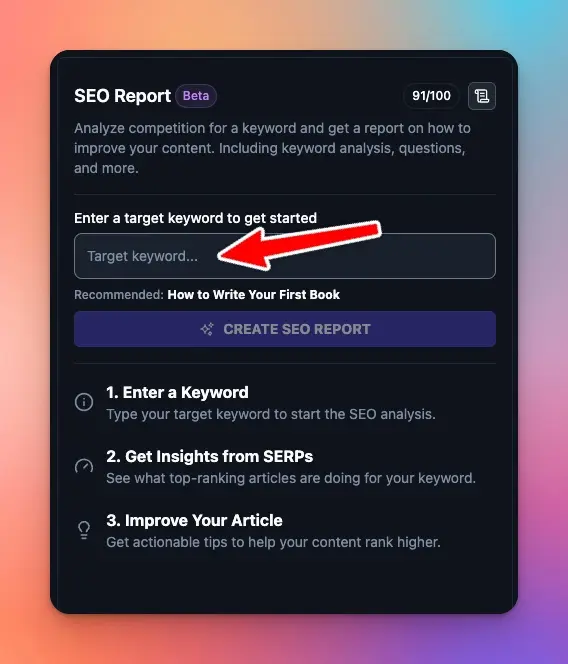
Once selected, the SEO Report fetches that keyword’s top Google-ranking articles and develops clear guidelines to follow for increasing your chances of ranking higher in Google search & in LLMs like ChatGPT.
And violá, you’ll have an SEO Report that analyzes every SEO factor about your content, giving you clear recommendations on how to improve.
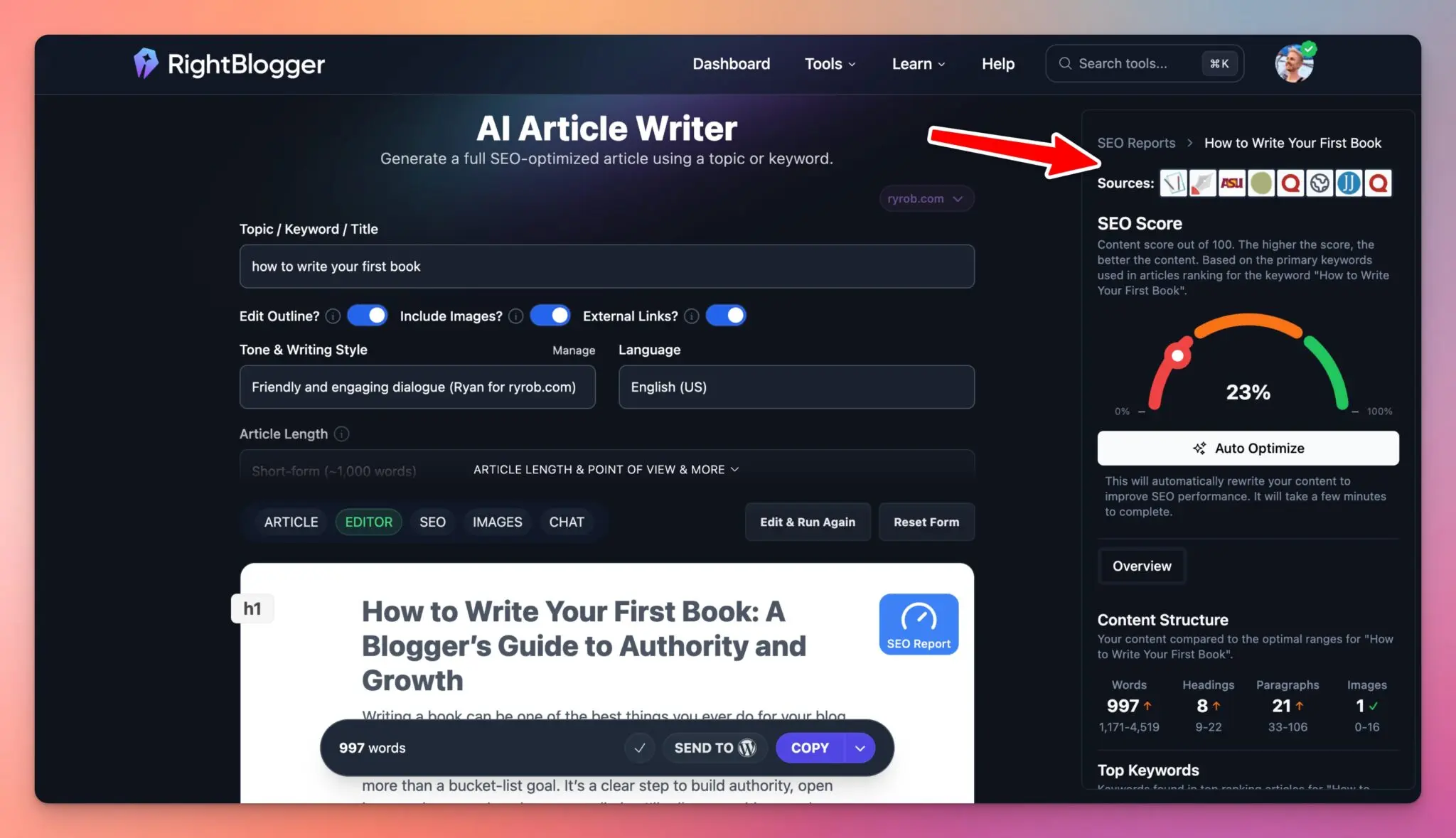
For a deeper dive into every aspect of SEO Reports and how to interpret each data point, check out our full SEO Reports guide right here.
Quick reminder: RightBlogger Solo customers get 30 SEO Reports/mo, Pro customers get 90/mo, and Agency customers get 300/mo (with the option to add even more for agencies and publishers with high volumes of content).
Scoring Your First Draft: What the SEO Score Really Means
RightBlogger instantly scores your content for it’s current level of SEO optimization based on the attached report, offering valuable insights as part of your ongoing SEO audits.
From the example article I’ve been using in this breakdown, my first draft scored a measly 23%, deep in the red, the kind of score that gets overlooked by both Google and AI platforms like ChatGPT. I knew I’d want to improve that ASAP.
What the SEO Score Tells You:
- Scores range from low (red) to high (green)
- Your score reflects keyword coverage, content structure, length, headings, and paragraphs, covering more than just technical SEO basics
- A low score means you’re missing important signals that search engines want to see for effective AI optimization
Why You Don’t Want 100%:
- Chasing a perfect score can backfire, over-optimizing by stuffing keywords can make your content unreadable and may even lead to SEO penalties
- The ideal SEO optimization score will land you in the green range (usually in the 80-90% range), this sweet spot ensures Google & LLMs take notice while your writing remains natural and engaging
Remember, SEO success is about balance. Too little optimization means your content won’t get discovered; too much makes it feel forced or robotic. Focus on hitting the green zone and using your SEO score as a guide, not obsessing over a perfect 100.
How to Improve Your Content with the Auto Optimize AI SEO Tool in 1 Click
Automating your SEO-optimization at scale is where our AI SEO tool really shines. The Auto Improve button uses AI-powered assistance to analyze all the data from your SEO Report… and applies AI optimization to bring your draft closer to what’s working for top-ranking articles:
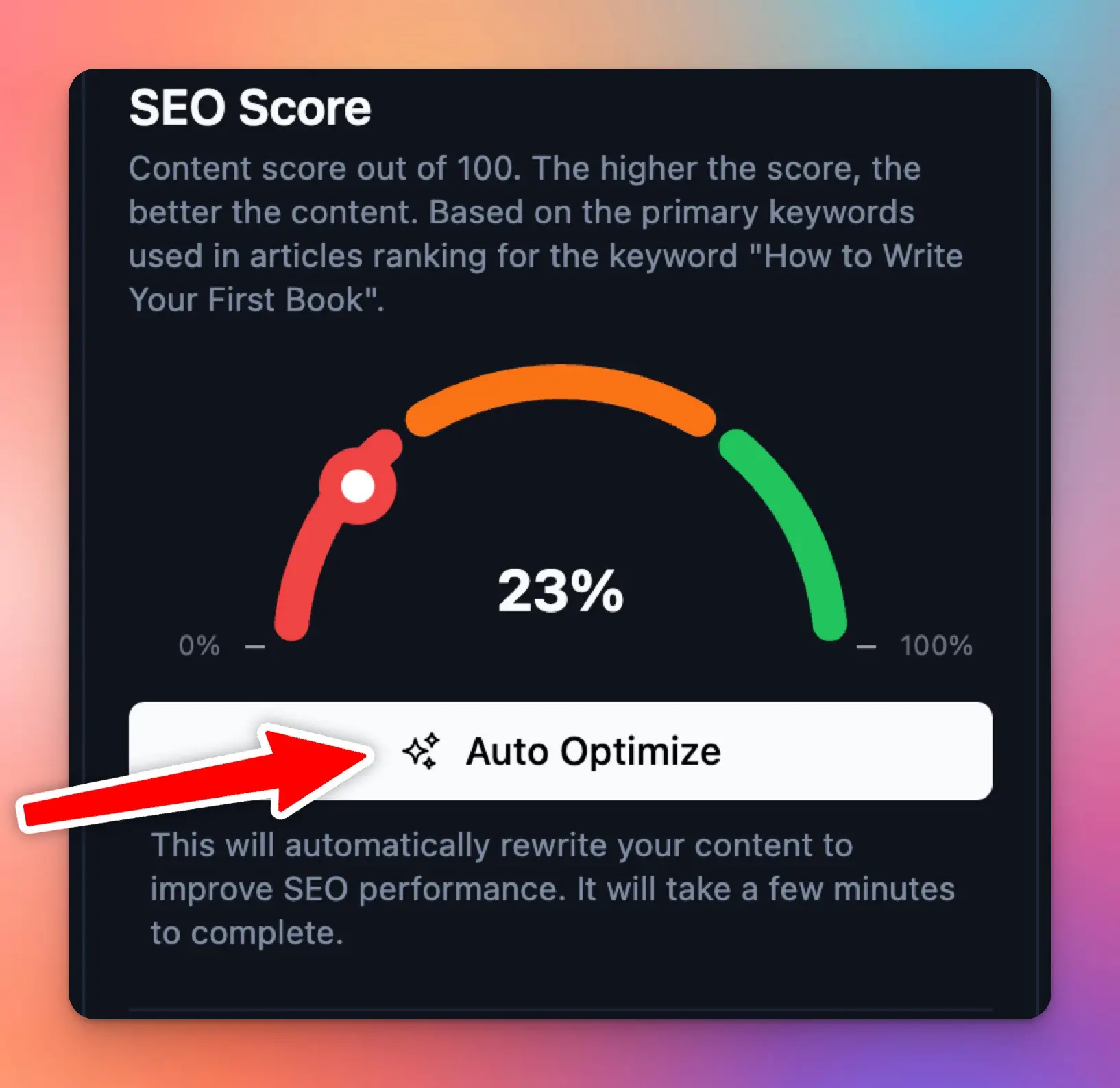
When I ran my 23% draft through Auto Improve, here’s what happened:
- Word count increased: A couple hundred more words were added, filling out weak sections with topic-rich sentences.
- More headings and paragraphs: The structure became more aligned with what Google prefers.
- Keyword coverage soared: Those zeros in the report started turning into real numbers, meaning every important topic was mentioned, and the content became much more relevant.
- SEO score shot up: In seconds, my draft jumped from 23% to 82% (and then 86% in a second optimization). This moved my content from almost invisible to ready to rank in just one click.
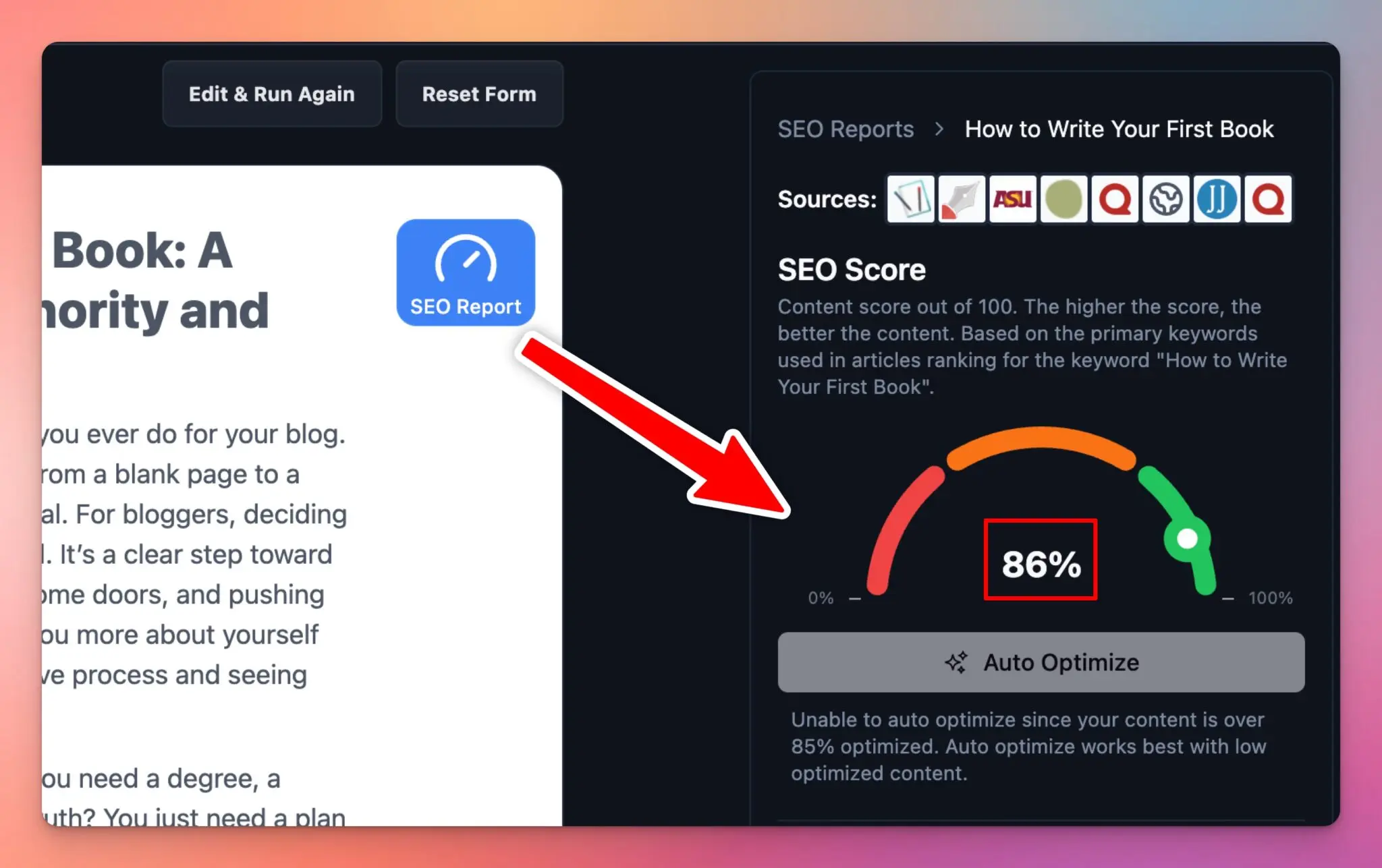
How Does Auto Optimize Work?
Auto Optimize takes the insights from your SEO Report and rewrites your content to make it more SEO-friendly (prepared to rank higher on Google and in LLMs like ChatGPT). Here are the specifics, Auto Optimize:
- Identifies missing topics and keywords from your SEO report
- Rewrites and expands sections (headings, images, paragraphs) to match what top articles currently do well, without losing your personal touch
- Makes sure keywords and phrases are blended naturally, so the content still reads like a human wrote it
Here’s a quick before and after from our example article we optimized above.
Before Auto Optimize:
- SEO score: 23% (red)
- Word count: Short, thin content
- Lots of missing keywords (lots of zeros in SEO report)
- Structure felt flat
After Auto Optimize:
- SEO score: 82% (green)
- Word count: Expanded and well-developed
- Most keywords now covered
- Headings and structure align better with Google’s top-ranking picks
The best part? Thanks to our new SEO automation tool, this entire SEO-optimization process only took one click. That’s why this is now my go-to AI tool for stronger content optimization, especially when I’m producing multiple posts each week.
Fine-Tuning Your SEO Optimized Article: My Polishing Tips
Auto Optimize takes you most of the way there, but the real value in any SEO-optimized content comes from spending at least a few minutes on manual review and personalized edits.

Here’s how I fine-tune my content after running Auto Optimize:
- Check the new word count. If it matches or exceeds the report’s recommendation, you’re on track.
- Review headings and paragraphs, focusing on on-page SEO. If sections still feel thin or off-topic, make adjustments.
- Look for any zeros in the keywords or low scores in your updated SEO report. This is a great opportunity for unique insights or angles only you can provide, important to avoid triggering an AI content detector.
- Want to stand out? Add a section or paragraph that covers a subtopic missing from competitor articles. I like to include a personal story, expert quote, or other elements that work as an AI humanizer.
- Consider keyword clustering by incorporating related but less-obvious keywords naturally throughout your text, avoid keyword stuffing for best results.
Last but not least, here are a few more quick tune-ups to improve your AI-assisted content:
- Enhance your introduction with more detail, a personal story, or captivating hook that draws readers into your content.
- Drop in an example or actionable tip your competitors overlooked.
- If you’re writing a review or guide, proactively address questions or objections your readers may have.
- Proofread, all changes save automatically in the RightBlogger Editor, so you can always revisit them.
Combining manual review with automated SEO-optimization produces rich, detailed content that feels natural and remains fully optimized for search engines, capturing the benefits of AI content while ensuring it’s humanized and Google-friendly.
Export and Publish Your Auto SEO-Optimized Content Instantly
RightBlogger’s export and publishing tools are designed to streamline your SEO workflow and minimize the amount of time you spend on these tasks. I use the 1-click WordPress integration to send drafts straight to my blog for final proofing.
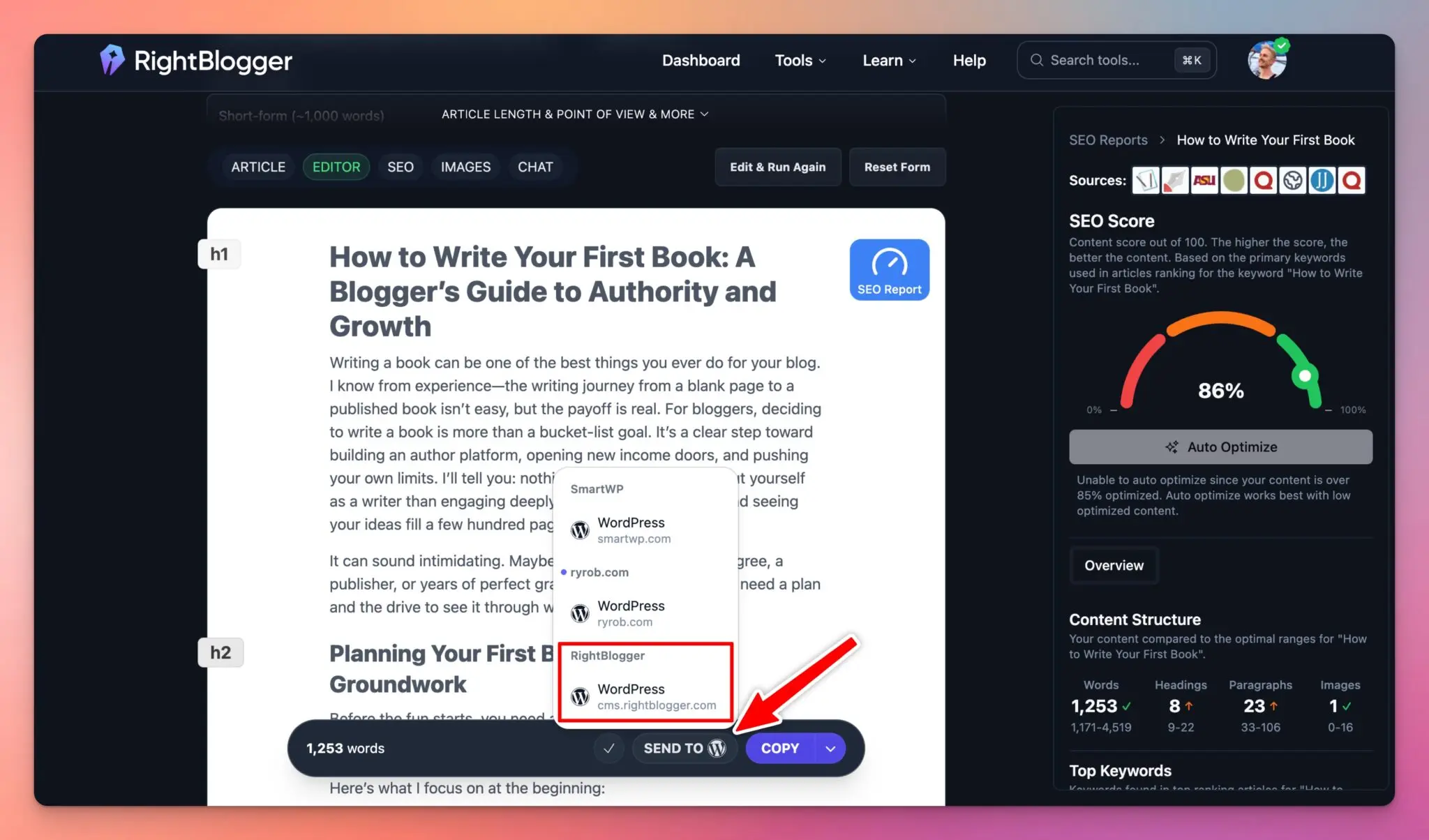
Once you’re satisfied with your optimized article, select the option that best complements your process:
- Direct publishing: Leverage our SEO automation tools by instantly sending your finished post to your connected WordPress, Webflow, or Ghost blog with a single click.
- Copy in multiple formats: Use the copy button to grab your content as plain text, HTML, or rich text, allowing flexible sharing and integration across platforms.
- Download as Microsoft Word: Prefer to finalize edits offline or maintain backups? Download your article in DOCX format for easy access.
👋 Look out for our upcoming new feature offering the ability to import existing blog posts for automatic SEO-optimization.
This enhancement could be especially helpful for comprehensive SEO audits and resolving technical SEO issues. As an AI SEO tool, RightBlogger continues to evolve based on user feedback, so let us know if this feature would enhance your workflow.
Get the Most from RightBlogger’s SEO Features: My Checklist
Over the years, I’ve found a few really helpful ways to maximize RightBlogger’s SEO tools, helping boost your overall SEO results.

If you’re serious about ranking higher, try these tips:
- Keyword research matters: Use our Keyword Research tool and select a primary keyword with strong search volume and clear relevance to your topic. Incorporating competitor analysis can make your SEO report even more robust.
- Avoid keyword stuffing: Aim for the green range in your SEO score, but always prioritize natural, engaging content that doesn’t feel forced or crammed with keywords to an extent that negatively impacts the quality of your content.
- Combine your unique voice with AI for SEO: Let the AI handle structure and comprehensive coverage, while you inject personality and expertise for the best results.
- Review AI Overviews and the SEO report after every significant edit: Treat these as your live checklist to identify new opportunities before you hit publish.
- Request features and share feedback: RightBlogger evolves based on user input. Whether you want automatic import, more integrations, or different reporting options, ask away!
And don’t forget, for more guidance, check out our course library where you’ll find fresh tutorials, deep dives, AI tool guides, and additional SEO tricks.
Try Our Powerful Automated SEO-Optimization Tool Today
Andy & I started RightBlogger because most SEO tools overwhelm, overcharge, or just overcomplicate things.
RightBlogger’s Auto Optimize AI SEO tool actually makes my life as a blogger easier. With intelligent automation, I spend less time stressing about keyword density and more time crafting deeper, richer posts that have the potential to rank & bring me targeted leads for my businesses.
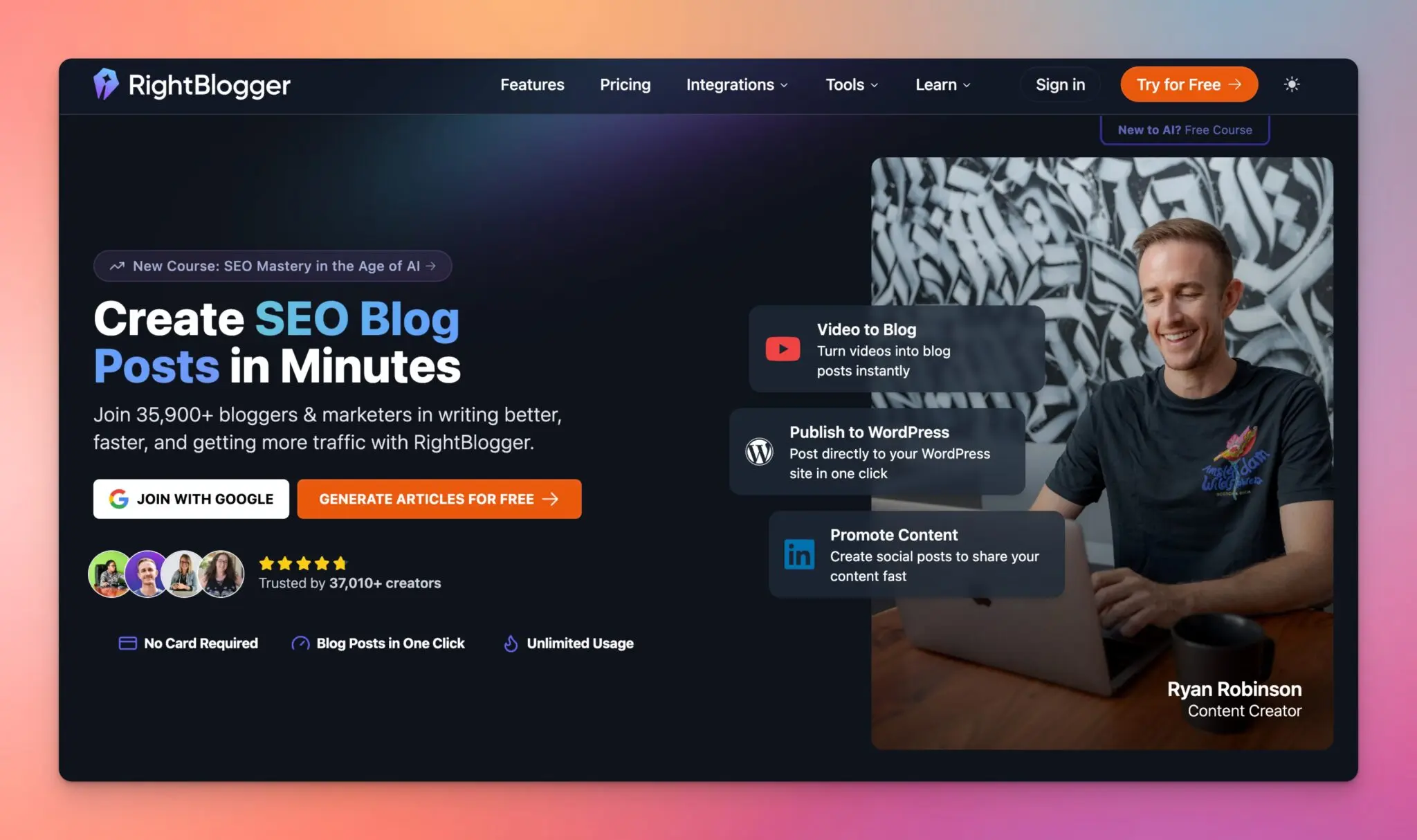
Auto Optimize and SEO Reports strip away all the guesswork. These tools will take action on exactly what your content needs for effective SEO-optimization, then help you get there, fast. Combining a clear editor interface with powerful export and publishing options, you end up with an SEO toolkit that’s not just smart, but actually practical.
Unlike other popular SEO tools like Semrush, Surfer, Clearscope, and SE Ranking, which each have their strengths, RightBlogger leverages AI for SEO to deliver streamlined results without the typically complex hassle.
Give it a try with your next article. Watch your SEO scores go up thanks to this new AI SEO approach. And if you come up with smart tweaks or extra features you wanna see in this tool, let us know!
👋 If you’d like to see a new tool with the ability to import existing blog posts for automatic SEO-optimization, leave us a comment below saying “import” so we get your vote.
Blog Automation That Keeps Your Posts Ranking
RightBlogger finds keywords, writes SEO articles, and publishes them to your blog. Then its Site Agent uses your Search Console data to keep older posts in shape, adding internal links, sharpening weak meta descriptions, and fixing stale years and broken links. Join 51,000+ bloggers using it to grow traffic from Google and ChatGPT.

Article by
RightBlogger Co-Founder Ryan Robinson is a blogger and creator who shares hands-on tips for growing an online business and getting more traffic.




Automated SEO Blog Posts That Work
Try RightBlogger for free, we know you'll love it.
7-day free trial. Cancel anytime.





Leave a comment
You must be logged in to comment.
Loading comments...