RightBlogger Winter 2023 Updates: Chat, Article Writer Upgrade, and More
See how SEO metadata, content chat, URL-based MyTone, and expanded keyword research improve your workflow.


What’s up, RightBlogger! We’re thrilled to bring you a big list of exciting updates we’ve been working on tirelessly behind the scenes. We know being content creators is always advancing, and staying ahead is key.
That’s why we’ve geared up to introduce some engaging tools and features aimed at boosting your blogging journey. Let’s dive right into what’s new and how these updates can revolutionize your content creation process.

Now let’s jump into all of the recent RightBlogger changes!
New Tools
RightBlogger is always on the lookout for ways to make your blogging experience smoother and more productive. We’ve introduced several new tools that are designed to pack a punch in your content strategy:
- Permalink Tool: Craft SEO-optimized Permalinks effortlessly. Simply enter a topic, and voila, you receive a URL structure poised to elevate your ranks in organic search.
- Mission Statement Generator: Ideal for crystallizing your brand’s essence on landing pages, it helps articulate who you are and your mission, succinctly.
- Slogan Generator: Snag a catchy slogan tailored to your topic and business identity, perfect for grabbing attention right from your homepage.
- Product Name Generator: Inventive names for your next big product are just a click away.
- Podcast Name Generator & More: Whether it’s podcasts, podcast topics, interview questions, or Excel formulas, we’ve got generators to spark your creativity.
SEO Tab for Article Writer
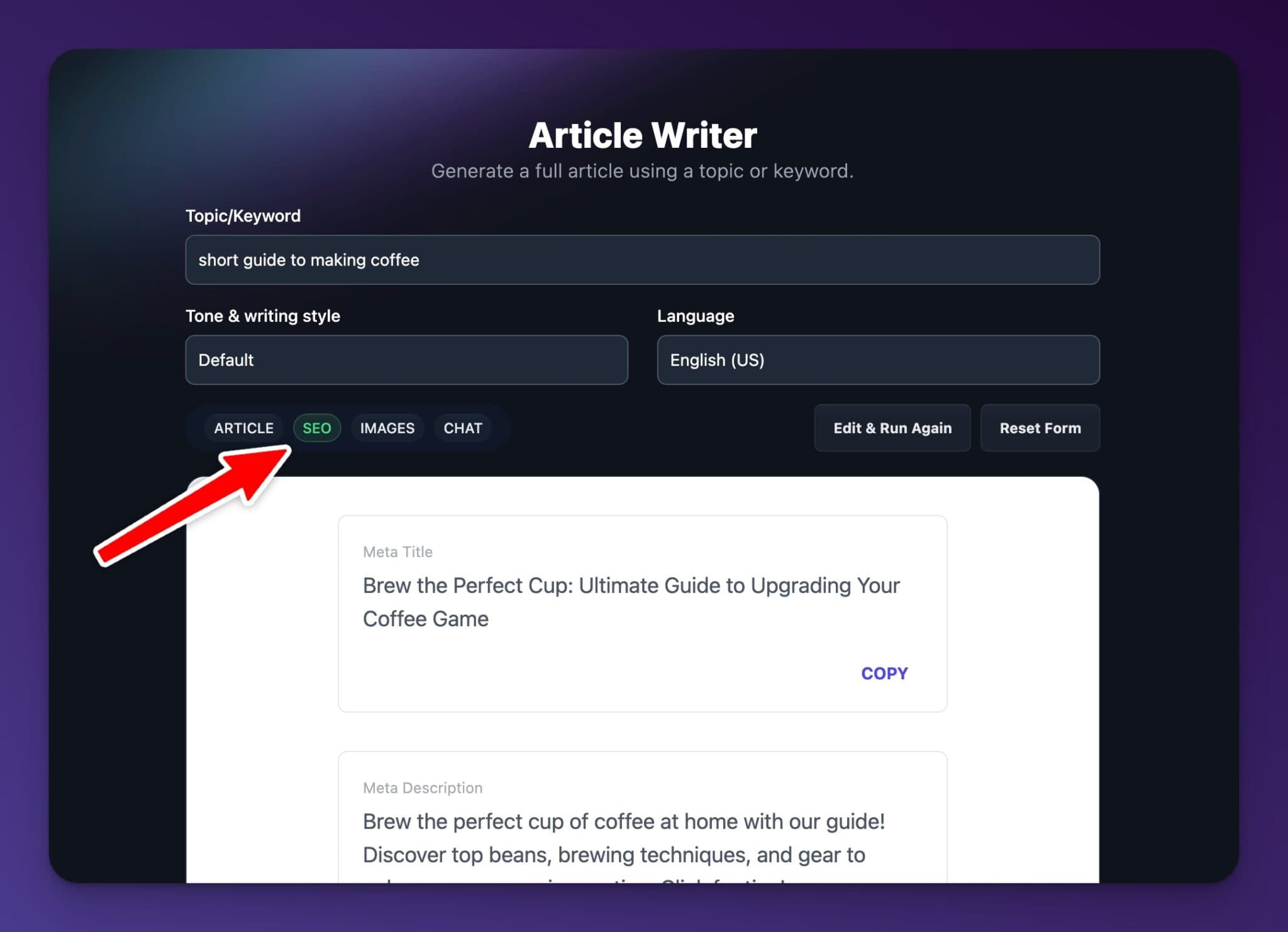
We’ve beefed up the article tool with a nifty toolbar. As requested by many we now generate SEO essentials like meta titles, descriptions, and permalinks happens automatically with any article you create. Access the SEO data, OG images, and chat via the new article tab bar.
Chat with your Content

You can now chat with content you create in tools like the Article Writer and YouTube to Blog Post tool. This is great for following up with questions about the content, revisions, or even advice for social content ideas.
Use a URL for MyTone
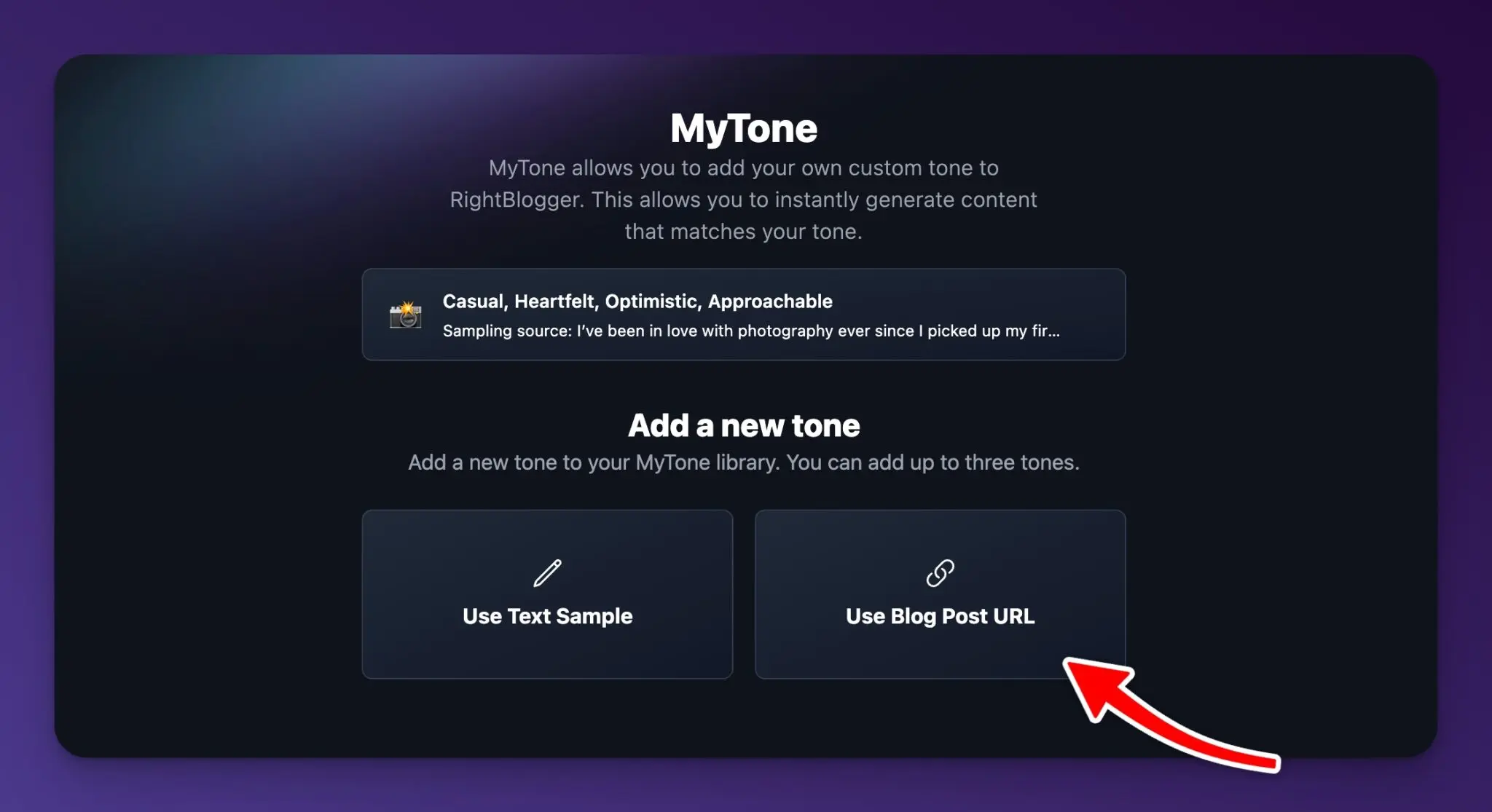
We’ve also pushed an update to ‘MyTone‘ now allows using URLs to create custom tones, making your content sound more like you. Paste a blog URL, and our system crafts a tone matching your unique voice, ensuring you can use our tools with your writing style.
Upgrades to Keyword Research Tool

Our keyword research tool has received a significant boost, making it easier to discover SEO gems. With expanded functionalities, including the generation of related keywords and customized search options, your content is set to rank higher and reach further.
Preview URLs in Many Tools

Preview URLs in many tools to ensure you’ve got the right URL before submitting. This is great in the content gap and YouTube to blog post tool to ensure you’ve got the right URL.
We Love Feedback

We’re committed to evolving RightBlogger based on your invaluable feedback. Whether it’s enhancements you’re keen on, bugs to squash, or just a chat over coffee about how to maximize your use of RightBlogger, we’re all ears. Hit us up through the platform’s feedback options or book a call directly to share your thoughts.
Smaller Changes and Bug Fixes
- Primary keyword in article and YouTube to blog post writer.
- New button in the dashboard to submit feedback to our feedback board.
- Additional length options in the Article and YouTube to blog post writer.
- When viewing content in the content dashboard lists content will now show the title AI wrote for the content making it easier to identify items.
- Option to unarchive and even delete created content.
- Option to fill in a target audience in the article/YouTube to blog post tools.
- Option to select a target language in the keyword research tool.
- Added support for YouTube live stream archives and shorts to the YT to blog post Tool.
- When viewing content you can now hover over formatting of headers to see if they are H1/H2/H3 etc.
- Allow YouTube video description generator to work with a YouTube video URL.
- Option to add timecode timestamps to the YouTube description generator (when using a YouTube video URL).
- New options in tweet generator including thread option and hashtag option.
- Display of word count for each item in our tool that generate lists.
- Select output language in the content gap tool and smart suggest tool.
- Large additions to output languages (100+)!
- Numerous bug fixes including mobile improvements.Fall updates from RightBlogger including new MyTone feature, ability to share content, improvements to all tools, new tools, and much more.
- New RightBlogger glossary that we’re working on adding blogging terms.
- Multiple blog posts published on the RightBlogger blog.
Conclusion
The blogging landscape never stands still, and neither do we. With these updates, RightBlogger‘s goal is to help you keep up with the fast-moving world of content creation. From generating SEO-optimized permalinks to writing posts that truly sound like you, these tools are designed to elevate your blogging to new heights.
Try out these features and let us know how they’ve transformed your content creation journey. Here’s to creating impactful, engaging, and optimized content together!
What came next? Check out our Summer 2024 updates for even more features.

Article by
RightBlogger Co-Founder Andy Feliciotti focuses on website development and shares his photography and travel adventures on YouTube and his blog.


Automated SEO Blog Posts That Work
Try RightBlogger for free, we know you'll love it.
7-day free trial. Cancel anytime.





Leave a comment
You must be logged in to comment.
Loading comments...