What Is AhrefsBot? User-Agent, IPs, and How to Block or Allow It
Verify real Ahrefs traffic through reverse DNS and published IP ranges, then choose whether to allow, throttle, or block it.


AhrefsBot is Ahrefs’ web crawler. Its data powers Ahrefs’ SEO tools and Yep, Ahrefs’ search engine. According to the official Ahrefs Bots page, it identifies as AhrefsBot/7.0, obeys robots.txt and Crawl-delay, crawls from IP ranges Ahrefs publishes, and its IPs always reverse-resolve to ahrefs.com or ahrefs.net. Blocking it does not change your Google rankings.
If you spotted “AhrefsBot” in server logs, a firewall event, or your CDN dashboard, it’s usually this normal crawler. But anyone can fake the user-agent, so verify the IP before you allowlist it. Below: how to verify it, then how to allow, slow, or block it.
What AhrefsBot is, and why it crawls your site
AhrefsBot is Ahrefs’ main public web crawler. Its job is to discover pages and links across the open web, then store that data so Ahrefs can show backlink profiles, referring domains, anchor text, broken link opportunities, and more.
That activity can feel suspicious if you’re only seeing the bot in logs. But crawling isn’t “hacking.” A crawler requests URLs your server already serves to regular visitors, then reads responses the same way a browser would (just without the human).
A few practical reasons you’ll see AhrefsBot on your site:
- Link discovery. It finds new inbound and outbound links, which later appear in backlink indexes.
- Content discovery. It revisits pages to keep the index fresh, especially if your site updates often.
- Search engine coverage. Ahrefs also uses crawl data for Yep.com.
- Rules-based crawling. AhrefsBot is designed to follow standard crawl rules like robots.txt, and it supports controls like
Crawl-delay.
If you publish public content and want accurate third-party SEO data about your domain, you usually want AhrefsBot to reach the pages you care about. This will allow Ahrefs to compute things like domain rating (DR) and backlink profiles. If your server is small or you’re under load, you might want to slow it down rather than block it outright.
If you’re working on your content and rankings, it also helps to pair crawl management with on-page improvements, for example using RightBlogger SEO Reports to tighten headings, keyword coverage, and structure while you keep crawl access clean.
AhrefsBot vs AhrefsSiteAudit, two bots with different jobs
It’s easy to lump all “Ahrefs bots” together, but there are two common ones you’ll see:
- AhrefsBot is the global crawler that builds Ahrefs’ public web index of links and pages. This is the one that shows up even if you don’t use Ahrefs.
- AhrefsSiteAudit is the crawler used for Ahrefs Site Audit projects. This one typically appears when a site owner (or someone with access) sets up an audit for a domain inside Ahrefs.
Why the difference matters: you might be happy to let AhrefsBot crawl your public blog posts, but you may want tighter control over AhrefsSiteAudit if audits could hit heavy pages, staging URLs, or parameter-based URL traps. On the flip side, if you actively use Ahrefs tools for your own site, blocking AhrefsSiteAudit can lead to incomplete audit results.
Each bot has its own robots.txt token: AhrefsBot and AhrefsSiteAudit. A rule for one does not cover the other. Per the Ahrefs Bots page, AhrefsSiteAudit crawls at most 30 URLs per minute, and only verified site owners can raise that speed or let it ignore robots.txt on their own site.
What about AI crawlers like GPTBot, ClaudeBot, and PerplexityBot?
AhrefsBot is the SEO crawler most site owners notice first, but in 2026 it’s worth knowing the AI crawlers too. GPTBot (OpenAI), ClaudeBot (Anthropic), PerplexityBot, and Google-Extended all read your public content for AI training and AI search retrieval. The same robots.txt and firewall patterns covered below apply to them, just with different user-agent strings. If AI search visibility matters to your site, our GEO vs SEO guide walks through which AI crawlers to allow and why blocking them can quietly shut you out of ChatGPT, Claude, and Perplexity citations. For copy-paste robots.txt rules per AI bot, see AI crawler access for blogs.
What the official user-agent strings look like
When you’re scanning server logs, these are common official examples you can match:
- AhrefsBot:
Mozilla/5.0 (compatible; AhrefsBot/7.0; +http://ahrefs.com/robot/) - AhrefsSiteAudit (desktop):
Mozilla/5.0 (compatible; AhrefsSiteAudit/6.1; +http://ahrefs.com/robot/site-audit) - AhrefsSiteAudit (mobile):
Mozilla/5.0 (Linux; Android 13) AppleWebKit/537.36 (KHTML, like Gecko) Chrome/151.0.7922.173 Mobile Safari/537.36 (compatible; AhrefsSiteAudit/6.1; +http://ahrefs.com/robot/site-audit)
Ahrefs publishes both desktop and mobile Site Audit strings on Ahrefs Bots (ahrefs.com/robot). Match those strings exactly (the mobile Chrome build number changes)—not a guessed variant.
Important: a user-agent string is easy to fake. Anyone can send a request that says “AhrefsBot.” Treat the user-agent as a clue, not proof.
How to confirm it is the real AhrefsBot (not a spoofed crawler)
If you’re going to allowlist AhrefsBot, don’t do it based on the user-agent alone. Your safest approach is to verify using multiple signals: user-agent, IP checks, and reverse DNS.
Here’s a quick way to think about it:
| Signal you check | What it tells you | What it doesn’t prove |
|---|---|---|
| User-agent contains “AhrefsBot” | The request claims to be AhrefsBot | It could be spoofed |
| IP matches Ahrefs’ published IP list | The traffic likely comes from Ahrefs infrastructure | Lists can change, so you must keep it updated |
Reverse DNS ends in ahrefs.com or ahrefs.net | Strong confirmation you’re seeing real Ahrefs traffic | DNS checks should be paired with forward confirmation when possible |
You can do these checks on most setups: Apache, Nginx, managed WordPress hosts, and CDNs like Cloudflare. Cloudflare also recognizes many major crawlers, and Ahrefs bots are included in Cloudflare’s verified bot ecosystem, which helps reduce guesswork when you’re filtering bot traffic in WAF logs.
Check your server logs first, then look for patterns that make sense
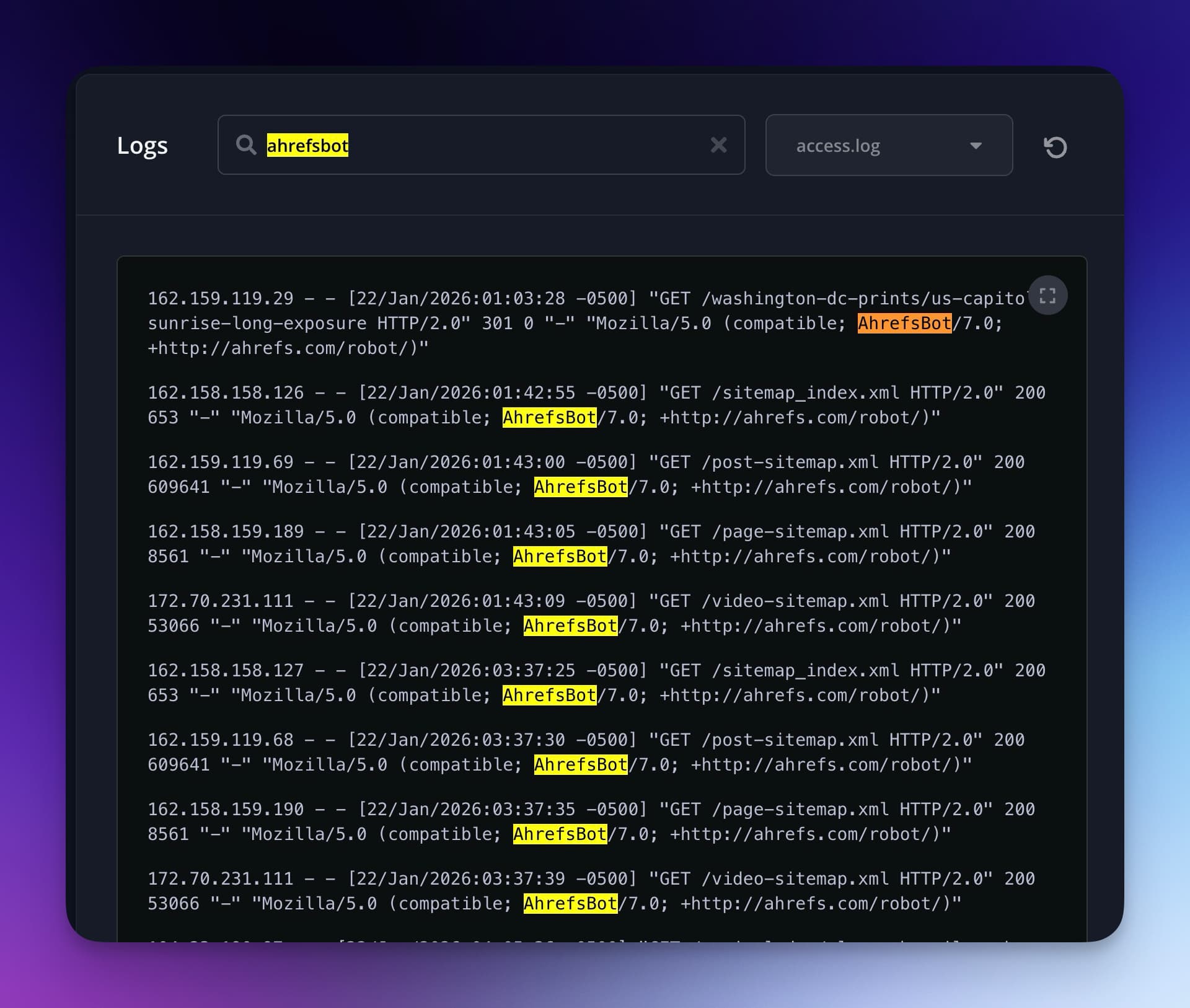
Start with your raw access logs or request analytics (CDN logs work too). Our guide to finding wasted crawl budget in server logs shows how to pull and filter them. If your site runs on Cloudflare, Ahrefs Bot Analytics (in beta on paid Ahrefs plans) shows which bots hit which pages without a JavaScript tag. You’re looking for normal crawler behavior:
- Request rate that ramps up and down instead of constant spikes.
- Mostly public URLs, like blog posts, category pages, and sitemaps.
- Respect for obvious blocks. For example, not hammering pages that return 403 or 404.
- Reasonable status codes (mostly 200s and 304s, with the occasional 404 if your internal links aren’t perfect).
Red flags that often point to spoofed bots:
- Huge bursts that look like a stress test (hundreds of requests per second).
- Probing of sensitive paths like
/wp-admin/,/xmlrpc.php,.env, or random PHP files that don’t exist. - Ignoring your patterns. For example, repeatedly requesting the same broken URL, or crawling a blocked path nonstop.
- Odd geographic IP locations that don’t line up with the real crawler’s infrastructure footprint.
If you do see behavior that looks like scraping or probing, treat it like suspicious traffic first, then verify whether it’s truly Ahrefs before you block by user-agent.
Verify IP addresses using Ahrefs’ published endpoints and reverse DNS
Once you’ve identified a suspicious (or simply heavy) request, take the IP address and verify it.
A safe verification flow looks like this:
- Copy the requesting IP from your logs (not from a third-party report).
- Run a reverse DNS lookup on that IP.
- Confirm the reverse hostname ends with
ahrefs.comorahrefs.net. - Cross-check the IP against the official IP list referenced on
ahrefs.com/robot.
This matters because IP ranges can change over time. Don’t rely on a random list from an old blog post or a firewall snippet you found in a forum. Always use the official source as your reference point, then build your allowlist or blocklist around what you confirm today.
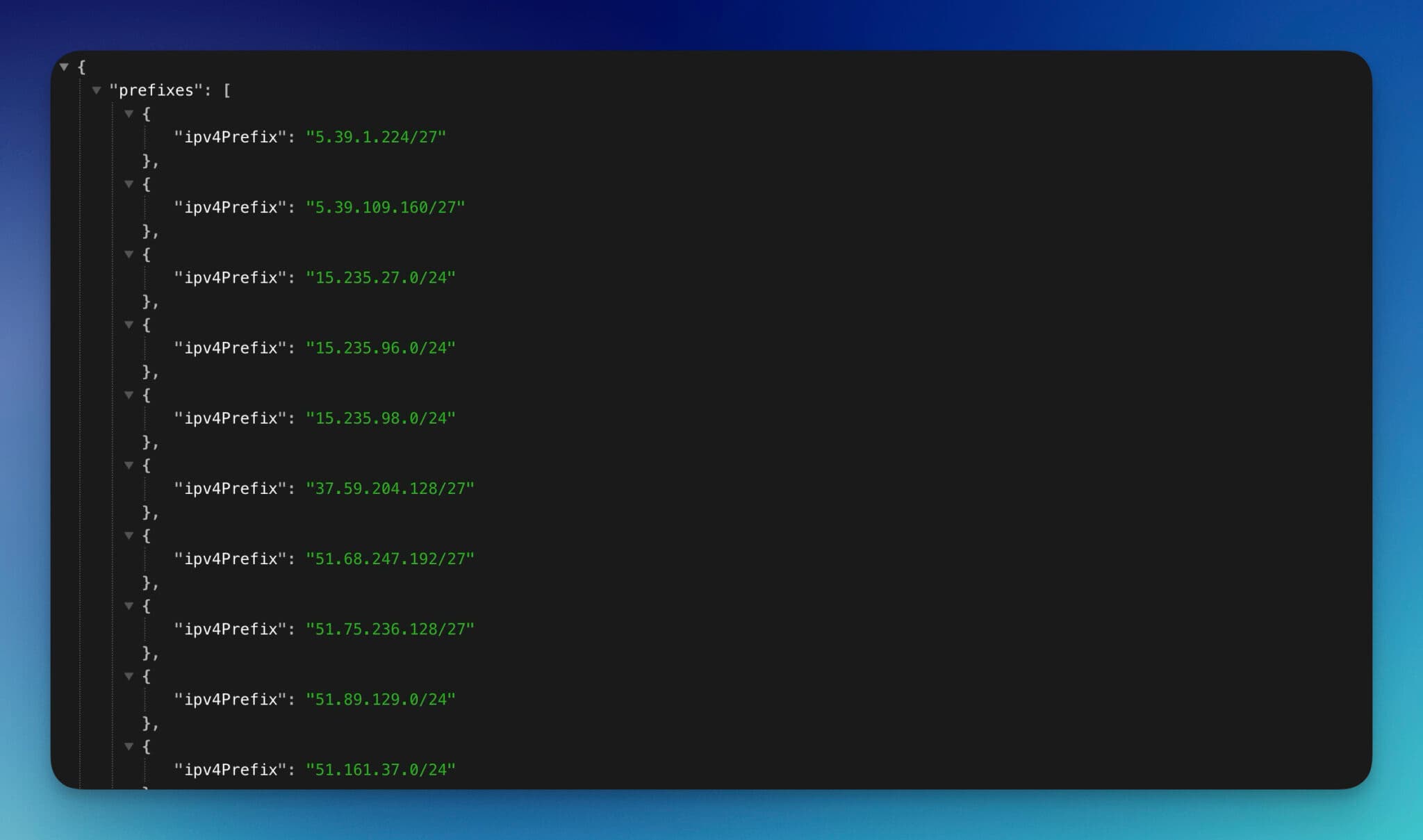
Advanced users can set up a cron job to pull IP addresses from the Ahrefs IP range list (or the Ahrefs individual IP list). This keeps the list up to date so the IPs remain accurate.
The API returns Ahrefs IP addresses as CIDR ranges in JSON format. Here’s a shortened example of what the response looks like:
{
  "prefixes": [
    { "ipv4Prefix": "5.39.1.224/27" },
    { "ipv4Prefix": "5.39.109.160/27" },
    { "ipv4Prefix": "15.235.27.0/24" }
  ]
}
You can match incoming request IPs against these CIDR ranges to build an accurate allowlist or blocklist. If you’re on Cloudflare, you can paste these ranges directly into a WAF rule instead of managing them on your server.
If you’re doing content and link work, it can be helpful to compare what third-party crawlers see versus what your own tools show. For example, you can sanity-check your backlink visibility using RightBlogger’s Free Backlink Checker Tool while you decide whether to allow or restrict crawlers.
How to allow, block, or throttle AhrefsBot without breaking your SEO
Managing AhrefsBot is really about choosing the lightest control that solves your problem.
A simple decision framework:
- Allow it if your site is public and you want accurate backlink and content discovery data (and possible visibility in Yep.com).
- Throttle it if crawling is real but your server resources are tight.
- Block it if the content is private, the site is staging, you’re running a paid community, or you’re under active strain.
Start with partial controls before full blocks. It’s like turning down a faucet before you shut off the water main.
Control crawling with robots.txt (allow, block certain folders, or block everything)
Robots.txt is your first line of control because it’s simple and it’s reversible. You can:
- Block everything for AhrefsBot
- Block only sensitive areas
- Allow everything (by doing nothing special, assuming you’re not blocking it already)
Examples you can adapt:
Block AhrefsBot site-wide:
User-agent: AhrefsBot
Disallow: /
Block only sensitive paths:
User-agent: AhrefsBot
Disallow: /private/
Disallow: /wp-admin/
A few practical notes:
- Robots.txt changes aren’t instant, they apply on the next crawl.
- These rules only cover AhrefsBot. To stop Ahrefs Site Audit crawls too, add a separate group that starts with
User-agent: AhrefsSiteAudit. - A messy robots.txt can cause rules to be ignored. Keep it clean, and avoid contradictory rules you don’t understand.
- Blocking
/wp-admin/is common, but remember WordPress also needsadmin-ajax.phpfor some public features. Don’t block files blindly if your front-end depends on them.
Slow it down with Crawl-delay (and when that might not fully help)
If your goal is “less load, same discovery,” a crawl-delay can help.
A common approach is:
User-agent: AhrefsBot
Crawl-delay: 10
That asks the bot to space requests out (in seconds). It can reduce the CPU spikes that show up when a crawler hits uncached pages.
One catch: crawl-delay is followed for HTML fetches, but Ahrefs says it cannot be followed the same way when rendering JavaScript (parallel assets). You may still see bursts around CSS, JS, or images. If you’re seeing that kind of pattern, combine crawl-delay with caching and rate limiting at the edge. Official: ahrefs.com/robot.
For a short outage or maintenance window, Ahrefs says you can return 4xx or 5xx status codes. AhrefsBot detects the errors and backs off automatically, so you don’t need to edit robots.txt for a temporary slowdown.
Use firewall, CDN, or host controls to allow or block by IP, safely
Likely the most complete option is using a firewall like Cloudflare to block Ahrefsbot.
Firewall and CDN controls are most useful when:
- You’re seeing fake bots spoofing the AhrefsBot user-agent.
- You want to allow only verified Ahrefs IPs and block everything else that claims to be Ahrefs.
- You need stronger enforcement than robots.txt (since robots is a request, not a lock).
Common options:
- Cloudflare or WAF rules. Create rules based on verified bot status, ASN, or IP ranges. If you allowlist by IP, keep it updated from Ahrefs’ official list.
- Server firewall rules. Useful for dedicated servers, but riskier if you don’t maintain them. A stale allowlist causes false blocks.
- Managed host bot controls. Some hosts offer toggles for “known bots” or custom rules at the edge.
A good safety habit: if you decide to allowlist, only allowlist after verification (reverse DNS plus IP list). Otherwise, you can accidentally give a malicious scraper a free pass just because it set its user-agent to “AhrefsBot.”
Block AhrefsBot with .htaccess or Nginx Server Rules
If robots.txt isn’t enough, you can block AhrefsBot at the server level. This stops the bot before it reaches your application.
For Apache servers, add this to your .htaccess file:
RewriteEngine On
RewriteCond %{HTTP_USER_AGENT} AhrefsBot [NC]
RewriteRule .* - [F,L]
For Nginx, add this inside your server {} block:
if ($http_user_agent ~* "AhrefsBot") {
    return 403;
}
Server-level rules are stronger than robots.txt because they return a 403 before PHP even loads. Use .htaccess or Nginx rules when you’ve confirmed a bot is ignoring your robots.txt, or when you need to save resources on high-traffic servers.
Both examples match AhrefsBot only. To block Site Audit crawls as well, change the pattern to (AhrefsBot|AhrefsSiteAudit).
Troubleshooting and best practices (so your site stays fast and secure)
Once you change crawler access, you want to confirm two things: your site still performs well, and you didn’t block something you actually needed.
If your server is struggling, fix the bottleneck before you blame the bot
Crawler traffic often exposes weak spots you already had:
- No full-page caching, so every request hits PHP and the database.
- Expensive endpoints that should be protected or cached.
- Slow TTFB on category pages or search pages.
- Thin error handling that returns 500s during spikes.
A few fixes that pay off fast:
- Enable page caching (plugin, host cache, or edge cache).
- Put a CDN in front of heavy assets and set sane cache headers.
- Return correct status codes (don’t serve 200s for missing pages).
- Watch 4xx and 5xx spikes. Many crawlers slow down when they see lots of errors, so cleaning up error responses can reduce crawl pressure naturally.
- Block URL traps like calendar pages, endless filtered parameters, and internal search results.
When to allow AhrefsBot and when blocking is the right call
Use real-world scenarios to decide:
You should usually allow AhrefsBot if:
- You run a public blog, niche site, or marketing site.
- You want accurate backlink and content discovery data in third-party SEO platforms.
- You care about visibility in Yep.com.
- You use Ahrefs tools and want complete reports for your own domain.
You should throttle AhrefsBot if:
- You’re on a small VPS or shared hosting.
- Crawling triggers CPU spikes or database bottlenecks.
- You can’t upgrade hosting right now, but you can tune caching and crawl-delay.
You should block AhrefsBot if:
- The site is staging or development.
- Content is paid, private, or community-only.
- You’re dealing with an incident and need to reduce all non-human traffic until things stabilize.
If you do block it, do it intentionally, document it, and set a reminder to review later. Many “temporary” blocks become permanent by accident.
Verify whether AhrefsBot (or AhrefsSiteAudit) can crawl your site (fast check)
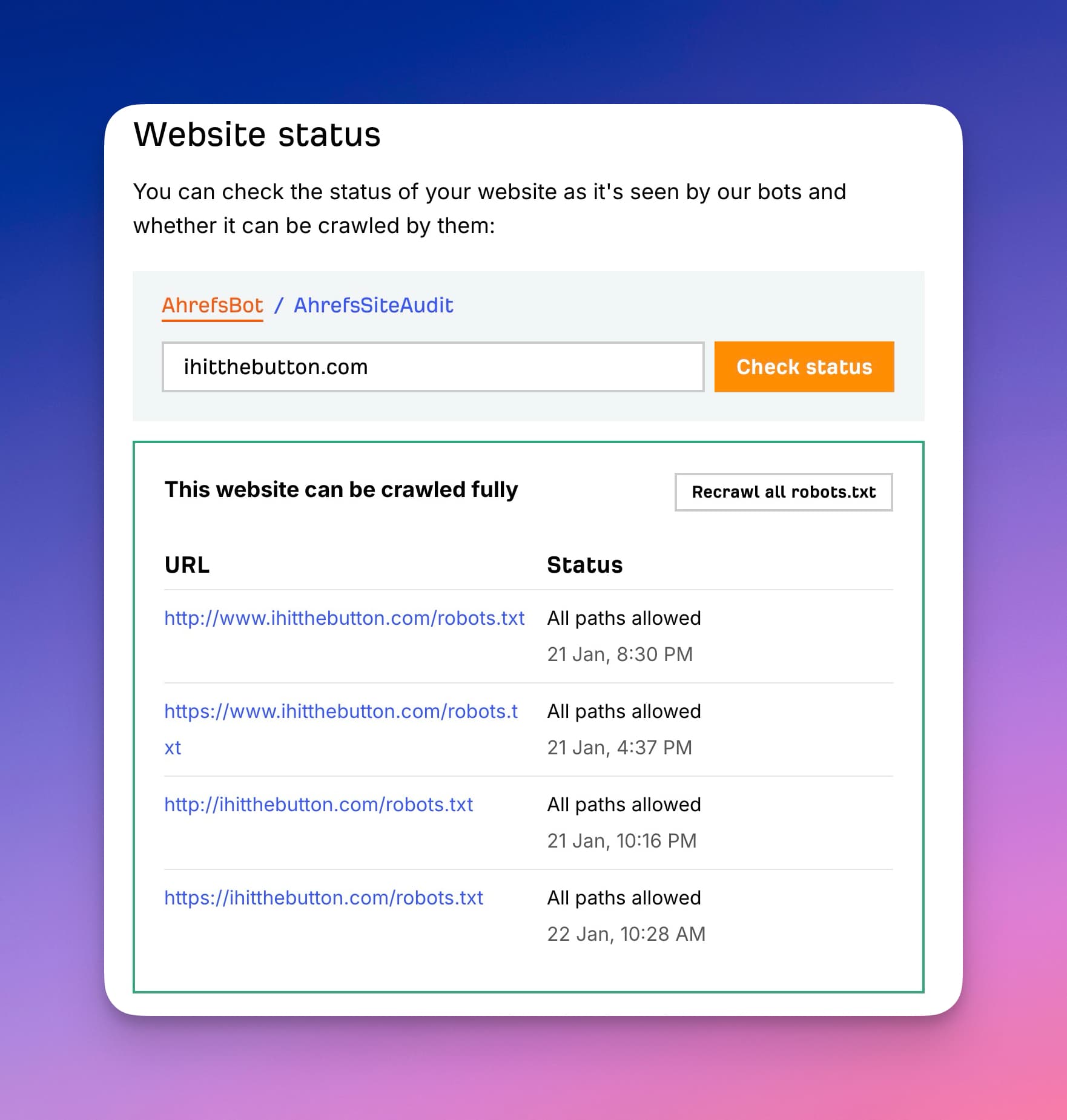
If you want a quick yes or no on whether Ahrefs can reach your site, use Ahrefs’ Website status tool.
- Open Ahrefs’ bot Website status page (the one shown in the screenshot).
- Select AhrefsBot (for the public crawler) or AhrefsSiteAudit (for audit crawls).
- Enter your domain (use the exact version you care about, like
https://example.com). - Click Check status.
- Read the result:
- “This website can be crawled fully” means Ahrefs sees your
robots.txtas allowing crawling. - If it shows blocked paths or errors, click Recrawl all robots.txt after you make changes to confirm the fix.
- “This website can be crawled fully” means Ahrefs sees your
This is a clean troubleshooting step because it tells you what Ahrefs’ systems see, not just what you think you configured in robots.txt or your firewall.
How to get AhrefsBot to crawl your site (if it’s not showing data)
If Ahrefs shows no data for your domain, a few common issues might be blocking the crawler. Work through these steps to allow AhrefsBot access.
- Check your robots.txt and make sure you haven’t disallowed AhrefsBot with a
Disallow: /rule. A valid XML sitemap referenced in robots.txt also helps crawlers discover your pages faster. - Remove IP-based blocks. Check your firewall, .htaccess, and security plugins for rules that silently block Ahrefs’ IP ranges.
- Verify your site in Ahrefs Free, the free account formerly called Ahrefs Webmaster Tools. It’s free for sites you own and gives you Site Explorer and Site Audit data for your verified site.
- Confirm your site has inbound links. AhrefsBot discovers pages through backlinks, and brand new sites with zero external links give the crawler no path to find them.
- Be patient. Crawl frequency depends on link popularity. High-authority sites get crawled daily, while newer sites may wait weeks. There’s no way to force an immediate crawl.
Frequently asked questions about AhrefsBot
Is AhrefsBot malicious?
No. AhrefsBot is a legitimate SEO crawler operated by Ahrefs. That said, bad actors can spoof the AhrefsBot user-agent to disguise their own scrapers. Always verify suspicious requests by checking the source IP against Ahrefs’ published IP ranges and running a reverse DNS lookup.
How often does AhrefsBot crawl my site?
Crawl frequency depends on your site’s size and backlink count. Sites with many inbound links get crawled more often, sometimes daily. You can use a Crawl-delay directive in robots.txt to control how fast it requests pages.
What happens if I block AhrefsBot?
AhrefsBot stops crawling your pages once it rereads your robots.txt, which isn’t instant. Ahrefs says it begins dropping blocked sites from its index about 6 months after the block. Links pointing to your site from other domains still show in Ahrefs, because blocking only stops crawls of your own pages, so competitors can still see much of your backlink profile. Source: Ahrefs Help Center: How long does it take for my site to be removed from Ahrefs? Blocking does not affect your Google rankings.
Does blocking AhrefsBot affect my Google rankings?
No. Google uses Googlebot, not AhrefsBot. Blocking Ahrefs only affects Ahrefs’ own tools and the Yep.com search engine, which also relies on AhrefsBot data.
What is the AhrefsBot user-agent string?
The main user-agent is Mozilla/5.0 (compatible; AhrefsBot/7.0; +http://ahrefs.com/robot/). Site Audit currently uses Mozilla/5.0 (compatible; AhrefsSiteAudit/6.1; +http://ahrefs.com/robot/site-audit) on desktop; the mobile string differs. See the full list of user-agent strings earlier in this article.
Conclusion

Verify first, then control. Confirm AhrefsBot traffic is real using reverse DNS and the official IP list, then pick the lightest option that solves your problem: Crawl-delay for load issues, robots.txt for selective blocking, or server rules for a full shutdown. After any change, re-check your logs to make sure the result matches your intent.
Blog Automation That Keeps Your Posts Ranking

RightBlogger finds keywords, writes SEO articles, and publishes them to your blog. Then its Site Agent uses your Search Console data to keep older posts in shape, adding internal links, sharpening weak meta descriptions, and fixing stale years and broken links. Join 51,000+ bloggers using it to grow traffic from Google and ChatGPT.

RightBlogger Co-Founder, Andy Feliciotti focuses on website development and shares his travel and photography adventures on YouTube and his blog.



Automated SEO Blog Posts for Your Site
Research, write, publish, and share from one account.
7-day free trial. Cancel anytime.





Leave a comment
You must be logged in to comment.
Loading comments...