2 Best Free AI Competitor Analysis Tools (+ How to Use Them)
Compare competing articles to find content gaps and pinpoint high-quality backlinks worth pursuing, using two free tools.


If you want to beat competitor websites in your niche to the top spot on Google and be in the top sources in LLMs like ChatGPT, Claude, Gemini, Perplexity & Google’s AI Mode, one of your best secret weapons is AI competitor analysis tools. Enter: RightBlogger’s free Content Gap & Backlink Checker tools.
🔑 Competitor analysis (or competitive analysis) is the process of figuring out what your competitors are doing well, and determining what you can do even better. Competitor analysis tools help you dig into exactly how your competitors are ranking their content, then provide you with actionable insights to improve your content and rankings.
This process can sound daunting if you’re not very familiar with SEO (search engine optimization). Some of the big name tools you can use for competitor analysis, like Semrush and Ahrefs, just aren’t affordable for many bloggers, solopreneurs, and small business owners I know. As of October 2026, the Semrush SEO plan is $139/month billed monthly (see Semrush pricing), and Ahrefs Lite is $129/month, with an entry-level Starter plan at $29/month (see Ahrefs pricing).
The great news? Andy and I made 2 AI-powered competitor analysis tools inside RightBlogger that’ll give you a highly detailed competitor analysis, and you can use them completely free with a RightBlogger account.
Blog Automation That Keeps Your Posts Ranking

RightBlogger finds keywords, writes SEO articles, and publishes them to your blog. Then its Site Agent uses your Search Console data to keep older posts in shape, adding internal links, sharpening weak meta descriptions, and fixing stale years and broken links. Join 51,000+ bloggers using it to grow traffic from Google and ChatGPT.
With artificial intelligence, there’s no need for time-consuming market research and manual competitor analysis, or wasteful guesswork. In just seconds with these tools, you can uncover valuable insights showing exactly what you need to do, to beat the competition.
1. RightBlogger’s Content Gap Tool (Analyze Competitor Content)
Let’s say you’ve got a post that’s performing well in search engines and in LLM recommendations… but it could be doing even better.
Wouldn’t it be awesome if you could get a list of exactly what you need to do to outrank other websites that are currently above you, for the same keywords?
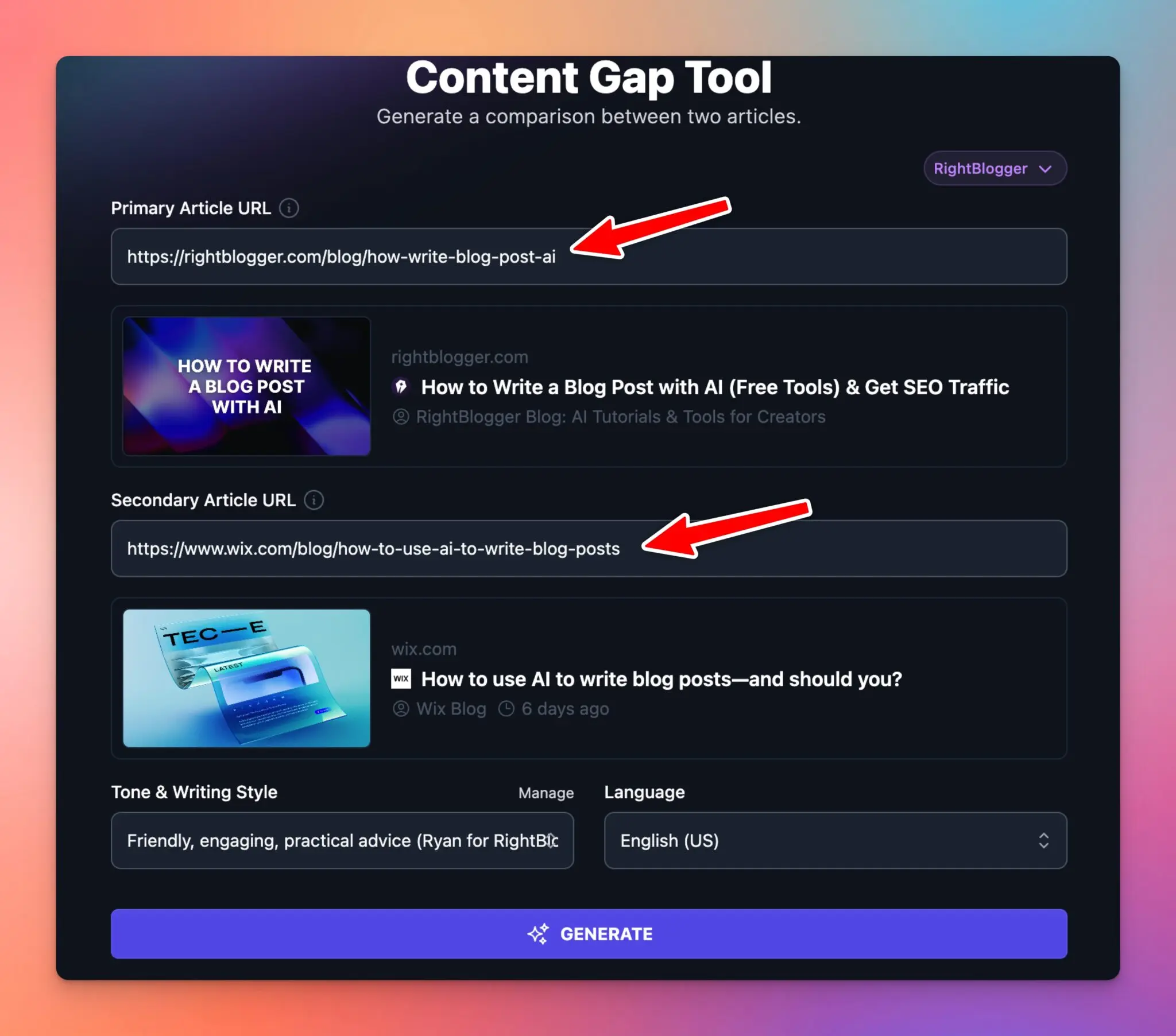
Well, with AI powered tools like our Content Gap tool, you can get just that, fast. You just need:
- The URL of your post
- The URL of a competitor’s post (hint: use the post that’s ranking #1 on Google for your primary keyword)
Our Content Gap tool will analyze both posts, digging into exactly where your post is falling short.
Here’s a full video tutorial where I walk through getting the most out of our Content Gap Tool:

Let’s get practical with an example, now. Imagine we want to improve this Shopify post How to Get More Followers on Instagram. They’re currently being outranked by Sprout Social’s post.
All we need to do is put the URLs into the tool and hit “Generate”. The AI does the rest.
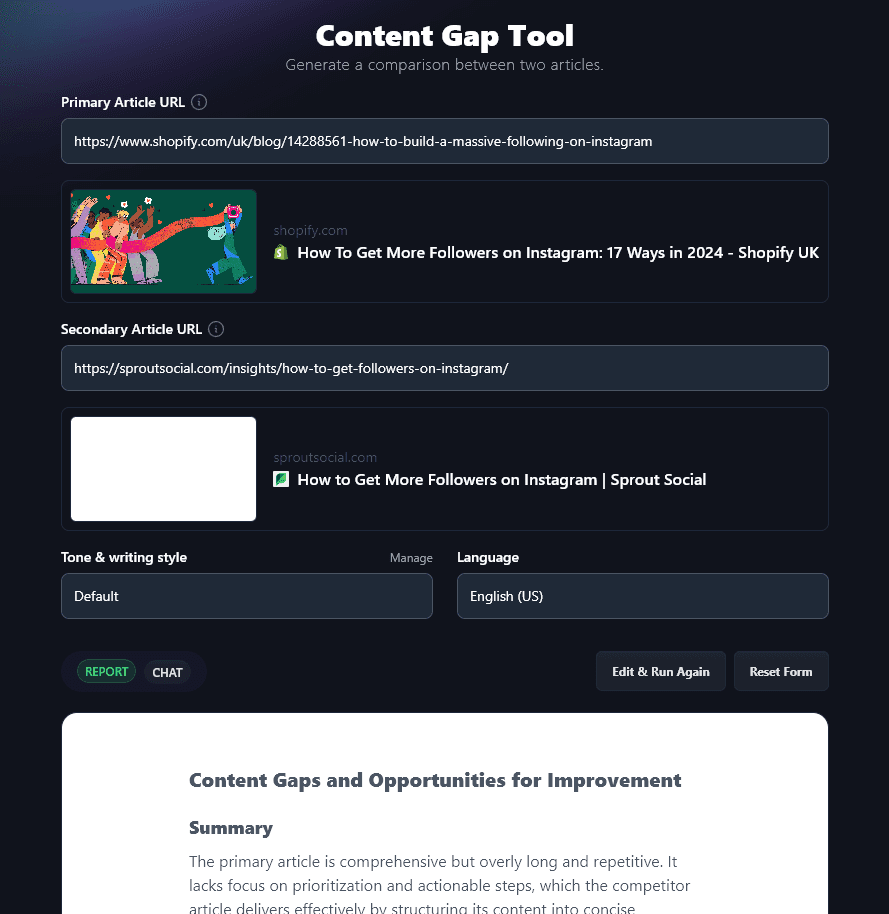
The content gap report covers:
- Summary: A brief summary of the differences between the pieces.
- Content Gaps: Specifics on the gaps between the primary article and the competitor piece, showing where the primary article may be falling short.
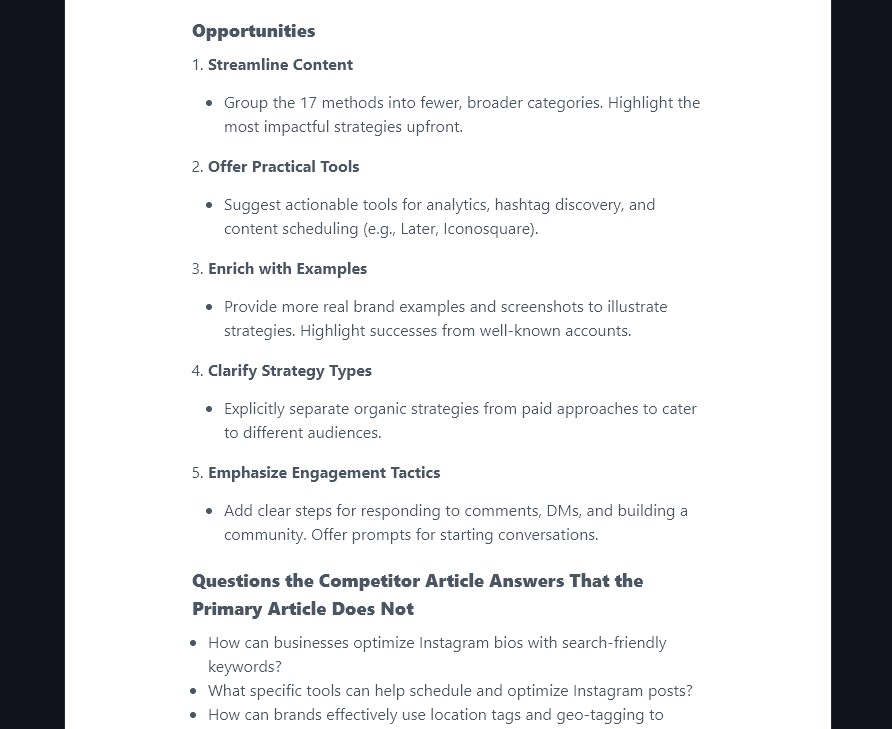
- Opportunities: A clear, specific list of ways the primary article could be improved.
- Questions: A list of questions that the competitor article is answering (and that the primary article isn’t).
- How to Improve the Primary Article: More details on how you could change the primary article, this builds on the tips on the “Opportunities” section, giving more details and further ideas.
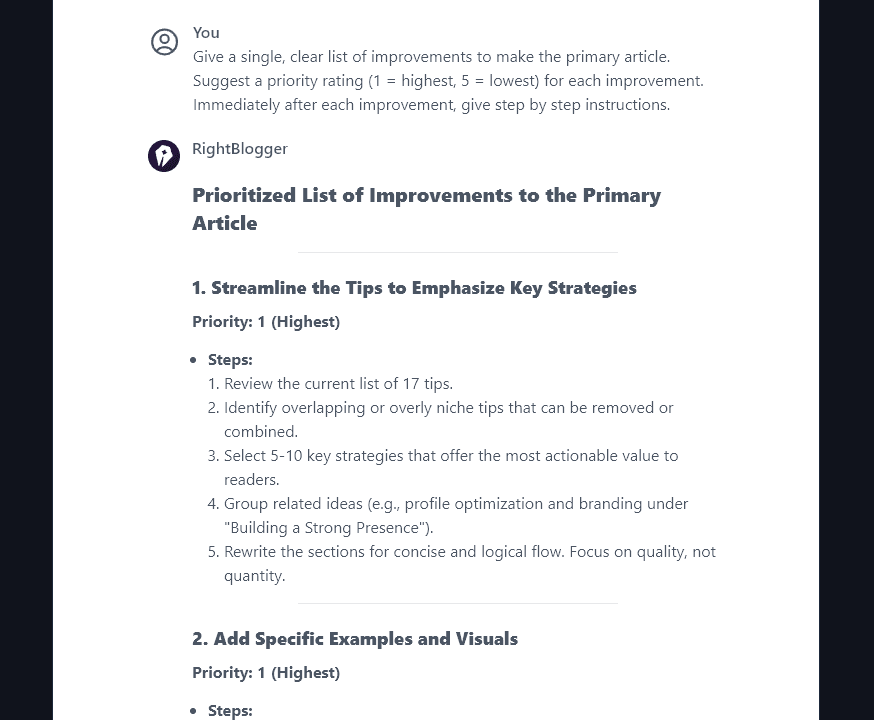
Want to go even further? Use the “Chat” feature (above the report) to turn these actionable insights into a detailed list of improvements. For instance, we’ve asked:
Our second AI competitor analysis tool helps uncover opportunities for marketing your content more effectively online.
2. RightBlogger’s Backlink Checker (to See Competitor Backlinks)
Building backlinks to your site is a brilliant way to improve your SEO (search engine optimization). It can be tough to figure out which sites to approach for a backlink or guest posting opportunity, however.
That’s where our Backlink Checker tool comes in. You can use this to find the backlinks for any website or URL. Let’s say you wanted to peek at RightBlogger’s backlinks. Just enter rightblogger.com and you’ll get a whole list:
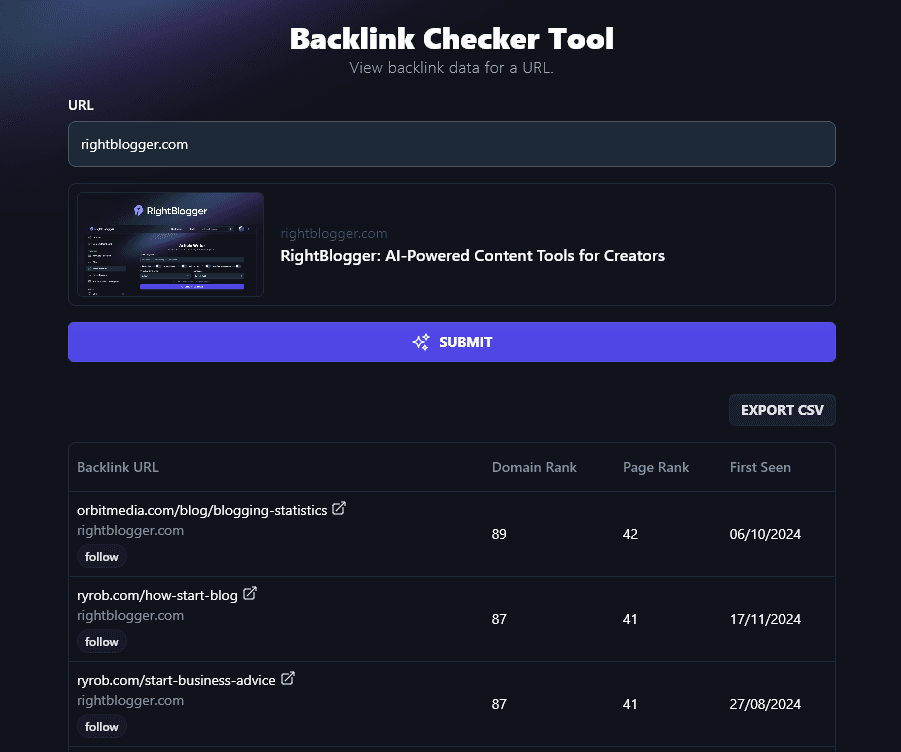
You can download the list as a CSV (spreadsheet) file, or you can reorder it by clicking on the column headers. This lets you quickly see which high-quality backlinks your competitors have.
When using the tool, make sure you choose a website with a similar target audience to you. That means your competitor data will be highly relevant to your own business.
The tool gives you:
- The Backlink URL: This shows the page that’s linking to the website/URL you entered, then the page on your site it’s linking to. Below this you’ll see a “follow” or “nofollow” button. “Follow” links are most valuable as they’re like a vote for your site from another site … but “nofollow” links can still be useful.
- The Domain Rank: This is a third-party estimate of how authoritative the linking site is, based on its backlinks. It’s not a score Google uses or publishes. Our Ahrefs DR vs Moz DA guide explains how these authority metrics work.
- The Page Rank: This is the page-level version of the same third-party estimate. It measures the authority of the linking page (not the whole site). It isn’t Google’s own PageRank, which Google’s SEO Starter Guide describes as just one of many ranking signals.
- First Seen: This tells you when the backlink was first detected, giving you a good sense of when it was likely created.
Tip: Look for backlinks with a high domain ranking and page rank. These could be great opportunities for you to pursue, too. Click the “open” link next to the backlink’s URL to see that page.

Ready to Put These AI Competitor Analysis Tools to Work?
Using the Content Gap and Backlink Checker AI tools gives you an inside look at exactly what your competitors are doing to rank high in Google.
With this knowledge, you’ve got the power to replicate their success, and even beat them. I’ve used these tools to flip the script on some of my own content rankings, and I couldn’t recommend it more.
You can try out the Content Gap Tool and the Backlink Checker at no charge with a free RightBlogger account. Give it a go today and gain an edge on your competitors. Then, once you’re really seeing the benefits from these AI competitor analysis tools, you can upgrade to a paid RightBlogger plan for unlimited access to all 90+ of our tools.
Blog Automation That Keeps Your Posts Ranking
RightBlogger finds keywords, writes SEO articles, and publishes them to your blog. Then its Site Agent uses your Search Console data to keep older posts in shape, adding internal links, sharpening weak meta descriptions, and fixing stale years and broken links. Join 51,000+ bloggers using it to grow traffic from Google and ChatGPT.

Article by
RightBlogger Co-Founder, Ryan Robinson teaches 500,000 monthly readers how to grow online businesses and shares tips on SEO and blogging.



Automated SEO Blog Posts for Your Site
Research, write, publish, and share from one account.
7-day free trial. Cancel anytime.





Leave a comment
You must be logged in to comment.
Loading comments...