
SEO Keyword Cluster Generator
Generate a keyword cluster from a phrase or keyword.
Creating keyword clusters is a fantastic SEO technique to get your site as a whole ranking well in Google. RightBlogger’s AI-powered keyword cluster generator can come up with powerful grouped lists of keywords for you instantly.
So what is keyword clustering? It’s all about coming up with related keywords for a topic, digging down into subtopics then individual components of those subtopics. Within those clusters, you can also group together keywords that essentially have the exact same keyword search intent (e.g. “best hiking boots” and “best boots for hiking”).
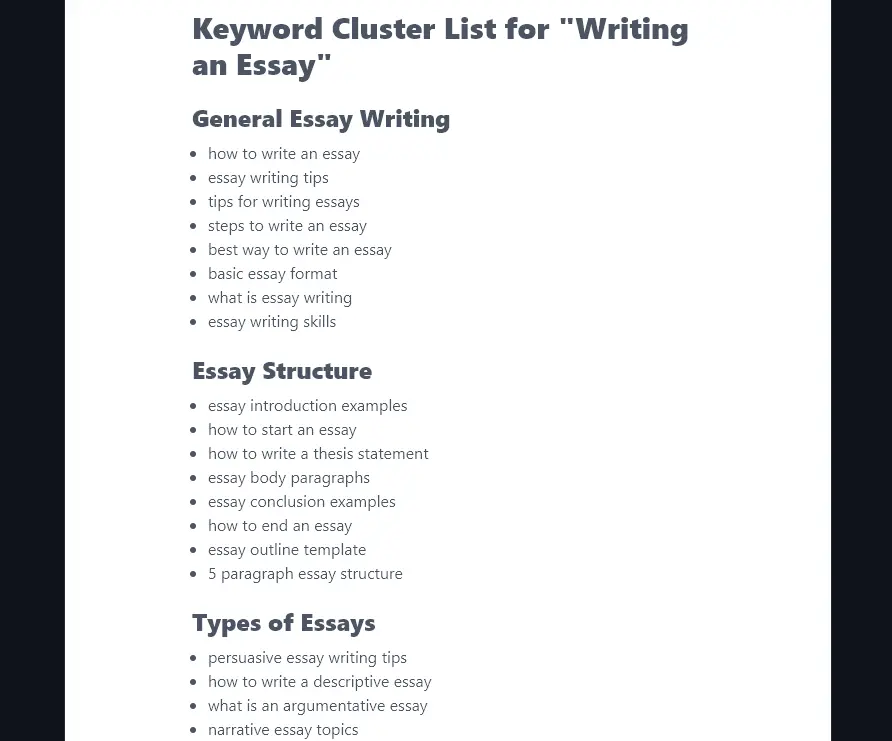
Here’s the start of a keyword cluster for the topic “writing an essay”
Keyword clusters are great for:
- Improving your SEO, as they show Google that your site has comprehensive content about your topic. (This topical authority can lead to all your content doing better in Google’s complex ranking algorithm.)
- Coming up with ideas to blog about that will be highly relevant for your audience (as they’re all related to your key topics).
- Interlinking between your posts, which helps readers discover more content on your site and can improve your SEO.
With keyword clusters, you’ll have some keywords with higher search volume than others. It’s worth building out content on even fairly low search volume search terms, due to all the benefits above, but it’s best to prioritize medium volume, low competition terms as those will bring in organic traffic fastest.
How to Use the Free SEO Keyword Cluster Generator (Keyword Grouping Tool)
Ready to create SEO keyword clusters? The keyword cluster generator finds and groups keywords automatically for you. It’s really easy to use: here’s what to do, step by step.
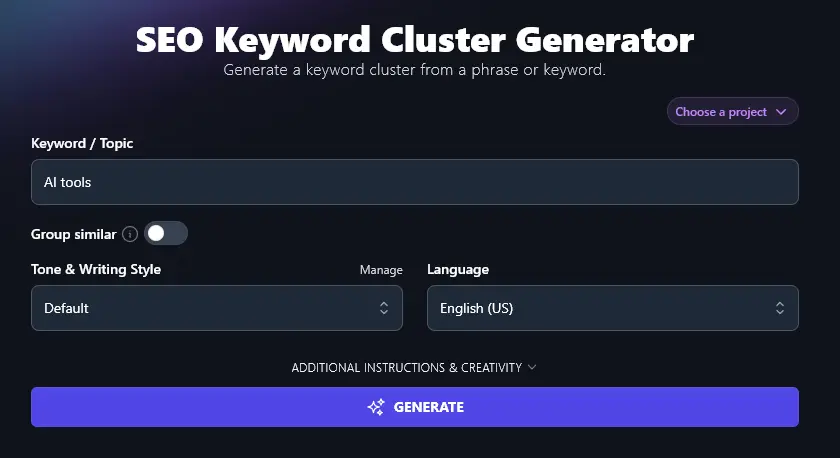
Step 1. Type in a Starting Topic or Keyword
Choose a broad starting topic or keyword for the keyword cluster generator. That could be a category on your blog or a topic that would work for a long-form blog post. You could even use your whole niche (e.g. “solo travel” or “advice for new parents”).
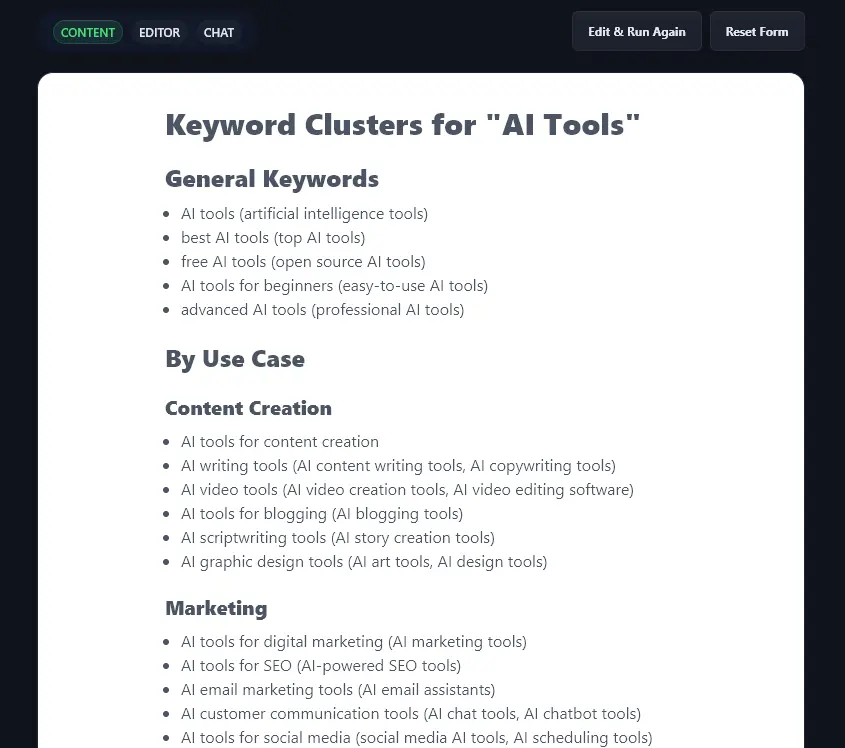
We’re going to use a major RightBlogger topic: AI tools.
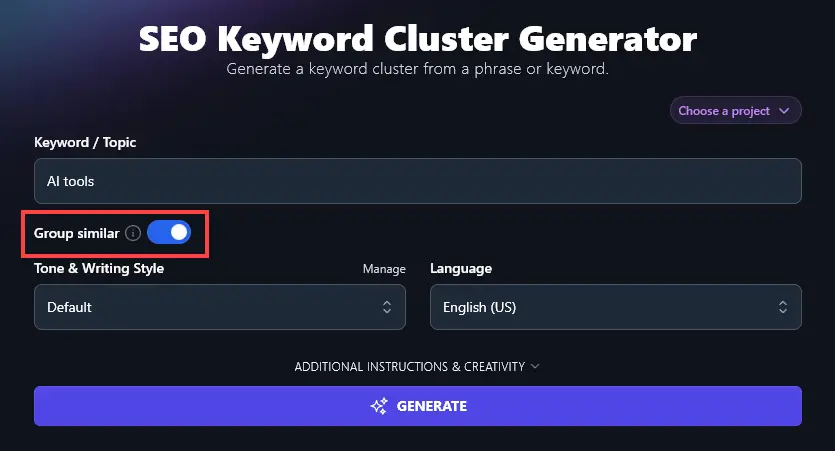
Step 2. Decide Whether to Group Similar Keywords
The keyword cluster tool has a “Group similar?” option. This puts together any keywords that mean essentially the same thing (you could create one post/page to target all of these).
Simply toggle this option on if you’d like to use it.
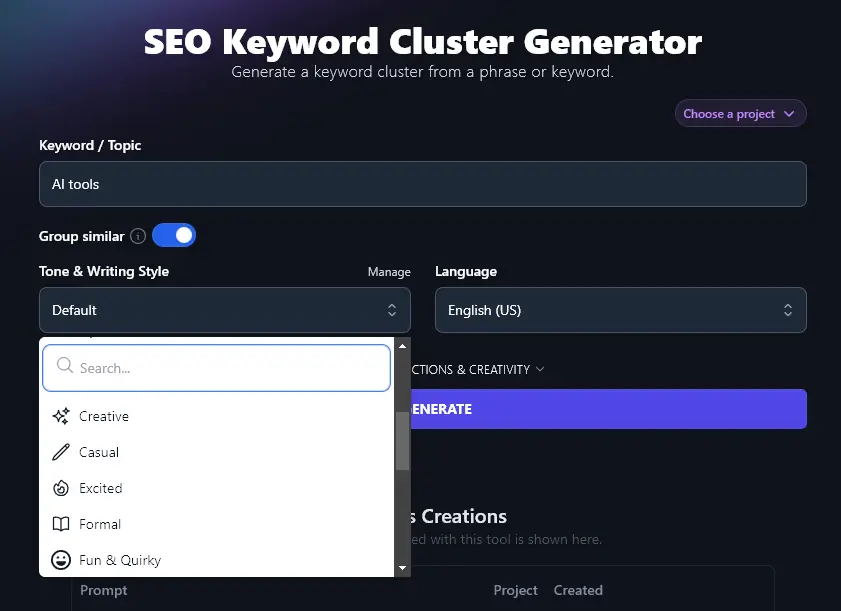
Step 3. Choose Your Tone & Writing Style
Like RightBlogger’s other generative AI tools, the keyword cluster tool has a “Tone & Writing Style” option. It’s fine to leave this set to “Default” here, but if you want to try out a different style, you can select it from the dropdown list.
Step 4. Select Your Language (Optional)
If you want your keyword clusters to be in a language other than English, go ahead and choose it from the dropdown list. RightBlogger can come up with keyword clusters in 100+ different languages.
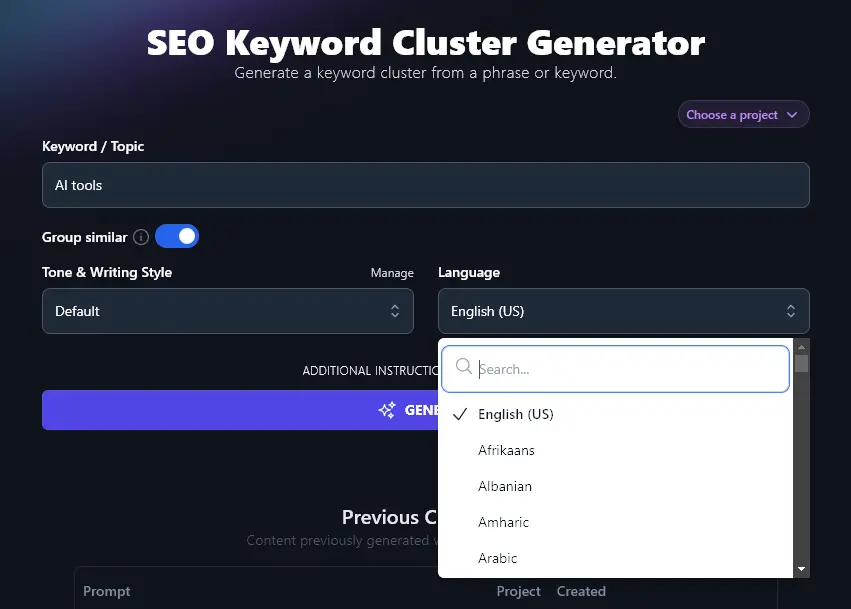
Once you’re happy with the options you’ve chosen, go ahead and run the keyword cluster generator.
In a few seconds, you’ll have a complete set of keyword clusters for your topic. These will be split into groups of related keywords, with very similar words listed together (the synonyms or near-synonyms appear in parentheses).
Bonus: Use This Free SEO Checklist Along With This Tool
Keyword clusters are a fantastic starting point for content that should rank well in search engine results pages (SERPs). But there’s a lot more you can do in terms of on-page optimization.
Here’s a quick SEO checklist that you can use for every post you create.
- Install (and use!) a WordPress SEO plugin like Yoast SEO or RankMath
- Carry out keyword research on your keyword to make sure it’s relevant and possible to rank for
- Use keywords in your subheadings where you can (encourages rich snippets and faster indexing)
- Make sure you only have a single H1 header on your page: that’s the title at the top
- Follow correct header hierarchy in your content, with H2 subheadings and H3 sub-subheadings
- Use your primary keyword naturally in the text: don’t go overboard
- Have a good mix of internal and external links (including at least 3-5 external links)
- Craft an engaging meta description that uses keywords and entices readers to click through
- Add descriptive alt text to all your images, using keywords where appropriate
- Make sure your article is long enough to rank well (usually, that means 1,500+ words)
- Write a compelling meta title (SEO title) that includes your primary keyword and attracts readers
- Use your keyword (minus little words like “to” or “a”) in your post’s permalink
How Does the SEO Keyword Cluster Tool Work to Create Topic Clusters?
Let’s take a closer look at how you can use the SEO keyword cluster tool to the full, so you can get the most from it as part of your content strategy.
1. Topic/Keyword (Be Fairly Specific)
While you can create keyword clusters for a huge topic, like your blog’s topic as a whole, you’ll get the most value from the keyword cluster tool if you’re quite specific. That way, the tool can give you a very detailed list of keywords.
Tip: Not sure what specific topics to use? Run the keyword cluster tool once, then pick a subheading from your keyword list and run it again.
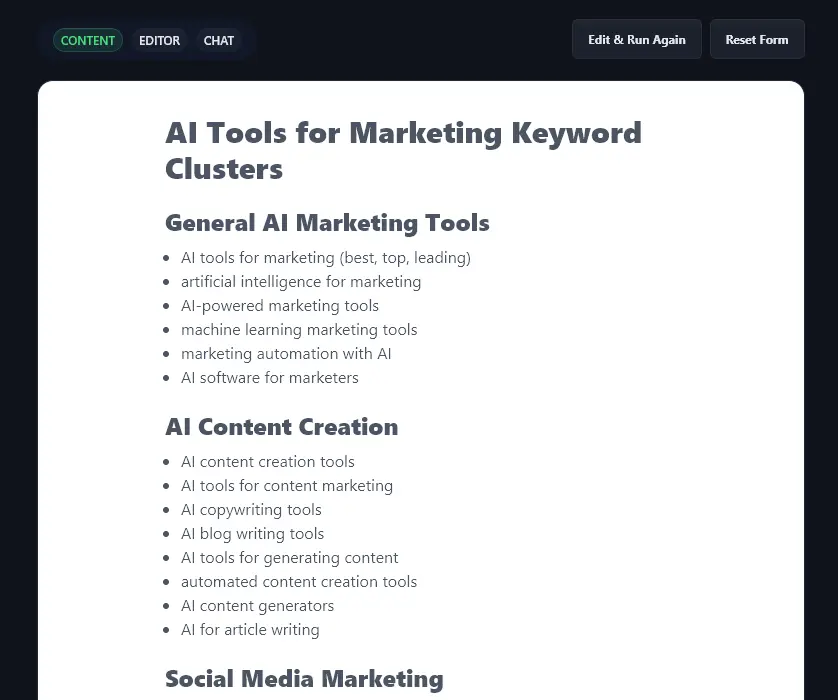
Here’s what we got when running the tool for “AI tools for marketing” (one of the specific use cases that it came up with for the topic “AI tools”). This time, the individual keywords are more specific: they’re long-tail keywords that should be fairly easy to rank for.
2. Group Similar? (Put Semantically Similar Keywords Together)
There’s not much point writing one article targeting “best AI tools for marketing” and another targeting “top AI tools for marketing”. Google knows that those search terms both mean basically the same thing.
When you opt to “group similar” keywords, the AI will automatically put keywords together if they’re synonymous or almost synonymous. This lets you easily spot where multiple keywords could be targeted with a single piece of content.
3. Tone & Writing Style (Can Leave This As Default)
The tone & writing style won’t make much difference to your keywords. You can simply leave this as the default setting. Make sure you bring in your unique voice and brand as you build out the content for your SEO clusters, e.g. when creating content briefs with the outlining tool.
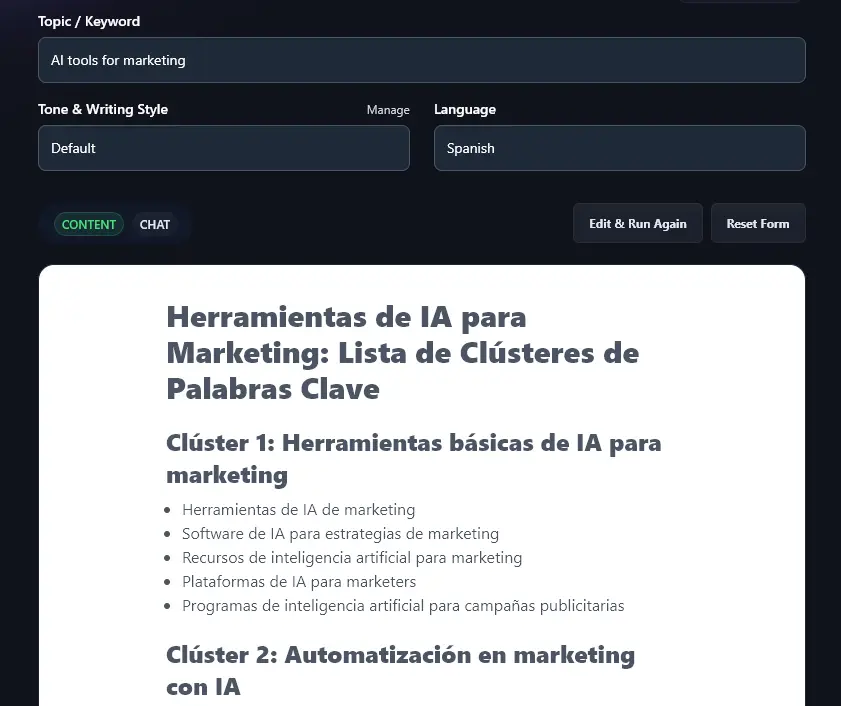
4. Language (100+ Languages to Pick From)
If you’re writing for a non-English speaking audience or you’ve got a multilingual website, then you can use the keyword cluster tool to come up with keywords in whatever language you choose.
Simply pick from the dropdown list (there’s a handy search bar included so you can instantly find your preferred language) and run the keyword tool as normal.
5. Additional Instructions (Add Specific Requests for the AI)
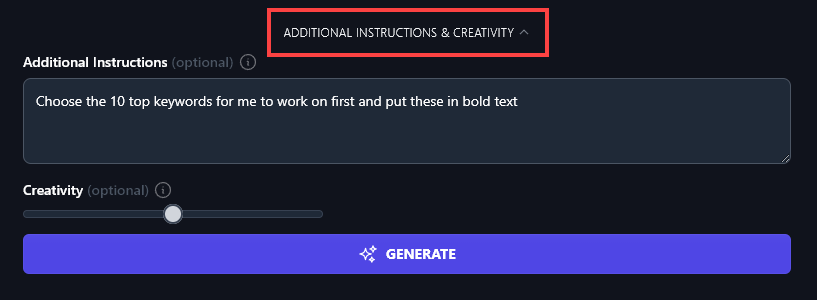
Click on the “Additional Instructions & Creativity” to open up the Keyword Cluster Tool’s advanced options.
You can enter any extra requests or constraints for the AI in the “Additional Instructions” box.
Keyword Cluster Generator FAQs (Frequently Asked Questions)
Got questions about keyword clusters or about using the keyword cluster tool? Here’s everything you need to know.
What is a Keyword Cluster in SEO?
A keyword cluster is a list of keywords grouped together by topic and potentially by user intent (search intent).
Very similar keywords, sometimes called semantic keywords, may be listed alongside one another. This can help to prevent keyword cannibalization.
As part of an SEO strategy, keyword clusters can be used to build “hub and spoke” style content, with a pillar page for each subtopic (e.g. “AI Content Creation Tools” could be the pillar page, linking to individual posts on “AI Content Writing Tools”, “AI Social Media Creation Tools” and so on.)
How Many Keywords Should Be in a Cluster?
There’s no fixed rule, but most effective keyword clusters contain 5 to 20 keywords. Smaller clusters (5-8) work well for focused subtopics, while larger clusters (10-20) suit broader pillar content. The key is grouping keywords that share the same search intent so one piece of content can target the entire cluster without spreading too thin.
What is Keyword Cannibalization and How Does Clustering Prevent It?
Keyword cannibalization happens when multiple pages on your site compete for the same search query. Google doesn’t know which page to rank, so both perform worse. Clustering prevents this by mapping related keywords to specific pages before you write. When you see that “best AI writing tools” and “top AI tools for writing” belong in the same cluster, you know to target them with a single post instead of two competing ones.
How Can I Create My Own Keyword Cluster?
You can create a keyword cluster manually, e.g. in Excel or Google Sheets. You’ll want to use a good keyword research tool to come up with keywords, then download these as a .csv file to edit and group together.
Another approach is to create a mind map. Start with your topic, then brainstorm lots of related ideas, drilling down into the details.
There’s no specific number of keywords you need, but you’ll likely have 6+ keywords in each small cluster (subtopic).
To speed things up, you’ll want to use a free keyword grouping tool or a paid tool. Some of the best keyword clustering tools include our own (free) keyword cluster generator, SEO Scout, Zenbrief, Semrush, and Ahrefs.
Our keyword cluster tool uses natural language processing (NLP) to understand and group related keywords.
Which Keywords Should I Prioritize Writing About?
Once you have your keyword clusters, it’s a good idea to use our keyword research tool to get keyword insights (key metrics) about search volume and difficulty for each keyword.
You want to prioritize the keywords that will do best in organic search: that means choosing low difficulty, medium volume keywords wherever possible. These should be (a) quite easy to rank for and (b) popular enough to deliver significant traffic to your site.
If your site is already fairly well established, you could use Google Search Console and/or Google Analytics to see what content is already ranking well. This could point you to great topics to write more about.
What Other AI Tools Can I Use to Write Better Content and Improve My SEO?
Here in RightBlogger, we have 90+ powerful AI tools to help you create great content and get more traffic.
Here are some you’ll definitely want to check out:
- Article Writer: write a full-length article based on a topic or keyword (great for SEO content)
- Blog Outline Generator: come up with an SEO-friendly outline as part of your content planning
- FAQ Generator: create FAQs (Frequently Asked Questions) to add extra value to your post
- Content Gap Analysis: learn exactly what to do for better content optimization by comparing your post to a competitor’s post
- Backlink Checker: learn where your competitors’ backlinks are coming from, so you can emulate these
- YouTube Video to Blog Post Generator: turn a video you’ve created into a well-structured blog post, automatically
We’ve also got a range of other SEO tools to help you create meta titles and descriptions, alt text, and much more. All of these are designed not just to help you rank well in search engines but also to offer a great user experience to your potential customers.
Who is the AI Keyword Cluster Tool For?
Our free keyword clustering tool is a great fit for bloggers, SEO professionals, online businesses, content creators, content marketers, and more. If you want to create more posts and web pages to bring in traffic to your site, then it’s for you!
How Do I Sign Up For RightBlogger and How Much Does it Cost?
The keyword cluster tool is included in every RightBlogger plan, starting at $49/mo.
If you want unlimited access to all our tools, along with advanced features (like the “Chat” feature to adjust or refine your keyword clusters) then see our plans. Solo is $49/mo, Pro is $69/mo, and Agency is $199/mo.