ChatGPT vs RightBlogger: Which AI Blogging Platform Is Better?
Choose ChatGPT if you want
- A general assistant for any kind of writing
- You already have an SEO workflow
- One $20 subscription covers everything
Choose RightBlogger if you want
- Keyword research built into the writing
- Publishes straight to your CMS
- Maintains posts after they go live
$0 due today. 30-day money-back guarantee on paid plans.
Table of contents
Key takeaways
- ChatGPT starts at $20 monthly; RightBlogger Solo costs $59 monthly or $588 annually, and both offer free plans.
- RightBlogger also offers a seven-day paid-plan trial with nothing due upfront and a 30-day money-back guarantee.
- RightBlogger can automatically generate, schedule, and publish posts to connected websites, while ChatGPT has no native blog publishing workflow.
- RightBlogger maintains published content on supported sites with approval controls and automatically shares new posts socially according to plan; ChatGPT lacks these workflows.
- ChatGPT is the better fit for varied tasks and occasional blogging, while RightBlogger suits regular SEO publishers, content teams, and agencies seeking integrated workflows.
ChatGPT and RightBlogger can both help you produce written content, but they’re built for very different jobs.
ChatGPT is a general-purpose AI assistant. It can help with writing, drafting emails, coding, and answering questions through a conversational interface.
RightBlogger is a dedicated AI blogging and SEO platform. It helps you research keywords, generate complete articles, optimize them for search, add images and links, publish them to your website, and automate future content.
Choosing between them comes down to what you need:
- Pick ChatGPT if you want a flexible AI chat assistant for many kinds of tasks.
- Pick RightBlogger if you want an end-to-end system for running and growing a blog.
Quick verdict: ChatGPT is the more affordable choice for open-ended AI assistance. RightBlogger is the stronger choice for bloggers, content teams, niche site owners, and agencies that want publishing, SEO, maintenance, distribution, and team tools in one place.
ChatGPT and RightBlogger at a Glance
Before exploring each feature in detail, here’s the full comparison between ChatGPT and RightBlogger.
| Feature |   | ChatGPT |
|---|---|---|
Free Plan | ||
Starts At | $49 | $20.00 |
Unlimited Use | ||
Autoblogging | ||
Site Agent | ||
AI Brand Monitoring | ||
Social Automation | ||
Backlink Exchange | ||
WordPress Integration | ||
Webflow Integration | ||
Shopify Integration | ||
Wix Integration | ||
Duda Integration | ||
Webhook Integration | ||
Ghost Integration | ||
Keyword Research Tool | ||
AI Chat | ||
Article Generator | ||
Automatic In-Article Images | ||
Automatic In-Article Videos | ||
Automatic Internal Linking | ||
Automatic External Linking | ||
Video to Blog | ||
Create Embedded Lead Magnets | ||
Mass Publishing | ||
Languages Supported | 139 | 95 |
Create Presets | ||
Change Voice Tonality | ||
Change Writer Point of View | ||
Sub User Accounts | ||
Educational Resources | ||
Priority Support | ||
SEO Reports | ||
Auto Optimize | ||
White Label Client Reports |
Feature-by-Feature Comparison
The main difference is scope.
ChatGPT gives you a blank chat box and responds to your instructions. RightBlogger provides structured tools and workflows built around blogging, search traffic, publishing, and content growth.
Content Generation
ChatGPT can generate text in response to a prompt. You can ask it for ideas, outlines, introductions, drafts, rewrites, or answers to questions.
However, ChatGPT doesn’t include a dedicated article generator. Its conversational workflow is flexible, but the user is responsible for building prompts and managing each stage of the article.
RightBlogger includes a full AI Article Writer designed to produce long-form blog posts. Its keyword-driven workflow connects topic planning with article creation, while saved presets let you reuse your preferred settings.
The distinction matters when producing content at scale. With ChatGPT, you’re responsible for building prompts, moving drafts between tools, and managing each step. RightBlogger gives you a guided workflow made for complete blog posts.
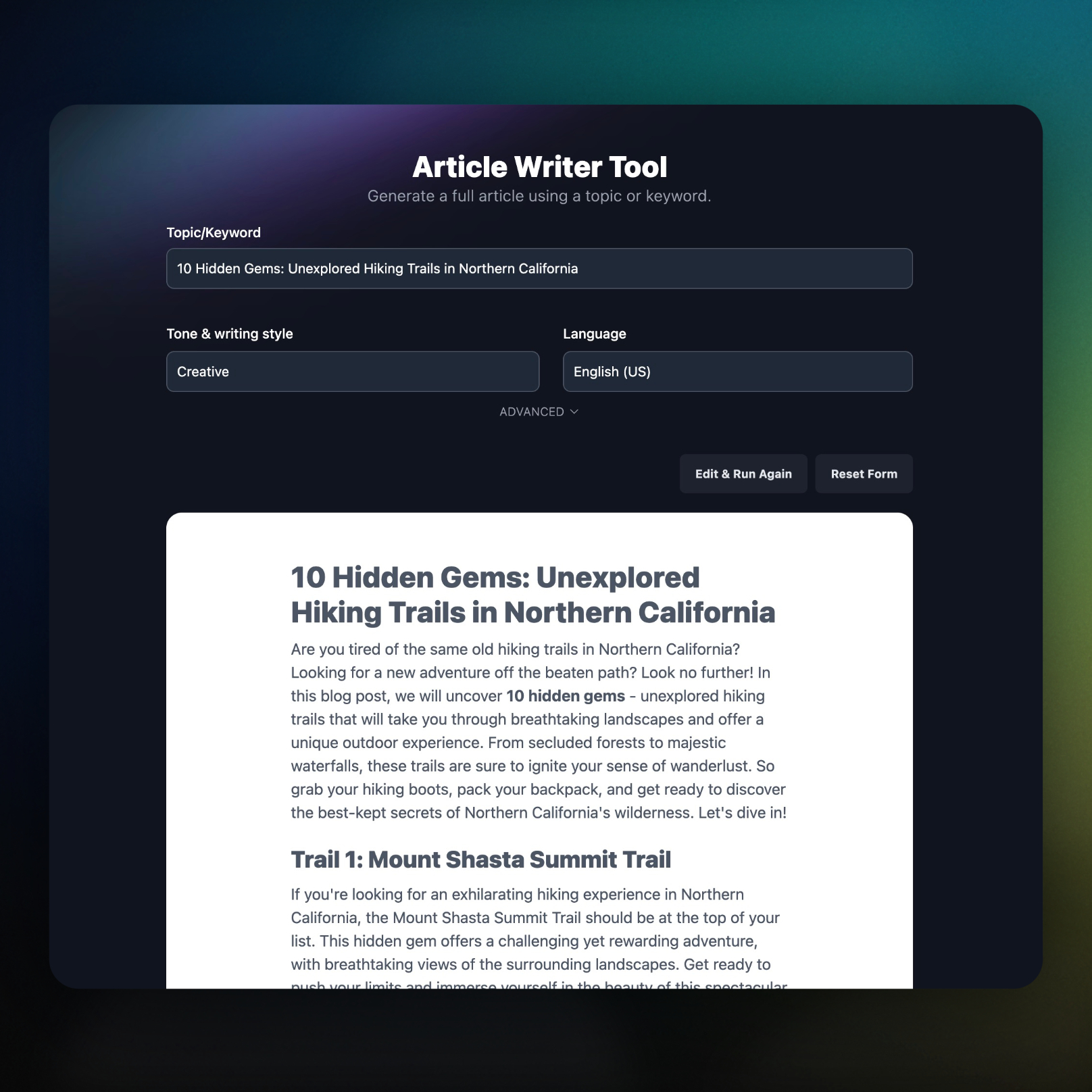
RightBlogger also includes unlimited article generation and unlimited words on its paid plans. ChatGPT doesn’t include unlimited use, which can make it less suitable for high-volume article production.
Winner for blog content generation: RightBlogger
Keyword Research and SEO Planning
Writing an article is only one part of blogging. You also need to find topics people search for and understand what a post needs to compete.
RightBlogger includes a built-in Keyword Research Tool. This allows bloggers to move from keyword discovery to article generation without switching platforms.
Its SEO reports and automatic optimization connect that research to the writing process. Automatic internal and external links also reduce the work needed to prepare a draft for publication.
ChatGPT doesn’t include a built-in keyword research tool, SEO reports, or automatic article optimization. You can use its chat interface to discuss general SEO ideas, but it isn’t a dedicated SEO research platform.
That makes RightBlogger better suited to repeatable SEO workflows rather than one-off writing help.
SEO Reports and Auto Optimize
RightBlogger’s SEO Reports analyze search results to identify what an article may need to rank higher.
Its Auto Optimize feature can then improve an article by adding relevant terms found in high-ranking content. This reduces the need to pay for and move drafts into a separate optimization platform.

SEO report limits vary by plan:
- Solo: 30 reports per month
- Pro: 90 reports per month
- Agency: 300 reports per month
RightBlogger also supports branded Google Search Console dashboards that agencies can share with clients through their own domain.
ChatGPT doesn’t include SEO reports, Auto Optimize, or white-label client reports.
Winner for SEO research and optimization: RightBlogger
AI Brand Monitoring
Search rankings don’t tell you how AI assistants describe your business. RightBlogger’s AI Brand Monitoring tracks how often ChatGPT, Claude, Gemini, and Perplexity mention your brand when people ask about your category.
It measures share of voice against competitors, the sentiment of those answers, and the sources they cite. For a marketing team, that means visibility reporting can extend beyond traditional search results to how AI assistants represent the brand.
AI Brand Monitor is included on every paid plan, with one monitor per connected site. It runs your prompts on a schedule and shows the per-prompt detail behind each number, so you can see which answers drive a change in visibility or sentiment.
This is monitoring inside a publishing platform, not a standalone AI visibility suite. Tools built primarily for visibility tracking cover more platforms and more prompts. RightBlogger’s value is keeping that monitoring alongside the content workflow you already use.
ChatGPT can answer questions, but it doesn’t provide this cross-platform brand monitoring system.
Publishing and Integration Capabilities
ChatGPT can help write a draft, but it doesn’t include a native blog publishing workflow. You’ll need to move the output into your content management system and handle formatting, scheduling, and publishing yourself.
RightBlogger has direct integrations with:
- WordPress
- Webflow
- Shopify
- Wix
- Duda
- Ghost
- Webhooks
Neither platform includes native Blogger or Zapier support.
RightBlogger’s integrations let you create an article and send it directly to a connected website. This removes several manual steps from the publishing process.
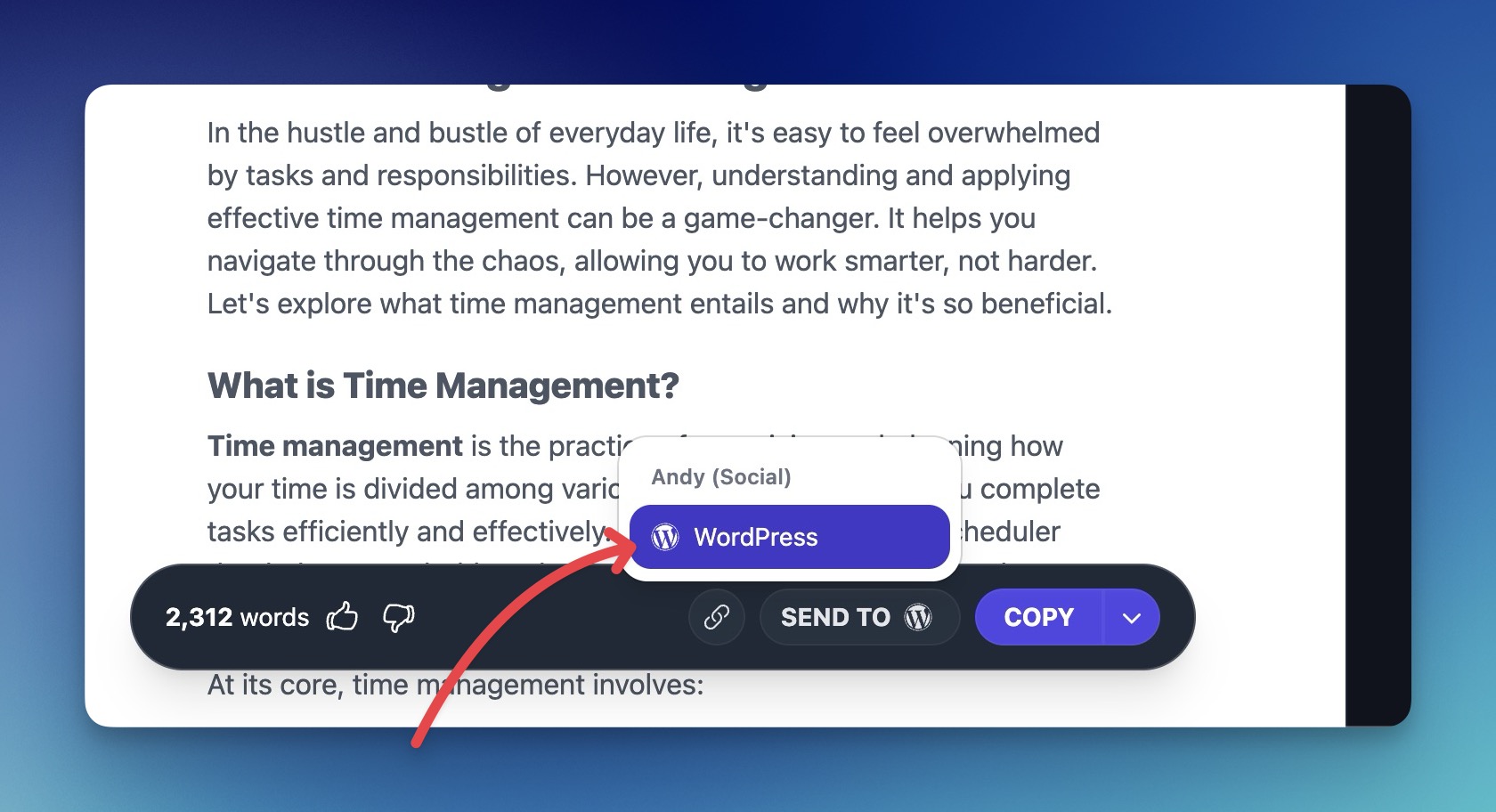
Direct publishing is useful when you manage a steady content schedule. It becomes even more important when you run several websites or publish articles for clients.
Winner for CMS integrations: RightBlogger
Customization and Editorial Control
Both tools can help create written content, but RightBlogger has more built-in controls for repeatable blog production.
RightBlogger lets you:
- Create reusable presets
- Change voice tonality
- Change the writer’s point of view
- Save custom writing styles
- Create sub-user accounts for team access
Saved presets help you keep the same settings across many articles. Instead of rebuilding your instructions each time, you can choose a preset and start generating.
The number of saved custom writing styles depends on your plan:
- Solo: 5 styles
- Pro: 15 styles
- Agency: 50 styles
ChatGPT uses conversational instructions rather than RightBlogger’s preset-driven article publishing workflow. The buying distinction is having reusable editorial settings connected to the rest of your blogging process.
Winner for repeatable content customization: RightBlogger
Images, Videos, and Content Repurposing
A finished blog post often needs more than text. Images, videos, and other interactive elements can make an article easier to follow and more useful.
RightBlogger can automatically include:
- Stock images inside articles
- Relevant YouTube videos
- Internal links to your existing posts
- External links to other websites
These additions reduce the amount of manual formatting required before publication.
RightBlogger can also turn videos into blog posts with its Video to Blog tool. This is helpful for YouTubers and brands that want to reuse existing video content.
Another distinct feature is the ability to create embedded lead magnets with Tool Studio. These AI-powered tools can be placed inside articles to capture leads and build traffic.
ChatGPT doesn’t assemble stock images, YouTube embeds, and site-aware links into an automated blog publishing workflow. It also doesn’t include a dedicated video-to-blog workflow or embedded lead magnet builder.
Winner for multimedia blog production: RightBlogger
Automation and Bulk Publishing
This is where the gap between a general AI assistant and a blogging platform becomes most clear.
ChatGPT can produce text, but it doesn’t generate, schedule, publish, distribute, and maintain blog posts as part of an automated workflow. RightBlogger connects those stages inside one platform.
Content Planner and Autoblogging
RightBlogger’s autoblogging system can generate, schedule, and publish posts automatically.
You can plan keyword-based topics, connect a website, and build ongoing content automations. The number of planner automations depends on your plan:
- Solo: 1 automation
- Pro: 3 automations
- Agency: 10 automations
RightBlogger also supports mass publishing, so you can publish multiple completed articles without moving them one at a time.

If automated publishing is a core part of your strategy, compare more options in our guide to the best autoblogging tools for bloggers and marketing teams.
Site Agent for Maintaining Published Content
Many AI writing tools focus on creating new content. RightBlogger’s Site Agent also maintains pages and posts that are already live.
On a recurring schedule, Site Agent scans connected WordPress, Ghost, Webflow, Wix, and Shopify sites for improvements such as:
- Adding useful internal links
- Cleaning up broken outbound links
- Sharpening weak meta descriptions on low-CTR pages
- Updating stale years in page titles
Site owners can choose from three modes:
- Ask Approval: Every proposed edit is queued for review.
- Smart: Low-risk fixes are applied automatically.
- Fully Automatic: All eligible fixes are applied automatically.
Every change includes one-click undo for 30 days, along with two independent backups. Site Agent can also work on any page on the connected site, not only articles created by RightBlogger.
This matters because publishing an article isn’t the end of the work. Internal links become outdated, outbound links break, and older posts can lose traffic. Site Agent helps keep the existing content library in better shape over time.
ChatGPT doesn’t include a comparable site maintenance agent.
Social Media Automation
RightBlogger can automatically share new blog posts with AI-written captions tailored to each platform through its social media automation tools.
The supported social networks are:
- X
- Threads
Plan access varies. Solo includes LinkedIn integration, while Pro and Agency include sharing across all five networks.
This extends the workflow beyond writing and publishing. A new article can also be distributed to your social audience without creating every caption by hand.
ChatGPT doesn’t automatically share newly published blog posts to social media.
Backlink Exchange
RightBlogger also offers an automated Backlink Exchange.
It matches your content with real, verified websites in your niche and places relevant in-content backlinks automatically. The workflow doesn’t require cold outreach or link farms.
ChatGPT doesn’t include a backlink exchange.
Winner for automation and bulk publishing: RightBlogger
Languages Supported
Both platforms can support multilingual content, but RightBlogger supports more languages.
- RightBlogger: 139 languages
- ChatGPT: 95 languages
That gives RightBlogger a 44-language advantage.
Language count isn’t the only factor to review. You should still test tone, formatting, and terminology in your target language before publishing. Even so, RightBlogger offers the broader range.
Winner for language support: RightBlogger
Team Collaboration and Scalability
A solo writer may only need a chat interface and a place to store drafts. Teams and agencies need more control over sites, users, reporting, and content volume.
RightBlogger supports sub-user accounts, with team capacity included on its larger plans:
- Pro: 3 team members
- Agency: 5 team members
The plans also scale connected websites and monthly SEO reports:
| Plan | Connected Sites | SEO Reports | Planner Automations |
|---|---|---|---|
| Solo | 1 | 30 per month | 1 |
| Pro | 3 | 90 per month | 3 |
| Agency | 10 | 300 per month | 10 |
RightBlogger also offers strategy calls. Agencies can use white-label reports to give clients branded access to Google Search Console dashboards.
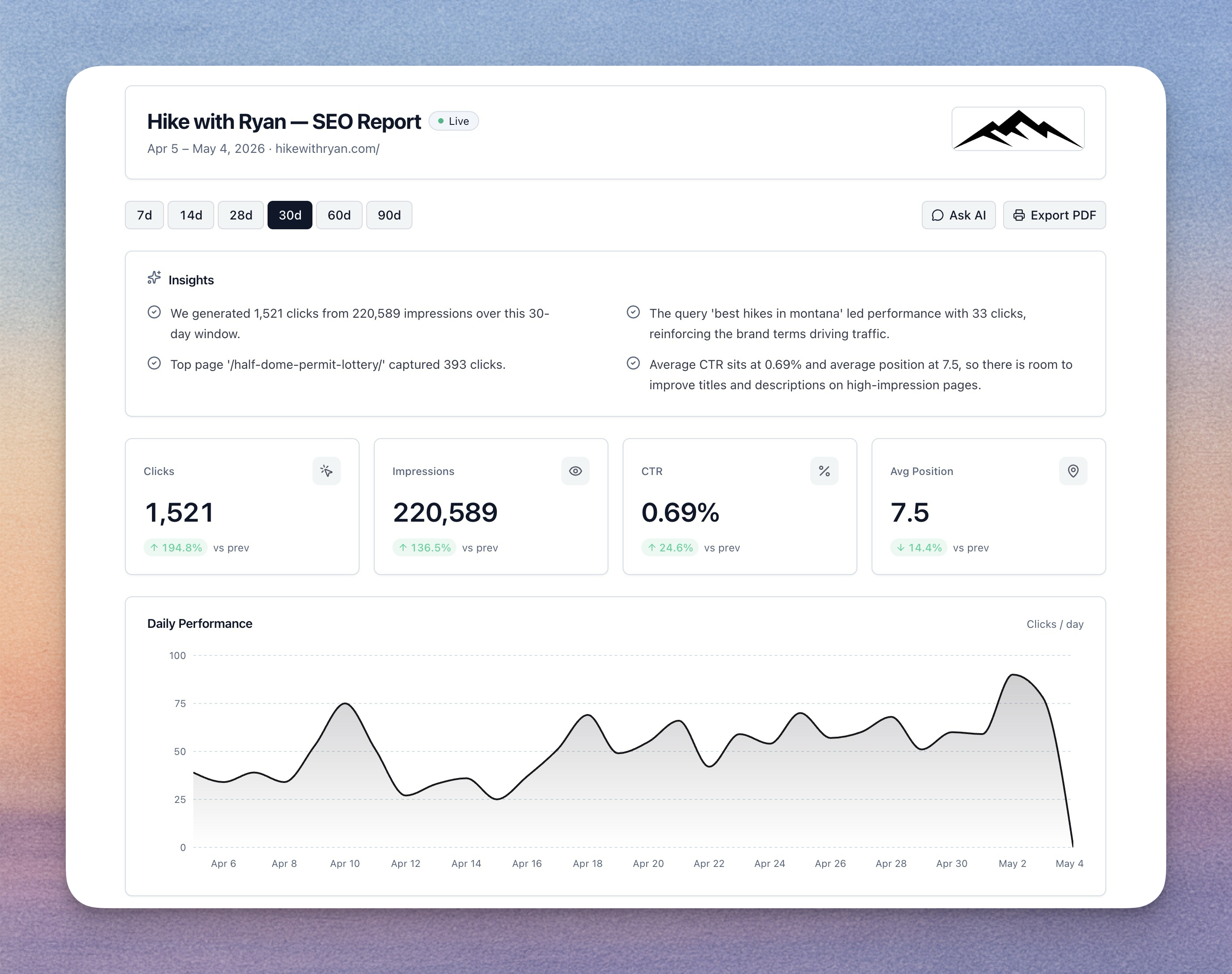
ChatGPT isn’t a shared blog publishing platform and doesn’t include white-label client reporting. Its role is conversational assistance rather than managing a team’s research-to-publication workflow.
For another comparison between a broad AI writing tool and RightBlogger’s blogging workflow, see our Jasper vs RightBlogger comparison.
Winner for blogging teams and agencies: RightBlogger
Customer Support and Educational Resources
Both ChatGPT and RightBlogger include educational resources and priority support.
RightBlogger adds more hands-on help for customers who need guidance with their blogging strategy. Alongside tutorials and guides, it offers courses and strategy calls.
The RightBlogger courses cover how to get more value from AI content, blogging, and SEO. Eligible users can also book strategy calls with the RightBlogger team.
ChatGPT also provides educational resources and priority support, but it doesn’t include strategy calls.
RightBlogger reviewers on Trustpilot repeatedly describe support answered personally by the founders, often within minutes. Reviewers on OpenAI’s profile describe automated support replies that loop back to the same generic response, with difficulty reaching a person when they need help.
Response times can vary, so it would be unfair to claim that one platform always responds faster.
Winner for hands-on guidance: RightBlogger
Pricing and Plans
Both ChatGPT and RightBlogger offer a free plan, so you can try either platform before moving to a paid subscription.
RightBlogger’s paid plans start with a 7-day free trial and $0 due today. Every paid plan is covered by a 30-day money-back guarantee, and you keep every article you write during the trial. You can evaluate the blogging workflow before a card is charged.
Cancellation is self-serve from your account page. It opens the Stripe billing portal, where cancelling takes a click, and access continues to the end of the paid period.
ChatGPT’s paid plans start at $20 per month. Usage isn’t unlimited, so high-volume users need to account for plan limits.
Reviewers on OpenAI’s Trustpilot profile praise the model’s breadth and quality, but some report charges they couldn’t get explained. That is a billing concern raised by customers, separate from how well ChatGPT handles a writing task.
RightBlogger’s Solo plan costs:
- $59 per month with monthly billing
- $588 per year, equal to $49 per month
RightBlogger also offers:
- Pro: $89 monthly or $828 yearly
- Agency: $299 monthly or $2,388 yearly
Neither platform offers a pay-per-article option. RightBlogger’s Agency plan supports higher volume through a fixed subscription rather than article credit packs.
Why RightBlogger Costs More Than ChatGPT
If you only compare the entry prices, ChatGPT is cheaper. The price difference makes sense because these subscriptions cover different types of software.
ChatGPT is primarily an AI assistant. RightBlogger combines functions that may otherwise require several subscriptions:
- AI writing
- Keyword research
- SEO analysis
- Content optimization
- Scheduling and publishing
- Internal link automation
- Social distribution
- Ongoing site maintenance
- AI brand monitoring
The better question isn’t simply, “Which tool has the lowest monthly price?” It’s, “How many tools will I need to complete my workflow?”
Replace-the-Stack Cost Estimate
Here’s a conservative example of what a small blogging stack might cost when assembled from separate subscriptions.
| Tool Category | Typical Monthly Estimate |
|---|---|
| AI writing assistant | $20 |
| SEO content optimization | $30 to $50 |
| Keyword research | $20 to $40 |
| Scheduling and publishing automation | $10 to $25 |
| Estimated total | $80 to $135 per month |
These figures are illustrative ranges rather than quotes for named products. Actual costs depend on limits, team size, and the tools you choose. This estimate assumes paid tools in each category; it isn’t a minimum cost for using ChatGPT to blog.
Against that estimated stack:
- RightBlogger Solo costs $59 monthly
- Annual Solo billing works out to $49 per month
- Monthly billing could save about $21 to $76 per month
- Annual billing could save about $31 to $86 per month
RightBlogger also includes features not represented in that basic estimate, such as Site Agent, AI Brand Monitoring, Social Automation, the Backlink Exchange, embedded lead magnets, and video-to-blog conversion. On Solo, social sharing covers LinkedIn; sharing across all five networks requires Pro or Agency.
For bloggers who only need occasional writing help, ChatGPT’s lower price may make more sense. For anyone paying for separate SEO, writing, and publishing tools, RightBlogger may offer better total value.
Winner for lowest entry price: ChatGPT
Winner for all-in-one blogging value: RightBlogger
User Experience and Interface
ChatGPT’s greatest interface strength is simplicity. You open a conversation, type a request, and receive a response. This format works well when you want to brainstorm or handle varied tasks.
That flexibility can also create more setup work for bloggers. You need to decide what to ask, how to structure the prompt, and what to do with the output after it’s generated.
RightBlogger uses dedicated tools and settings for each part of the blogging process. Instead of treating every task as an open chat, it provides structured workflows for:
- Keyword research
- Article generation
- SEO reports
- Content optimization
- Publishing
- Autoblogging
- Site maintenance
- Social distribution
RightBlogger also includes AI Chat for content assistance, so you still have access to a conversational tool when a structured generator isn’t the right fit.
The fair comparison comes down to the workflow. ChatGPT starts quickly, but bloggers must handle more steps outside the chat. RightBlogger requires upfront setup to connect sites and set publishing rules, but it reduces the work required to research, optimize, publish, and maintain each post.
Reviewers on OpenAI’s Trustpilot profile praise ChatGPT’s usage limits compared with other assistants and improvements between releases. As of September 2026, OpenAI sits at 1.3 out of 5 across 1,171 reviews. That is a rating of OpenAI the company, not a score for the ChatGPT model. Other reviewers describe disruptive quality changes between releases and frustration at being unable to keep the version that worked for them.
RightBlogger sits at 4.8 out of 5 across 46 reviews on Trustpilot as of September 2026. Reviewers praise the breadth of tools under one subscription and output that sounds like the person who requested it. No review on the profile was below 5 stars at that point, but a complaint-free profile isn’t proof of a perfect product. Connecting sites still takes setup, and site, team, and SEO report limits still affect which plan you need.
ChatGPT feels better for open-ended conversations. RightBlogger feels better for managed blogging workflows.
Ideal Users and Use Cases
Neither platform is the best choice for every person. The right option depends on what you plan to create and how much of the workflow you want to automate.
ChatGPT Is Best For
ChatGPT is a good fit for people who need one AI assistant for many different tasks.
Consider ChatGPT if you:
- Write emails, documents, and short-form content
- Need brainstorming help
- Ask questions or work through ideas
- Write or review code
- Only publish blog posts occasionally
- Prefer building your own prompts and workflows
- Already have separate SEO and publishing tools
It can also be useful as a companion to an existing content stack. If your keyword research, optimization, and publishing systems are already in place, ChatGPT can fill gaps without replacing the rest of your setup.
RightBlogger Is Best For
RightBlogger is designed for users whose main goal is publishing and growing online content.
Choose RightBlogger if you publish SEO-focused articles on a regular schedule and want to manage research, writing, optimization, and publishing together. Its value grows when you manage more than one blog or spend time moving drafts between separate tools.
It also suits publishers whose workload continues after an article goes live. Recurring site maintenance, social sharing, backlink matching, and AI brand monitoring extend the platform beyond generating more text.
For writers, editors, and agencies, sub-user accounts and reusable settings help make recurring blog production more consistent.
Which Blog Automation Tool Is Best for You?
The easiest way to choose is to look at the type of publishing operation you run.
Solo Bloggers
Choose ChatGPT if you publish infrequently and mainly want help brainstorming or drafting. It’s a practical fit when you don’t need direct publishing or SEO automation.
Choose RightBlogger if you want to build a steady content schedule. The Solo plan includes one connected site, unlimited words, keyword research, recurring Site Agent audits, LinkedIn sharing, and 30 monthly SEO reports.
For a solo blogger who treats content as a long-term growth channel, RightBlogger is the more complete option.
Niche Site Owners
RightBlogger is the stronger choice for niche sites.
Keyword research, article generation, automatic internal links, mass publishing, and recurring Site Agent audits all support the needs of a growing content library.
Start with Solo for one site. Pro is the better fit when you need three connected sites and three planner automations rather than one. Choose around the number of sites and workflows you need, not just article volume.
Agencies
Choose RightBlogger’s Agency plan if you manage content for several clients.
Its 10 connected sites, 300 monthly SEO reports, 10 planner automations, and five team members give you room to run several client blogs. The 50 saved custom writing styles help keep each brand’s settings separate, while white-label reports give clients branded access to performance dashboards.
If three sites and three team members cover your workload, Pro is the smaller starting point. ChatGPT can still help with broad client work, but it isn’t the primary system for delivering scheduled blog content across client websites.
Marketing Teams
RightBlogger is better for teams running a repeatable content calendar.
Pro supports three connected sites and three team members, while Agency supports larger site and user allowances. Team members can work within the same blogging platform rather than passing prompts, drafts, and files across several disconnected tools.
Both plans cover sharing new posts to X, LinkedIn, Facebook, Threads, and Pinterest. AI Brand Monitoring also helps teams track how AI assistants mention their brand alongside competitors.
ChatGPT may remain useful for brainstorming and general marketing tasks. It isn’t the better primary system for automated blog operations.
ChatGPT Pros and Cons
Pros
ChatGPT works well when writing is one task among many.
- Handles writing help, emails, questions, and code in one conversation
- Gets you drafting without setting up a publishing system
- Fits an existing content stack without replacing your SEO and CMS tools
- Earns praise from reviewers for model quality and improvements over time
Cons
For blogging, the tradeoff is how much work remains outside the chat.
- Turning a draft into a live SEO post takes more tools and manual steps
- A regular publishing schedule needs a separate system
- Usage limits can interrupt high-volume drafting
RightBlogger Pros and Cons
Pros
RightBlogger’s strengths show up when you publish regularly or manage several sites.
- Takes a post from keyword idea to publication without constant tool switching
- Maintains older content without repeated trips into the CMS
- Connects publishing with social promotion and brand visibility tracking
- Brings writers, site management, and client reporting into one blogging platform
Cons
The broader workflow also comes with setup work and plan boundaries.
- Connecting sites and choosing automation rules takes upfront work
- Unlimited writing doesn’t remove site, team, or SEO report limits
- Sharing beyond LinkedIn requires Pro or Agency
- Brand monitoring covers fewer platforms and prompts than dedicated visibility tools
Final Verdict: Is RightBlogger Better Than ChatGPT for Blogging?
ChatGPT remains a strong general AI assistant. It’s flexible, easy to start using, and better suited to people who need help with many unrelated tasks or only publish a few articles.
For serious blogging, SEO content, and publishing automation, RightBlogger is the better choice. It combines research, writing, optimization, publishing, distribution, brand monitoring, and ongoing site maintenance in one system. Review the plans and annual savings on the RightBlogger pricing page.




