
Keyword Research Tool: Find Blog & Website Keywords
Research blog and website keywords with search volume, CPC, and competition data so you can find keyword opportunities and plan content that ranks.
Keyword research is at the foundation of SEO (search engine optimization). With a powerful AI keyword research tool, you can quickly find the perfect keywords that your audience are searching for, along with accurate volumes, difficulty ratings, and search intent.
Whatever type of content you’re publishing online, you want your target audience to be able to find it. That means getting it to rank well in Google.
Keyword research is the process of finding out what people are searching forin Google (and other search engines) so that you can create content that matches up to their search queries. These search queries are called “keywords”.
Keywords can be a single word, but normally, they’re a short phrase (of around 2 to 4 words). Longish keywords are sometimes called “long-tail keywords”.
You’ve probably heard people talk about a page or their whole website “to the top of Google”. But it only makes sense to talk about this in the context of a specific keyword.
For instance, Andy and I might plausibly aim to get RightBlogger to rank #1 on Google for a term like “AI for bloggers”. But we definitely wouldn’t expect it to rank top for a big, general keyword like “artificial intelligence” … or for an unrelated search term like “gardening tips”.
Each piece of content you publish on your website, like a blog post or a landing page for a product/service, should be optimized for one specific keyword. You want people to find your page when they type that keyword into Google.
So how do you figure out what that specific keyword should be? That’s where the keyword research tool comes in.
How to Use the Free Keyword Research Tool to Get SEO Keyword Ideas
Keyword research can seem daunting, but it’s really easy to find relevant keywords using our keyword research tool. Here’s how.
Step 1. Enter Your Initial Topic or Keyword
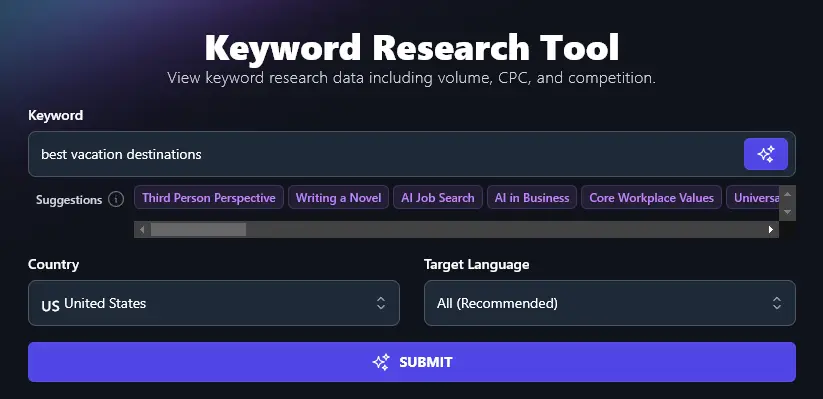
First, type in a starting topic or keyword for your post. For instance, if you run a travel blog, you could start with the topic “best vacation destinations”.
Step 2. Select Your Target Country
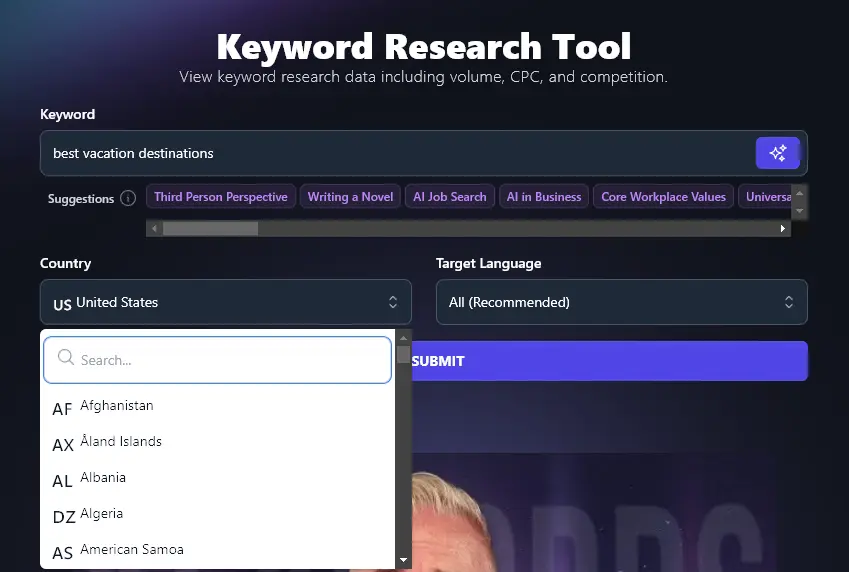
If your audience is in the US or international, we recommend leaving the target country set to “US”. But if you sell a local product or service and you’re only interested in traffic from a specific country, you can select that country here.
Step 3. (Optional) Choose Your Target Language
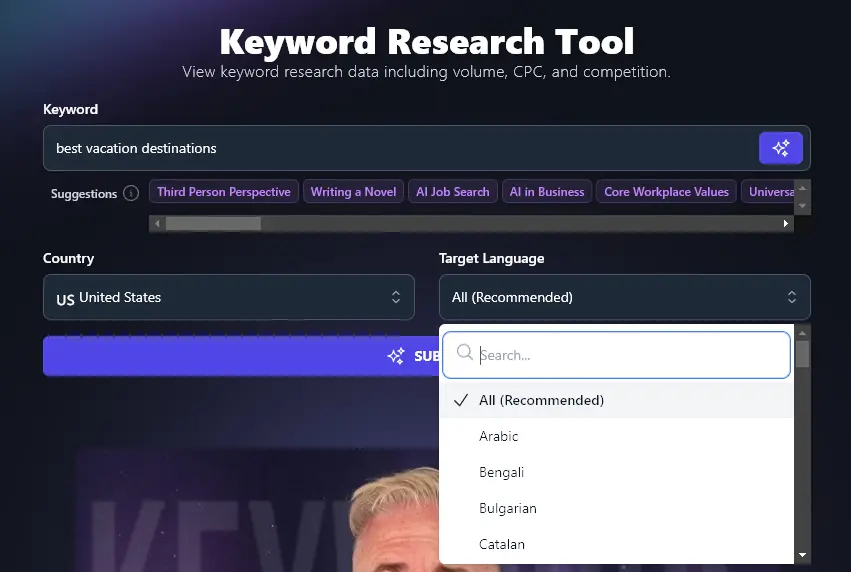
If you have an international audience, it makes sense to leave the target language set to “All”. If you know your audience will be searching in one specific language, though, you can select from the list of 50+ languages here.
Step 4. Run the Search Tool and Sort/Download Your Results
Once you’ve entered your starting keyword and (if needed) set your country and target language, go ahead and hit the “Submit” button.
The keyword tool will come up with a list of keywords for you in seconds:
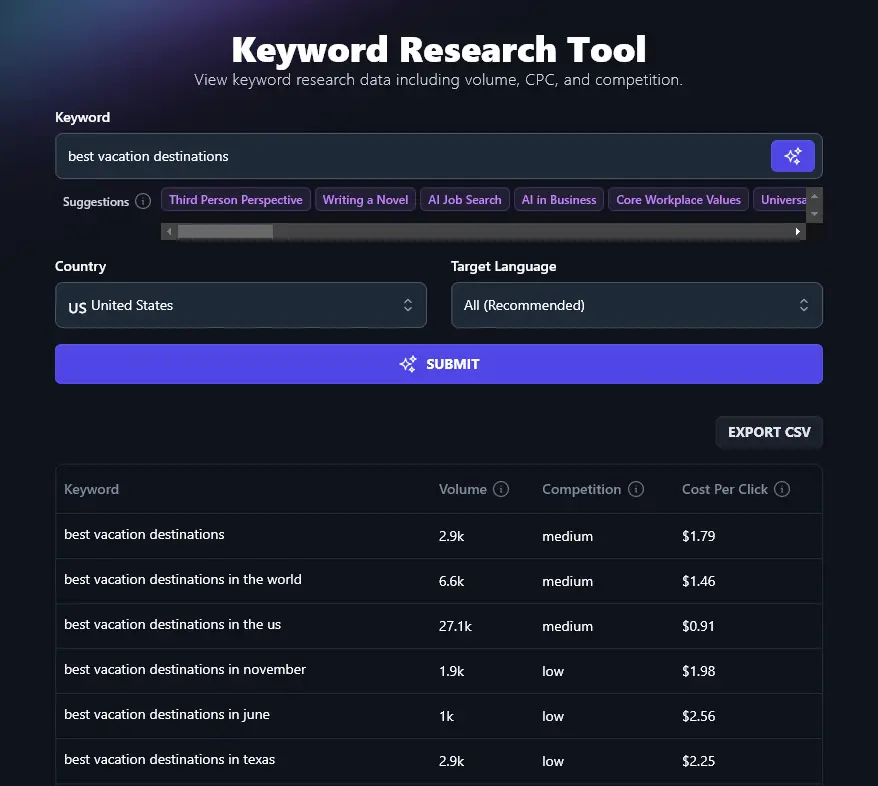
Note: On the Solo plan, you’ll see up to 25 keyword results. Upgrade to Pro or Agency for expanded results.
We’ll dig into the Volume, Competition, Cost Per Click, and Intent in a moment. The basics you need to know are that you ideally want to choose keywords with:
- Medium search volume (1,000-10,000 monthly searches)
- Low competition
These should be achievable even for small blogs and websites, while also bringing in enough traffic to be worth going after.
Understanding Search Volume and Keyword Difficulty
Whenever you run the keyword research tool, you’ll see that all your keyword suggestions come with an associated “volume” and “competition” rating. Most will also have a “cost per click” rating (those that don’t normally have a very low volume).
So what do these stats mean?
Volumeor Search Volume is all about how many people are searching for that keyword on Google every month. In the screenshot above, around 2,900 people are searching for “best vacation destinations in Texas” every month.
Competitionor Keyword Difficultyis about how easy or hard it is to rank on the first page of Google (in the top 10 results) for that keyword. High competition means a lot of other sites are trying to rank for the keyword. Low competition means you’ve got a good chance of being able to rank well.
Cost Per Click or CPC tells you how much advertisers (on Google AdSense) generally pay to run an ad that targets that keyword. They pay this amount every time someone clicks through on the ad. A high figure here tends to mean a high competition keyword.
Intent tells you what the searcher is trying to do: informational (learn something), commercial (compare options), transactional (buy or take action), and similar. Use the Filters control on the results table to narrow the list, not just sort by column headers. Click a keyword row to open a popup with more detail on that specific term.
The same keyword research backs Content Planner automations. You can start from a keyword you found here, or let automations suggest keyword-backed topics with real search demand and publish on a schedule. See Autoblogging with AI.
The most important pieces of information are the volume and the competition.
There’s not much point considering only one of these. After all, you could have a keyword with low competition but only 10 searches a month: it would be easy to rank for, but you’d receive very little traffic. Or, you could have some very popular keywords with thousands of monthly searches and very high competition: the traffic’s there, but it might be next to impossible for you to rank for those.
Bonus: Use This Free SEO Checklist Alongside This Tool
Choosing the right keyword is just the first step in optimizing your content for search engines.
Here’s my personal SEO (search engine optimization) checklist to help you have the best shot of ranking well.
- Use a SEO tool like Yoast SEO or Rank Math (both are available as WordPress plugins)
- Make sure you’ve got a relevant keyword for your readers and target audience
- Use keywords in your subheadings, this helps encourage rich snippets and can get your content indexed faster
- Only use one H1 header on your page (this should be your title or headline at the top)
- Use H2 for subheadings and H3 for sub-subheadings to maintain correct header hierarchy
- Don’t use your keyword so much that your text sounds robotic, just use it naturally
- Have a good mix of internal and external links, with at least 3-5 external links
- Craft a meta description that uses your keyword(s) and hooks readers
- Make sure you add alt text to all your images, using keywords where appropriate
- Aim for 1,500 words or more for most of your blog posts
- Write a meta title (SEO title) that includes your keyword and gets readers’ interest
- Add your keyword within your post or page’s permalink (URL)
Want to learn more SEO tactics? Check out our SEO Mastery course with over 3 hours of video lessons.
How to Get the Most From the Keyword Research Tool
Want to find the best possible keywords for your content and use this tool to the full? Let’s dig a little deeper in its functionality and how to get the most from it.
Try Out Variations on Your Starting Keyword
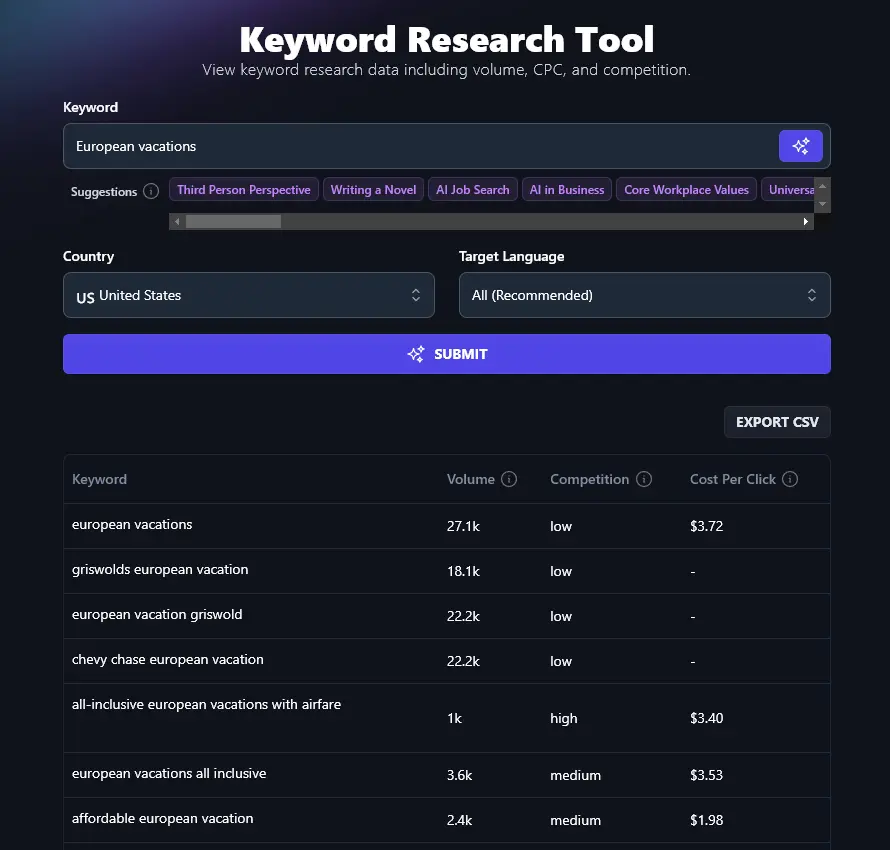
Sometimes, you might try out a keyword that simply doesn’t have many related keywords. For instance, we only got one result for “short vacations in Europe”:
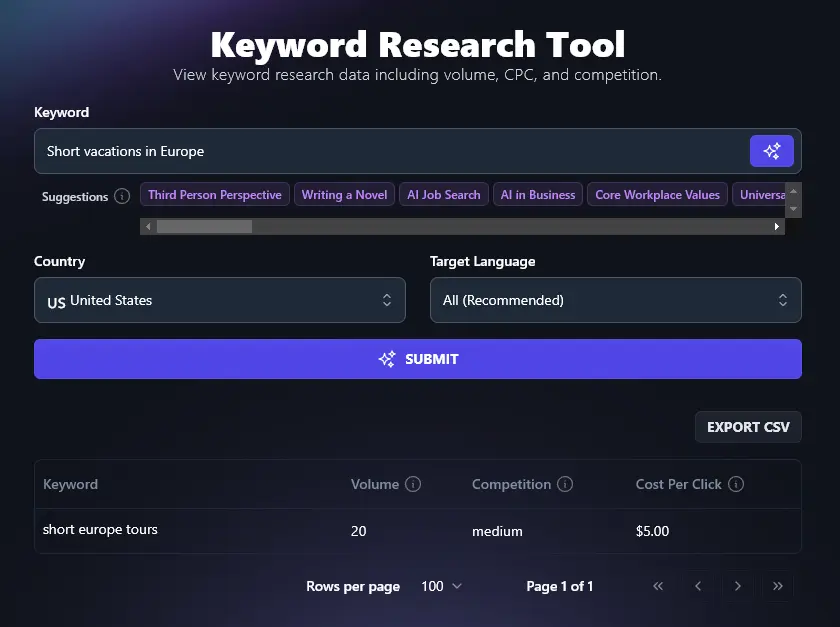
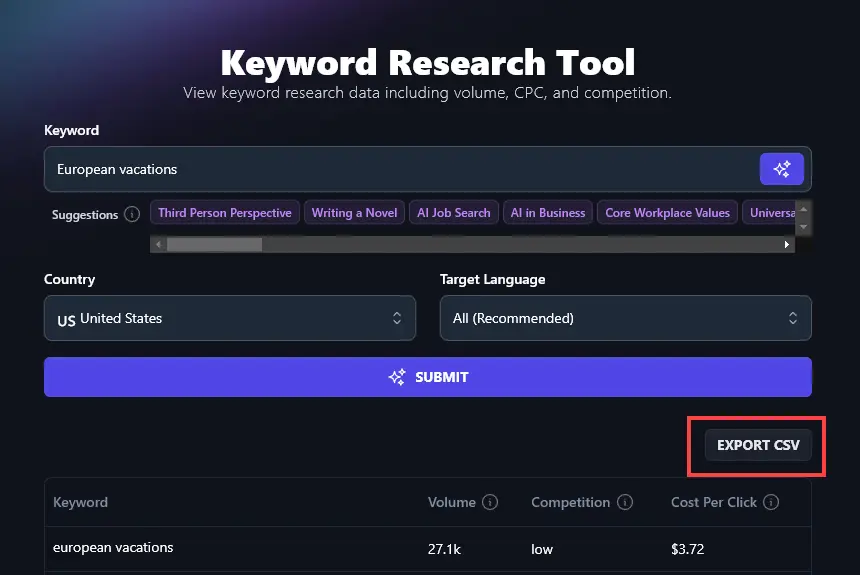
If your given keyword doesn’t get many results, you might need to try something broader or different as your starting keyword. The keyword “European Vacations” gave us far more options to choose from:
Find Medium Volume, Low Difficulty Keywords
We mentioned above that you want to pick medium volume, low competition keywords. To make those easier to spot, you can sort your keyword results by clicking on any of the column headers. Click once to sort from high to low, and click again to sort from low to high.
For instance, here we’ve sorted by “Competition”, showing difficulty scores from low to high:
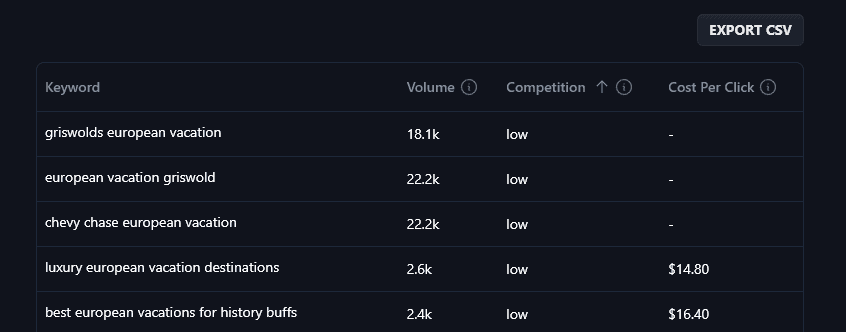
While some of these low difficulty keywords aren’t going to be the right fit (“Griswold’s European Vacation” refers to the film National Lampoon’s European Vacation), others like “Luxury European Vacation Destinations” could be great options for a travel blog.
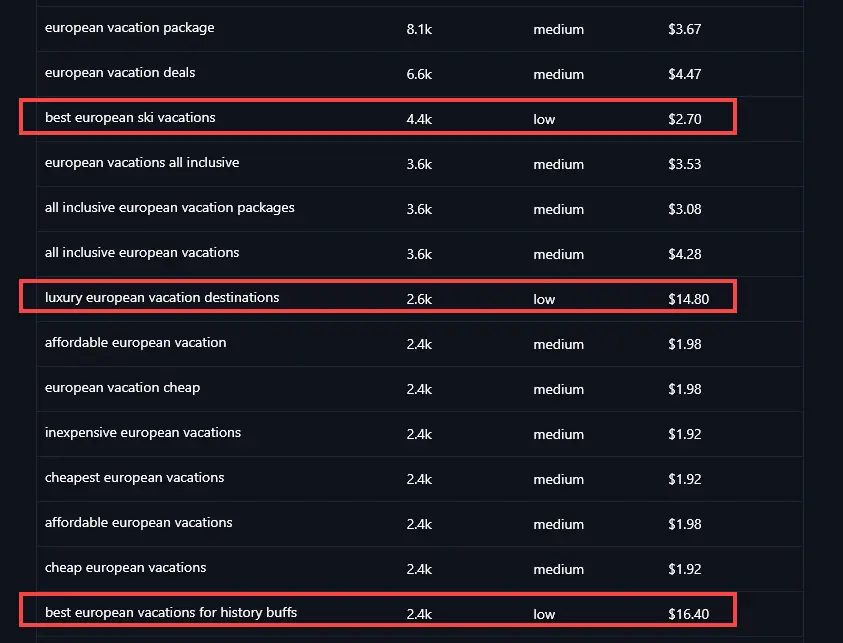
Similarly, you can sort by volume, then page through the results to find low difficulty options:
If you’ve got a long list of results or you want to save them to go through at a later stage, just click the Export CSV button at the top of your list of results. This gives you a spreadsheet file, compatible with any spreadsheet software, of all your generated keywords.
AI Keyword Research Tool FAQs (Frequently Asked Questions)
Got questions about the AI keyword research tool or about using keywords in your content? Here’s what you need to know.
Where Do I Use Keywords in My Content?
Google’s ranking algorithms prioritize certain parts of your post when deciding where to rank it. It’s important to put keywords in:
- Your meta title (SEO title). This is the title that shows up in Google and other search engines
- Your on-page header (H1 title at the top of the page). This might be the same as your meta title or it may be slightly different.
- Your meta description. This appears in the SERP (search engine results page) immediately below your title.
- Subheadings and image alt text, where appropriate. These aren’t such strong ranking factors as your title, meta description, and header, however.
- Your content itself. Normally, your keyword will come up naturally in the course of writing your post.
- Your post’s URL (permalink)
How Does This Free Tool Compare With Google Keyword Planner?
Google Keyword Planner is designed for advertisers. It’s a good option because it’s free and its keyword data is considered reliable, but it gives search volume data as a broad range (e.g. “1k-10k”). You also need to sign up for a Google Ads account to use it.
Some other alternatives include Ahref’s Keyword Explorer. You can also use tools like Semrush for optimizing a whole post based on related keywords.
Tip: Try Google Trends to see search trends over time or seasonally.
How Will I Know if I’ve Chosen the Right Keywords?
It can be tricky to know if you’ve picked the best keywords to optimize for. Using the keyword tool and choosing keywords with (a) medium monthly keyword search volume and (b) low difficulty is a great start with your SEO strategy.
Once you’ve created optimized content, you can track metrics (primarily, how much organic traffic your content is receiving) to see whether your keywords are working. You can use tools like Google Search Console and Google Analytics to see in-depth where your traffic is coming from.
Keep in mind, though, that your keywords and your use of them aren’t the only ranking factor. Google also looks at things like backlinks (off-page SEO) to see how popular your site is when deciding where to rank your content.
Are These Keywords Just for Google?
No! While Google accounts for by far the highest monthly search volume, other popular search engines like Bing will tend to see your content ranking in the same way. You can use these keywords to get traffic from many search engines.
Tip:Some big sites with a search bar have their own best practices for SEO and keywords, like YouTube and Amazon. You can try my free YouTube keyword research tool if you want to optimize YouTube videos (whether those are tutorials, promos, educational content, etc).
What Other AI Tools Can I Use to Boost My SEO?
Inside RightBlogger, there are lots of different tools to help you with your content strategy and SEO efforts. As well as the keyword generator tool for your SEO keyword research, we have the:
- Keyword Cluster Tool: Generate clusters of new keywords from a single seed keyword.
- Content Gap Tool: Figure out exactly why a competitor is outranking you in Google search.
- Google Preview Tool: See how your meta title and meta description will look in Google.
- Backlink Checker: View backlink data for any page/post (yours or your competitor’s).
- Article Writer: Powerful content creation tool to create SEO-optimized blog posts.
- People Also Ask: Get keywords based on autocomplete (good for getting an idea of search intent).
We have a full suite of tools, including social media tools, blogging tools, productivity tools, and more.
Who is the AI Keyword Research Tool Designed For?
Andy and I created this keyword research tool to be suitable for total beginners. It’s a great fit for bloggers, content creators, content marketers, SEO professionals and agencies, and small businesses. If you’re involved in any kind of digital marketing and want to use AI to speed up your work and improve your results, then it’s probably a good fit for you.
How Do I Sign Up for RightBlogger and How Much Does it Cost?
You can use the AI keyword research tool with any RightBlogger plan. The Free plan returns a smaller sample of results per search, and every paid plan returns the full result set.
If you want full results, along with unlimited AI words and our advanced features, upgrade to any paid plan. We’ve kept the pricing as low as we can: monthly is $59 (Solo), $89 (Pro), or $299 (Agency), and annual billed monthly is $49 (Solo), $69 (Pro), or $199 (Agency). See RightBlogger pricing for the full breakdown.