RightBlogger Summer 2023 Updates: Logo, Dashboard, & New Tools
Search content by keyword, compare rankings, track backlinks, and turn YouTube videos into posts.


Welcome, bloggers! We’re so excited to share some awesome summer updates from RightBlogger that are going to make your blogging journey that much more fun.
In this breakdown, we’ll cover the latest new tools, feature updates and improvements that will help you speed up your content creation process, enhance your SEO strategies, and boost your blog’s growth. Peep the vid from Ryan right here:

Now, let’s get started with everything we’ve changed this summer (so far)!
New Branding

Right off the bat, you’ll notice some snazzy new branding on our home page. We’ve unveiled a brand new logo that perfectly embodies our mission to empower bloggers like you. Big thanks to Deividas Bielskis for creating our logo. We hope our fresh look will inspire you as you get started blogging with RightBlogger.
Revamped Content Dashboard

We’re delighted to introduce a completely updated and revamped dashboard, designed with your convenience in mind. One standout feature is the ability to search through all of your content effortlessly. For instance, if you’re looking for articles related to a specific keyword like “clothes,” our dashboard will instantly filter out relevant articles, allowing you to quickly access the content you need.
This feature is especially handy when you have a ton of content on RightBlogger and want to jump right into the pieces you’ve generated.
Enhanced Keyword Research
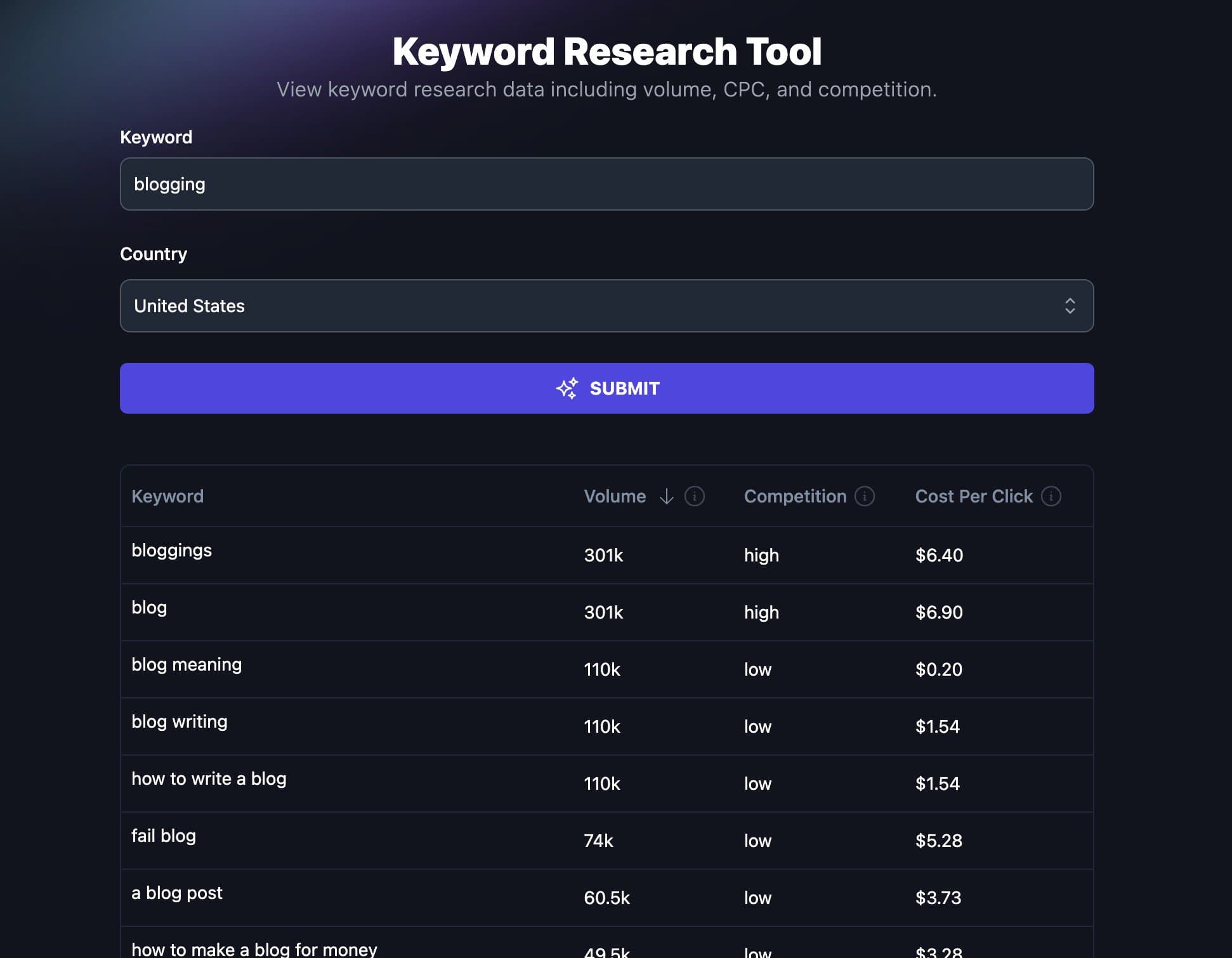
Our keyword database has undergone several exciting updates to supercharge your keyword research process. Head over to the SEO tools dropdown menu and explore the enhanced keyword research tool.
Now, you can filter your keyword search by country, providing you with localized keyword insights. Want to sort by competition? No problem!
Filter by search volume, competition, or even cost per click to identify highly monetized keywords for your blog.
Our aim is to equip you with valuable information that will help you optimize your content and drive more traffic to your blog.
Discovering new topics to write about has never been easier. With RightBlogger’s keyword research tool, you can generate post ideas and explore keyword clusters effortlessly. Let’s say you’re planning to write a blog post on “how to write a blog.” Simply click on the tools option and watch as a wealth of post ideas and related topics unfolds before your eyes. This feature is a treasure trove for content creators and will undoubtedly inspire your writing process.
New Tool: Backlink Checker

Backlinks are like gold in the internet. They lend credibility and authority to your blog. Our brand new backlink checker tool allows you to track and analyze all the reputable websites that link to your blog.
You’ll gain insights into domain rank, page rank, and much more. By leveraging this tool effectively, you can build a network of high-quality backlinks, which will elevate your blog’s reputation and visibility.
Need help building links? Check out Ryan Robinson’s guide to link building.
Longer Inputs for Many Tools
We understand the importance of summarizing large chunks of text efficiently. That’s why we’ve extended the length of text that you can input into tools like the summarizer tool.
With this enhancement, you can now generate longer summaries effortlessly. This improvement will not only save you time but also enable you to create more comprehensive and engaging summaries for your readers.
RightBlogger Chrome Extension
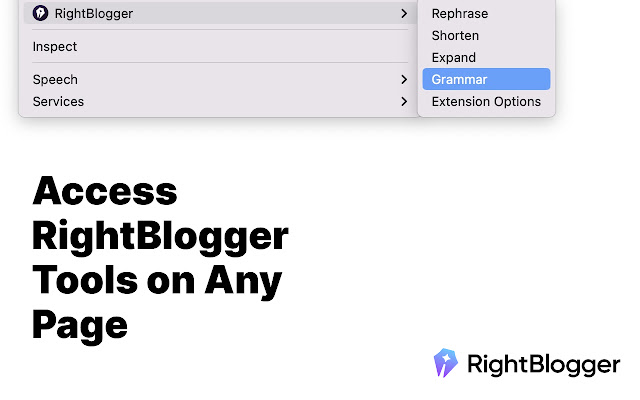
Introducing our brand new Chrome extension, designed to make your blogging experience even smoother. Once installed, you’ll have a plethora of options at your fingertips. From rewriting and paraphrasing to grammar checks and more, this extension is a huge upgrade. It’s especially helpful when you’re rewriting repetitive content or seeking fresh perspectives for your articles.
New Tool: Content Gap
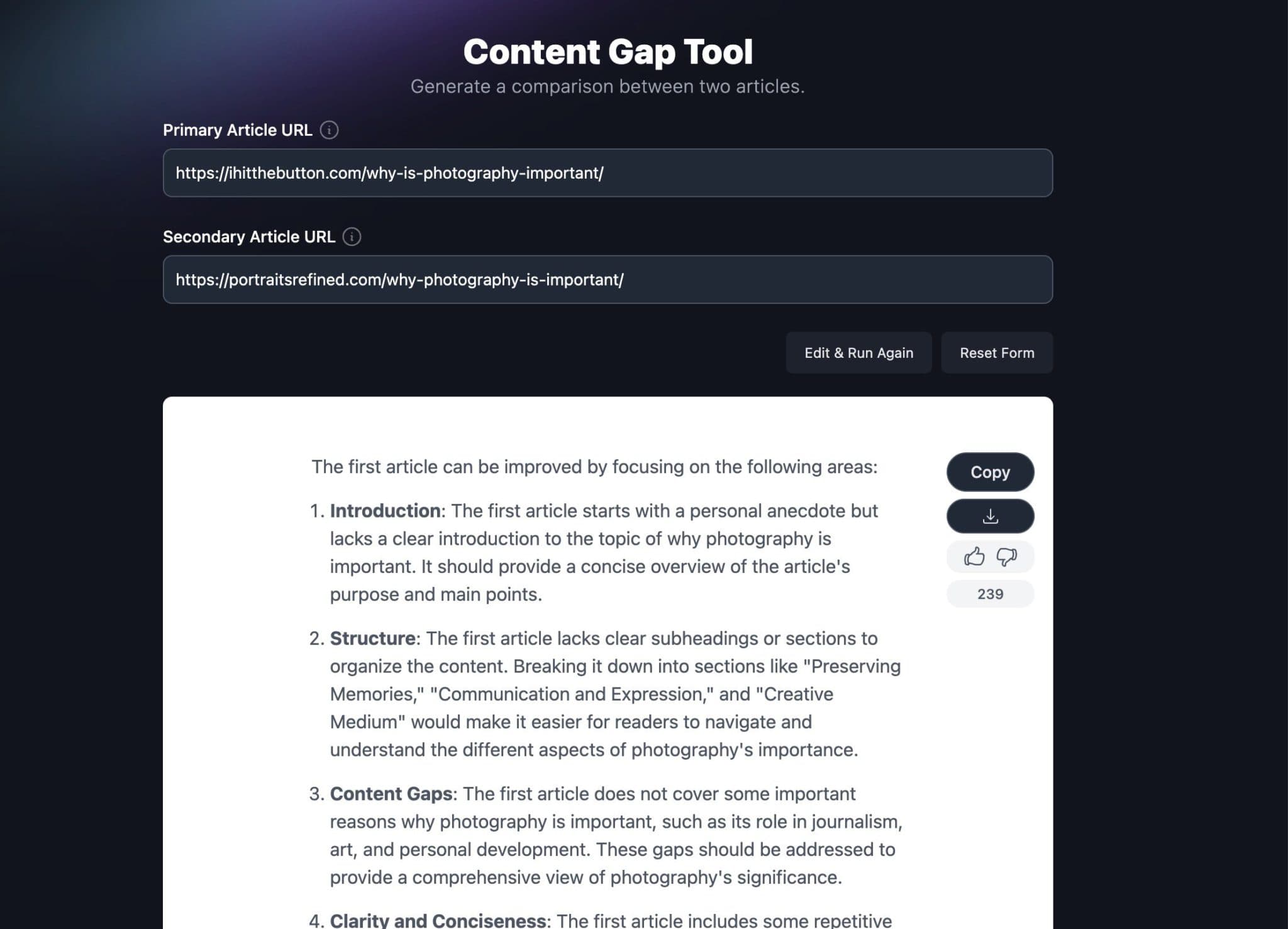
One of our favorite new additions is the content gap tool. This tool allows you to compare your article with the top-ranking article for a specific keyword. By analyzing the gap between your content and the competition, you’ll gain valuable insights and clear recommendations on how to improve your article. This tool will undoubtedly give you a competitive edge and help you climb the ranks in search engine results.
New Tool: YouTube Videos to Blog Posts

We’ve made it easier than ever to convert your YouTube videos into engaging blog posts. With our YouTube video to blog post tool, you can effortlessly transform your videos into written content. This feature generates an article based on your video, complete with an introduction and section recommendations. It’s the perfect way to repurpose your video content and expand your blog’s reach.
Bug Fixes and Improvements
We’ve been hard at work addressing any bugs and making various improvements to enhance your experience on RightBlogger. We want everything to run smoothly, so you can focus on what you do best – creating amazing content.
If you run into any issues please email us, many of the bugs we’ve fixed were from many of you! This includes issues with timeouts, Safari, copy button, and avatars.
RightBlogger Blog
We’re excited to announce the launch of our very own blog! In our blog, you’ll find valuable updates about RightBlogger (like this one you’re reading), tips on how to make the most of our platform, and strategies to improve your SEO efforts and drive more traffic to your blog. The blog will be an invaluable resource for you to stay informed and continue growing as a blogger.
Thank you for joining us on this journey of exciting updates and improvements. We value your feedback, so please don’t hesitate to reach out to us. Have a comment? Send us an email at contact@rightblogger.com we’re here to assist you every step of the way. Stay tuned for more exciting features and enhancements from Right Blogger. Happy blogging!
Up next: See what we shipped in our Fall 2023 updates.

Article by
RightBlogger Co-Founder, Andy Feliciotti focuses on web development and shares travel and photography adventures on YouTube.



Automated SEO Blog Posts That Work
Try RightBlogger for free, we know you'll love it.
7-day free trial. Cancel anytime.





Leave a comment
You must be logged in to comment.
Loading comments...