AI for Bloggers: How to Use AI in Your Content Creation Workflow
Use AI for keyword research, outlines, drafts, and editing, then fact-check and add firsthand expertise before publishing.


So you’re on the hunt for the best AI tools for bloggers and you wanna know, what are some actual practical ways to use AI in your content creation workflow?
We know the feeling first-hand ourselves: AI is a productivity booster, and adding it to your workflow seems like a nice idea in theory. But you’re probably wondering:
- How can I really benefit from AI as a blogger?
- Will Google penalize my site if I use AI-generated content?
- Which AI writing software is best for bloggers?
Over here at RightBlogger, we’re a team of bloggers ourselves. We built these AI tools for bloggers, to be the exact tools we use in our own workflows, and we’re pretty opinionated on this topic.
This guide covers Google’s stance on AI content, the pros and cons, a step-by-step AI workflow, and the AI writing tools we recommend for bloggers.
Google’s Position on AI-generated Content
Google has made it clear: its ranking systems aim to reward original, high-quality content however it’s produced, as long as it shows the qualities Google calls E-E-A-T: expertise, experience, authoritativeness, and trustworthiness.
Your content needs to be high quality, original, and relevant. Whether it’s written by a human or generated by AI, it must be accurate, valuable, and free of misleading information.
The line Google draws is intent. Using AI to generate many pages primarily to manipulate search rankings falls under “scaled content abuse” in Google’s spam policies, no matter how the content is created. So your AI-assisted posts need to address user intent and get a real human pass before they go live.
The rest of this guide shows how to use AI tools responsibly.
Pros and Cons of Using AI in Blogging
Generative AI offers a lot of benefits for content creators, but it has drawbacks you need to manage. Weigh both before you decide how much of your workflow to hand over.
Pros of Using AI for Bloggers
Here are some pros of AI for bloggers:
- Efficiency is the big one. AI tools speed up content creation by handling tasks like brainstorming topics, generating bullet points, summarizing research, proofreading, or even drafting an entire article, which frees up time for other parts of blogging.
- AI helps with SEO, too. Data-driven keyword research, outline creation, and writing all go faster, and AI tools can point out ranking opportunities you might otherwise miss.
- As a creative collaborator, AI can help you break through writer’s block and explore new topics.
- The time savings add up across the whole process. AI handles research, data analysis, and drafting quickly, so you can publish more often without working longer hours.
Cons of Relying on AI for Bloggers
Here’s a quick look at the cons of AI in blogging:
- Accuracy and authenticity take work. Generative AI can produce text with impressive language and flair, but AI drafts often need thorough fact-checking for accuracy, coherence, and relevance. (Humanizing AI content is a skill worth learning.) AI-generated content may also echo phrases or ideas used elsewhere, so plagiarism checks matter.
- Originality is another concern. AI-generated content can be impressive, but it lacks the human touch that connects with audiences, which is why using AI for content creation isn’t a “set-it-and-forget-it” solution.
- AI-generated content often sounds robotic and overly formal. It leans on empty phrases, such as “in the fast-evolving digital world” and “in the digital landscape,” which makes the writing less engaging.
AI tools still struggle to add emotion, personal experience, and authentic storytelling, which is why a human should always oversee the content.
How to Use AI in Your Blogging Workflow
These are the practical ways to use generative AI at each stage of a blog post.
Keyword Research
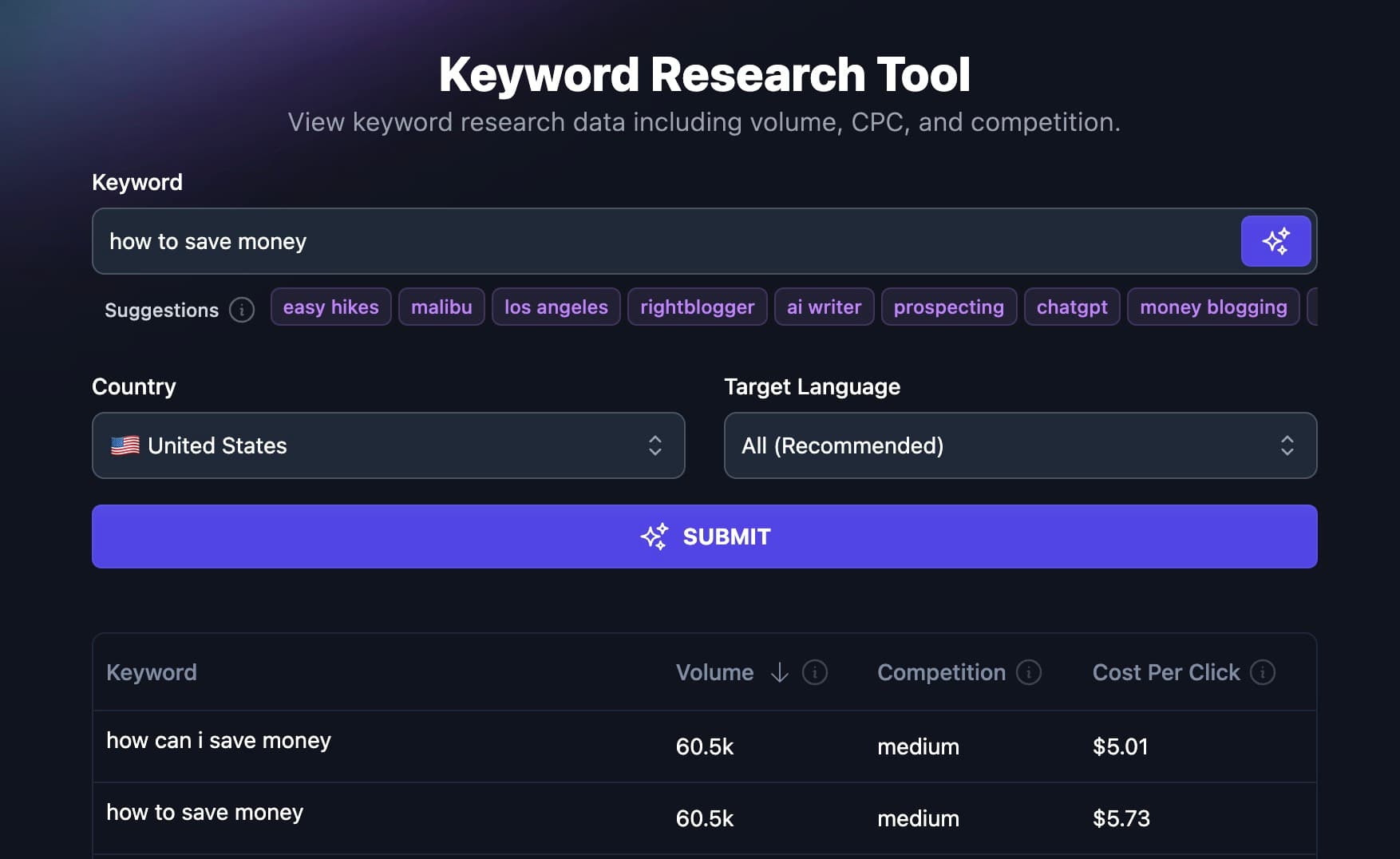
Keyword research is the cornerstone of successful blogging. It helps you find keyword search volumes, long-tail and short-tail keywords, related terms, etc. This guides your decision on what topic to write about and which article to prioritize.

In the AI world, however, the goal of keyword research has shifted from simply uncovering search volume and related terms to something more strategic.
A strategic approach requires you to look into search intent, ranking opportunities, and ideas for topic creation. Generative AI makes all of this much faster.
So, use AI to:
Generate a List of Keywords
Instead of manually searching for keywords one by one, use AI-powered keyword research software to identify related keywords. For instance, if your blog centers around social media marketing, you’ll want to explore related queries to target, such as boosting engagement and social media content creation.
AI keyword research software can uncover a host of these quickly, which broadens your research and surfaces search terms you might have missed.
Take a look at the example in the screenshot below.

I entered the keyword “social media content strategies,” and RightBlogger got back with several related keywords I wouldn’t have thought of.
Build a Topic Cluster
These days, your blog can’t go far without positioning yourself as an authority in one specific niche.
Establishing topical authority requires creating multiple articles that address the same or related subjects, and this requires you to build keyword clusters. For instance, if your blog covers football games, a single comprehensive post won’t establish your authority.
Instead, you must explore various aspects of football that will connect with your audience and ensure comprehensive coverage across the board.
This approach will solidify your expertise and credibility in the field and enhance your blog’s relevance and ranking on Google.
For this, let’s use RightBlogger’s Keyword Cluster tool and see what it comes up with.

That’s awesome. RightBlogger came up with all that in under a minute, potentially saving me lots of time and energy.
Outline Creation
A typical process for bloggers to build a blog post outline involves selecting a topic, conducting SERP research, determining the structure, and more. We mostly want this to be data-driven, which can be time-consuming.
AI-powered tools can speed this up because they analyze data a lot faster.
You don’t have to delegate every task to generative AI. You can collaborate with it instead, by editing the outlines it provides, supplying your own outlines for refinement, or comparing AI-generated outlines with the ones you created manually.
This collaborative approach allows you to use AI capabilities while maintaining control over your content creation process.
Consider RightBlogger’s Blog Outline Generator, for example. You can work with it in a few ways:
- Entering a topic or working title and letting it generate an outline from scratch.
- Pasting in your rough notes, or the URL of an older post, so it builds a structured outline from them.
- Editing the outline it generates, then sending it to the AI Article Writer for a full draft (on paid plans).
Here is an example of a RightBlogger-generated outline without any human input:

Fast Draft Generation
AI can generate a first draft of a blog post in minutes, which speeds up the writing process a lot.
However, this convenience also brings challenges. It’s important not to become too reliant on AI-generated content and immediately publish it without careful consideration. Rushing to publish could be a recipe for disaster.
Before publishing, there are a few processes to complete, and this shouldn’t take you more than two hours. They are as follows:
- Check for plagiarism. AI tools may reuse existing phrasing by accident, and many other people use similar tools to write about the same topics, so run a plagiarism check and fix anything it flags.
- Fact-check every detail, including anything the AI says it pulled from the internet. AI-generated content can include fabricated facts or irrelevant links that appear to support false claims.
- Add real E-E-A-T (Experience, Expertise, Authoritativeness, Trustworthiness). Make sure the post reflects real experience and expertise, and cut vague or unsubstantiated claims.
- Edit for flow and engagement. AI drafts can lack rhythm and energy. Tools like RightBlogger let you set the tone of your article, but you should still review the content yourself and remove repetitive or meaningless phrases.
Proofreading
One of the use cases of AI for bloggers is effective proofreading and editing.
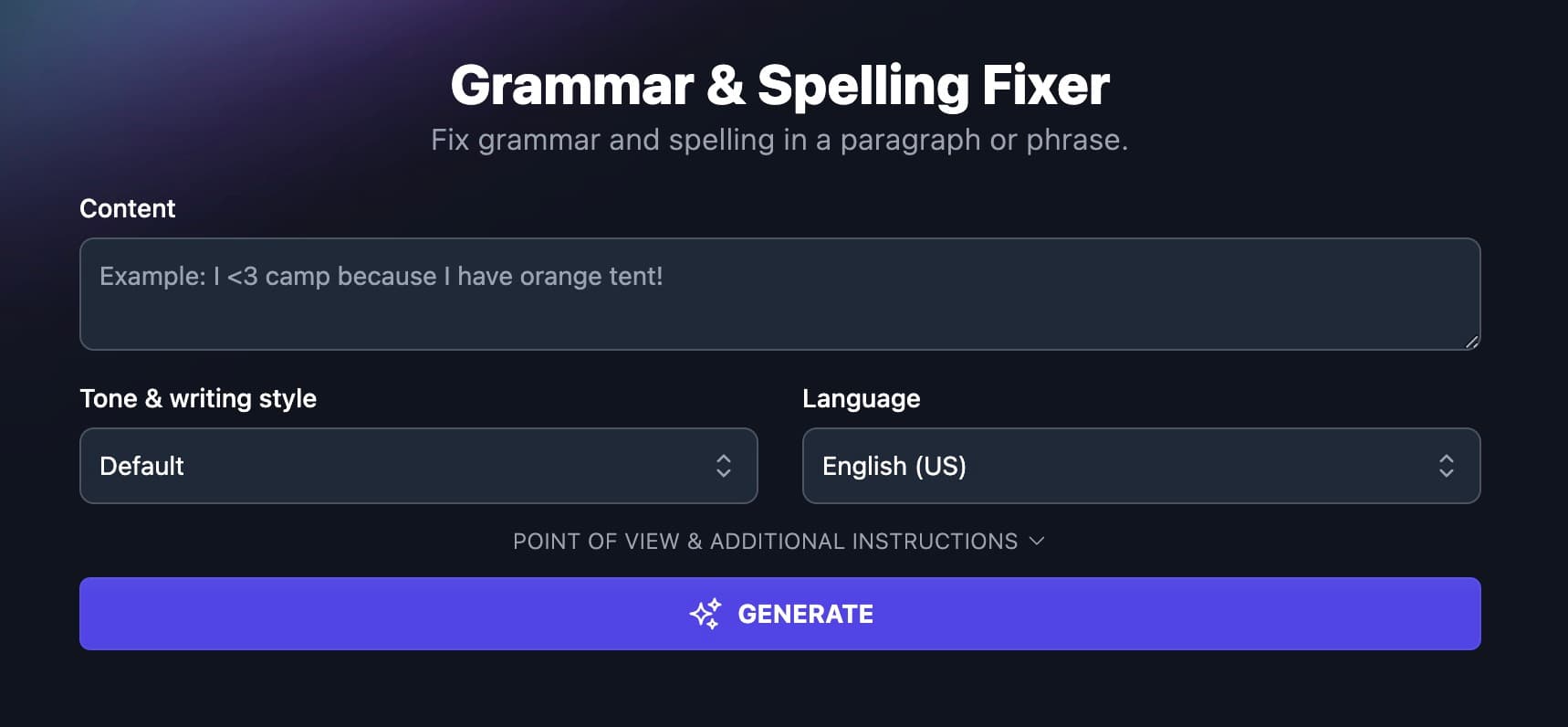
RightBlogger has a free Grammar Fixer tool built just for this purpose.
AI tools are good at catching grammar and spelling errors and suggesting style fixes, which helps you polish every post for a smooth reading experience.
Other solid tools for this include:
- Grammarly
- QuillBot
In addition to those, I prefer RightBlogger’s Rewriter because it has another feature: SEO optimization.
You can add your target keywords before rewriting (separate several with commas), paste in your existing content, and have it rewritten with those keywords worked in.
SEO Optimization
Optimizing content for SEO has become increasingly complex, requiring attention to various factors such as structure, E-E-A-T (Expertise, Experience, Authoritativeness, Trustworthiness), NLP (Natural Language Processing), content length, image optimization, and more.
As a writer, I can tell you for free that this process is both challenging and time-consuming. However, AI tools like Surfer SEO and Clearscope have emerged to simplify these tasks, offering valuable assistance in content optimization.
While you may opt for traditional methods, which still work, if you blog in a competitive niche, you’ll need to go the extra mile as part of a broader SEO content strategy. Chances are many of your competitors already use AI tools for optimization.
If you’d rather not pay for a separate optimizer, RightBlogger includes SEO Reports on every paid plan (30 a month on Solo), so you can optimize drafts inside the same tool you write with.
Content Gap Analysis
Content gap analysis examines content to see if there are opportunities to cover it better. As you know, the race to the top position on Google is a bloodbath, and the richer your content is with information, the better your chance is overall.
This is why identifying content gaps and opportunities is key to developing a strong content strategy. AI tools assist in evaluating existing content, conducting competitor analysis, and strategizing future content creation to fill gaps effectively.
A great example is this content gap analysis I conducted with RightBlogger. The amount of insight it yielded within a few minutes is insane:

Analyzing your content against what’s currently ranking at the top of SERPs isn’t a guarantee you’ll replace that top result by implementing these suggestions, but it’ll definitely help move the needle on longer-tail keyword phrases.
What are the Best AI Tools for Bloggers?
To help you find the best AI tools for your content creation workflow, here are our top picks (for a broader comparison, see our best AI content creation tools roundup):
RightBlogger

We’re biased, since this is our tool, but we built RightBlogger for bloggers and content marketers. It bundles 90+ AI tools for blogging, SEO, and social, plus blog automation that writes and publishes posts on a schedule.
My favorite features for bloggers are the AI Article Writer (you set the tone, point of view, length, and keywords to include), Content Gap Analysis, which compares your article with a competitor’s in a few minutes, and the Keyword Cluster tool for planning topical authority.
Paid plans start at $49/month billed annually (Solo), with Pro at $69/month and Agency at $199/month. Every paid plan includes unlimited AI words and blog automation, with a 7-day free trial and a 30-day money-back guarantee, and the free plan gives you 2,000 AI words a month. Skip it if you only need a chatbot for occasional brainstorming.
Copy AI

Copy AI (Copy.ai) has repositioned as a GTM AI platform aimed at sales and marketing teams, built around automated workflows rather than the template library it started with. It still handles short-form social and email copy, with a host of integrations.
If you rely on outbound marketing or post a lot on social media and need a tool for that, Copy AI is for you.
Its entry Chat plan costs $29 per month ($24/month billed annually) for 5 seats and unlimited words in chat, and the workflow-based plans start at $1,000 per month.
ChatGPT

ChatGPT is OpenAI’s AI assistant. You can have natural language conversations to generate and refine content and ask it to handle tasks that would otherwise take you a lot of time.
It works well as a brainstorming partner and research assistant for bloggers who want to speed up their workflow, though you’ll still need to fact-check what it tells you.
The free plan includes unlimited text chats with GPT-6, and ChatGPT Plus costs $20 per month for advanced reasoning models and higher limits.
Writer AI

Writer is an enterprise-grade generative AI platform focused on agentic workflows and content creation for regulated industries like financial services, healthcare, and life sciences.
Writer offers a Starter plan for up to 5 users with a 14-day free trial, then moves to custom Enterprise pricing (contact sales). It’s built for large teams, so most solo bloggers will find it more than they need.
Surfer SEO

Surfer is a comprehensive SEO tool designed to optimize content, conduct keyword research, audit websites, and monitor performance. One of its standout features is the content score, which gives you real-time feedback on your on-page optimization.
While Surfer’s higher tiers get pricey, it’s a worthwhile investment if you are seeking advanced AI assistance in content creation and SEO optimization.
Surfer pricing plans start at $49 per month billed yearly (Discovery), and the platform now tracks visibility in AI search engines like ChatGPT, Perplexity, and Gemini alongside traditional SEO.
Final Thoughts on AI for Bloggers
While we advocate for bloggers to use AI in their content creation process, we want to stress one point:
Collaborate with AI, but don’t depend solely on it.
AI boosts efficiency and saves time, but it can’t fully replace human expertise. To ensure the creation of valuable content that connects with your audience, make sure you are part of the entire process from inception to completion.
And once your AI workflow is humming, put it to work. Here are the real ways to make money with AI as a blogger and creator.

Ali Faagba is a content strategist and writer for B2B SaaS companies like Close, Copysmith, and Userpilot. He writes about AI, marketing automation, and sales.


Automated SEO Blog Posts for Your Site
Research, write, publish, and share from one account.
7-day free trial. Cancel anytime.





Leave a comment