How to Go From Keyword to Blog Post (for More SEO Traffic): My Step-by-Step Guide
Learn to read search results for intent, shape focused outlines, and edit AI drafts into useful posts readers trust.


Too many people treat keyword research like it’s the secret sauce in SEO content creation. It’s useful, but it’s just the first step. The real magic happens when you use the keywords you uncover, to understand what people actually need.
Are the people in your target audience looking for advice, answers, motivation, or maybe just a little inspiration to get started on their journey? Understanding the intent of a particular search query, is where great content really comes to life, and trust me, the payoff of investing a little more time at this stage (and using the right tools) is so worthwhile.
Ready to dive into search intent and learn how to craft better content that really connects with your audience? Let’s break it all down.

If you haven’t made a RightBlogger account yet, sign up today to unlock access to all our most powerful tools, courses, a private community, and a whole lot more. Plans start at $49/mo with a 30-day money-back guarantee.
Blog Automation That Keeps Your Posts Ranking

RightBlogger finds keywords, writes SEO articles, and publishes them to your blog. Then its Site Agent uses your Search Console data to keep older posts in shape, adding internal links, sharpening weak meta descriptions, and fixing stale years and broken links. Join 51,000+ bloggers using it to grow traffic from Google and ChatGPT.
Why Keyword Research Isn’t Enough & What to Look for Instead
Keyword research is great for showing you what people are searching for, but it has its limitations. Keywords don’t paint the entire picture of user intent. That’s where context comes in.
A keyword on its own doesn’t tell you why someone is searching for it, and your job is to figure out what they’re really after. Think of keyword research as your starting point for a deeper dive into deciphering the real human needs behind the search.
For example, let’s say the keyword is “anxiety journaling.” Open up Google and check out what’s already ranking for this term…
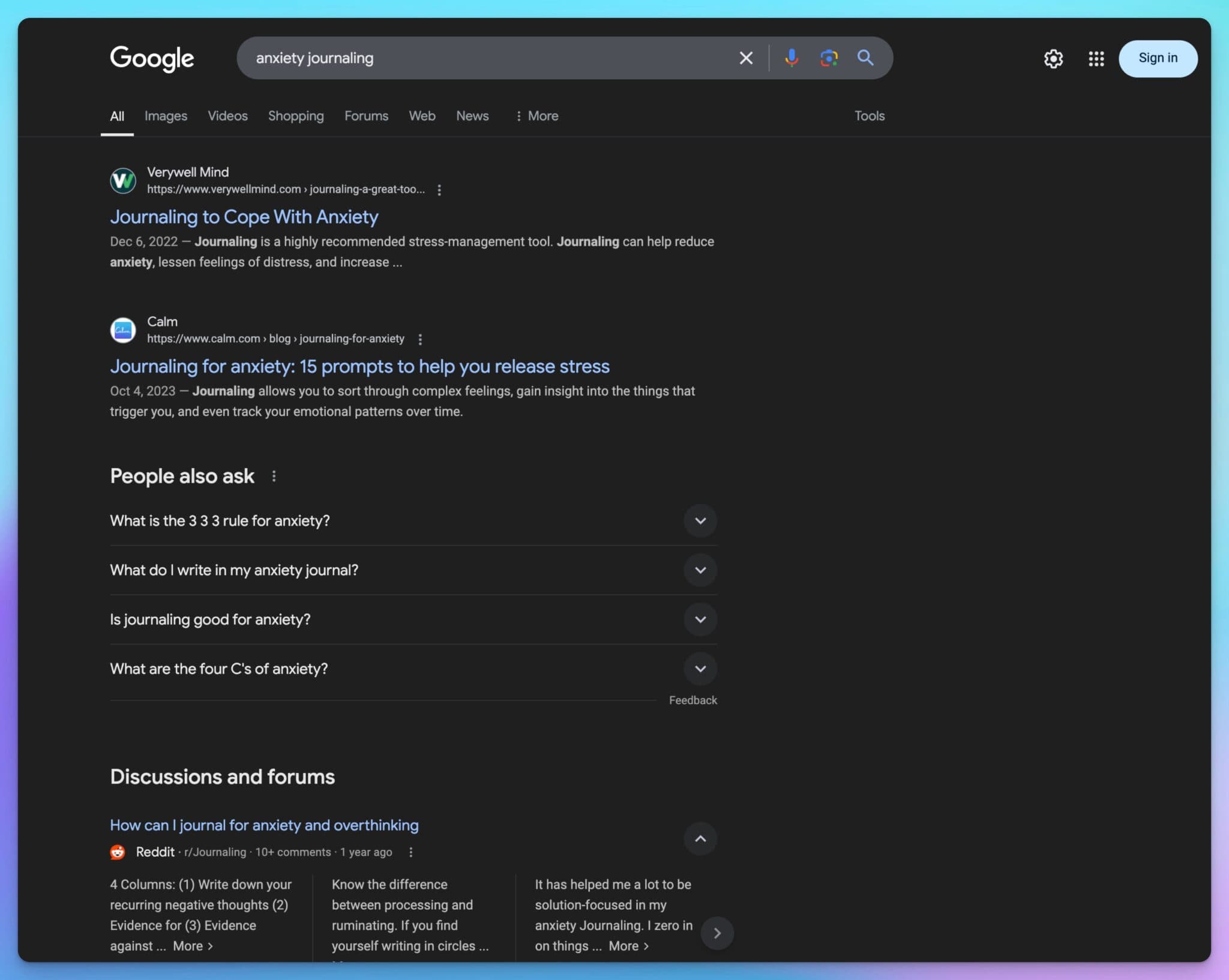
You’ll usually see a variety of content types, guides, lists, and how-to articles. Maybe some videos, discussion forums.
What stands out? Are people asking for journaling prompts? Maybe they’re looking for stories of how people have used their journals to manage anxiety.
Your mission is to figure out how to best meet the needs of the people making these searches.
Need help picking winning keywords every time? Our SEO course walks through the exact process.
Analyzing Search Results Like a Pro (Understanding User Intent)
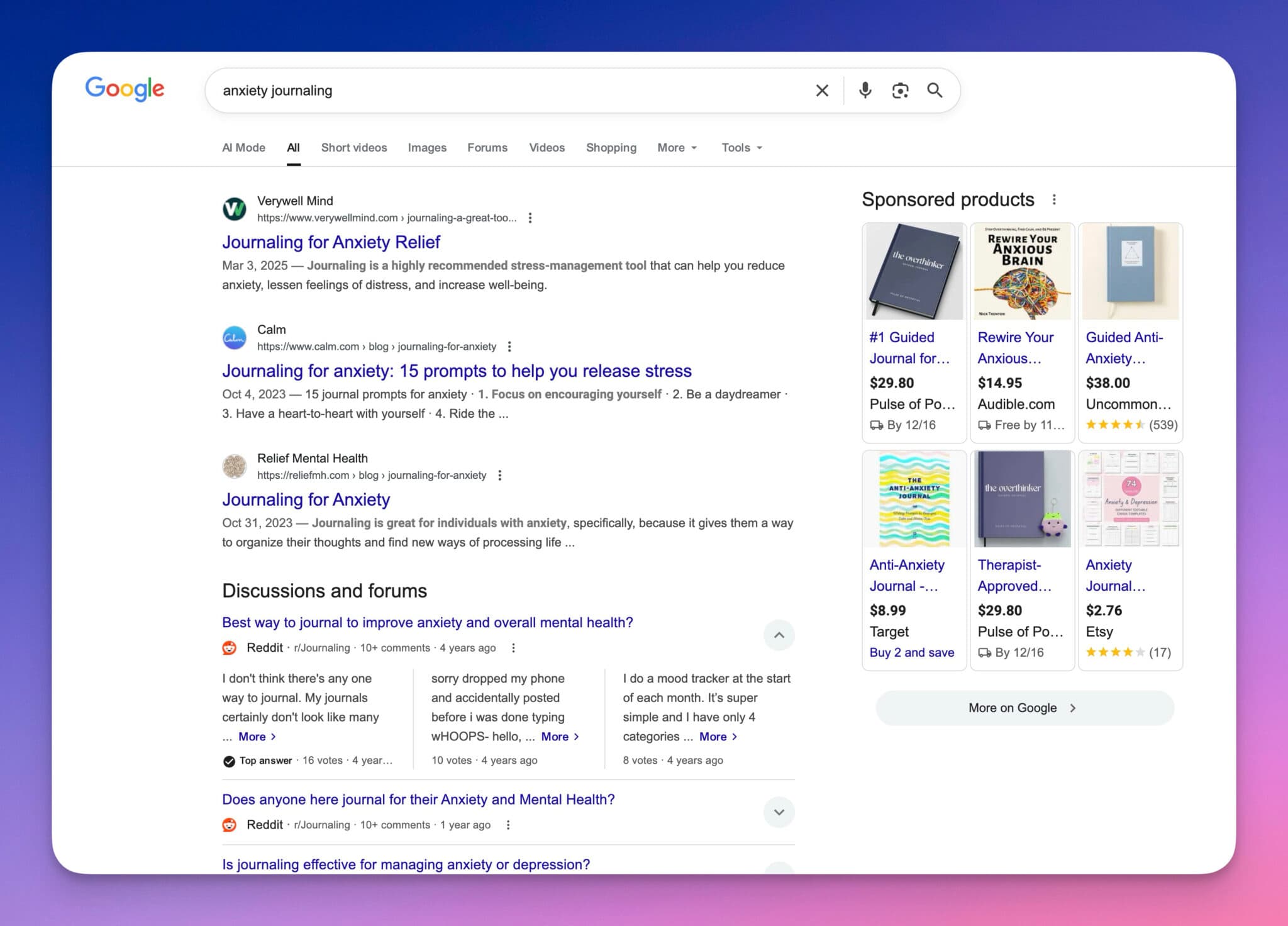
When you search for something like “anxiety journaling,” scroll down and take notes on the top results. What kinds of titles and descriptions catch your eye? For example, scan for these kinds of factors:
- Titles with Action Words: “Journal Prompts for Anxiety Relief: Start Managing Stress Today”
- Frequent Themes: Words like “prompts,” “stress,” and “relief” pop up over and over again in the results Google already wants to rank high on the page.
- People Also Ask Section: Goldmine alert! Questions like “How do I start journaling for anxiety?” inside the People Also Ask section give you a great clue about additional content you can create. Psssst use our People Also Ask Tool to scrape this data for any search query.
Keep in mind that one keyword might spark multiple blog posts, videos, or other pieces of content based on meeting the different search intents on any given keyword phrase.
AI Tools: Your Not-So-Secret Weapon to Fast Tracking SEO Content
Here’s where tools like RightBlogger’s Keyword Tool (and all our other free AI SEO tools) can save you a lot of work. Once you’ve got your suspected primary target keyword phrase in mind, it’s time to let AI help you brainstorm some alternatives & different potential approaches.
Enter something specific like “anxiety journaling prompts,” and you’ll quickly see tons of related phrases, search volumes, and competition levels.
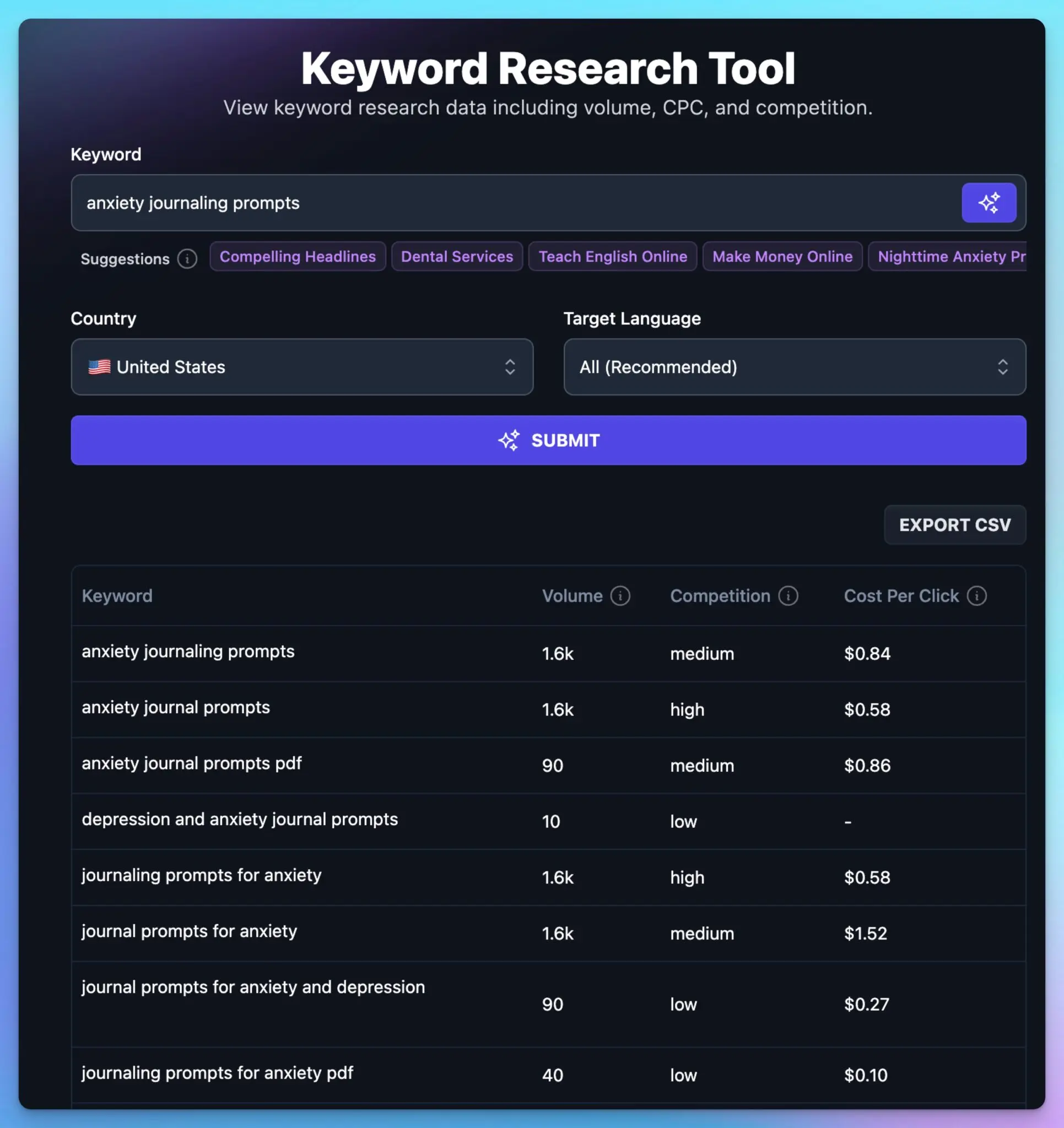
Here’s a few standouts that popped up in my exploration of this topic:
- “Anxiety Journal Prompts”
- “Anxiety Journal Prompts PDF”
- “Best Journaling Topics for Anxiety”
Why are these important? Because specificity matters. A term like “anxiety journal prompts PDF” signals that someone isn’t just looking to browse, they want something they can download and keep offline.
That’s a really powerful intent signal, and there’s significantly less competition to rank for that, compared to other related terms.
For a deeper dive into making AI work for your content, browse this guide: AI for Content Marketers: 5 Smart Ways to Elevate Your Output.
Creating Content that’ll Rank in Google Search (and Help Real People)
Once you understand user intent, the next step is to choose which format you’re going to create in, and outline how you’ll approach that piece of content.

For instance, using “Nighttime Journaling for Anxiety” as a topic, you might structure an outline of a video and/or blog post piece like this:
- Introduction: A relatable story from your own life about how hard it is to turn off anxious thoughts at night
- The Problem: Why nighttime anxiety can keep you awake (what the potential underlying issues are)
- The Solution: Introducing journaling as a tool to alleviating anxiety
- Effective Anxiety Journaling Prompts:
- What’s one thing that went well today?
- What’s troubling me, and why?
- An affirmation I can use to calm down
- Conclusion: Encourage readers to try one prompt tonight for better sleep
Boom. Pretty simple, really. Speaking of creating standout content, be sure to check out our guide to Content Repurposing with AI: 5 Ways to Multiply Your Reach.
Save Time with AI-Generated Outlines and First Draft SEO Blog Posts
Too many ideas tends to paralyze most of us to inaction. That’s why I love using AI tools like the first step in our AI Article Writer, to generate SEO-optimized outlines.
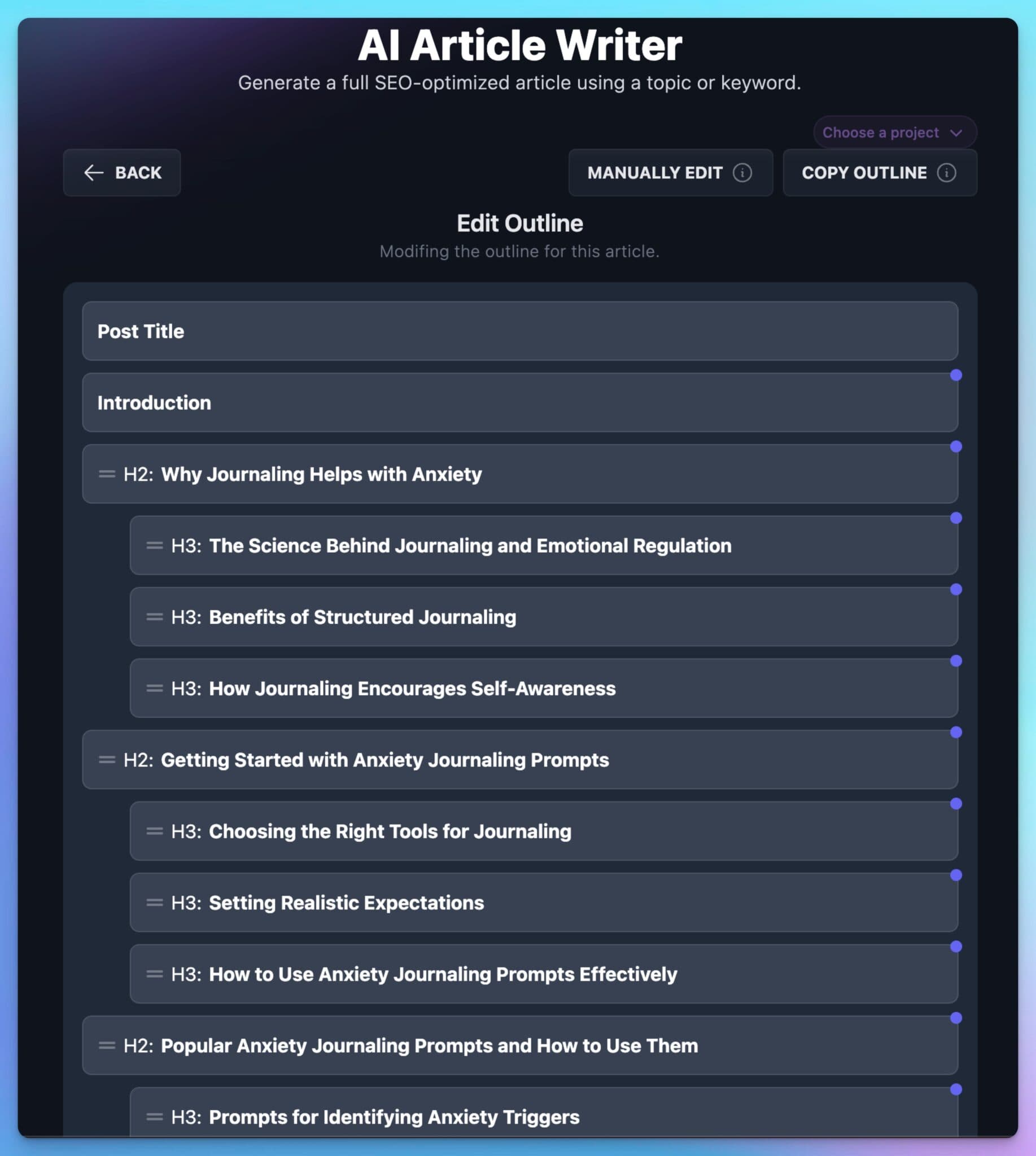
AI tools can create clear structures, complete with detailed prompts, subheadings, and even stock image suggestions that we can use to help speed up our process and gather inspiration.
This isn’t about letting AI do all the work. It’s about speeding up the process, so you can focus on making your content personal and relatable (during the prompting and editing stages).
For a smart system to manage content efficiently, read AI Content Creation: A Complete Guide.
Editing and Publishing Your Content
It’s important to note that the AI-assisted content you create will not be perfect on its own. It needs you, in order to become truly great, to be yours. Features like Projects and MyTone inside RightBlogger help significantly when it comes to personalizing the style, tone, and voice of your content, but it’ll still need you.
Before hitting “Publish” on your content, take these steps:
- Edit Ruthlessly: Make the writing look, feel, and sound like it’s truly yours. Add personal stories, share unique examples only you can tell, and incorporate your flavor of writing into the mix. Be shamelessly you here.
- Add Internal and External Links: RightBlogger’s Article Writer does a great job at first drafting with links included, but you’ll wanna double check to make sure you’re not missing any killer opportunities to link to other key relevant blog posts (or trusted sources).
- Optimize for SEO: We’ve tuned our tools to do a bang up job at this, but you’ll wanna make sure your keyword is in the headline, sprinkled in throughout subheadings, woven into the body of your article, and prominent in both the meta title & meta description.
- Preview on Mobile: Last but not least, make sure your content looks good on all devices and you’re ready to send it!
For more tips on boosting your content’s visibility, check out Keyword Clustering 101: Beginner’s Guide (SEO).
Don’t Overthink it, Just Start and Adjust if Needed
The hardest part of blogging isn’t the research, using the right tools, or even getting your content to rank on Google. It’s taking that first step.

Remember: Action is what brings the most clarity. Publish your article. Test different content mediums and styles. Learn as you go.
The more you create, the more confident you’ll become.
Keyword research is just the start. It’s on you to create content that answers real questions and solves real problems.
Ready to tackle your next post?
Let’s do it together!
Once you have a solid blogging routine, you can use tools like RightBlogger to make things easier. It can help with auto-blogging, SEO reports, and one-click content improvements right inside the platform.

Article by
RightBlogger Co-Founder Ryan Robinson teaches 500,000 monthly readers how to grow an online business and create content that reaches people.

Automated SEO Blog Posts That Work
Try RightBlogger for free, we know you'll love it.
7-day free trial. Cancel anytime.





Leave a comment
You must be logged in to comment.
Loading comments...