What is a No-Index Tag? - RightBlogger
In the world of blogging and website optimization, the term “noindex-tag” plays a crucial role in determining how search engines index and display your content.
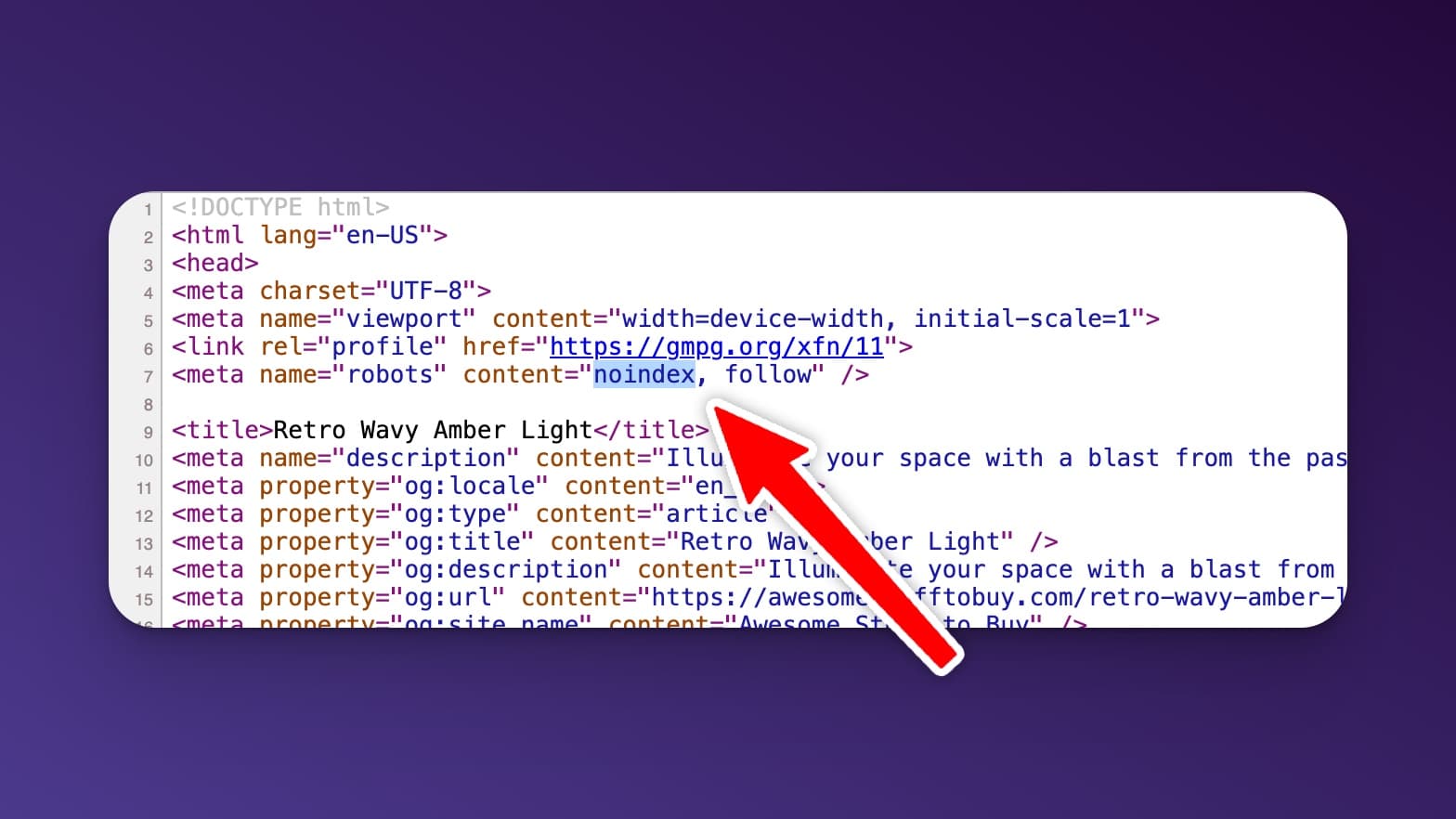
Let’s dive into what exactly a noindex-tag is and why it’s essential for your SEO strategy.
Understanding the Noindex-Tag
A “noindex-tag” is a specific command placed within the HTML of a webpage that signals search engines not to include that particular page in their index. In simpler terms, it tells search engine bots not to show your page in search results. This directive is a powerful tool for controlling which pages of your website appear in search engine results and which ones remain hidden.
How Does a Noindex-Tag Impact SEO?
By utilizing a noindex-tag, you are essentially telling search engines to ignore a specific page on your website. This can be beneficial for various reasons, such as preventing duplicate content from being indexed, hiding private or sensitive information, or keeping temporary pages out of search results.
Implementing Noindex-Tags on Your Website
To add a noindex-tag to a webpage, you need to insert a simple line of code in the HTML header of that page. This code instructs search engine crawlers not to index the content, ensuring that it remains hidden from public search results. If you are debugging a URL you can use Google Search Console to submit a URL to Google or just test live links.
If you are using WordPress many SEO plugins will give you the option to set the page to no-index. In Yoast SEO the option is under “Advanced” with the title “Allow search engines to show this content in search results?”.
Best Practices for Using Noindex-Tags
When utilizing noindex-tags, it’s essential to use them strategically. Avoid using them on critical pages that you want to rank on search engines. Reserve the noindex directive for pages that serve a specific purpose but are not meant for public consumption.
Conclusion
In conclusion, a noindex-tag is a valuable tool in the SEO toolkit for bloggers and website owners. By understanding how to use this directive effectively, you can have better control over which pages appear in search results and ultimately improve the visibility of your most important content.
Remember, the key is to use the noindex-tag wisely and strategically to achieve the desired SEO outcomes.

What does a noindex tag do, in simple terms?
A noindex tag tells search engines not to add a page to their search index, so it should not show up in Google results.
It is useful when you have pages that help users but are not meant to rank, like thank-you pages, internal test pages, or thin content you plan to improve later.
Noindex is different from “no follow” or blocking a page in robots.txt. A page can still be crawled and seen by Google, but it will not be listed as a result when noindex is in place.
When should I use a noindex tag (and when should I avoid it)?
Use noindex on pages you do not want people landing on from search. Common examples are duplicate pages, filtered category pages, login pages, and temporary promos.
Avoid using noindex on pages you want to rank, like your main blog posts, product pages, and key landing pages. If you noindex an important page, it can drop out of search and stop bringing in traffic.
If your goal is to fix duplicate content, a canonical may be a better choice than noindex. See the Canonical Tag glossary page to compare the options.
How do I add a noindex tag in WordPress?
In WordPress, the easiest way is usually through an SEO plugin that lets you set a page to “noindex” without touching code.
For example, many plugins have an advanced setting that asks if search engines should show the page in results. Turning that setting off adds the noindex directive for you.
After you change it, give search engines time to recrawl the page. If you need faster feedback, you can use Google Search Console and follow this guide on how to submit a URL to Google for indexing checks.
Will a noindex tag hurt my SEO or rankings?
A noindex tag does not hurt your whole site by itself, but it does remove that specific page from search results.
That can actually help SEO when it cleans up low-quality pages, duplicate pages, or pages that confuse Google. It helps search engines focus on your best content.
The risk is using noindex on pages that matter. If traffic drops, double-check that you did not noindex a page you meant to keep searchable.
What is the difference between noindex, robots.txt, and an XML sitemap?
Noindex controls indexing. It tells Google, “Do not show this page in search results.”
Robots.txt controls crawling. It tells bots which areas they should or should not crawl, but it does not always guarantee a page will never appear in search. Learn more in this Robots.txt guide.
An XML sitemap is a list of pages you want search engines to discover and crawl. It does not force indexing, but it helps Google find your important URLs. See the Sitemap glossary page for a clear breakdown.
How can RightBlogger help me spot pages that should be noindexed or improved?
RightBlogger can help you find SEO issues faster, so you know which pages to improve, merge, or keep out of search.
Start by running SEO Reports to review on-page SEO signals and spot pages that may be thin, outdated, or overlapping. Those are common candidates for updates, consolidation, or noindex.
If a page is worth keeping, you can refresh it instead of hiding it. Tools like Auto Optimize for SEO can help you tighten headings, improve keyword use, and make the content clearer for readers and search engines.
New:Autoblogging + Scheduling
Automated SEO Blog Posts That Work
Try RightBlogger for free, we know you'll love it.
- Automated Content
- Blog Posts in One Click
- Unlimited Usage


Leave a comment
You must be logged in to comment.
Loading comments...